agentlytics
Comprehensive analytics dashboard for AI coding agents — Cursor, Windsurf, Claude Code, VS Code Copilot, Zed, Antigravi…
JavaScript★ 555
本地优先的类飞书 Markdown 编辑器,内置可审改的 AI 助手 | Local-first WYSIWYG Markdown editor with a reviewable AI agent
 1661169091kiwi
A modern, Feishu-style WYSIWYG Markdown editor with a built-in AI agent.
类飞书体验的所见即所得 Markdown 编辑器,内置可审改的 AI 助手。
Cross-platform · Local-first · Bring-your-own-AI-key
跨平台 · 本地优先 · 自带 AI 密钥
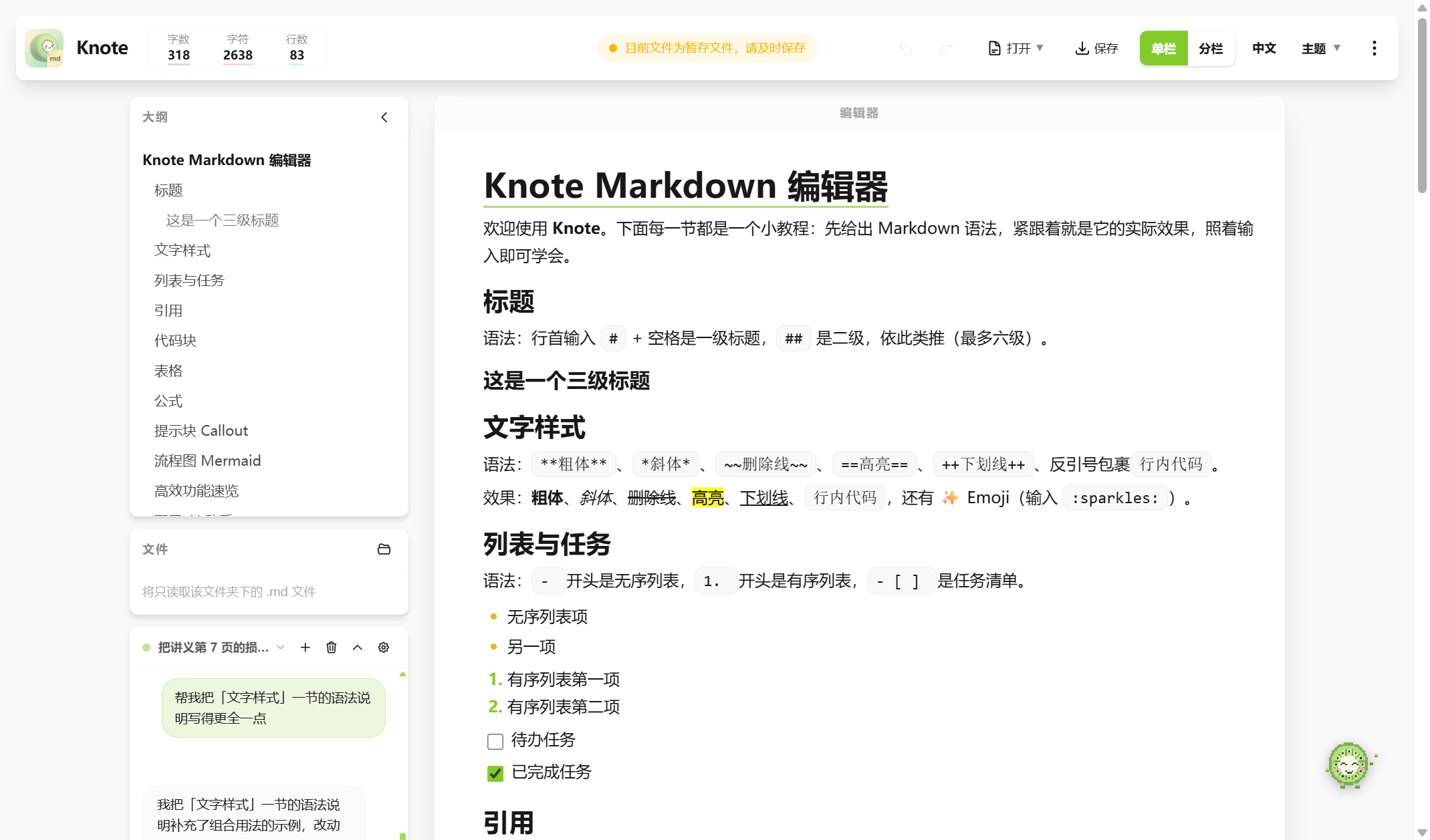
Knote 是一款本地优先的 Markdown 编辑器,拥有现代块编辑器(飞书 / Notion 风格)的顺滑体验,同时可配置辅助 Agent,他可以帮助你维护、修改、重构文档,你可以审改他的修改,不满意的内容可以拒绝修改。可作为网页应用(部分功能受限)、Windows 桌面应用(推荐)和 Android 应用(正在测试)运行。
演示:拖入 PDF → 生成论文总结并自动配图
> [!tip]、> [!warning] 等渲染为彩色卡片。mermaid 代码块即可实时渲染流程图/时序图。Ctrl+F / Ctrl+H)、快速打开(Ctrl+P)、标题折叠、版本历史(一键回滚)、图片查看器(双击放大/拖拽)、界面缩放(Ctrl+滚轮)。.doc)、HTML、Markdown。Knote 内置 AI 助手,直接驻守在编辑器中,目标是帮你把"写、改、审、理"文档这件事变得更顺手。他不会直接修改原文,而是先把改动暂存成 diff,用户逐块或一键接受后才会生效。
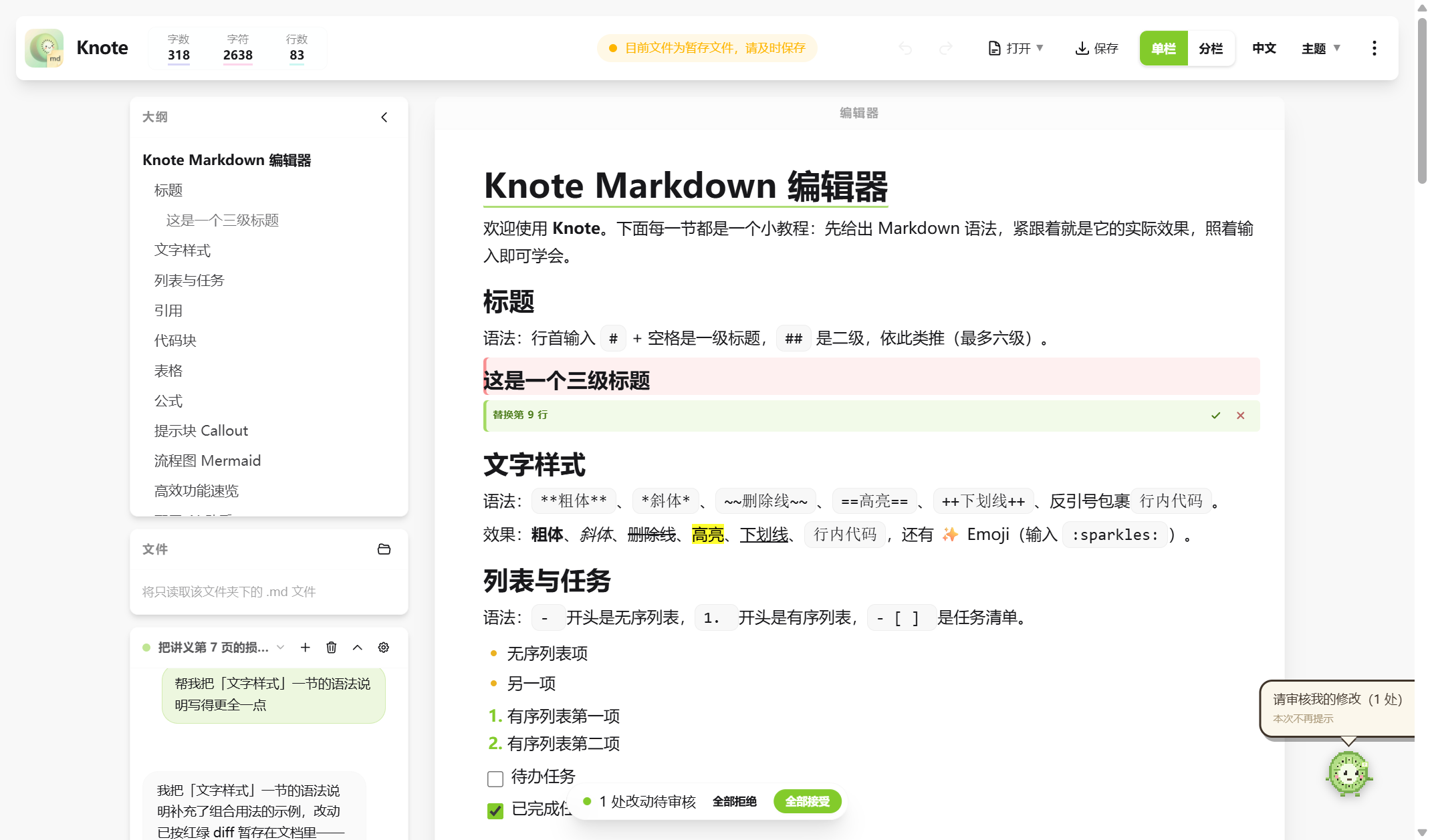
能做什么:
助手会用哪些工具,取决于你的模型是否支持"工具调用"以及当前是否打开了文件夹——点"检测"后会亮起对应能力徽章。所有联网/文件/图片来源的内容都被当作不可信外部数据,其中的指令不会被执行。
工作区面板 —— 让 agent 的工作全程可见:
助手工作时,聊天窗口右侧会展开一块工作区面板,把它正在做的事实时摊开给你看,不再是黑箱:
面板只展示当前这一次任务的进展,任务结束自动归位;不需要时可一键收起。
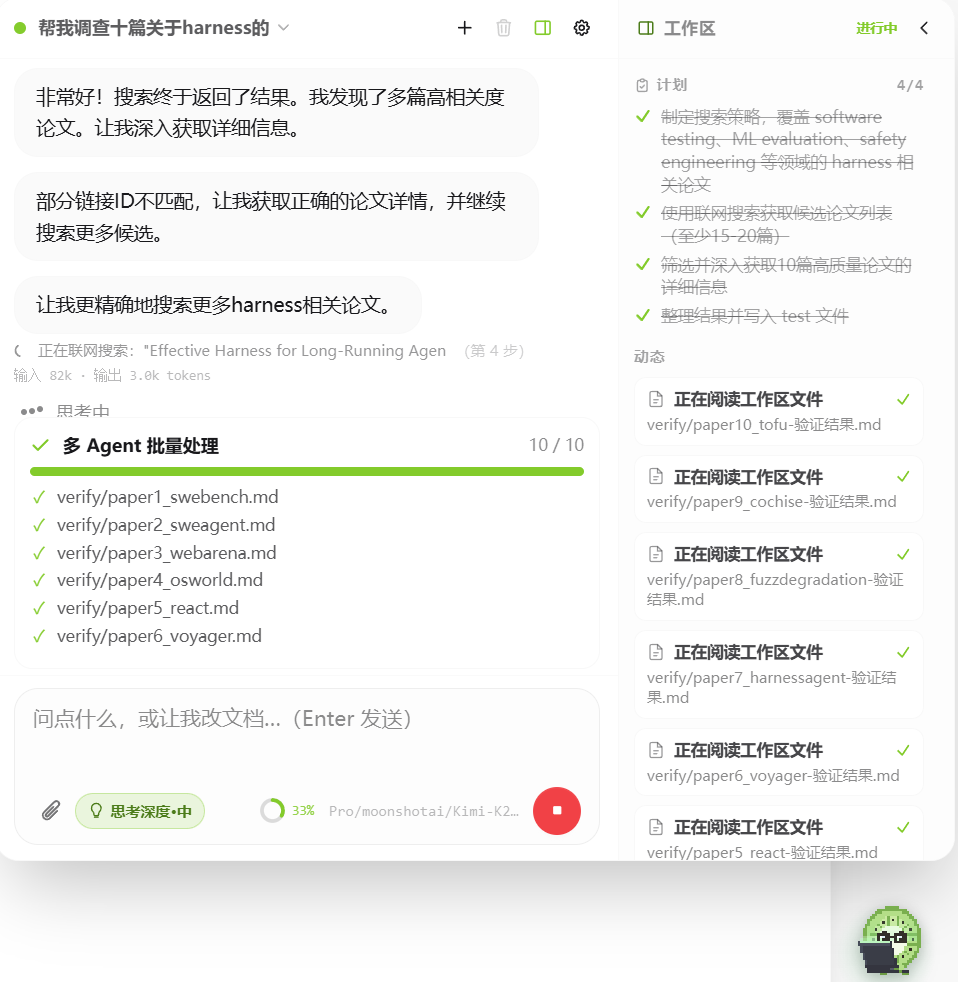
示例截图,可能因版本更新稍有不同
参考场景:

示例截图,可能因版本更新稍有不同
配置:
点击右下角绿色圆球打开助手,进入设置:
密钥仅存于浏览器本地存储;Knote 没有服务器,绝不上传。
PDF 版面分析(可选增强):桌面版设置里提供 PaddleOCR 环境的一键安装——没有安装过 Python 也没关系,Knote 会自动下载内置版 Python 并完成全部配置(全程国内镜像)。装好后,PDF 的图表提取与精确定位能力自动启用;不装也能正常使用文字读取和整页截图。
# 标题、- 列表、**粗体** 等语法,即时变成排版效果;Ctrl+P 快速打开文件,Ctrl+F/H 查找替换。Ctrl+S 保存;顶栏"导出"可出 PDF / Word / HTML / Markdown。Vue 3 · Vite · TipTap / ProseMirror · markdown-it · Tailwind CSS · daisyUI · KaTeX · Mermaid · highlight.js · Electron · Capacitor
下载 Windows 安装包后一键安装(推荐):
前往 Releases 下载 Knote Setup x.x.x.exe,双击安装即可。
下载 Android apk 安装包(测试中):
前往 Releases 下载 .apk(如当前版本未提供,可按下方开发方式自行构建)。
本地浏览器部署(开发者):
git clone https://github.com/1661169091kiwi/Knote.git
cd Knote
npm install
npm run dev        # 打开 http://localhost:5173

# 打包 Windows 安装包
npm run dist:win   # -> release/Knote Setup <版本>.exe

# 打包 Android APK(原生工程未纳入版本库,需先生成)
npx cap add android
npm run dist:apk   # -> android/app/build/outputs/apk/debug/
基于 MIT 许可证 发布。构建于诸多优秀开源项目之上(Vue、TipTap/ProseMirror、markdown-it、KaTeX、Mermaid、highlight.js、Electron、Capacitor —— 均为宽松协议)。像素字体 Press Start 2P 以 SIL 开放字体许可(OFL)使用。
"飞书"及其他产品名称为各自所有者的商标;Knote 为独立项目,与之无关联、亦未获其背书。
Knote is a local-first Markdown editor that feels like a modern block editor (Feishu / Notion style) while keeping plain Markdown as the single source of truth — plus a configurable AI agent that helps maintain, edit and restructure your documents. Every change it proposes is staged as a red/green diff you review and can reject. Runs as a web app, a Windows desktop app (recommended), and an Android app (in testing).
> [!tip], > [!warning], etc. render as colored cards.mermaid code blocks and see the diagram render live.Ctrl+F / Ctrl+H), quick open (Ctrl+P), heading fold, version history with one-click rollback, image viewer, and UI zoom (Ctrl+Wheel)..doc), HTML, and Markdown.Windows (recommended): grab Knote Setup x.x.x.exe from Releases.
Develop / run from source:
git clone https://github.com/1661169091kiwi/Knote.git
cd Knote
npm install
npm run dev        # web dev server at http://localhost:5173

npm run dist:win   # Windows installer -> release/

npx cap add android
npm run dist:apk   # Android debug APK
Click the green floating ball (bottom-right) to open the assistant, then open settings:
Keys live in your browser's local storage only. On desktop, the optional PaddleOCR layout-analysis environment installs with one click — Knote even downloads an embedded Python automatically if none is installed.
Released under the MIT License. Built on excellent open-source projects (Vue, TipTap/ProseMirror, markdown-it, KaTeX, Mermaid, highlight.js, Electron, Capacitor — all permissively licensed). The Press Start 2P pixel font is used under the SIL Open Font License.
"Feishu" and other product names are trademarks of their respective owners; Knote is an independent project and is not affiliated with or endorsed by them.
more like this
Comprehensive analytics dashboard for AI coding agents — Cursor, Windsurf, Claude Code, VS Code Copilot, Zed, Antigravi…
Open-source, offline-first face recognition attendance platform that runs on any webcam.
📱 A React app to preview and edit Markdown✍. You can also export it as HTML.
search projects, people, and tags