meine
meine 🌒 - A CLI file manager and system utility built with Textual. It combines intuitive command parsing with rich t…
Python★ 50
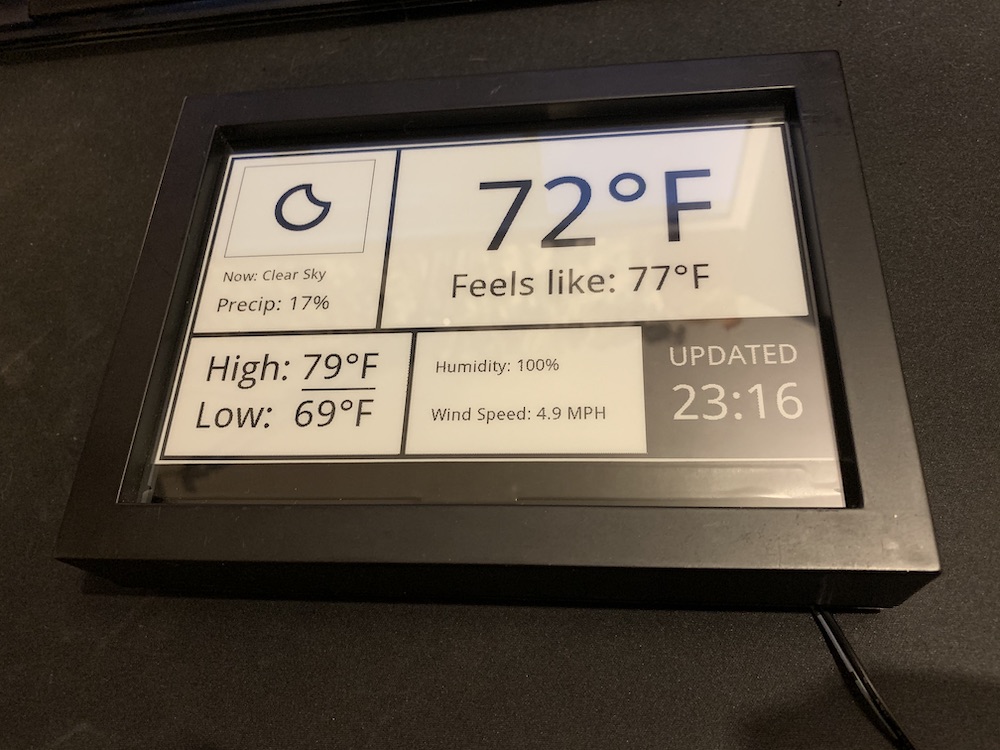
Raspberry Pi weather display using Waveshare e-paper display and Open Weather Map API
 AbnormalDistributions
git clone https://github.com/AbnormalDistributions/e_paper_weather_display.gitAbnormalDistributions/e_paper_weather_displayThis project uses a Raspberry Pi to show weather updates and trash reminders on a Waveshare 7.5-inch e-paper display. It fetches weather data from OpenWeatherMap and refreshes the display at set intervals. Minimal energy consumption makes this setup ideal for continuous display without frequent updates.

If you find this project useful, consider buying me a coffee ☕️.
Note: If you use this affiliate link, it helps support this project at no additional cost to you. Thank you!
Clone the Project: Open a terminal and run:
git clone https://github.com/AbnormalDistributions/e_paper_weather_display.git
cd e_paper_weather_display
Install Python Libraries:
pip install pillow requests
Add Your OpenWeatherMap API Key:
Sign up on OpenWeatherMap for an API key, then open weather.py and add your API key where it says API_KEY = 'XXXXXXXX'.
Customize Your Settings:
Edit the following user-defined settings at the top of weather.py:
API_KEY: Your OpenWeatherMap API key.LOCATION: Name of the location to display (e.g., New Orleans).LATITUDE and LONGITUDE: Coordinates for weather updates (use Google Maps to find these).UNITS: Choose 'imperial' (Fahrenheit) or 'metric' (Celsius).CSV_OPTION: Set this to True if you’d like to save a daily log of weather data in records.csv.TRASH_DAYS: Add the days for trash reminders as numbers (0=Monday, 6=Sunday).Note: If you are not using a 7.5 inch Version 2 display, you will want to replace 'epd7in5_V2.py' in the 'lib' folder with the appropriate version from Waveshare's e-Paper library. Adjustments will be required for other screen sizes.
e_paper_weather_display directory, run:
python weather.pyThis will fetch the weather data and update the display immediately.
You can set up a scheduled update every 15 minutes using crontab. This will make sure your display updates automatically.
In the terminal, type:
crontab -e
Then, add the following line at the end of the file:
*/15 * * * * /usr/bin/python /home/pi/e_paper_weather_display/weather.py >> /home/pi/e_paper_weather_display/weather_display.log 2>&1
/home/pi/e_paper_weather_display/ with the path where the project is stored, if different.CSV_OPTION is enabled.pillow and requests) are installed.crontab if the automatic updates aren’t working as expected.more like this
meine 🌒 - A CLI file manager and system utility built with Textual. It combines intuitive command parsing with rich t…
Create and add progress bars, Office365 Files and Dropbox Paper papers by labels and link them to your Todoist tasks.
search projects, people, and tags