 AgibotTech
SimGAN
Pytorch Implementation of SimGAN: Hybrid Simulator Identification for Domain Adaptation via Adversarial Reinforcement L…
Python★ 50
English | 中文
AgiBot X1 is a modular humanoid robot with high dof developed and open-sourced by AgiBot. It is built upon AgiBot's open-source framework AimRT as middleware and using reinforcement learning for locomotion control.
This project is about the accompanying software for AgiBot X1, including multiple functional modules such as model inference, platform driver, and software simulation.
For detailed tutorials on AimRT framework, please visit the AimRT official website.
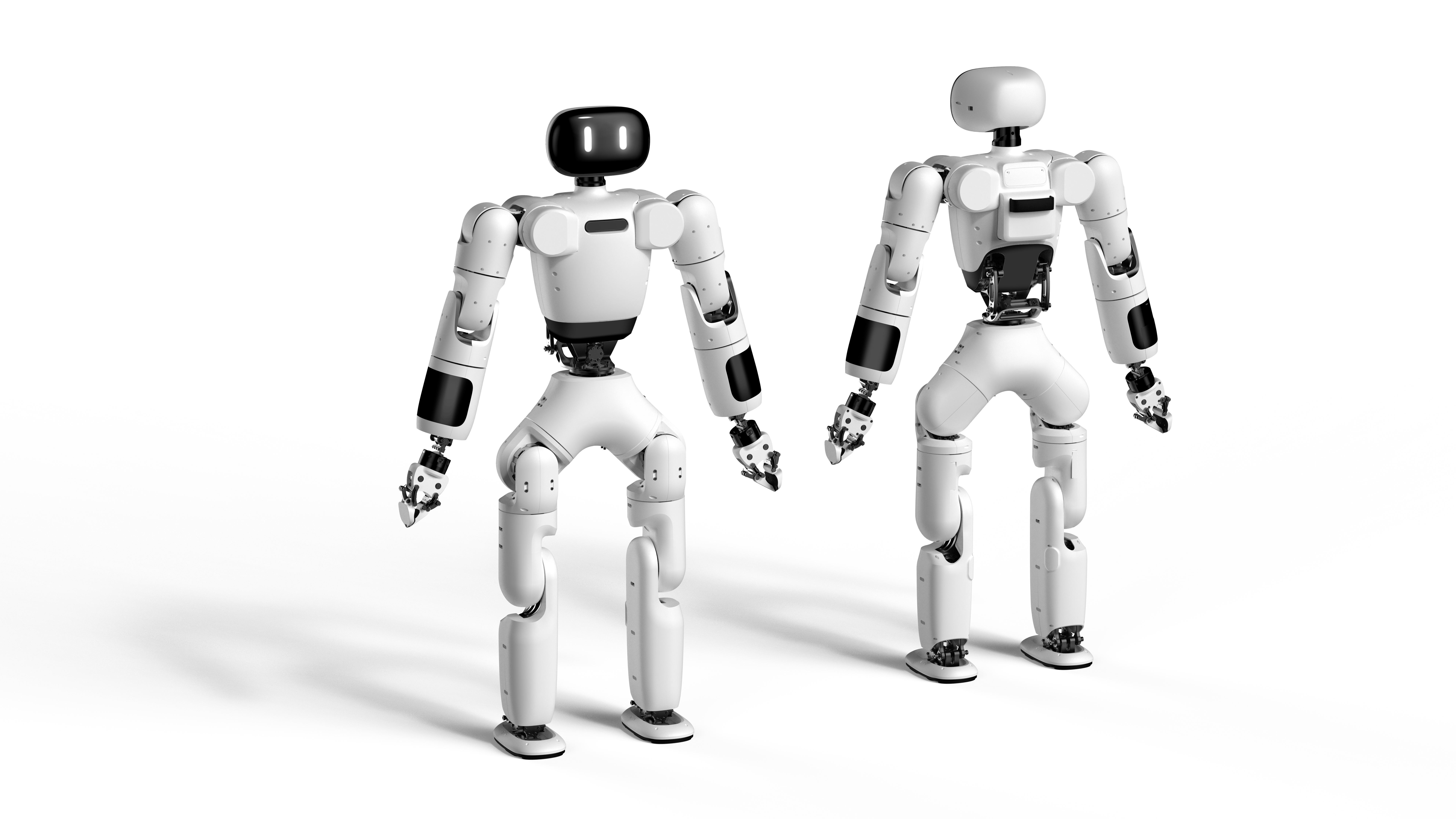
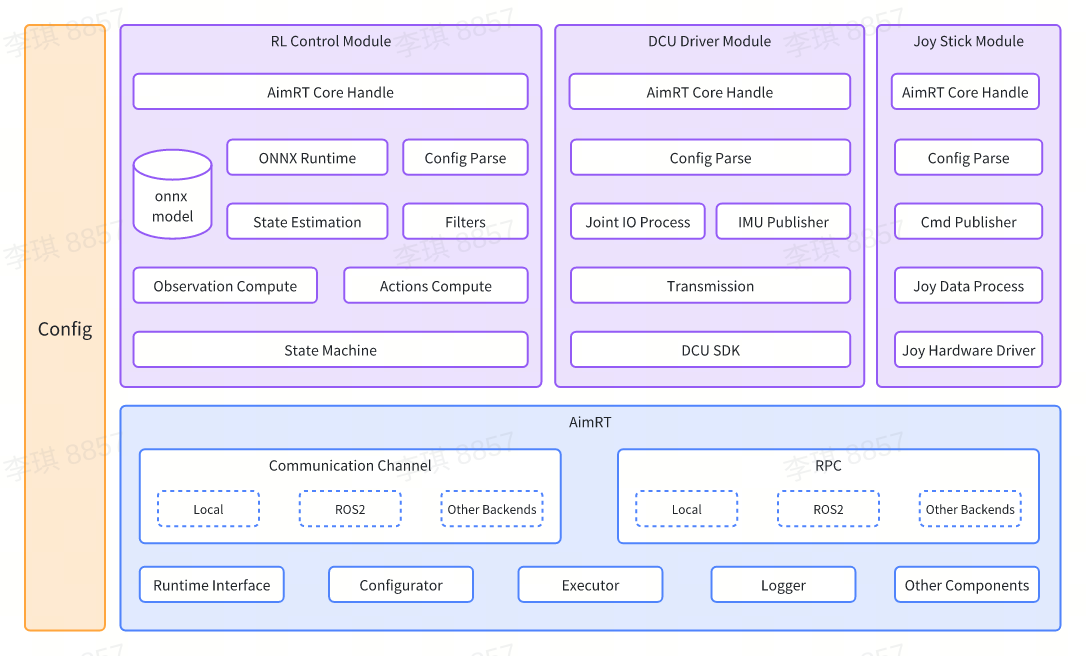
For detailed annotations of modules, please refer to the Development Guide.
.
├── build.sh              # Build scripts
├── cmake                 # CMake scripts for build dependencies
│   ├── GetAimRT.cmake
│   ├── GetGTest.cmake
│   └── NamespaceTool.cmake
├── CMakeLists.txt        # Top-level CMakeLists.txt
├── format.sh             # Formatting scripts
├── README.md             # README document
├── doc                   # Development guide directory
├── src                   # Source code directory
│   ├── CMakeLists.txt    # CMakeLists.txt for the source code directory
│   ├── assistant         # ROS2 simulation and example project directory
│   ├── install           # Configuration script directory
│   ├── module            # Module directory
│   ├── pkg               # Deployment directory
│   └── protocols         # Protocol directory
└── test.sh               # Testing scripts
Install GCC-13.
Install cmake (version 3.26 or above).
Install ONNX Runtime.
sudo apt update
sudo apt install -y build-essential cmake git libprotobuf-dev protobuf-compiler

git clone --recursive https://github.com/microsoft/onnxruntime

cd onnxruntime
./build.sh --config Release --build_shared_lib --parallel

cd build/Linux/Release/
sudo make install
Install ROS2 Humble and configure the environment variables. For detailed instructions, visit the ROS2 official website.
Install dependencies for the simulation environment.
sudo apt install jstest-gtk libglfw3-dev libdart-external-lodepng-dev
It will be very slow or even fail to download AimRT's numerous dependencies from default sources. Therefore, we provide environment variables DOWNLOAD_FLAGS for the download based on the Gitee source in url_gitee.bashrc. Simply source url_gitee.bashrc before running build.sh and add environment variable parameters for the Gitee source.
After completing the above steps, execute the following commands in the terminal:
source /opt/ros/humble/setup.bash
source url_gitee.bashrc

# Build
./build.sh $DOWNLOAD_FLAGS

# Test
./test.sh $DOWNLOAD_FLAGS
Before starting, it is necessary to connect the handle receiver.
cd build/
./run_sim.sh
Export your library path first, just need to execute once.
# Open "/etc/ld.so.conf" as root
sudo vi /etc/ld.so.conf

# Add this path to the end of "/etc/ld.so.conf"
/opt/ros/humble/lib
{YourProjectSource}/build/install/lib

# Refresh system env
sudo ldconfig
Ready to launch.
cd build/
./run.sh
For specific control instructions, please refer to the Joystick Control Module.
The code provided in this project runs on the AimRT framework. This is research code subject to frequent changes, and cannot apply to all specific purposes. The source code is released under the MULAN license agreement.
If you have any questions or issues with this repository, please use the Issues.
Please do not contact us via email as we may not be able to respond. If you would like to contribute code, simply fork the repository (or if you are a collaborator, create a branch), make your changes, and submit a pull request to us.
more like this
Pytorch Implementation of SimGAN: Hybrid Simulator Identification for Domain Adaptation via Adversarial Reinforcement L…
search projects, people, and tags