baralga
Simple and lightweight time tracking for individuals and teams.
 Baralga
git clone https://github.com/Baralga/baralga.gitBaralga/baralga
Baralga Time Tracker
Simple and lightweight time tracking.
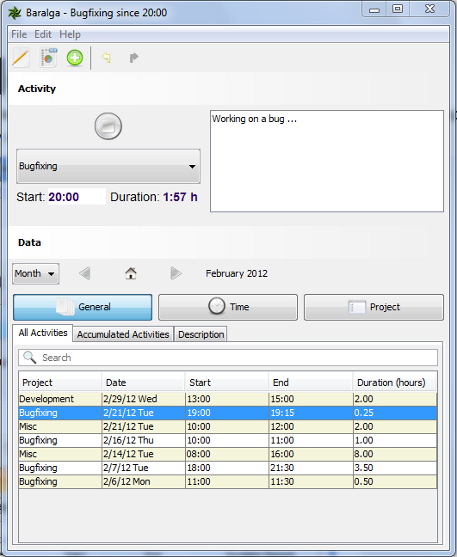
Record the time spent on a project or manually enter and edit activities.
Features
- plain time tracking no fuzz
- switch projects with tray icon
- record your activities
- report as Excel, CSV and iCalendar
- manually add and edit activities
- enter data fast with shortcuts
- suitable for single users and teams
Editions
Use Baralga just for yourself or for your whole team.
Single User Mode
As a single user use our great Desktop application.
Multi User Mode
As a team use our great Desktop application along with our team server.
User Guide
Single User Mode
Single user mode is enabled by default so no extra settings required.
Multi User Mode
In multi-user mode all data is stored on the Baralga server backend. Multi-user mode is enabled using the Java system property
-DuserMode=multiuser or the setting userMode=multiuser in the application.properties
stored in the directory $USER_HOME\.baralga\application.properties.
Settings in Application Properties
# Mandatory for multiuser mode
userMode=multiuser

# Default value http://localhost:8080
backendURL=http://localhost:8080

# Default value is current system user
user=user

# Default value us3r
password=us3r
Changelog
see Changelog
more like this
mc-fps-jvm-args
JVM arguments that you can use from your Minecraft launcher to increase game performance.