r2
Free open-source Cloudflare R2 desktop client and S3 GUI for macOS, Windows, and Linux. Manage Cloudflare R2, AWS S3, M…
TypeScript★ 50
DockFlare: Automate Cloudflare Tunnels with Docker Labels
 ChrispyBacon-dev

Go from container to publicly-secured URL in seconds. No manual Cloudflare dashboard configuration required.
Website · Documentation · Report a Bug · Sponsor
DockFlare is a self-hosted ingress and access-control plane for Cloudflare Tunnel environments. It continuously translates your desired state into Cloudflare configuration by combining Docker labels, manual rules from the web UI, and optional remote agents.
It was built to remove repetitive dashboard work from fast-changing self-hosted environments. Instead of manually updating DNS records, tunnel ingress rules, and Access applications, you define intent once and DockFlare reconciles it.
The result is a set-it-and-forget-it workflow with a fully localized native experience: less operational drift, more reliable service exposure, and one place to manage routing and access decisions.
Detailed architecture guide: https://dockflare.app/architecture
| Component | Purpose |
|---|---|
| DockFlare Master | Web UI, encrypted config/state, reconciliation, Cloudflare API orchestration |
| DockFlare Mail Manager | Sovereign email backend, SQLite storage, R2 integration, and webhook handling |
| DockFlare Webmail | PWA-ready mail client with push notification support |
| Redis | Shared cache, coordination, and pub/sub signaling |
| DockFlare Agent | Remote host watcher and command executor for distributed deployments |
| cloudflared | Tunnel connector runtime managed per deployment mode |
| Cloudflare API | Source of truth for Tunnel, DNS, Email, and Access resources |
cloudflared aligned.bash <(curl -fsSL https://dockflare.app/install.sh)
The script will guide you through:
~/dockflare/).5000).For full setup documentation, use the project docs site:
Docker and Docker Compose.
A Redis instance (the quick-start stack below includes one).
A Cloudflare account.
Cloudflare Account ID.
Cloudflare Zone ID for your primary domain.
Cloudflare API token with these permissions:
Account:Cloudflare Tunnel:WriteAccount:Account Settings:ReadAccount:Access: Apps and Policies:WriteAccount:Access: Organizations, Identity Providers, and Groups:WriteAccount:Access: Service Tokens:WriteZone:Zone:ReadZone:DNS:WriteFor optional DockFlare Email features, add these additional permissions:
Workers Scripts:WriteWorkers KV Storage:WriteWorkers R2 Storage:WriteEmail Routing Addresses:WriteEmail Routing Rules:Write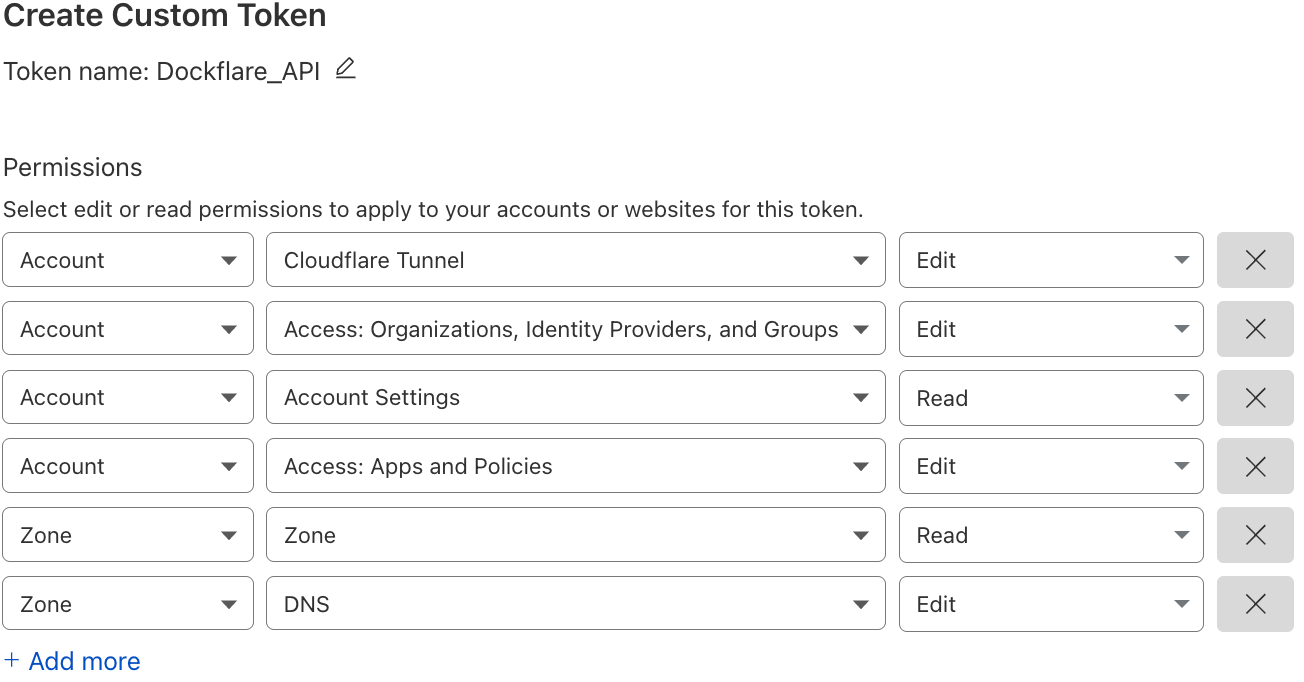
Before first launch, create the shared network once:
docker network create cloudflare-net
docker-compose.yml:services:
docker-socket-proxy:
image: tecnativa/docker-socket-proxy:v0.4.1
container_name: docker-socket-proxy
restart: unless-stopped
logging:
driver: "none"
environment:
- DOCKER_HOST=unix:///var/run/docker.sock
- CONTAINERS=1
- EVENTS=1
- NETWORKS=1
- IMAGES=1
- POST=1
- PING=1
- INFO=1
- EXEC=1
volumes:
- /var/run/docker.sock:/var/run/docker.sock
networks:
- dockflare-internal
dockflare-init:
image: alpine:3.20
command: ["sh", "-c", "chown -R ${DOCKFLARE_UID:-65532}:${DOCKFLARE_GID:-65532} /app/data"]
volumes:
- dockflare_data:/app/data
networks:
- dockflare-internal
restart: "no"
dockflare:
image: alplat/dockflare:stable
container_name: dockflare
restart: unless-stopped
ports:
- "5000:5000" # Optional: comment out once exposed via Cloudflare Tunnel with an Access Policy to restrict access to tunnel-only
#labels: # -- Cloudflare Tunnel Configuration (via DockFlare) OPTIONAL --
# Main DockFlare with access policy
#- dockflare.enable=true
#- dockflare.hostname=dockflare.TLD # replace with your domain
#- dockflare.service=http://dockflare:5000
#- dockflare.access.group=YOUR-ACCESS-GROUP-ID # your custom access policy
# -- OAuth Callback Path (Bypass Access Policy) OPTIONAL --
# Required if using OAuth authentication with access policies on main interface
#- dockflare.0.hostname=dockflare.example.tld
#- dockflare.0.path=/auth/google/callback
#- dockflare.0.service=http://dockflare:5000
#- dockflare.0.access.group=public-default-bypass
# Add additional callback paths for other OAuth providers as needed
# - dockflare.1.hostname=dockflare.example.com
# - dockflare.1.path=/auth/github/callback
# - dockflare.1.service=http://dockflare:5000
# - dockflare.1.access.group=public-default-bypass
volumes:
- dockflare_data:/app/data
environment:
- REDIS_URL=redis://redis:6379/0
- REDIS_DB_INDEX=0
- DOCKER_HOST=tcp://docker-socket-proxy:2375
depends_on:
docker-socket-proxy:
condition: service_started
dockflare-init:
condition: service_completed_successfully
redis:
condition: service_started
networks:
- cloudflare-net
- dockflare-internal
redis:
image: redis:7-alpine
container_name: dockflare-redis
restart: unless-stopped
command: ["redis-server", "--save", "", "--appendonly", "no"]
logging:
driver: "none"
volumes:
- dockflare_redis:/data
networks:
- dockflare-internal
dockflare-mail-manager:
image: alplat/dockflare-mail-manager:stable
container_name: dockflare-mail-manager
restart: unless-stopped
profiles: ["email"]
environment:
- DOCKFLARE_MASTER_URL=http://dockflare:5000
- MAIL_DATA_PATH=/data
volumes:
- mail_data:/data
depends_on:
dockflare:
condition: service_started
networks:
- cloudflare-net
- dockflare-internal
dockflare-webmail:
image: alplat/dockflare-webmail:stable
container_name: dockflare-webmail
restart: unless-stopped
profiles: ["email"]
environment:
- DOCKFLARE_MASTER_URL=https://dockflare.TLD # replace with your domain
labels:
- dockflare.enable=true
- dockflare.hostname=mail.dockflare.TLD # replace with your domain
- dockflare.service=http://dockflare-webmail:80
depends_on:
dockflare-mail-manager:
condition: service_started
networks:
- cloudflare-net
- dockflare-internal
volumes:
dockflare_data:
dockflare_redis:
mail_data:
networks:
cloudflare-net:
name: cloudflare-net
external: true
dockflare-internal:
name: dockflare-internal
docker compose up -d
The Email Suite is an optional, opt-in feature and will not start by default. To include email services, add the email profile:
docker compose --profile email up -d
Email setup and provisioning guide: Email Overview
http://your-server-ip:5000 and complete the setup wizard.If you are migrating from older environment-based setups, DockFlare can import existing values during onboarding.
Use container labels to declare hostname, service target, and access behavior. DockFlare observes lifecycle events and reconciles records and ingress rules automatically.
Detailed label reference: https://dockflare.app/docs/container-labels
Create and edit routes directly in the UI for static hosts, VMs, appliances, or external services. Manual rules support HTTP/HTTPS advanced origin options and are persisted in DockFlare state.
Use labels for most workloads while managing exceptions in UI. DockFlare merges both sources into one reconciliation model.
Run a central master with agents on remote Docker hosts. Agents stream host-local container events and execute commands while the master owns policy and Cloudflare configuration decisions.
Multi-agent setup guide: https://dockflare.app/docs/multi-server-agent
DockFlare uses Access Groups as the primary abstraction for reusable access intent.
For one-off services, individual dockflare.access.* labels are still supported.
services:
  picoshare:
    image: mtlynch/picoshare
    labels:
      - "dockflare.enable=true"
      - "dockflare.hostname=files.example.com"
      - "dockflare.service=http://picoshare:8080"
      - "dockflare.access.group=nas-family"
services:
  internal-tool:
    image: nginx:latest
    labels:
      - "dockflare.enable=true"
      - "dockflare.hostname=tool.example.com"
      - "dockflare.service=http://internal-tool:80"
      - "dockflare.access.policy=authenticate"
      - "dockflare.access.email=admin@example.com,@example.com"
UID/GID 65532) in the reference setup.Common workflows handled in UI:
http:// or https://) for manual rules.Additional troubleshooting references:
docker compose build --no-cache
docker compose up -d
curl http://localhost:5000/ping
curl http://localhost:5000/api/v2/overview
(Available in 8 languages directly within the DockFlare UI or online)
Release notes are maintained in CHANGELOG.md. ailable in 8 languages directly within the DockFlare UI or online)*
Release notes are maintained in CHANGELOG.md.
more like this
Free open-source Cloudflare R2 desktop client and S3 GUI for macOS, Windows, and Linux. Manage Cloudflare R2, AWS S3, M…
A to-do list that runs your Claude Code agents — capture anywhere, dispatch in parallel, review from your phone.
Arduino library and MATLAB/Simulink API for the AutomationShield Arduino expansion boards for control engineering educa…
search projects, people, and tags