agentlytics
Comprehensive analytics dashboard for AI coding agents — Cursor, Windsurf, Claude Code, VS Code Copilot, Zed, Antigravi…
JavaScript★ 555
Dispatch your task backlog to local, interactive AI coding agents. One git worktree per task, sandboxed by default.
 ClipboardHealth
git clone https://github.com/ClipboardHealth/groundcrew.gitClipboardHealth/groundcrew

Dispatch your task backlog to local, interactive AI coding agents. One git worktree per task, sandboxed by default.
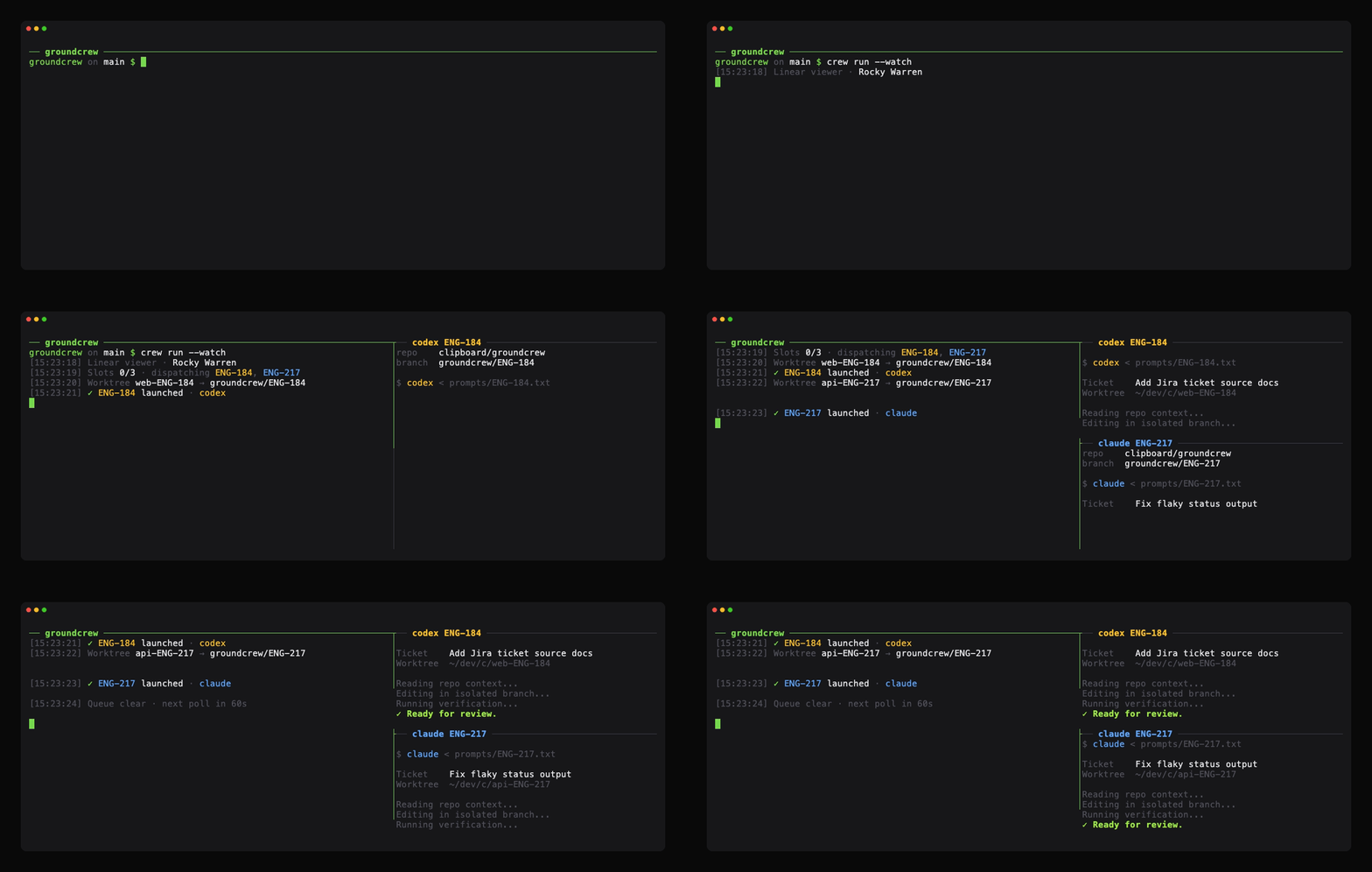
Groundcrew watches assigned tasks, creates isolated worktrees, launches agent CLIs in dedicated terminals, and leaves each task's work on its own PR-ready branch. For the backstory, read Tickets to pull requests while you sleep.
claude, codex, cursor-agent, or pi CLI in its own terminal pane, not a wrapper that approximates it. Watch any session live and take over when you need to.none is an explicit escape hatch.claude, codex, cursor (plus a cursor-grok variant), and pi presets; bring your own CLI in config.crew doctor checks all of these, so you can install as you go.
nvm install 24.brew install git, apt install git.cursor-agent, for the cursor and cursor-grok presets), and/or Pi.--runner none.# 1. Install groundcrew. npm install -g @clipboard-health/groundcrew@latest # 2. Scaffold a global config. Agents are sandboxed by default # (Safehouse/Docker Sandboxes); add --runner none to run unsandboxed on the host. crew init --global --project-dir ~/dev --repo OWNER/REPO --agent claude # 3. Run the clone commands printed by `crew init`. # 4. Safehouse runs use groundcrew's bundled clearance allowlist automatically. # Add extra hosts later via CLEARANCE_ALLOW_HOSTS or CLEARANCE_ALLOW_HOSTS_FILES. # 5. Using Linear? Export your API key. (Jira and other trackers: see Task Pickup.) export GROUNDCREW_LINEAR_API_KEY="lin_api_..." # 6. Verify setup, then dispatch. crew doctor crew run --watch
crew init --global writes config to ${XDG_CONFIG_HOME:-$HOME/.config}/groundcrew/. Pass --repo more than once for multiple repos. --agent claude, --agent codex, --agent cursor, or --agent pi chooses the single built-in agent preset to enable in the generated config.
Pi needs credentials only for the provider its selected model uses—not every provider. Authenticate that provider before unattended use; see Pi provider authentication.
When using Pi through tmux 3.5 or later, add the following to ~/.tmux.conf so tmux preserves modified keys such as Shift+Enter and Ctrl+Enter:
set -g extended-keys on
set -g extended-keys-format csi-u
Stop or finish every active Groundcrew task and save work in every other tmux session before running tmux kill-server; it terminates the entire shared tmux server, including unrelated user sessions. The change takes effect the next time tmux starts. These are server-wide options, so Groundcrew deliberately does not change them for you. With tmux 3.2–3.4, omit extended-keys-format; see Pi's tmux setup.
Not on Linear? Use Jira or local files via task sources.
Linear works out of the box: assign tasks to yourself and add an agent-* label.
agent-claude, agent-codex, agent-pi, or agent-<name> routes to that enabled launch profile.agent-any routes to the enabled agent with the most session headroom, after skipping agents over their session limit or weekly paced budget.agent-* label are ignored by crew run; dispatch one manually with crew start <TASK>.Agent names are launch profiles, so you can use them to pick model tiers. For example,
define claude-fable with claude --model claude-fable-5 --permission-mode auto
and claude-opus with claude --model claude-opus-4-8 --permission-mode auto,
then label tasks with agent-claude-fable or agent-claude-opus.
Groundcrew scans workspace.knownRepositories to infer which repo a task belongs to.
A task blocked by non-terminal blockers is skipped until those blockers are done.
Groundcrew sends each agent a generic unattended-execution prompt plus the task title and description. The prompt says how to work: read the repo instructions, make the smallest sensible change, verify it, and produce the requested output. The task description says what to do.
Write tasks as complete agent instructions: the goal, the context and constraints, links to logs or screenshots, how to verify, and the output you want. A vague task gets a vague PR.
crew init [--global | --local] [--force] [--dry-run]     # create a crew.config.ts
          [--project-dir <dir>] [--repo <repo>]...
          [--runner <auto|safehouse|sdx|none>] [--agent <claude|codex|cursor|pi>]
crew doctor                                              # check setup
crew source list|verify [<source>]                       # inspect configured task sources
crew task list [--source <name>]                         # list tasks across sources
crew task get <TASK> [--source <name>] [--prompt]        # inspect one task or its prompt
crew task create "Title" --source <name> [--agent <name>] # create a source task
crew task done <TASK> [--allow-dirty]                    # mark a no-PR task done
crew task validate [<source>]                            # validate task content
crew status [<TASK>]                                   # inspect current state or one task
crew run [--watch]                                       # one-shot or --watch forever
crew start <TASK>                                      # provision + launch one task now
crew stop <TASK> [--reason <text>]                     # stop workspace, keep worktree
crew resume [--new] <TASK>                             # reopen a paused task (--new: fresh conversation)
crew open <pr> | --branch <name> [--repo <owner/repo>] # iterate on an existing PR or branch
         [--prompt <text> | --prompt-file <path>] [--task <id>] [--dry-run]
crew cleanup [--force] <TASK>                          # tear down every worktree for a task
crew cleanup [--force] --all                           # tear down every idle worktree (no live workspace)
crew upgrade [<version>]                                 # reinstall crew globally through npm
crew completions <bash|zsh|fish>                        # print a shell completion script
See command details for status output, doctor behavior, and the stop/resume workflow.
Workspace settings and at least one enabled agent are required; everything else has a default.
import type { Config } from "@clipboard-health/groundcrew";

export default {
  workspace: {
    projectDir: "~/dev",
    // Optional: all worktrees go here regardless of where each repo lives.
    // worktreeDir: "~/dev/worktrees",
    // Strings live under projectDir; use { name, projectDirOverride } to override per repo.
    knownRepositories: ["OWNER/REPO"],
  },
  agents: {
    default: "claude",
    definitions: {
      claude: {},
    },
  },
  defaults: {
    hooks: {
      // No-op placeholder; replace with your repo's setup, e.g. "npm ci".
      prepareWorktree: "true",
    },
  },
} satisfies Config;
Changing workspace.worktreeDir only affects worktrees discovered under the new
root. Clean up existing worktrees before switching it, or temporarily unset
worktreeDir when you need crew cleanup to find worktrees created beside the
repos.
There is no linear config block. Groundcrew reads GROUNDCREW_LINEAR_API_KEY first, then falls back to LINEAR_API_KEY.
none escape hatch.preLaunch..groundcrew/config.json hooks.prepareWorktree for per-repo dependency setup.crew.config.ts knownRepositories[].unsandboxedHooks.prepareWorktree runs trusted, per-repo setup on the host outside the sandbox.more like this
Comprehensive analytics dashboard for AI coding agents — Cursor, Windsurf, Claude Code, VS Code Copilot, Zed, Antigravi…
meine 🌒 - A CLI file manager and system utility built with Textual. It combines intuitive command parsing with rich t…
Skill Claude Code de veille tech francophone. Agrège les flux RSS (Journal du Hacker, Human Coders News…) et produit un…
A to-do list that runs your Claude Code agents — capture anywhere, dispatch in parallel, review from your phone.
search projects, people, and tags