Scythe
SCYTHE is a lightweight, C#-based game engine focused on modifiability and rapid iteration using Raylib.
C#★ 50
Toggle Bionic Reading for Neovim buffers using syllable based highlighting
 FluxxField
git clone https://github.com/FluxxField/bionic-reading.nvim.gitFluxxField/bionic-reading.nvim __ _ _ ___ _
/ /_ (_)___ ____ (_)____ ________ ____ _____/ (_)___ ____ _ ____ _ __(_)___ ___
/ __ \/ / __ \/ __ \/ / ___/_____/ ___/ _ \/ __ `/ __ / / __ \/ __ `/ / __ \ | / / / __ `__ \
/ /_/ / / /_/ / / / / / /__/_____/ / / __/ /_/ / /_/ / / / / / /_/ / / / / / |/ / / / / / / /
/_.___/_/\____/_/ /_/_/\___/ /_/ \___/\__,_/\__,_/_/_/ /_/\__, (_)_/ /_/|___/_/_/ /_/ /_/
/____/
Toggleable and customizable bionic reading for Neovim using syllable-based highlighting and TreeSitter.
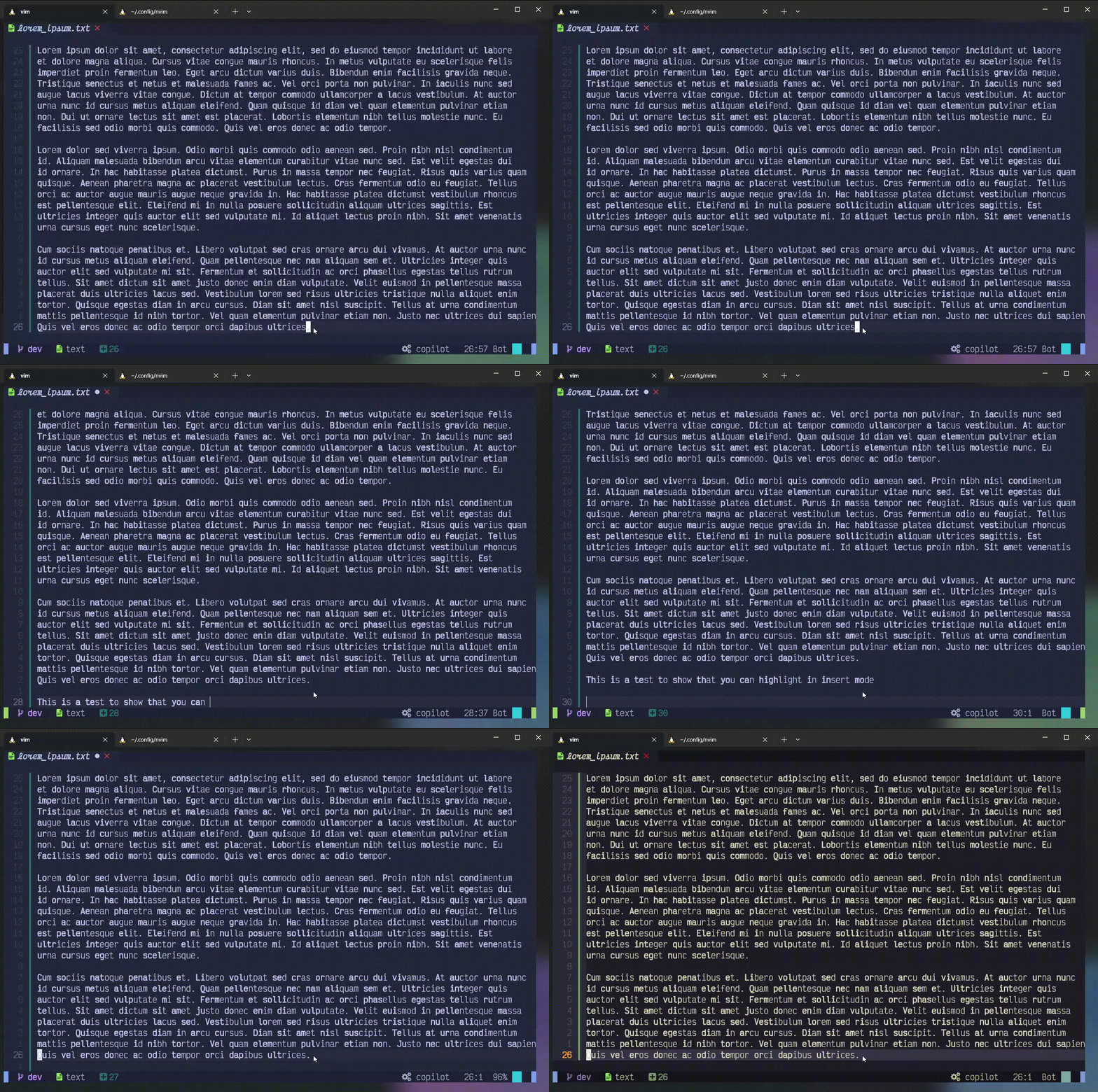
Font: VictorMono | Config: AstroNvim with my setup
Bionic reading is a technique that highlights the beginning of each word to guide your eyes through text faster. Your brain fills in the rest of each word automatically, improving reading speed and comprehension.
bionic-reading.nvim uses a custom syllable algorithm to determine how much of each word to highlight (up to 60% of the word length), giving more natural results than a fixed character count. Combined with TreeSitter, you get fine-grained control over what gets highlighted — only comments, only strings, or the entire file.
The default style uses bold text. Make sure your terminal and font support bold rendering, or the highlighting will be invisible.
iTerm2: Settings → Profiles → Text → Text Rendering → enable "Draw bold text in bold font"
Terminal.app: Settings → Profiles → Text → enable "Use bold fonts"
Install with your preferred package manager. You must call setup() for the plugin to work.
{
  'FluxxField/bionic-reading.nvim',
  config = function()
    require('bionic-reading').setup()
  end,
}
MiniDeps.add('FluxxField/bionic-reading.nvim')
require('bionic-reading').setup()
All options shown below are the defaults. You only need to include values you want to change.
require('bionic-reading').setup({
  -- Automatically highlight matching filetypes when a buffer is opened
  auto_highlight = true,

  -- Filetypes to highlight and which TreeSitter node types to target.
  -- Use "any" to highlight everything, or a list of node type names.
  file_types = {
    ["text"] = "any",
    ["lua"] = {
      "comment",
    },
  },

  -- Highlight style passed to nvim_set_hl() (see :help nvim_set_hl)
  hl_group_value = {
    bold = true,
  },

  -- Prompt before highlighting a filetype not listed above
  prompt_user = true,

  -- Use TreeSitter to scope highlighting (falls back to regex if unavailable)
  treesitter = true,

  -- Update highlights as you type in insert mode
  update_in_insert_mode = true,
})
TreeSitter lets you target specific node types per filetype. For example, the default config only highlights comment nodes in Lua files, leaving code untouched.
You can use any valid TreeSitter node type name for your language. To find available node types, use :InspectTree on a file.
You need the language parser installed for TreeSitter to work:
:TSInstall lua
If TreeSitter is enabled but no parser is available for the current buffer, the plugin falls back to regex-based highlighting automatically.
Most bionic reading tools take a shortcut: bold the first N characters of every word (typically half). This produces awkward results — **str**ing splits mid-syllable, **thro**ugh bolds into the vowel cluster, and short words like **t**he barely get touched.
bionic-reading.nvim uses a custom syllable detection algorithm instead. It analyzes the actual structure of each word — onset, nucleus, and coda — to find where the first syllable ends, then highlights up to that point.
ea, ou, ai, oo, etc.) and treats them as a single nucleus. This keeps clusters like the eau in "beautiful" or the ou in "through" from being split.y gets special handling: it's a consonant at the start of a word ("yellow") but a vowel when it doesn't precede another vowel ("system").gh, nd, ld, st) are included with the syllable when they follow the nucleus, matching natural pronunciation ("string", not "string").| Word | Fixed half | Syllable algorithm |
|---|---|---|
string |
string | string |
through |
through | through |
beautiful |
beautiful | beautiful |
comment |
comment | comment |
reading |
reading | reading |
yield |
yield | yield |
The result is highlighting that follows how you actually read and pronounce words, not an arbitrary character count.
" Toggle bionic reading for the current buffer.
" Prompts if the filetype is not in your config.
:BRToggle

" Toggle insert-mode highlight updates
:BRToggleUpdateInsertMode

" Toggle auto-highlighting on file open
:BRToggleAutoHighlight
No keymaps are set by default. Example:
vim.keymap.set('n', '<leader>br', '<cmd>BRToggle<cr>', { desc = 'Toggle bionic reading' })
The plugin exposes two functions for programmatic use:
local br = require('bionic-reading')

-- Highlight a range (0-indexed, end-exclusive). Omit args for full buffer.
br.highlight(bufnr, line_start, line_end)

-- Clear all bionic reading highlights in a buffer
br.clear(bufnr)
more like this
search projects, people, and tags