Scythe
SCYTHE is a lightweight, C#-based game engine focused on modifiability and rapid iteration using Raylib.
C#★ 50
A Go based MUD (Multi-User Dungeon) server.
 GoMudEngine
git clone https://github.com/GoMudEngine/GoMud.gitGoMudEngine/GoMud
GoMud is an open-source MUD (Multi-User Dungeon) game server and library, written in Go.
It includes a fully playable default world, and provides built-in tools to customize or create your own.
Playable online demo: http://www.gomud.net
Click below to see in-game screenshots of just a handful of features:
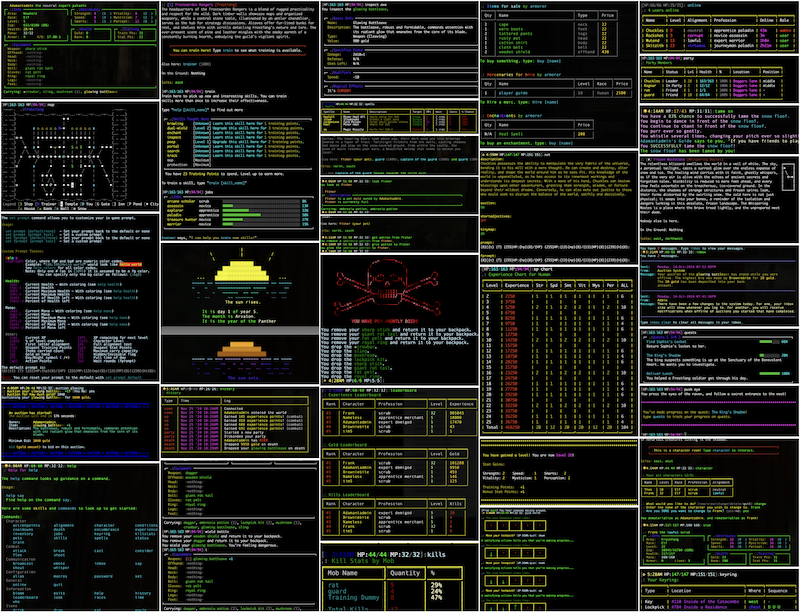
There are comprehensive web based admin tools to help build your MUD in addition to the in-game commands. You can browse the admin in read-only mode here:
Colorization is handled through extensive use of my github.com/GoMudEngine/ansitags library.
The fastest way to get GoMud running. These scripts install Go and Git if needed, clone the repo, and build the server binary automatically.
Linux / macOS:
curl -fsSL https://raw.githubusercontent.com/GoMudEngine/GoMud/master/scripts/install.sh | sh
Windows (PowerShell):
irm https://raw.githubusercontent.com/GoMudEngine/GoMud/master/scripts/install.ps1 | iex
Both scripts install GoMud to ~/GoMud by default. Set the GOMUD_DIR environment variable before running to choose a different location.
If you prefer to clone and run the server yourself:
git clone https://github.com/GoMudEngine/GoMud.git
cd GoMud

make reset-admin-pw   # set a new admin password before first run
make run              # build and start the server
To run inside Docker instead:
make run-docker
Other useful commands:
make build        # compile a standalone binary at ./go-mud-server
make run-new      # delete generated room instance data and start fresh
make help         # list all available make targets
Once the server is running, you can connect in several ways:
| Method | Address |
|---|---|
| Telnet (public) | localhost:33333 or localhost:44444 |
| Telnet (local only) | 127.0.0.1:9999 |
| Web client | http://localhost/webclient |
| Web admin | http://localhost/admin/ |
The web client is the easiest way to jump in without installing a separate telnet client.
Before starting the server for the first time, run:
make reset-admin-pw
This sets a password of your choosing for the built-in admin account. If you skip this step, the server starts with the default credentials admin / password, which you should change immediately.
The admin account gives you access to in-game admin commands as well as the web-based admin panel at http://localhost/admin/.
GoMud supports optional community modules that add new gameplay features, commands, events, and more. Modules are compiled into the server binary, so they are fast and have full access to the engine.
The module manager is built into the server binary. Run it via the module
subcommand — no separate tool needed:
go run . module
Running it with no arguments and an interactive terminal launches an interactive menu. You can also pass subcommands directly (see below).
A make module shortcut is also available if you prefer:
make module list
make module install <name>
| Command | Description |
|---|---|
go run . module list |
List all modules available in the registry |
go run . module info <name> |
Show full details for a specific module |
go run . module install <name> |
Download, verify, and install a module |
go run . module remove <name> |
Remove an installed module |
go run . module update |
Check for updates to all installed modules |
go run . module update <name> |
Update a specific installed module |
With a built binary, replace go run . with ./go-mud-server.
Modules are compiled into the server binary, so a rebuild is required for any change to take effect:
make build
If a newly installed module depends on a Go package not already in go.mod, run go mod tidy before building.
The manager records what is installed in modules/modules.lock.yaml. This file is managed automatically - do not edit it by hand. You can commit it to source control to track which community modules your server uses.
GoMud loads configuration in layers so you can keep your own world-specific changes separate from the bundled defaults:
_datafiles/config.yaml
  -> FilePaths.DataFiles (defaults to _datafiles/world/default)
      -> {DataFiles}/config-overrides.yaml
          -> environment variables such as CONFIG_PATH, LOG_PATH, LOG_LEVEL, LOG_NOCOLOR
_datafiles/config.yaml is the bundled base config that ships with the repo, and shouldn't be edited or changed.
FilePaths.DataFiles points at the active world data directory. By default that is _datafiles/world/default.
{DataFiles}/config-overrides.yaml is the normal place to save local overrides for a world.
CONFIG_PATH=/path/to/config.yaml can point GoMud at a different override file when you want to keep it outside the repo or maintain separate deploy-specific settings.
For upgrades, treat _datafiles/config.yaml as a reference file, not your day-to-day edit target.
= Keep your custom changes in config-overrides.yaml or a separate file selected with CONFIG_PATH so pulling new code does not overwrite your local settings.
GoMud can serve HTTPS when you provide a certificate and private key, or can be automated using LetsEncrypt provisioning.
For a guided HTTPS setup process, run:
make https-setup
When the admin interface is enabled, /admin/https/ shows the current HTTPS mode, the checks GoMud ran, and the next steps needed to finish setup.
If you have comments, questions, suggestions (don't be shy, your questions or requests might help others too):
Interested in contributing? Check out our CONTRIBUTING.md to learn about the process.
| Command | Description |
|---|---|
make build |
Validates and builds the server binary. |
make run |
Generates module imports and starts the server with go run .. |
make run-new |
Deletes generated room instance data, then starts the server fresh. |
make run-docker |
Builds and starts the server container from compose.yml. |
make https-setup |
Runs the interactive HTTPS certificate setup helper. |
make reset-admin-pw |
Interactively resets the admin user's password. |
make test |
Runs code generation, JavaScript linting, and go test -race ./.... |
make validate |
Runs fmtcheck and go vet. |
make ci-local |
Builds the local CI container and runs workflow validation. |
make help |
Lists the available developer targets. |
When running, several environment variables can be set to alter behaviors of the mud:
| Variable | Example Value | Descripton |
|---|---|---|
CONFIG_PATH |
/path/to/config.yaml |
Use alternate config file |
LOG_PATH |
/path/to/log.txt |
Log to file instead of stderr |
LOG_LEVEL |
LOW / MEDIUM / HIGH |
Set verbosity (rotates at 100MB) |
LOG_NOCOLOR |
1 |
Disable colored log output |
Why not?
Go provides a number of practical benefits:
more like this
SCYTHE is a lightweight, C#-based game engine focused on modifiability and rapid iteration using Raylib.
Vinculum (vin·cu·lum) is a set of C# autogen bindings for Raylib 5.0 additionally provides some convenience wrappers. R…
search projects, people, and tags