perplexity-cli
🧠 A simple command-line client for the Perplexity API. Ask questions and receive answers directly from the terminal! 🚀🚀🚀
Python★ 176
Gogh is a collection of color schemes for various terminal emulators, including Gnome Terminal, Pantheon Terminal, Tili…
 Gogh-Co
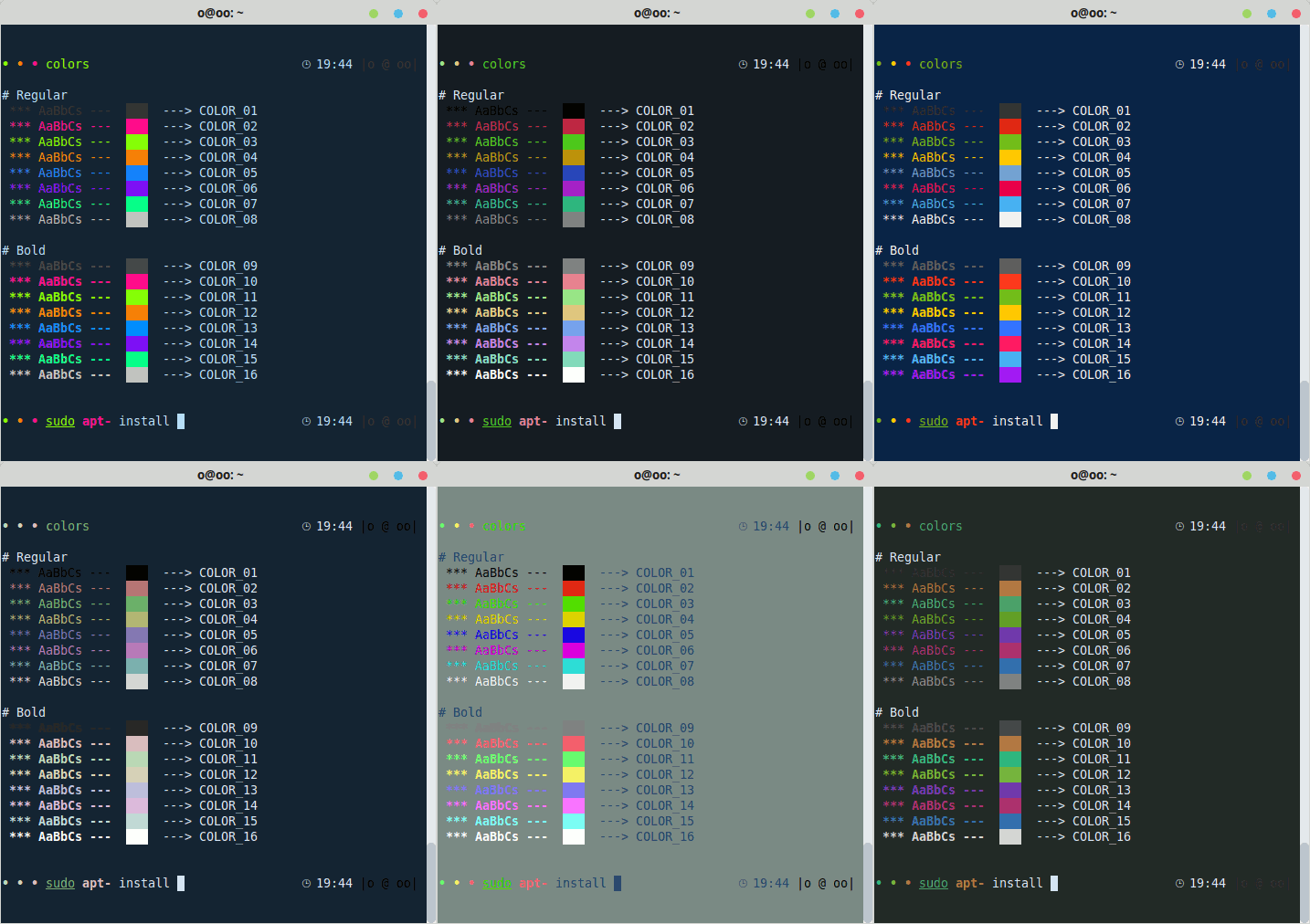
Gogh is a collection of color schemes for various terminal emulators, including Gnome Terminal, Pantheon Terminal, Tilix, and XFCE4 Terminal. These schemes are designed to make your terminal more visually appealing and improve your productivity by providing a better contrast and color differentiation. (This fork of Gogh includes a color scheme named "Vaombe".)
The inspiration for Gogh came from the clean and minimalistic design of Elementary OS, but the project has since grown to include a variety of unique and beautiful options. Not only does Gogh work on Linux systems, but it's also compatible with iTerm on macOS, providing a consistent and visually appealing experience across platforms.
|
Index: |
|
In your terminal, type:
For Debian/Ubuntu:
sudo apt-get install dconf-cli uuid-runtime
For Arch Linux:
sudo pacman -S dconf util-linux-libs
You can now install Gogh in Interactive Mode (Easier) or Non-Interactive Mode! (Ideal for Scripting)
1. Just copy and paste this one-line command:
bash -c "$(wget -qO- https://git.io/vQgMr)"
Or, if you're a Mac user:
bash -c "$(curl -sLo- https://git.io/vQgMr)"
2. Select your installed theme from your terminal.
DEMO:

Two ways:
# Clone the repo into "$HOME/src/gogh"
mkdir -p "$HOME/src"
cd "$HOME/src"
git clone https://github.com/Gogh-Co/Gogh.git gogh
cd gogh

# necessary in the Gnome terminal on ubuntu
export TERMINAL=gnome-terminal

# necessary in the Alacritty terminal
pip install -r requirements.txt
export TERMINAL=alacritty

# Enter theme installs dir
cd installs

# install themes
./atom.sh
./dracula.sh
# Download apply script
wget https://github.com/Gogh-Co/Gogh/raw/master/apply-colors.sh
# Download desired themes from ./installs/ like this:
wget https://github.com/Gogh-Co/Gogh/raw/master/installs/selenized-dark.sh

# Optional - download Alacritty dependency (may require additional python packages, see requirements.txt for more)
wget https://github.com/Gogh-Co/Gogh/raw/master/apply-alacritty.py
# Optional - download Terminator dependency (may require additional python packages, see requirements.txt for more)
wget https://github.com/Gogh-Co/Gogh/raw/master/apply-terminator.py

# You can also specify where to find the apply scripts with the following environmental variables:
GOGH_APPLY_SCRIPT=/path/to/apply-colors.sh
GOGH_ALACRITTY_SCRIPT=/path/to/apply-alacritty.py   # only needed if applying to Alacritty terminal
GOGH_TERMINATOR_SCRIPT=/path/to/apply-terminator.py # only needed if applying to Terminator terminal

# Control Gogh behavior with the following:
TERMINAL=gnome-terminal # Select for which terminal to install the theme
                        # (see apply-colors.sh for all supported terminals)
GOGH_NONINTERACTIVE= # Make output silent and answer all prompts with default value
                     # (errors will still be printed)
GOGH_USE_NEW_THEME= # Make theme the currently used/default one of the terminal
                    # Actual effect may differ between terminals
                    # Supported terminals: xfce4-terminal

# Apply downloaded theme (apply script must be in the same folder)
TERMINAL=gnome-terminal bash ./selenized-dark.sh
# OR specify apply script path
GOGH_APPLY_SCRIPT=/path/to/file/apply-colors.sh bash ./selenized-dark.sh
Here are some terminals that Gogh is supported with:
We have lots of themes in stock! Check them out here!
sudo apt install gconf2 - #334 (comment)dconf reset -f /org/gnome/terminal/legacy/profiles:/
dconf reset -f /org/gnome/terminal/legacy/profiles:/
dconf reset -f /org/gnome/terminal/legacy/profiles:/
sudo apt install uuid-runtime
1 - Uncomment the following line in .bashrc ;you can find this file in your /home/USER/ directory.
#force_color_prompt=yes
2 - Execute in terminal
source .bashrc
Good news! Now, creating themes are easier than ever.
All you need to do is to create a YAML format file, following the example of the other files in the themes folder.
Some rules to keep in mind:
Solarized Dark.ymlname: 'Solarized Dark'Now, you can send your Pull Request Thank you for collaborating!
If you indeed use this, replace the HEX values with your own ones.
---
name: 'Gogh'
author: ''             # 'Author Name (http://website.com)'
variant: ''            # Dark or Light

color_01: '#292D3E'    # Black (Host)
color_02: '#F07178'    # Red (Syntax string)
color_03: '#62DE84'    # Green (Command)
color_04: '#FFCB6B'    # Yellow (Command second)
color_05: '#75A1FF'    # Blue (Path)
color_06: '#F580FF'    # Magenta (Syntax var)
color_07: '#60BAEC'    # Cyan (Prompt)
color_08: '#ABB2BF'    # White

color_09: '#959DCB'    # Bright Black
color_10: '#F07178'    # Bright Red (Command error)
color_11: '#C3E88D'    # Bright Green (Exec)
color_12: '#FF5572'    # Bright Yellow
color_13: '#82AAFF'    # Bright Blue (Folder)
color_14: '#FFCB6B'    # Bright Magenta
color_15: '#676E95'    # Bright Cyan
color_16: '#FFFEFE'    # Bright White

background: '#292D3E'  # Background
foreground: '#BFC7D5'  # Foreground (Text)

cursor: '#BFC7D5'      # Cursor
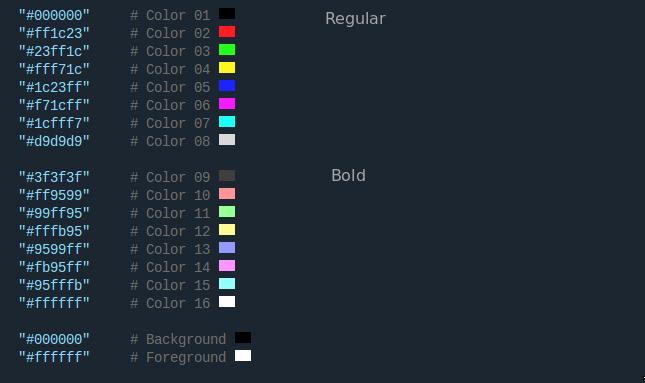
The colors of the terminal are composed of 18 colors in 3 sections.
Section 1: Regular text.
Section 2: Bold text.
Section 3: text and background.
The basic colors are 8:
In comments variables is that of the console belongs each color.
Here is a picture that explains a little better as colors are distributed.
WARNING: Only if you know what you are doing or trust me :)
sudo wget -O /usr/local/bin/gogh https://git.io/vQgMr && sudo chmod +x /usr/local/bin/gogh
Now in your terminal just type gogh:
gogh
You can also select themes directly with CLI arguments (skip the interactive list):
# by name/slug (recommended, stable)
gogh Dracula
gogh dracula nord-light

# all themes
gogh ALL
For one-line remote usage with arguments, pass -- before the options:
bash -c "$(wget -qO- https://git.io/vQgMr)" -- Dracula
Nov 18, 2013 - aa9871e
Many thanks to all who have participated in this project.
I cannot claim to be the only author of this project. Without the help of the people who have contributed, this would not have been possible. Therefore, that's why all contributors are listed first in this document. While I am listed as the author, the true authors are all those who are mentioned in the document. I would like to express my gratitude to all of them, as well as to future contributors.
There is no blue without yellow and without orange.
-- Vincent Van Gogh --
more like this
🧠 A simple command-line client for the Perplexity API. Ask questions and receive answers directly from the terminal! 🚀🚀🚀
search projects, people, and tags