perplexity-cli
🧠 A simple command-line client for the Perplexity API. Ask questions and receive answers directly from the terminal! 🚀🚀🚀
Python★ 176
This custom Home Assistant integration automatically scans your entities, detects new devices, and uses AI (via cloud a…
 ITSpecialist111
git clone https://github.com/ITSpecialist111/ai_automation_suggester.gitITSpecialist111/ai_automation_suggester
An AI‑powered assistant for Home Assistant that leverages large language models to understand your unique smart home environment – your entities, areas, devices, and existing automations. It proposes intelligent, actionable YAML suggestions tailored to your specific setup, helping you unlock your home's full potential.
As your Home Assistant setup grows, managing its complexity and identifying new opportunities for automation can become challenging. You might find yourself with:
The result is often an under-automated house despite having powerful hardware.
The AI Automation Suggester integration solves these challenges by acting as a personal automation consultant. It intelligently analyzes your Home Assistant instance to:
In essence, this integration turns the complexity of a large Home Assistant environment into actionable insights and tangible benefits, guiding you toward a more efficient, comfortable, and secure smart home.
The integration follows a simple, effective process:
| Step | What happens? | Details |
|---|---|---|
| 1 · Snapshot | Collects data about your home. | On manual trigger or schedule, the integration gathers information on your entities (including attributes), devices, areas, and existing automations. You can control the scope using filters and limits. |
| 2 · Prompt Building | Structures the data for the AI. | This snapshot is embedded into a detailed system prompt describing your specific Home Assistant setup. You can enhance this with a custom prompt to steer suggestions towards specific goals (e.g., "focus on presence lighting"). |
| 3 · Provider Call | Sends the prompt to the AI. | The crafted prompt is sent to your configured AI provider (OpenAI, Azure OpenAI, Anthropic, Google, Groq, LocalAI, Ollama, Mistral, Perplexity, OpenRouter, Requesty, LiteLLM, or another OpenAI-compatible endpoint). |
| 4 · Parsing | Processes the AI's response. | The integration asks capable providers for structured JSON, falls back to fenced YAML parsing, validates returned YAML, and records warnings for missing or possibly truncated output. |
| 5 · Surface | Delivers and stores the suggestions. | Suggestions appear as Home Assistant persistent notifications, sensor attributes, and stored history that can be used by the bundled dashboard card or your own cards. |
Randomized entity selection (configurable) helps ensure each analysis run can surface fresh ideas rather than repeating the same suggestions.
Suggestions are delivered directly within Home Assistant notifications:
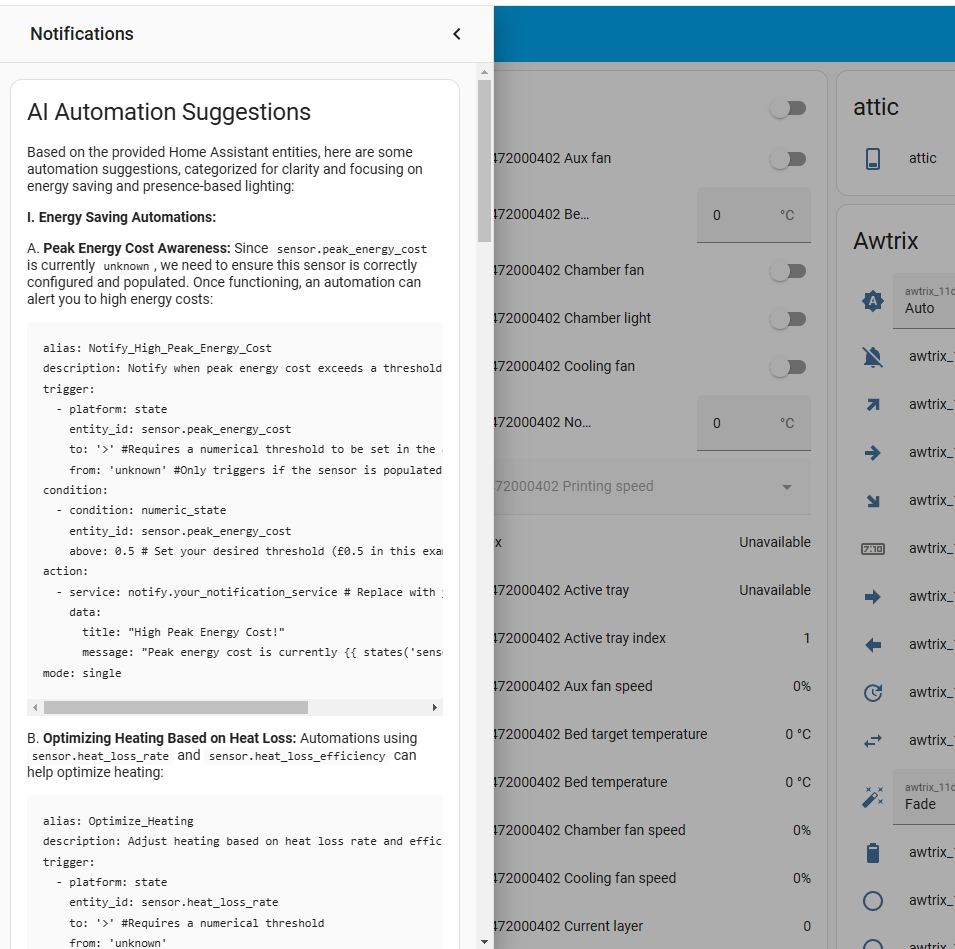
AI suggestions delivered right inside Home Assistant
You can also build custom dashboard cards to display suggestions using sensor attributes:
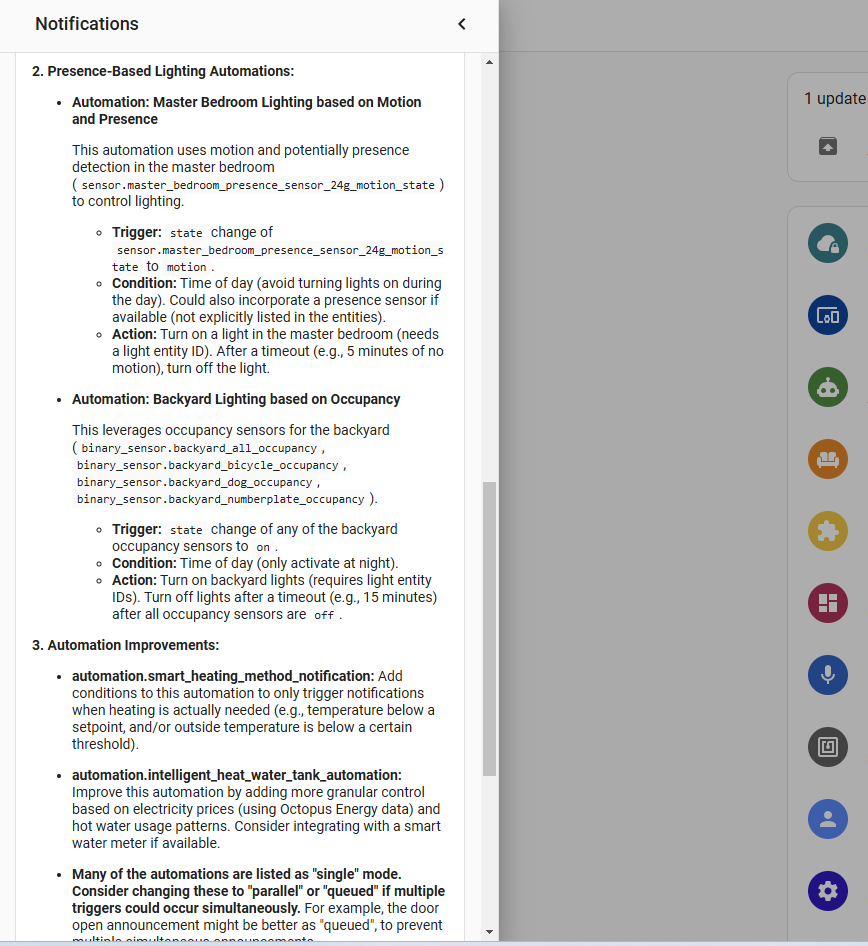
Dashboard showing human-readable description and extracted YAML block
Here's an example of displaying suggestions on a dashboard:
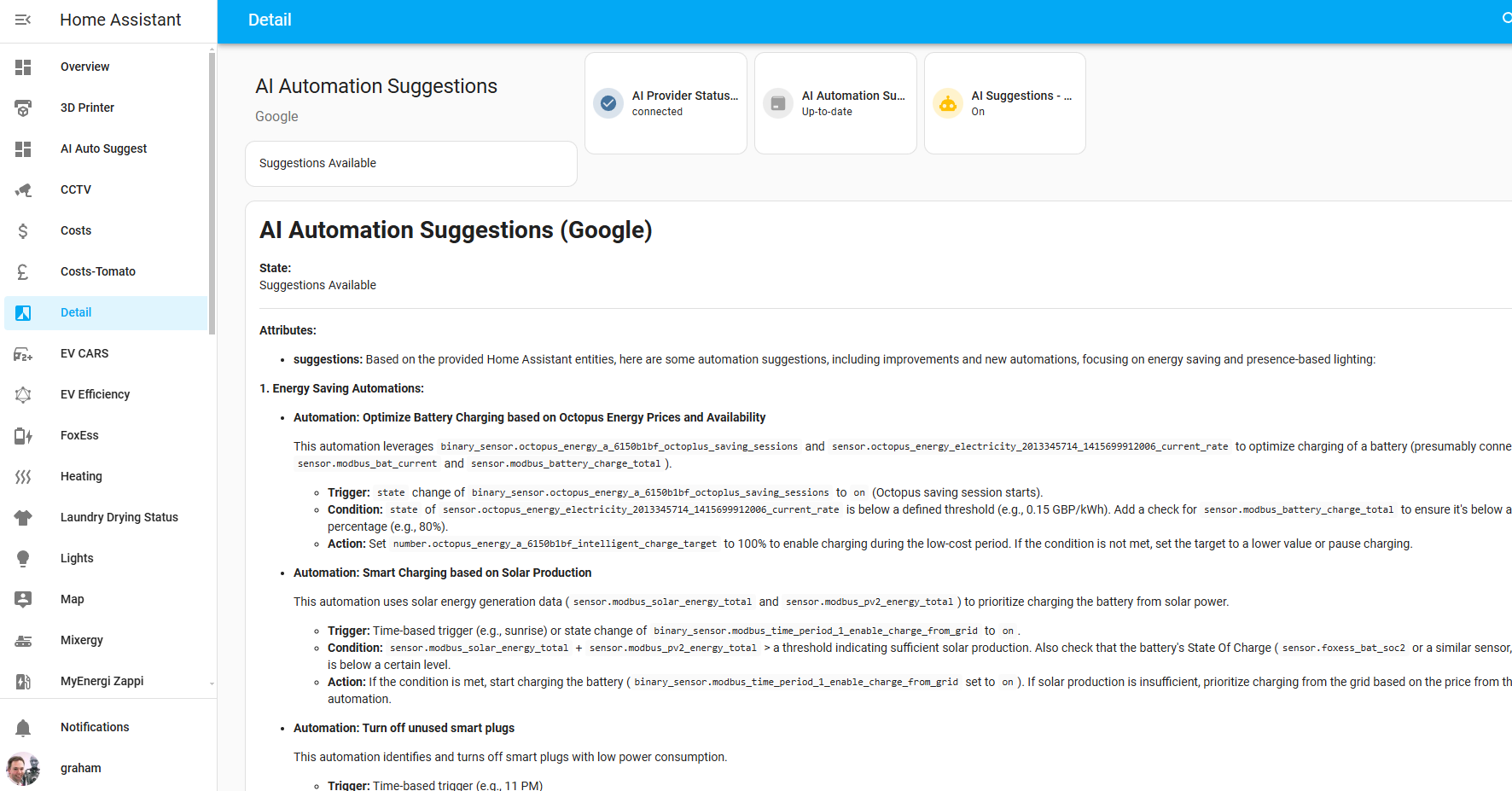
Example of a dashboard displaying AI-suggested automations
Leveraging the AI Automation Suggester provides several key benefits:
ai_automation_suggester.generate_suggestions service with full parameter control.+ button.AI Automation Suggester.AI Automation Suggester.When a GitHub release is published, HACS can detect the new version and show it as an available update. Update through HACS, then restart Home Assistant so the custom integration is reloaded.
custom_components/ai_automation_suggester folder to your Home Assistant custom_components directory.
<homeassistant_config_dir>/
└── custom_components/
    └── ai_automation_suggester/
        ├── __init__.py
        └── ... (other files)
AI Automation Suggester.AI Automation Suggester.You can adjust these settings later via the integration options in Settings → Devices & Services.
Temperature Control:
Token Management:
History and Filtering:
Model APIs change quickly, so the integration keeps a compatibility catalog and still allows custom model names. Existing configured model values are preserved on upgrade.
| Provider | New default for new configs | Compatibility notes |
|---|---|---|
| OpenAI | gpt-5.4-mini |
GPT-5-style models use the Responses API, max_output_tokens, and reasoning effort. Temperature is not sent to models known to reject it. gpt-5.5 and gpt-5.5-pro are supported when available on your account. |
| Azure OpenAI | gpt-5.4-mini deployment name |
Azure uses deployment names. Configure the deployment ID, endpoint, and API version that match your Azure resource. |
| Anthropic | claude-sonnet-4-6 |
Supports current Claude Sonnet/Opus model IDs such as claude-sonnet-4-6 and claude-opus-4-7. |
| Google Gemini | gemini-2.5-flash |
Replaces the stale gemini-2.0-flash default. Gemini 3 preview IDs can be entered manually. |
| Groq | llama-3.3-70b-versatile |
Replaces the stale llama3-8b-8192 default. Custom Groq model IDs are still allowed. |
| Mistral AI | mistral-small-latest |
Supports current *-latest aliases and custom published IDs. |
| Perplexity AI | sonar |
Supports Sonar, Sonar Pro, reasoning, and research-style model IDs where your account has access. |
| OpenRouter | openai/gpt-5.4-mini |
OpenRouter remains dynamic. Use provider-prefixed IDs from OpenRouter's model catalog. |
| Requesty | openai/gpt-4o-mini |
OpenAI-compatible router (https://router.requesty.ai) providing 300+ models through a single API key. Use provider-prefixed model IDs. |
| LiteLLM | openai/gpt-4o-mini |
Uses the LiteLLM Python SDK to reach 100+ backends (OpenAI, Bedrock, Azure, Vertex, Groq, and more). Model IDs follow the LiteLLM naming scheme. |
| LocalAI/Ollama/custom OpenAI-compatible | User configured | Custom model names remain valid and are treated conservatively. |
For maximum stability, prefer stable model IDs over preview or latest aliases unless you intentionally want fast-moving behavior.
The integration comes with example automations you can enable or adapt:
Find and enable these examples in Settings → Automations.
You can trigger the suggestion generation manually using the service call:
ai_automation_suggester.generate_suggestions.all_entities (boolean, default: false): Set to true to consider all eligible entities, false to only consider entities added since the last successful run.domains (list of strings, optional): Limit the analysis to entities within specific domains (e.g., ['light', 'sensor']).exclude_domains (list of strings, optional): Exclude domains even when considering all entities.exclude_entities (list of entity IDs, optional): Exclude specific entities from analysis.exclude_areas (list of area IDs/names, optional): Exclude areas from analysis.entity_limit (integer, optional): Set a maximum number of entities the AI should consider in this run. Useful for controlling prompt length and cost.custom_prompt (string, optional): Add a specific instruction for this particular run (e.g., "Suggest security automations for doors and windows.").automation_read_yaml (boolean, optional): Include YAML from automations.yaml for deeper review.automation_limit (integer, optional): Limit how many automations are included.script_read_yaml (boolean, optional): Include YAML from scripts.yaml so the AI can reason about scripts you already have. Uses more input tokens — best paired with large-context models.script_limit (integer, optional): Limit how many scripts are included (default: 100).ai_automation_suggester.clear_history: Clears stored suggestion history.ai_automation_suggester.update_suggestion: Updates a stored suggestion status. Supported statuses are new, accepted, declined, and dismissed.The bundled dashboard card also uses these stored suggestion APIs:
GET /api/ai_automation_suggester/suggestionsPOST /api/ai_automation_suggester/{accept|decline|dismiss}/{suggestion_id}The main sensor (sensor.ai_automation_suggestions_<provider_name>) exposes useful attributes for display on dashboards. Replace <provider_name> with the name you gave the integration instance (e.g., openai, ollama).
{{ state_attr('sensor.ai_automation_suggestions_<provider_name>', 'description') }}
{{ state_attr('sensor.ai_automation_suggestions_<provider_name>', 'yaml_block') }}
You can use Markdown cards or other card types to present this information cleanly in your Home Assistant dashboard.
The integration provides several sensors for monitoring:
AI Automation Suggestions: (sensor.ai_automation_suggestions_<provider_name>)
No Suggestions, New Suggestions Available, Suggestions Availabledescription: Human-readable suggestion descriptionyaml_block: Ready-to-use automation YAMLlast_update: Timestamp of last updateentities_processed: List of analyzed entitiesentities_processed_count: Number of entities analyzedsuggestion_count: Number of retained suggestionswarnings: Parsing, model, or truncation warningsAI Provider Status: (sensor.ai_provider_status_<provider_name>)
connected, error, disconnected, initializinglast_error_message: Details of any errorslast_attempted_update: Timestamp of last attemptMax Input/Output Tokens: (sensor.max_input_tokens_<provider_name>, sensor.max_output_tokens_<provider_name>)
AI Model: (sensor.ai_model_in_use_<provider_name>)
Suggestion History Count: (sensor.suggestion_history_count_<provider_name>)
Last Error: (sensor.last_error_message_<provider_name>)
Stack Traces:
Common Error Scenarios:
Error Monitoring:
Beyond the basic configuration and service call parameters, you can further customize the integration's behavior:
By default, the integration uses randomized entity selection when all_entities is true (or the automatic weekly scan runs). This helps ensure variety in suggestions and prevents the AI from focusing only on the same initial set of entities.
Use the domains parameter in the service call or your automation configuration to narrow the focus. This is very effective for getting suggestions for specific areas (e.g., only analyze light and switch entities in the living_room area - though area filtering is implicit based on the entities selected).
The entity_limit parameter is crucial for managing prompt size, particularly with models sensitive to input length or cost. Experiment to find a limit that provides good suggestions without hitting token limits or incurring excessive costs.
The custom_prompt parameter allows you to be very specific about the type of suggestions you want for a particular run. Combine it with domain filtering for highly targeted results (e.g., domains: ['climate'], custom_prompt: "Suggest automations to optimize heating/cooling based on occupancy and weather.").
When Home Assistant is configured to a supported non-English language, generated suggestion titles, descriptions, and warnings are prompted in that language. YAML, entity IDs, service names, and code identifiers remain unchanged. Use the persistent custom system prompt or custom_prompt if you want to force a different output language for a specific provider or run.
yaml_block content.automations.yaml file and restart Home Assistant.The integration provides two key sensors for monitoring:
sensor.ai_automation_suggestions_<provider_name>
idle, generating, suggestions_available).description, yaml_block, and potentially other details depending on the AI provider's response format.sensor.ai_provider_status_<provider_name>
connected, error, unavailable).Monitor these sensors to ensure the integration is functioning correctly.
entity_limit and scheduled run frequency to manage potential costs. Monitor your provider's billing.openai package. Avoid installing or pinning openai in your HA environment, as mismatched SDK versions can break the official OpenAI Conversation integration.| Symptom | Check / Action |
|---|---|
| No suggestions available | - Verify API key is correct. - Check the AI Provider Status sensor for errors.- Check the Home Assistant logs for errors related to the integration. - Try triggering the service manually with a small entity_limit and no domain filters.- Ensure you have enough entities/devices for meaningful suggestions. |
AI Provider Status shows error |
- Inspect the Home Assistant log (home-assistant.log) for detailed error messages (look for ai_automation_suggester and processing error).- Check your network connection to the provider's server (if cloud-based) or your local server. - Confirm your API key is active and has permissions. - Ensure your local AI server is running and accessible. |
| Suggestion prompt is too long | - Reduce the entity_limit parameter when triggering the service or configuring the automation.- Use the domains filter to narrow the scope of entities analyzed.- Shorten or simplify your custom_prompt if you are using one. |
| Unintended startup suggestions | - Review your Home Assistant automations and scripts to ensure none are configured to call ai_automation_suggester.generate_suggestions on startup or via events you didn't intend. |
| Suggestions are repetitive | - Ensure all_entities is used (e.g., in a weekly automation) and consider enabling randomized entity selection.- Try different custom_prompt values to steer the AI in a new direction.- Increase the entity_limit to give the AI more data points (if prompt length allows). |
| Image links are broken in HACS/GitHub | This has been addressed in this README version. Ensure the README file in your repository uses the corrected URLs provided. Clear your browser cache or wait for GitHub/HACS to refresh. |
If you encounter issues not covered here, please open an issue on the GitHub repository with details from your Home Assistant logs.
Future planned features and improvements:
This project is licensed under the MIT License. See the LICENSE file for details.
We welcome contributions! If you have ideas for new features, improvements, bug fixes, or translations, please feel free to open an issue or submit a pull request on the GitHub repository. Please follow standard development practices.
This is a custom component developed independently. It is not affiliated with, endorsed by, or officially supported by Home Assistant, Nabu Casa, or any of the mentioned AI providers. Use at your own discretion.
If you find this integration helpful and it saves you time and effort in automating your home, please consider supporting its development. Your support helps with maintenance, adding new features, and covering any potential costs associated with development and testing.
For further questions, discussions, or assistance, please visit the GitHub repository or the Home Assistant Community Forums thread (if one exists). Your feedback is highly valuable and helps shape the future direction of this project.
1. How do I update the integration?
If installed via HACS, update directly through the HACS interface in Home Assistant. If installed manually, download the latest version of the files from the repository and replace the existing ones in your custom_components/ai_automation_suggester folder, then restart Home Assistant.
2. Can I use this integration without a cloud API key? Yes! You can use local AI models like those provided by LocalAI or Ollama running on your local network. This requires setting up and running the local AI server separately.
3. Is my Home Assistant data safe? When using cloud-based AI providers, specific entity data (names, states, attributes) is sent to the provider's API for processing. Refer to the privacy policies of your chosen AI provider. Using local models keeps all data processing within your local network.
4. I found a bug or have a feature request. What should I do? Please open an issue on the GitHub repository. Provide as much detail as possible, including steps to reproduce the bug, screenshots, and relevant logs. For feature requests, clearly describe the desired functionality and use case.
5. Can I get suggestions in languages other than English? The quality of suggestions in other languages depends heavily on the AI model used. The integration structures the prompt in English, but you can experiment with custom prompts in other languages and see how the model responds. Community translations of the integration's UI and documentation are welcome!
With the AI Automation Suggester, you gain an AI-powered ally to help you unlock your home’s full potential. Instead of being overwhelmed by possibilities, receive thoughtful, context-aware suggestions that make your Home Assistant automations more impactful, efficient, and enjoyable.
more like this
🧠 A simple command-line client for the Perplexity API. Ask questions and receive answers directly from the terminal! 🚀🚀🚀
A specialized swipe card for todo lists in Home Assistant with custom styling
search projects, people, and tags