r2
Free open-source Cloudflare R2 desktop client and S3 GUI for macOS, Windows, and Linux. Manage Cloudflare R2, AWS S3, M…
TypeScript★ 50
PyBreeze features built-in modules tailored for every level of modern automation, allowing developers to tackle complex…
 Integration-Automation
git clone https://github.com/Integration-Automation/PyBreeze.gitIntegration-Automation/PyBreeze
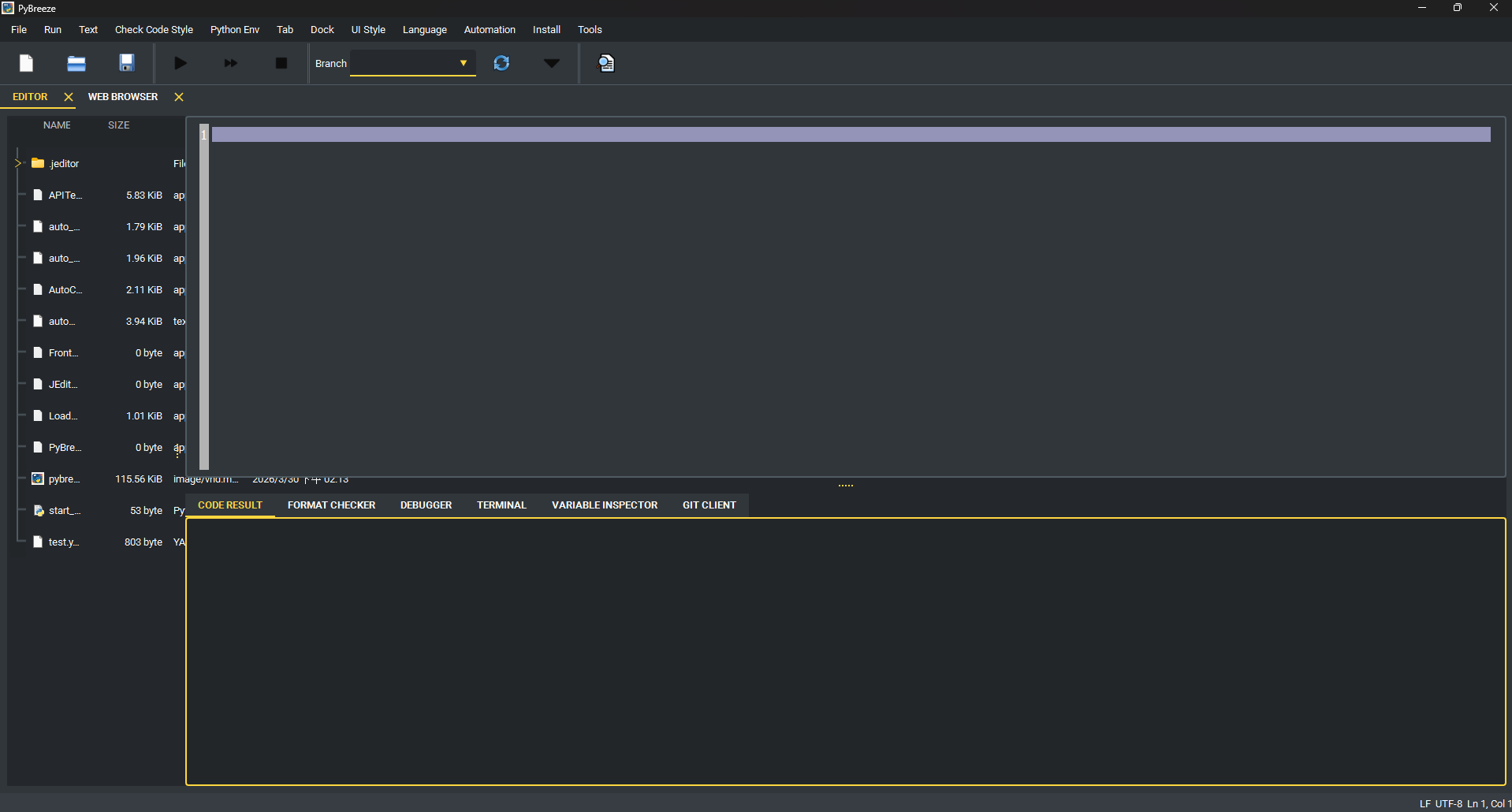
PyBreeze is a Python IDE purpose-built for automation engineers. It integrates Web, API, GUI, and load testing automation into a single unified environment — no plugin hunting, no complex environment setup, just open and start automating.
PyBreeze covers the full spectrum of automation testing needs out of the box:
| Dimension | Module | Description |
|---|---|---|
| Web Automation | WebRunner | Browser-based interaction simulation and testing with deep integration of browser drivers and element locators |
| API Automation | APITestka | RESTful API development and testing with built-in request builders, response analyzers, mock servers, and assertion verification |
| GUI Automation | AutoControl | Desktop application automation via image recognition, coordinate-based positioning, keyboard/mouse control, and action recording |
| Load & Stress Testing | LoadDensity | High-concurrency performance testing engine for monitoring system stability under extreme pressure |
Additionally:
PyBreeze is not just a code editor — it is a command center for the automation lifecycle:
.venv or venv).~/.pybreeze/ssh_known_hostsflowchart / graph import.diagram.json, export to PNG or SVGcurl command copied from your browser's dev tools and generate a ready-to-run script for the target of your choice: Python requests, an APITestka Python snippet (test_api_method_requests(...)), an APITestka JSON action ([["AT_test_api_method", {...}]]) that execute_files runs directly, or a LoadDensity Locust load-test (start_test(...)). (These are the HTTP-oriented modules; a curl request has no meaningful mapping to the browser or desktop-GUI automation modules.) Parses the method, URL, headers, body, basic auth, -G query parameters, -F multipart form fields (file uploads become files=open(...)), the --json shortcut (which also sets the JSON Content-Type/Accept), and -d @file bodies (which become open(...).read(), while --data-raw stays literal) — all with multi-line \ / ^ continuations. It knows the arity of curl's common flags, so value-taking options like --max-time 30 or -o out.json never leak into the URL; it URL-encodes --data-urlencode values the way curl does; and it infers POST when a body or form is present and sends JSON bodies as JSON. Targets include Python requests, a ready-to-run pytest test (a named test_... function that sends the request and asserts the status), APITestka (Python and JSON action), and a LoadDensity load test. Pick one from the dropdown, then copy the result, open it straight into a new editor tab, or save it to a .py / .json file (the extension follows the chosen target). A repeated -H is handled the way HTTP handles it — the values are combined into one header (with ; for cookies) rather than the last one silently winning, and names are matched case-insensitively so an explicit header always beats one implied by another flag. One click also hands the parsed parts to the tool that specialises in them: the URL to the URL parser/builder (query string and all) or the headers to the header analyzer. The parser is pure logic and never executes the command..har export and every recorded call is listed with its method, path, status and media type — page furniture (stylesheets, images, fonts) filtered out by default so what remains is the API traffic. Select the calls you want, or take everything listed, and generate one script for the whole set using the same targets as the cURL importer: a pytest file with one test per call (repeated endpoints get numbered names so no test silently replaces another), an APITestka action list that replays the flow in capture order, a requests walkthrough, an APITestka Python script, or LoadDensity runs. Recorded headers, cookies, query parameters and bodies (raw, URL-encoded and multipart, including file uploads) all come across; HTTP/2 pseudo-headers are dropped and a Cookie header that duplicates the recorded cookie list is removed, so the generated code sends each value once. A single selected request produces exactly what the cURL importer would, so the two tools never disagree. HAR is JSON, so this needs nothing beyond the standard library, and nothing is ever replayed for you.exp, iat, nbf, auth_time) rendered as readable UTC times. Inspection only — the signature is never verified and the token is never trusted.Z or an offset) and get every representation back in UTC. Deterministic and independent of the local time zone.usedforsecurity=False, never for security decisions).application/x-www-form-urlencoded query string to pretty JSON and back, URL-decoding and -encoding as needed. Repeated keys become JSON arrays and vice versa. Copy the result, open it in an editor tab, or save it to a file.curl -i, or a proxy log) and read back every field plus what is worth knowing about it: names sent more than once, Set-Cookie entries missing Secure / HttpOnly / SameSite, a wildcard CORS policy (and the wildcard-plus-credentials combination browsers reject outright), an HSTS max-age too short to survive a restart, CSP unsafe-inline / unsafe-eval, product banners, deprecated headers, and — for responses — the security headers that are absent. Headers carrying credentials are reported by name only; their values are never copied into the report. The cURL importer and the Response Inspector both hand their headers here in one click, and a bearer token spotted in any header opens in the JWT decoder, already decoded.IGNORECASE / MULTILINE / DOTALL / VERBOSE flags, and see every match with its offsets, numbered groups and named groups. Invalid patterns report a friendly error instead of crashing.Authorization: Bearer header) are decoded with their timestamp claims shown in UTC. Ties the HTTP-status, JSON-format and JWT tools together, and can open a found status code, JWT, the whole header block, or a JSON body directly in its dedicated tool tab, pre-filled.PyBreeze supports an extensible plugin architecture for:
Plugins are auto-discovered from the jeditor_plugins/ directory. See PLUGIN_GUIDE.md for full documentation.
Bundled plugins: C, C++, Go, Java, Rust syntax highlighting and run support; French translation.
The IDE interface supports multiple languages:
flowchart TB
    UI["PyBreeze UI · PySide6"]

    subgraph Editor["JEditor (Base Editor)"]
        direction LR
        E1["Code Editor + Tabs"]
        E2["File Tree"]
        E3["Syntax Highlighting"]
        E4["Plugin System"]
    end

    subgraph Automation["Automation Menu"]
        direction LR
        A1["APITestka"]
        A2["AutoControl"]
        A3["WebRunner"]
        A4["LoadDensity"]
        A5["FileAutomation"]
        A6["MailThunder"]
        A7["TestPioneer"]
    end

    subgraph Executors["Subprocess Executors · TaskProcessManager"]
        direction LR
        X1["je_api_testka"]
        X2["je_auto_control"]
        X3["je_web_runner"]
        X4["je_load_density"]
        X5["automation-file"]
        X6["je-mail-thunder"]
        X7["test_pioneer"]
    end

    subgraph Tools["Tools"]
        direction LR
        T1["SSH · paramiko"]
        T2["AI Code Review"]
        T3["CoT Prompt Editor"]
        T4["Skill Prompt Editor"]
        T5["Skill Send GUI"]
        T6["Diagram Editor"]
        T7["JupyterLab"]
    end

    subgraph Install["Install Menu"]
        direction LR
        I1["Module Installers"]
        I2["Build Tools"]
    end

    UI --> Editor
    UI --> Automation
    UI --> Tools
    UI --> Install

    A1 --> X1
    A2 --> X2
    A3 --> X3
    A4 --> X4
    A5 --> X5
    A6 --> X6
    A7 --> X7
Loading
PyBreeze follows a modular architecture:
PyBreeze UI (PySide6)
├── JEditor (Base Editor Engine)
│   ├── Code Editor with Tabs
│   ├── File Tree Navigation
│   ├── Syntax Highlighting Engine
│   └── Plugin System
├── Automation Menu
│   ├── APITestka ──→ APITestka Executor ──→ je_api_testka
│   ├── AutoControl ──→ AutoControl Executor ──→ je_auto_control
│   ├── WebRunner ──→ WebRunner Executor ──→ je_web_runner
│   ├── LoadDensity ──→ LoadDensity Executor ──→ je_load_density
│   ├── FileAutomation ──→ FileAutomation Executor ──→ automation-file
│   ├── MailThunder ──→ MailThunder Executor ──→ je-mail-thunder
│   └── TestPioneer ──→ TestPioneer Executor ──→ test_pioneer
├── Tools
│   ├── SSH Client (paramiko)
│   ├── AI Code Review Client
│   ├── CoT Prompt Editor
│   ├── Skill Prompt Editor
│   ├── Skill Send GUI
│   ├── Diagram Editor (WYSIWYG, Mermaid import, PNG/SVG export)
│   ├── cURL Import (curl → Python requests code)
│   ├── HAR Import (browser session → test suite)
│   ├── JWT Decoder (header/payload inspection)
│   ├── Timestamp Converter (epoch ⇄ ISO-8601)
│   ├── Hash Generator (SHA-256/512, SHA-1, MD5)
│   ├── Query ⇄ JSON Converter
│   ├── URL Parser / Builder (URL ⇄ JSON parts)
│   ├── HTTP Header Analyzer (duplicates, cookie flags, security headers)
│   ├── Regex Tester
│   ├── HTTP Status Reference
│   ├── Text Diff
│   ├── JSON Format (pretty / minify)
│   ├── Response Inspector (status + JSON + JWT)
│   └── JupyterLab Integration
└── Install Menu
    ├── Automation Module Installers
    └── Build Tools Installer
Each automation module runs in its own subprocess via PythonTaskProcessManager, providing process isolation and preventing crashes from affecting the IDE.
pip install pybreeze
git clone https://github.com/Intergration-Automation-Testing/AutomationEditor.git
cd AutomationEditor
pip install -r requirements.txt
python -m pybreeze
from pybreeze import start_editor

start_editor()
python exe/start_pybreeze.py
Once launched, you can:
Automation menu — choose the target module (APITestka, WebRunner, etc.)PyBreeze/
├── pybreeze/
│ ├── __init__.py # Public API (start_editor, plugin re-exports)
│ ├── __main__.py # Entry point (python -m pybreeze)
│ ├── extend/
│ │ ├── mail_thunder_extend/ # Email report sending after tests
│ │ ├── process_executor/ # Subprocess managers for each automation module
│ │ │ ├── api_testka/
│ │ │ ├── auto_control/
│ │ │ ├── file_automation/
│ │ │ ├── load_density/
│ │ │ ├── mail_thunder/
│ │ │ ├── test_pioneer/
│ │ │ └── web_runner/
│ │ └── process_executor/python_task_process_manager.py
│ ├── extend_multi_language/ # Built-in translations (English, Traditional Chinese)
│ ├── pybreeze_ui/
│ │ ├── editor_main/ # Main window (extends JEditor) + file tree context menu
│ │ ├── connect_gui/ssh/ # SSH client widgets (TOFU host-key verification)
│ │ ├── diagram_editor/ # WYSIWYG architecture-diagram editor
│ │ ├── extend_ai_gui/ # AI code review & prompt editors
│ │ ├── jupyter_lab_gui/ # JupyterLab integration
│ │ ├── menu/ # Menu bar construction
│ │ ├── syntax/ # Automation keyword definitions
│ │ └── show_code_window/ # Code display widgets
│ └── utils/ # Logging, exceptions, file processing, package management
├── exe/ # Standalone launcher & build configs
├── docs/ # Sphinx documentation source
├── test/ # Unit tests
├── images/ # Screenshots
├── architecture_diagram/ # Architecture diagrams
├── PLUGIN_GUIDE.md # Plugin development documentation
├── pyproject.toml # Package configuration
├── requirements.txt # Runtime dependencies
└── dev_requirements.txt # Development dependencies
| Package | Purpose |
|---|---|
PySide6 (6.11.0) |
GUI framework (Qt for Python) |
je-editor |
Base code editor engine |
je_api_testka |
API testing automation |
je_auto_control |
GUI/desktop automation |
je_web_runner |
Web browser automation |
je_load_density |
Load and stress testing |
je-mail-thunder |
Email automation |
automation-file |
File operation automation |
test_pioneer |
YAML-based test framework |
paramiko |
SSH client support |
jupyterlab |
Integrated notebook environment |
build, twine, sphinx, sphinx-rtd-theme, auto-py-to-exe
This project is licensed under the MIT License — see the LICENSE file for details.
Copyright (c) 2022 JE-Chen
more like this
Free open-source Cloudflare R2 desktop client and S3 GUI for macOS, Windows, and Linux. Manage Cloudflare R2, AWS S3, M…
A to-do list that runs your Claude Code agents — capture anywhere, dispatch in parallel, review from your phone.
Arduino library and MATLAB/Simulink API for the AutomationShield Arduino expansion boards for control engineering educa…
search projects, people, and tags