ForwardWidgets
Widgets for Douban and Trakt watchlists plus personalized recommendations, live TV streaming including PlutoTV, Yatu ra…
JavaScript★ 247
Simple Python & Flask web-calendar
 Kartones
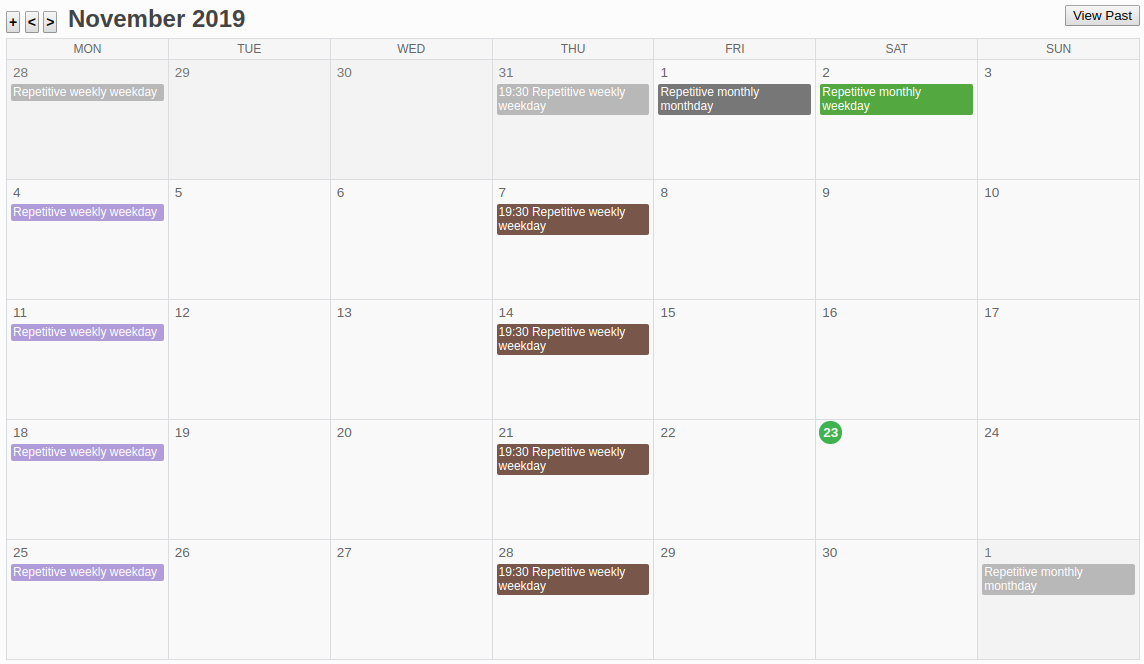
git clone https://github.com/Kartones/flask-calendar.gitKartones/flask-calendarAt December 2017, I decided I wanted to opt out from Google services as much as possible. One of the services that tied me most was Calendar. There are not many alternatives, and even fewer web-based. I decided to try using a Trello board with due dates and some labels for a while, but proved to be harder to maintain. Add the lack of a month calendar view, and no support for recurrent/repetitive tasks, and I decided to do good use of a holidays to spend some hours and build a simple GCalendar clone.
Main calendar view:
Create new task view:
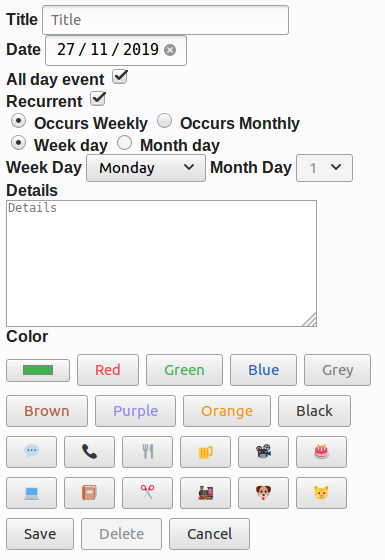
Supports a basic drag & drop on desktop of days (like Google Calendar), edition of existing tasks, creation of repetitive tasks (daily, montly, by weekday, by month day or on specific day number), custom colors, and a few options like hiding past tasks or being able to manually hide those repetitive task ocurrences (I like a "clean view" and usually remove/hide past tasks).
It is mobile friendly (buttons for actions are ugly and cannot drag & drop days on mobile, but otherwise works), might not be perfectly designed for all resolutions but at least works.
Compatible with Firefox, Brave and Chrome. No plans for other browser support (but PRs are welcome).
No Javascript libraries and no CSS frameworks used, so this means the corresponding code and styles are accordingly non-impressive.
No databases, as I don't need to do any querying or complex stuff I couldn't also do with JSON files and basic dictionaries.
Authentication works using werkzeug SimpleCache for storage, which means if the application runs with more than one thread you'll get into problems. Run it with a single process uwsgi or similar.
HTML inputs are favoring HTML5 ones instead of fancy jquery-like plugins to reduce support and increase mobile compatibility.
This feature is built with a basic implementation, with certain limitations:
Other requirements are on the requirements.txt file.
The project has been tested with Linux, but should work without problems on OSX or Windows too.
pip install -r requirements.txt to install the required dependenciesuWSGI. For example, this tutorial looks quite complete.nginx, it is not hard to pipe them so that nginx keeps serving everything. If I recall correctly, I followed this tutorial.DATA_FOLDER, so it can store changes.config.py file for additional configuration, and check the Miscellaneous section below to see how to create users.When I hosted an instance of the flask calendar, this were my configuration files, just in case they are of use as a guideline:
uwsgi.ini:
[uwsgi]

chdir = /path/to/flask-calendar

module = flask_calendar.uwsgi
callable = app
manage-script-name = true
mount = /=%(module):%(callable)

master = true
processes = 1

uid = www-data
gid = www-data
socket = /tmp/flask-calendar.sock
chmod-socket = 660

vacuum = true

logto = /path/to/logs/flask-calendar.log

die-on-term = true
nginx's site-available file:
server {
    listen 80;
    listen [::]:80;

    root /path/to/flask-calendar;
    index index.html;

    server_name your.flask-calendar.hostname;

    location / {
        include uwsgi_params;
        uwsgi_pass unix:/tmp/flask-calendar.sock;
    }

    # other stuff here, like ssl
}
Starting with version v1.0, there is a \scripts folder that will contain any required migrations. They will be listed here in this section to simplify things.
data_migration_001: v0.9 -> v1.0. Not backwards compatible once migrated. Must be run before v1.0 logic or server will throw errors and maybe could override old due_time fields.config.py and fill in or adapt to your needs.make run
Sample username is a_username with password a_password.
dev Dockerfile installs a sample locale (es_ES), but does not activate it. Refer to that file and to the config.py file for setting up any locale or commenting the lines that install them to speed up container bootup if you're sure don't want them.
Remember you can check which locales you have installed with locale -a and add new ones with the following commands:
cd /usr/share/locales
sudo ./install-language-pack es_ES
sudo dpkg-reconfigure locales
make test
make coverage
Please ensure you've setup pre-commit (it's installed, then run pre-commit install on the repository) so that flake8 and other linters run before pushing the code.
This project uses black and isort so it might auto-format your files and modify them. Just check them and add to the commit (should only be text formatting and import ordering related).
$ python3 -m venv .venv
$ source .venv/bin/activate
(.venv) $ pip install -r requirements.txt
(.venv) $ pip install -r requirements-dev.txt
(.venv) $ # Run tests
(.venv) $ pytest

(.venv) $ # Extract coverage into './cov_html' folder
(.venv) $ pytest --cov-report html:cov_html  --cov=. --cov-config .coveragerc

(.venv) $ # Run testing server
(.venv) $ python -m flask_calendar.app
As there is no admin interface, to create or delete users you should create a python file with code similar to the following example:
from authentication import Authentication
import config


authentication = Authentication(data_folder=config.USERS_DATA_FOLDER, password_salt=config.PASSWORD_SALT)

# Create a user
authentication.add_user(
    username="a username",
    plaintext_password="a plain password",
    default_calendar="a default calendar id"
)

# Delete a user
authentication.delete_user(username="a username")
more like this
Widgets for Douban and Trakt watchlists plus personalized recommendations, live TV streaming including PlutoTV, Yatu ra…
Firefox and Chrome extensions to prevent Google from making links ugly.
meine 🌒 - A CLI file manager and system utility built with Textual. It combines intuitive command parsing with rich t…
search projects, people, and tags