glean
A self-hosted RSS reader and personal knowledge management tool.
 LeslieLeung
Glean 拾灵
Important
Join our Discord to stay updated on the latest developments and get support.
This project is still in development and is not ready for production use.
A self-hosted RSS reader and personal knowledge management tool.
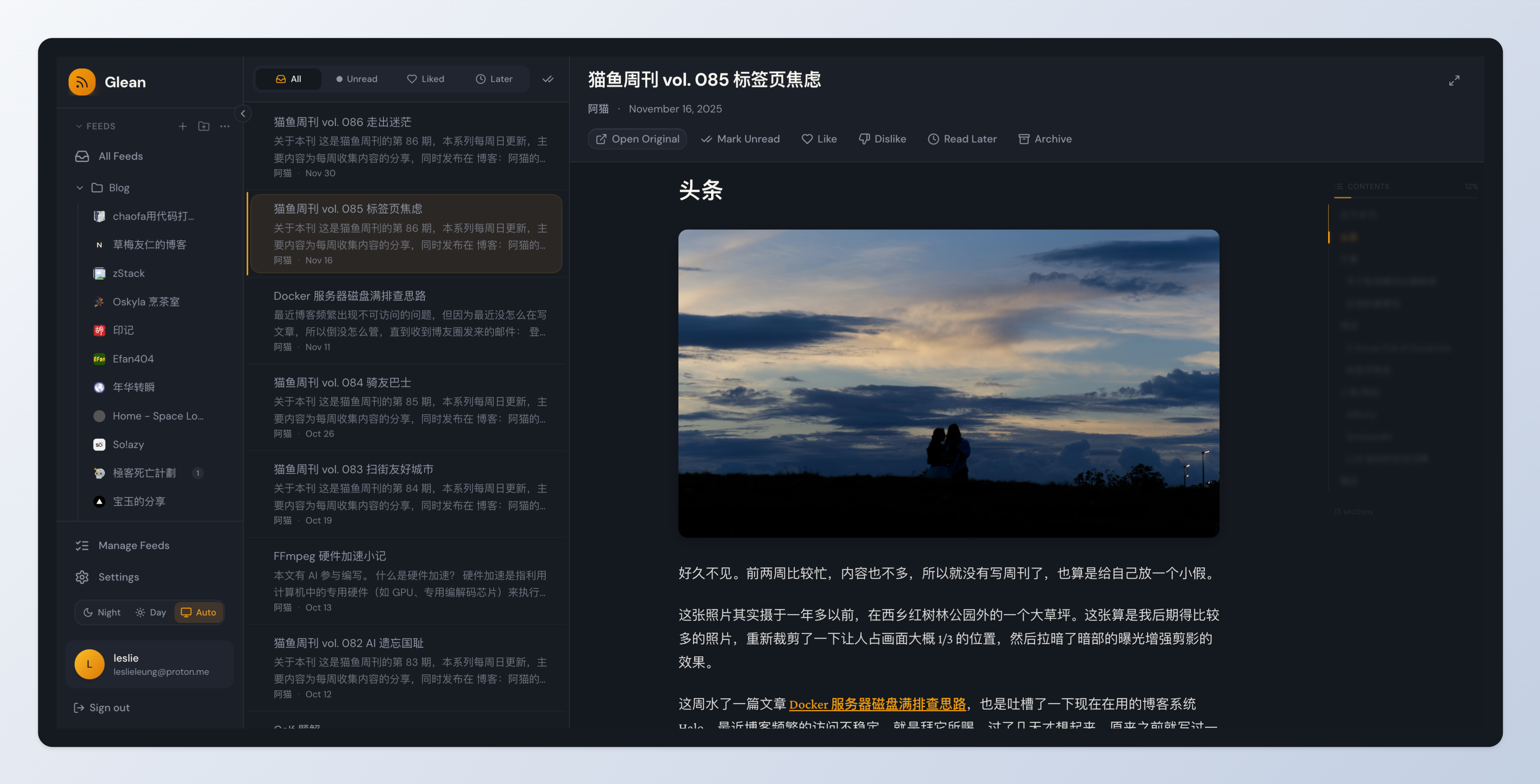
Glean (拾灵) helps information-heavy consumers efficiently manage their reading through intelligent RSS aggregation.
Features
Core Features
- 📰 RSS Subscription - Subscribe and organize RSS/Atom feeds with OPML import/export
- 📚 Smart Reading - Clean reading experience with content filtering
- 🔖 Read Later - Save articles for later reading with auto-cleanup
- 📁 Folders & Tags - Multi-level folders and tags for organization
- ⭐ Bookmarks - Save articles from feeds or external URLs
- 🔧 Background Sync - Automatic feed updates every 15 minutes
- 🔒 Self-hosted - Full data ownership with Docker deployment
- 🎨 Modern UI - Beautiful, responsive warm dark theme interface
- 👨💼 Admin Dashboard - User management and system monitoring
Planned Features (WIP)
- 🧠 Smart Recommendations - AI-powered preference learning and article scoring
- ⚙️ Rule Engine - Automated processing with Jinja2-style conditions
- 🤖 AI Features - Summary generation, auto-tagging, keyword extraction (BYOK)
- 📄 Full Content Fetch - Fetch complete article content for RSS summaries
- 🔌 Chrome Extension - One-click bookmarking from browser
- 📱 Mobile PWA - Progressive Web App for mobile devices
Quick Start
One-Command Deployment
# Download docker-compose.yml
curl -fsSL https://raw.githubusercontent.com/LeslieLeung/glean/main/docker-compose.yml -o docker-compose.yml

# Start Glean (full deployment with Milvus)
docker compose up -d

# Access:
# - Web App: http://localhost
# - Admin Dashboard: http://localhost:3001 (default: admin/Admin123!)
Default Admin Account: An admin account is automatically created with:
- Username:
admin - Password:
Admin123! - ⚠️ Change this password in production!
Lite Deployment (without Milvus, if you don't need Phase 3 features):
# Download lite version
curl -fsSL https://raw.githubusercontent.com/LeslieLeung/glean/main/docker-compose.lite.yml -o docker-compose.yml

# Start Glean
docker compose up -d

# Admin Dashboard: http://localhost:3001 (default: admin/Admin123!)
Customize Admin Account (Optional)
To use custom admin credentials instead of the defaults, create a .env file before starting:
# Set custom admin credentials in .env
cat > .env << EOF
ADMIN_USERNAME=admin
ADMIN_PASSWORD=YourSecurePassword123!
SECRET_KEY=$(openssl rand -base64 32)
EOF

# Start services
docker compose up -d
To disable auto-creation and create admin manually:
# Disable auto-creation in .env
echo "CREATE_ADMIN=false" >> .env

# Start services
docker compose up -d

# Create admin manually
docker exec -it glean-backend /app/scripts/create-admin-docker.sh
Configuration
For production, customize your deployment with environment variables. Download the example file:
curl -fsSL https://raw.githubusercontent.com/LeslieLeung/glean/main/.env.example -o .env
Important settings to change:
| Variable | Description | Default |
|---|---|---|
SECRET_KEY |
JWT signing key | Must change in production! |
POSTGRES_PASSWORD |
Database password | glean (Change in production!) |
ADMIN_PASSWORD |
Admin password | Admin123! (Change!) |
WEB_PORT |
Web interface port | 80 |
ADMIN_PORT |
Admin dashboard port | 3001 |
CREATE_ADMIN |
Auto-create admin | true (set false to disable) |
For all configuration options, see .env.example.
Docker Images
Pre-built images are available on GitHub Container Registry:
ghcr.io/leslieleung/glean-backend:latest- API server & workerghcr.io/leslieleung/glean-web:latest- Web frontendghcr.io/leslieleung/glean-admin:latest- Admin dashboard
Supported architectures: linux/amd64, linux/arm64
Testing Pre-release Versions
Want to test upcoming features? Use pre-release versions (alpha/beta/rc):
Method 1: Using environment variable (recommended)
# Set the IMAGE_TAG in .env file
echo "IMAGE_TAG=v0.3.0-alpha.1" >> .env

# Or export it directly
export IMAGE_TAG=v0.3.0-alpha.1

# Start with pre-release images
docker compose up -d
Method 2: Inline environment variable
IMAGE_TAG=v0.3.0-alpha.1 docker compose up -d
Note: Pre-release versions are for testing only. They won't trigger auto-updates for Electron apps and are not recommended for production use.
See available pre-release versions on the Releases page.
Deployment
The default deployment includes all services (full version):
- Web App (port 80) - Main user interface
- Admin Dashboard (port 3001) - User management and system monitoring
- Backend API - FastAPI server
- Worker - Background task processor (feed fetching, cleanup)
- PostgreSQL - Database
- Redis - Task queue
- Milvus - Vector database for smart recommendations and preference learning (Phase 3)
Lite deployment (without Milvus) is also available using docker-compose.lite.yml.
For detailed deployment instructions and configuration, see DEPLOY.md.
Tech Stack
Backend:
- Python 3.11+ / FastAPI / SQLAlchemy 2.0
- PostgreSQL / Redis / arq (task queue)
Frontend:
- React 18 / TypeScript / Vite
- Tailwind CSS / Zustand / TanStack Query
Development
See DEVELOPMENT.md for complete development setup instructions.
Quick start:
# Clone and setup
git clone https://github.com/LeslieLeung/glean.git
cd glean
npm install

# Start infrastructure
make up

# Initialize database (first time only)
make db-upgrade

# Install pre-commit hooks (optional but recommended)
make pre-commit-install

# Start all services
make dev-all

# Access:
# - Web: http://localhost:3000
# - Admin: http://localhost:3001
# - API Docs: http://localhost:8000/api/docs
Pre-commit Hooks
The project uses pre-commit hooks to ensure code quality:
# Install hooks (one-time setup)
make pre-commit-install

# Run hooks manually on all files
make pre-commit-run

# Uninstall hooks (if needed)
make pre-commit-uninstall
Hooks automatically run on commit and check:
- Backend: ruff format, ruff linter, pyright type checking
- Frontend: ESLint, Prettier formatting
- General: trailing whitespace, file endings, YAML/JSON/TOML validation
Roadmap
| Phase | Status | Features |
|---|---|---|
| Phase 1: MVP | ✅ Done | User system, RSS subscription, reader, admin dashboard |
| Phase 2: Organization | ✅ Done | Bookmarks, folders, tags, read later |
| Phase 3: Preferences | 🚧 WIP | Embedding pipeline, preference learning, smart recommendations |
| Phase 4: Rules | 📋 Planned | Rule engine, Jinja2 conditions, automated actions |
| Phase 5: AI | 📋 Planned | AI summaries, auto-tagging, keyword extraction, BYOK support |
| Phase 6: Extensions | 📋 Planned | Chrome extension, PWA, web snapshots |
See Product Requirements for detailed feature specifications.
Documentation
- Development Guide - Set up your development environment
- Deployment Guide - Production deployment details
Contributing
Contributions are welcome! Please read our Development Guide first.
- Fork the repository
- Create a feature branch
- Make your changes
- Run tests and linting
- Submit a Pull Request
License
This project is licensed under the AGPL-3.0 License - see the LICENSE file for details.
more like this
veille-techno
Skill Claude Code de veille tech francophone. Agrège les flux RSS (Journal du Hacker, Human Coders News…) et produit un…