agentlytics
Comprehensive analytics dashboard for AI coding agents — Cursor, Windsurf, Claude Code, VS Code Copilot, Zed, Antigravi…
JavaScript★ 555
Personal OS agent that learns who you are, detects life patterns, and grows smarter about you every day. Memory + Cron…
 Lethe044
git clone https://github.com/Lethe044/hermes-life-os.gitLethe044/hermes-life-os
The personal OS that grows with you.
Built for the NousResearch "Show us what Hermes Agent can do" hackathon.
Most productivity tools forget you the moment you close them. Hermes Life OS remembers everything - your mood, your meals, your sleep, your stress, your wins and your struggles - and gets smarter about you every single day.
Tell it how you feel. Log what you ate. Track your sleep. Over time it starts connecting dots you haven't: energy crashes after poor sleep, mood dips on low-hydration days, focus drops when stress spikes. Every morning it briefs you. Every evening it reflects with you. Every week it tells you what the data says about your life.
The longer you use it, the more it knows. The more it knows, the more useful it becomes.
flowchart TD
    A([👤 You share something]) --> B
    B[🧠 REMEMBER<br/>Mood · Sleep · Meals<br/>Stress · Focus · Habits] --> C
    C[🔍 RECALL<br/>Search memory<br/>for context] --> D
    D[📊 DETECT PATTERNS<br/>Correlations across<br/>all life dimensions] --> E
    E[📋 BRIEF<br/>Personalized insight<br/>based on YOUR data] --> F
    F([🌱 Hermes knows you<br/>a little better today])

    G([⏰ Cron Schedule<br/>07:00 Morning<br/>12:00 Midday<br/>18:00 Evening<br/>23:00 Consolidate<br/>Mon 08:00 Weekly]) --> C

    style A fill:#2980b9,color:#fff
    style F fill:#27ae60,color:#fff
    style G fill:#8e44ad,color:#fff
    style D fill:#e67e22,color:#fff
Loading
| Feature | How It's Used |
|---|---|
| Memory | Stores every mood, meal, sleep entry, workout, stress log - recalls before every response |
| Skills | Life OS playbook defines daily rhythm, pattern detection rules, and briefing format |
| Cron | Automated briefings at 07:00, 12:00, 18:00, 23:00, and weekly Monday reviews |
| Gateway | Delivers briefings via terminal - extensible to Telegram, email, SMS |
| Subagents | Pattern detection runs across all health dimensions in parallel |
| Atropos RL | Reward function trains Hermes to be more personal and memory-driven over time |
| Category | What Hermes Tracks |
|---|---|
| 🥗 Nutrition | Meals, calories, protein/carbs/fat, daily totals |
| 😴 Sleep | Duration, quality score, 7-day averages |
| 💧 Hydration | Daily water intake with progress bar |
| 💪 Fitness | Workouts, duration, intensity, weekly count |
| 🧘 Mental | Stress levels, meditation sessions, gratitude logs |
| 🎯 Focus | Deep work sessions, distractions, quality scores |
| ✅ Habits | Streaks, best streaks, completion tracking |
| 🎯 Goals | Progress percentages, milestones, notes |
| 😊 Mood & Energy | Daily scores, trend detection, dip alerts |
Hermes automatically detects and surfaces:
demo/analytics.py computes real Pearson correlation coefficients between
tracked metrics (mood, sleep, stress, energy, hydration) using daily-averaged
values from memory. A pair is only surfaced when there's enough data
(4+ overlapping days by default) and the relationship is meaningful
(|r| >= 0.4). Each result reports the direction (positive/negative), strength
(weak/moderate/strong), and the number of days behind it - no external
dependencies required (pure Python stdlib).
pie title Life OS Reward Components
    "Briefing Sent - Delivered via send_briefing?" : 30
    "Memory Used - Recalled AND remembered?" : 25
    "Pattern Detected - Called detect_patterns?" : 20
    "Personalization - Referenced real context?" : 15
    "Tool Coverage - Used expected tools?" : 10
Loading
Works with four LLM backends - pick whichever you already have. The
provider is auto-detected from whatever key is set (or force one with
--provider).
pip install "hermes-life-os[all]"

# Option A - free, fully local, no API key:
ollama serve
ollama pull llama3.1

# Option B / C / D - pick one:
set ANTHROPIC_API_KEY=sk-ant-...
set OPENAI_API_KEY=sk-...
set OPENROUTER_API_KEY=sk-or-...

hermes-life-os --mode onboard
hermes-life-os --mode morning
hermes-life-os --mode chat

# force a specific backend regardless of which keys are set:
hermes-life-os --mode morning --provider anthropic
Prefer running from source instead of installing? Clone the repo and use
python demo/demo_life_os.py ... in place of hermes-life-os ... above
(same flags, same behavior) - see Project Structure.
# pull the pre-built image - no clone needed:
docker run --rm -it -e ANTHROPIC_API_KEY=sk-ant-... \
    -v hermes-life-os-data:/root/.hermes \
    ghcr.io/lethe044/hermes-life-os:latest --mode morning
Or build it yourself, and get a fully free trial paired with a local Ollama container (no API key at all):
git clone https://github.com/Lethe044/hermes-life-os.git
cd hermes-life-os

docker compose up -d ollama
docker compose exec ollama ollama pull llama3.1
docker compose run --rm hermes-life-os --mode onboard
| Mode | What Happens |
|---|---|
onboard |
First-time setup - Hermes learns who you are |
morning |
Daily briefing based on all your patterns |
checkin |
Midday log - mood, habits, quick nudge |
evening |
Evening reflection - wins, struggles, patterns |
weekly |
Sunday review - what this week says about you |
nutrition |
Log meals and get nutrition insights |
sleep |
Log sleep and get sleep analysis |
fitness |
Log workouts and track fitness patterns |
mental |
Log stress, meditation, and gratitude |
focus |
Log deep work sessions and productivity |
health |
Full health dashboard - all data in one view |
dream |
Dream journal - log dreams, detect patterns, sleep/stress correlation |
chat |
Interactive conversation - type anything |
python demo/demo_life_os.py --mode chat
Type naturally. Hermes responds using everything it knows about you.
Type exit to leave.
Example conversations:
python demo/demo_life_os.py --mode morning --profile alex
python demo/dashboard.py --profile alex
By default everything lives at ~/.hermes/life-os/ (unchanged, single
person). Passing --profile <name> (or setting LIFE_OS_PROFILE) fully
isolates that person's data under ~/.hermes/life-os/profiles/<name>/ -
so a household can share one install without mixing anyone's mood/sleep/
habit data. Omitting --profile always keeps working exactly as before.
set LIFE_OS_ENCRYPTION_KEY=your-passphrase-here
python demo/demo_life_os.py --mode morning
Off by default - nothing changes unless you set this. When set, every
data file (profile, habits, goals, nutrition, sleep, etc.) and every line
of memory.jsonl is encrypted at rest with a key derived from your
passphrase (PBKDF2-HMAC-SHA256 + Fernet/AES). Existing plaintext data is
read transparently and gets encrypted the next time it's written - no
separate migration step. There is no password recovery - if you lose
the passphrase, that data is unrecoverable by design. Requires
pip install "hermes-life-os[encryption]" (or pip install cryptography
if running from source).
graph LR
    A[hermes-life-os] --> B[skills/]
    A --> C[environments/]
    A --> D[demo/]
    A --> E[tests/]
    A --> F[docs/]

    B --> B1[life-os/SKILL.md<br/>Daily rhythm playbook]
    C --> C1[life_os_env.py<br/>Atropos RL environment]
    C --> C2[life_os_config.yaml<br/>Training config]
    D --> D1[demo_life_os.py<br/>CLI / chat / voice orchestration]
    D --> D2[storage.py<br/>Persistence layer]
    D --> D3[patterns.py<br/>Trend detection]
    D --> D4[analytics.py<br/>Pearson correlation engine]
    D --> D5[tools.py<br/>dispatch_tool + TOOLS schema]
    D --> D6[scheduler.py<br/>Cron-style trigger engine]
    D --> D7[notifications.py<br/>console/webhook/Telegram/email]
    D --> D8[run_scheduler.py<br/>Production scheduler entry point]
    E --> E1[test_life_os_env.py]
    E --> E2[test_analytics.py]
    E --> E3[test_storage.py]
    E --> E4[test_tools.py]
    E --> E5[test_scheduler.py]
    E --> E6[test_notifications.py]

    style B1 fill:#27ae60,color:#fff
    style C1 fill:#8e44ad,color:#fff
    style D1 fill:#2980b9,color:#fff
    style D6 fill:#e67e22,color:#fff
    style D7 fill:#e67e22,color:#fff
Loading
demo_life_os.py used to be a single ~1600-line file. It's now a thin
CLI/chat/voice orchestration layer that imports its storage, pattern
detection, and tool-dispatch logic from focused sibling modules -
each independently testable and reusable.
demo/scheduler.py implements the "Daily Rhythm" cron table from
skills/life-os/SKILL.md (07:00 morning, 12:00 midday, 18:00 evening,
Monday 08:00 weekly, 20:00 proactive nudge check) as a dependency-free
polling loop. The scheduling logic itself (due_entries) is pure and
fully unit tested; the actual briefing generation and delivery are
injected as callables, so the core engine has no dependency on the
OpenAI client or network access. The 20:00 nudge check is LLM-free
(see "Proactive Nudges" above) and stays silent when there's nothing
worth flagging.
demo/notifications.py delivers briefings through a pluggable channel,
selected via HERMES_NOTIFY_CHANNEL: console (default), webhook,
telegram, or email (SMTP). All channels are stdlib-only. A failed
remote channel never crashes the scheduler - it's caught, logged, and
the briefing still prints to console.
To run the scheduler in production:
set ANTHROPIC_API_KEY=sk-ant-...   # or OPENAI_API_KEY / OPENROUTER_API_KEY / a running ollama
set HERMES_NOTIFY_CHANNEL=telegram
set TELEGRAM_BOT_TOKEN=...
set TELEGRAM_CHAT_ID=...
python demo/run_scheduler.py
python demo/demo_life_os.py --voice
# or pin a backend/model explicitly:
python demo/demo_life_os.py --voice --provider anthropic --model claude-sonnet-5
Speak to Hermes directly. It listens via microphone, processes your input using everything it knows about you, and responds out loud via system TTS.
No extra API key needed - uses built-in Windows/Linux speech synthesis.
To stop: say or type exit
pip install "hermes-life-os[dashboard]"   # or: pip install matplotlib (running from source)
hermes-life-os-dashboard
hermes-life-os-dashboard --days 60 --compare-days 7 --out my-report.html
Turns your logged mood/sleep/stress/energy/hydration data and the
correlations Hermes already detects (e.g. "poor sleep tracks with lower
mood, r=0.62") into a single self-contained HTML report with charts -
opens straight in your browser, no server, nothing leaves your machine.
Needs no LLM/API key at all - it's pure local data analysis. Includes a
retrospective section comparing this week to last week (--compare-days
changes the window size), color-coded by whether the change is favorable -
a stress increase shows red, a mood increase shows green.
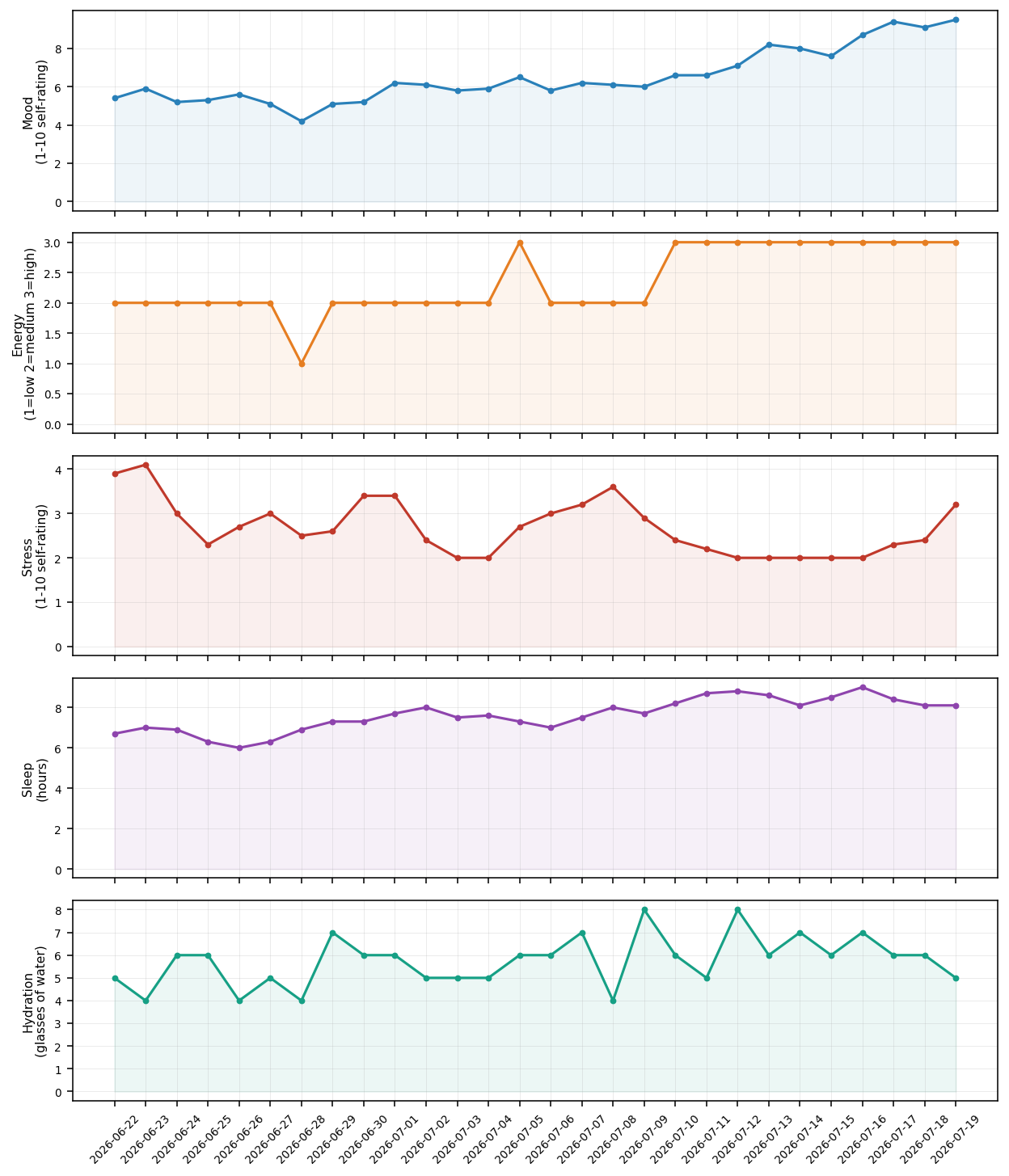
Example output from 28 days of sample data - your own chart will reflect whatever you've actually logged.
Goals can track themselves from real data instead of needing manual progress updates - just tell Hermes what to track:
Progress is the average of the linked metric over a rolling window (7 days by default) relative to the target, clamped to 0-100%. Goals without a linked metric keep working exactly as before - a plain percentage you update manually.
pip install hermes-life-os
hermes-life-os-import --apple-health export.xml
hermes-life-os-import --csv my_data.csv
hermes-life-os-import --csv my_data.csv --dry-run   # preview without writing
Reduces manual one-entry-at-a-time logging by bulk-importing data you already have, with real historical dates preserved (not stamped "today"):
export.xml from Health app -> profile icon -> Export
All Health Data): imports Sleep Analysis and Dietary Water records,
aggregated per day.date column (YYYY-MM-DD) plus any
subset of sleep_hours, mood, stress, energy, hydration columns - works
for a Google Fit CSV export or your own spreadsheet.Imported entries are tagged so they're distinguishable from entries logged live through chat.
hermes-life-os-calendar --ics calendar.ics
hermes-life-os-calendar --ics calendar.ics --dry-run
Correlates meeting-heavy days with mood/stress/sleep - no OAuth or live
API needed, just a standard .ics export (Google Calendar: Settings ->
Import & export -> Export; Outlook: File -> Save Calendar; Apple
Calendar: File -> Export). Only timed events count toward meeting hours
(all-day events are skipped); recurring events count once, on their
start date. Once imported, ask Hermes "is my stress linked to
meeting-heavy days?" or check the dashboard's Correlations section.
The scheduler (see above) includes a daily check (20:00 by default) that looks for anything worth flagging - an unusual day, a goal falling behind - using the same deterministic analysis as the tools above, with no LLM call needed. It stays silent on days with nothing notable, so it won't spam you.
hermes-life-os-export --json backup.json --csv summary.csv
Your data isn't locked in. --json writes a complete backup (every
memory entry plus profile/habits/goals/logs, unmodified). --csv writes
a daily summary in the same shape hermes-life-os-import --csv expects -
export, edit in a spreadsheet, and re-import elsewhere if you want.
v1.11.0 - Anomaly Detection, Calendar Import, Proactive Nudges, Data Export, History Queries
check_anomalies tool + analytics.detect_anomalies(): flags statistical
outlier days (z-score based) in mood/energy/stress/sleep/hydration.compare_before_after tool + analytics.compare_before_after(): compares
metric averages before vs. after a specific changepoint date (e.g. "did
starting meditation on March 1st actually help?").hermes-life-os-calendar CLI: imports meeting hours per day from a
standard .ics calendar export (Google Calendar/Outlook/Apple Calendar,
no OAuth needed). meeting_hours is now a fully tracked metric -
participates in correlations, goal-linking, retrospectives, and anomaly
detection automatically.nudge_check entry
deterministically (no LLM call) surfaces anomalies and lagging
metric-linked goals, staying silent when nothing stands out.hermes-life-os-export CLI: --json for a complete backup, --csv
for a daily summary in the same shape hermes-life-os-import --csv
expects (export, edit, re-import).get_period_summary tool + storage.get_memory_by_date_range(): natural-
language history queries like "how was I in March?" - the LLM resolves
the phrase to concrete dates, Hermes returns real averages and notable
entries for that period.v1.10.0 - Goal-Metric Linkage, Retrospective Comparison, Health Data Import
update_goal accepts metric/target/direction/window_days;
new check_goal_progress tool recomputes and reports current progress.compare_periods tool and a Dashboard "Retrospective" section compare
this period to the one before it (week-over-week by default,
--compare-days to change the window), color-coded by whether the change
is favorable per metric.hermes-life-os-import CLI: bulk-imports Apple Health export.xml
(Sleep Analysis, Dietary Water) or a generic CSV
(date + sleep_hours/mood/stress/energy/hydration columns), preserving real
historical dates instead of stamping everything "today".write_memory() now only stamps "now" when no timestamp was already
provided - unchanged for all real-time logging (which never supplies one),
enables historical-dated bulk import.v1.9.0 - Multi-Profile, Encryption at Rest, Correcting/Deleting Entries
--profile <name> (or LIFE_OS_PROFILE) isolates all data per person
under ~/.hermes/life-os/profiles/<name>/ - for shared households.
Omitting it keeps the original single-profile layout unchanged.LIFE_OS_ENCRYPTION_KEY - optional encryption at rest (PBKDF2-HMAC-SHA256
correct_entry / delete_entry
tools let you fix a mistake or remove a bad log entry through normal
conversation ("that sleep entry was wrong, it was actually 7 hours" /
"delete that last entry") instead of it being stuck in an append-only log.v1.8.0 - PyPI Package, GHCR Image, Contributor Docs
pip install hermes-life-os - real PyPI packaging via pyproject.toml,
with CLI commands hermes-life-os, hermes-life-os-dashboard,
hermes-life-os-scheduler. Source layout (demo/) unchanged, so
existing python demo/demo_life_os.py usage still works exactly the
same. Auto-published to PyPI on every GitHub Release.ghcr.io/lethe044/hermes-life-os - pre-built Docker image, auto-published
on every push to main and every release. No git clone needed to try it.CONTRIBUTING.md and GitHub issue templates (bug report / feature
request) for contributors.v1.7.0 - CI, Docker & Dashboard
Dockerfile + docker-compose.yml for a zero-install trial - pairs
with a local Ollama container for a completely free, no-API-key rundemo/dashboard.py: generates a self-contained HTML report with
charts of your mood/sleep/stress/energy/hydration trends and the
correlations Hermes detects - pure local data analysis, no LLM callv1.6.0 - Multi-Provider LLM Support
demo/llm_providers.py: provider-agnostic client layer supporting
Ollama (free, fully local, no API key), OpenAI, Anthropic, and
OpenRouter, with auto-detection from whichever key is set--provider flag / LIFE_OS_PROVIDER env var to force a specific backendtest_llm_providers.py) covering provider resolution
and the Anthropic <-> OpenAI message/tool format adapter - total suite
grew from 113 to 129 tests, all passingv1.5.0 - Modular Architecture, Scheduler & Notifications
demo_life_os.py monolith into focused, independently
testable modules: storage.py, patterns.py, tools.py (demo_life_os.py
is now the CLI/chat/voice orchestration layer only)demo/scheduler.py: dependency-free cron-style engine implementing
the Daily Rhythm table (07:00 morning, 12:00 midday, 18:00 evening,
Monday 08:00 weekly), with pure, fully unit-tested scheduling logicdemo/notifications.py: pluggable delivery via console, webhook,
Telegram, or email (SMTP) - stdlib only, never crashes on missing configdemo/run_scheduler.py: production entry point wiring the scheduler
to real briefing generation and deliverytest_storage.py, test_tools.py, test_scheduler.py,
test_notifications.py) - total suite grew from 36 to 113 tests, all passingv1.4.0 - Real Correlation Engine
demo/analytics.py module: pure-stdlib Pearson correlation analysis
across mood, sleep, stress, energy, and hydrationdetect_patterns() now computes actual daily-aggregated correlations
(r-value, day count, direction, strength) instead of a static placeholder
message ("correlation analysis active")detect_patterns
tool output, feeding into morning/evening/weekly briefingstests/test_analytics.py)v1.3.0 - Dream Journal
v1.2.0 - Voice & Performance
v1.1.0 - Health & Wellness Expansion
v1.0.0 - Initial Release
python -m pytest tests/ -v
python -c "from environments.life_os_env import smoke_test; smoke_test()"
Every other agent in this hackathon does something for you. Hermes Life OS becomes something with you.
It tracks nutrition, sleep, fitness, stress, focus, hydration, habits, and goals - and connects them all. Bad Monday? It checks if you slept poorly Sunday. Energy crash at 3pm? It looks at what you ate for lunch. Mood dip this week? It finds the pattern you missed.
That is not a tool. That is a presence that accumulates.
more like this
Comprehensive analytics dashboard for AI coding agents — Cursor, Windsurf, Claude Code, VS Code Copilot, Zed, Antigravi…
meine 🌒 - A CLI file manager and system utility built with Textual. It combines intuitive command parsing with rich t…
search projects, people, and tags