perplexity-cli
🧠 A simple command-line client for the Perplexity API. Ask questions and receive answers directly from the terminal! 🚀🚀🚀
Python★ 176
Menu-driven Proxmox VE toolkit — post-install, backup/restore and a live web dashboard for the homelab.
 MacRimi
git clone https://github.com/MacRimi/ProxMenux.gitMacRimi/ProxMenux
ProxMenux is an interactive toolkit for Proxmox VE — a menu-driven CLI plus a web dashboard for post-install, backup/restore and continuous health monitoring of your homelab.
To install ProxMenux, simply run the following command in your Proxmox server terminal:
bash -c "$(wget -qLO - https://raw.githubusercontent.com/MacRimi/ProxMenux/main/install_proxmenux.sh)"
⚠️ Be careful when copying scripts from the internet. Always remember to check the source!
📄 You can review the source code before execution.
🛡️ All executable links follow our Code of Conduct.
Once installed, launch ProxMenux by running:
menu
Then, follow the on-screen options to manage your Proxmox server efficiently.
ProxMenux Monitor is an integrated web dashboard that provides real-time visibility into your Proxmox infrastructure — accessible from any browser on your network, without needing a terminal.
What it offers:
Access:
Once installed, the dashboard is available at:
http://<your-proxmox-ip>:8008
The Monitor is installed automatically as part of the standard ProxMenux installation and runs as a systemd service (proxmenux-monitor.service) that starts automatically on boot.
Useful commands:
# Check service status
systemctl status proxmenux-monitor

# View logs
journalctl -u proxmenux-monitor -n 50

# Restart the service
systemctl restart proxmenux-monitor
Want to try the latest features before the official release and help shape the final version?
The ProxMenux Beta Program gives early access to new functionality — including the newest builds of ProxMenux Monitor — directly from the develop branch. Beta builds may contain bugs or incomplete features. Your feedback is what helps fix them before the stable release.
Install the beta version:
bash -c "$(wget -qLO - https://raw.githubusercontent.com/MacRimi/ProxMenux/develop/install_proxmenux_beta.sh)"
What to expect:
menu launch and offer to switch automaticallyHow to report issues:
Open a GitHub Issue and include:
journalctl -u proxmenux-monitor -n 50
💙 Thank you for being part of the beta program. Your help makes ProxMenux better for everyone.
The following Debian packages are installed automatically during setup:
| Package | Purpose |
|---|---|
dialog |
Interactive terminal menus |
curl |
Downloads and connectivity checks |
jq |
JSON processing |
git |
Repository cloning and updates |
python3 + python3-pip |
ProxMenux Monitor (Flask web dashboard) |
UI translations ship as pre-built JSON files per language (English, Spanish, French, German, Italian, Portuguese). There is no runtime translation dependency.
ProxMenux is an open, collaborative project — contributions of every shape are very welcome, no matter your background. Every PR, bug report, idea, translation or kind word helps move the project forward.
📖 Before sending code, please read the Contributing Guide. It covers the project structure, the UI design policy (the two-phase
dialog/whiptailflow), message helpers, translation policy and submission conventions — what reviewers will look for in your PR.
Ways to help:
journalctl -u proxmenux-monitor -n 50).Before contributing, please take a moment to read our Code of Conduct.
Thanks to everyone who has helped make ProxMenux what it is today.
Made with contrib.rocks.
If ProxMenux is useful to you, the simplest way to support it is a ⭐ on GitHub — it really helps others discover the project.
If you want to go a step further, a coffee on Ko-fi keeps development going:
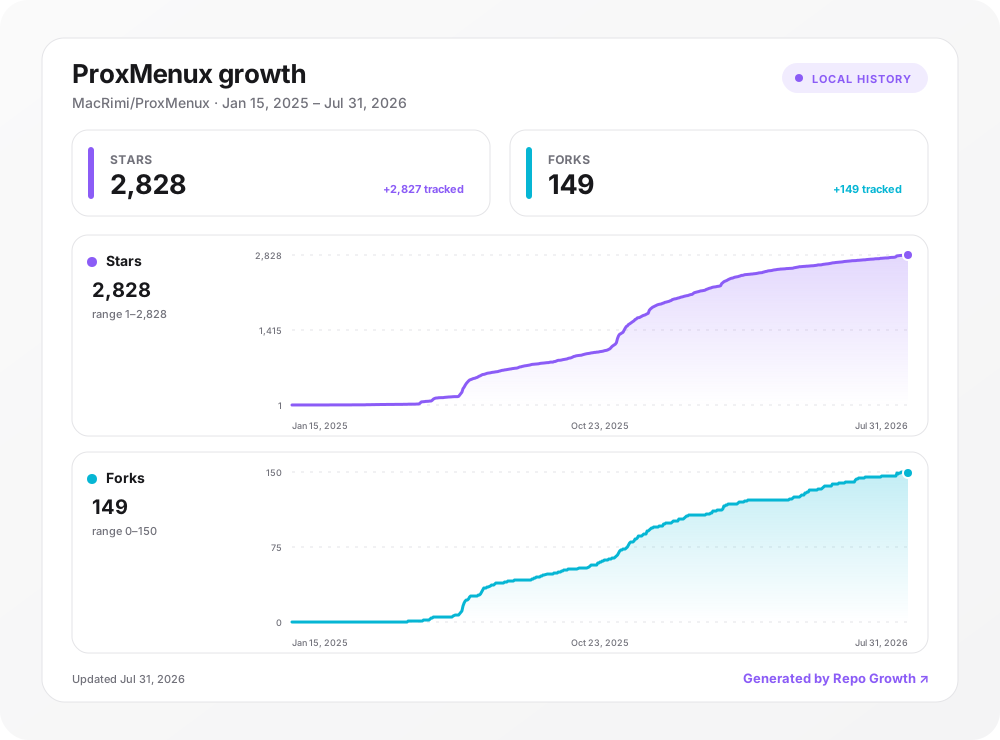
Stars and forks tracked with Repo Growth.
more like this
🧠 A simple command-line client for the Perplexity API. Ask questions and receive answers directly from the terminal! 🚀🚀🚀
Comprehensive analytics dashboard for AI coding agents — Cursor, Windsurf, Claude Code, VS Code Copilot, Zed, Antigravi…
search projects, people, and tags