sim-plugin-comsol
Use Codex and Claude Code with COMSOL via sim-cli: .mph inspection, live Desktop sessions, bounded execution, artifacts.
Python★ 59
Local-first browser AI video editor with WebGPU AI music, AI repair, voiceovers, captions, talking avatars, and determi…
 MartinDelophy
git clone https://github.com/MartinDelophy/ai-video-editor.gitMartinDelophy/ai-video-editorEnglish | 中文 | 日本語 | 한국어 | Español | Français | Deutsch | Português | ไทย | Tiếng Việt | Русский
Timeline Studio is launching on Product Hunt Aug 25 (PDT). Follow our page to share technical feedback on launch day!
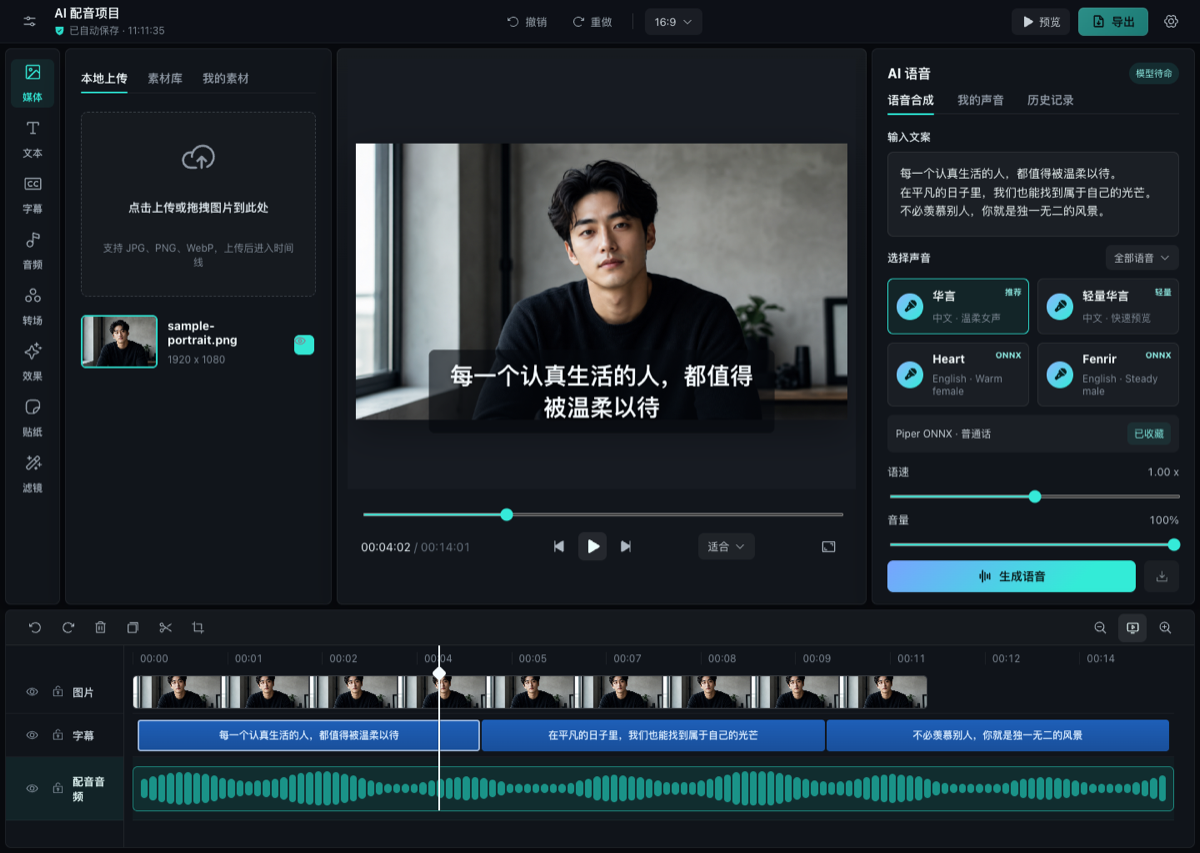
Timeline Studio is a local-first AI video editor that runs in the browser. It combines a CapCut-style multi-track timeline with WebGPU AI music and repair, multilingual voiceovers, automatic captions, talking-avatar generation, and deterministic offline export.
Open the editor · Watch on YouTube · Hugging Face Space
Visual analysis, keyframes, captions, and export.
Timed watermark removal with before/after review.
Browser AI models are mirrored on both Hugging Face and ModelScope. Timeline Studio performs a lightweight reachability race on the first request, remembers the faster working source for the current runtime, and automatically falls back to the other source if the network changes. Cache identities are shared across both providers, so switching routes does not download the same revision twice.
.timeline projects.The repository includes the AI Video Editing Skill for Codex, Claude Code, Copilot and Gemini CLI, backed by edit-timeline-studio for planning, executing, and verifying editable video timelines.
It helps an agent:
skills/edit-timeline-studio/scripts/validate_edit_plan.mjs;.timeline project as the source of truth instead of returning only an opaque render.The versioned headless command runner loads and inspects portable projects, validates revisioned JSON plans, applies supported operations transactionally, supports dry runs and idempotent operation IDs, and writes a new .timeline archive without rewriting its media files. It also renders the documented portable Visuals + Voiceover + Music subset to a verified H.264/AAC MP4. Browser control remains the compatibility path for richer compositions and operations that are not in the command registry yet.
npm run agent -- project.inspect /absolute/path/project.timeline
npm run agent -- track.inspect /absolute/path/project.timeline visuals
npm run agent -- clip.inspect /absolute/path/project.timeline visual-123
npm run agent -- transcript.inspect /absolute/path/project.timeline voice-123
npm run agent -- project.diff /absolute/path/edit-plan.json
npm run agent -- project.run /absolute/path/edit-plan.json
npm run agent -- project.render /absolute/path/render-request.json
The legacy inspect and run aliases remain available. The write registry supports ffprobe-backed, hashed visual/audio import to Visuals, Music, or the portable Voiceover slot, plus transactional timed edits, captions, source-accurate Visuals/Overlays, transitions, validated properties, track state, and ratio changes. Read commands return project, track, clip, transcript, media-inventory, and field-level predicted diffs. See the command contract for the plan envelope.
Install through the public skills.sh directory (the current CLI requires Node.js 22.20.0 or later):
npx skills add MartinDelophy/ai-video-editor --skill edit-timeline-studio
Or install it with GitHub CLI 2.90.0 or later:
# Claude Code
gh skill install MartinDelophy/ai-video-editor edit-timeline-studio --agent claude-code --scope user

# Codex
gh skill install MartinDelophy/ai-video-editor edit-timeline-studio --agent codex --scope user
To install the tested release instead of following the latest release, add --pin v0.7.1. Preview the Skill before installing with:
gh skill preview MartinDelophy/ai-video-editor edit-timeline-studio
Roadmap priorities are shaped in GitHub Discussions. Feature requests and real-world workflow feedback are welcome.
Timeline Studio is looking for contributors interested in browser media, WebCodecs, WebGPU/ONNX, timeline UX, localization, testing, and documentation.
Requirements: Node.js 20+ and a modern Chromium browser. WebGPU is recommended for the heaviest AI workflows.
git clone https://github.com/MartinDelophy/ai-video-editor.git
cd ai-video-editor
npm install
npm run dev
Open the local URL printed by Vite. The first AI run may download model files; later runs reuse the browser cache.
npm run build
npm run preview
Run the complete repository check with:
npm run check
The included netlify.toml builds with npm run build, publishes dist, enables the cross-origin isolation headers required by browser AI/media workers, and provides the SPA fallback.
npx netlify-cli deploy --prod --dir=dist
If this project helps you, please consider giving it a ⭐ Star. If you encounter a problem, please open an Issue.
Join our Discord community to ask questions, share feedback, and connect with other users and contributors.
more like this
Use Codex and Claude Code with COMSOL via sim-cli: .mph inspection, live Desktop sessions, bounded execution, artifacts.
CLI-first runtime for Codex, Claude Code, and AI agents to operate CAE solvers via plugins: COMSOL, Abaqus, Ansys.
search projects, people, and tags