TachiSnap
TachiSnap — Pixel Snapper for animation pixel artists. Rust + WebAssembly client-side tool for cleaning up AI-generated…
HTML★ 50
Image processing tool to make images look like pixel art
 MiguelMJ
git clone https://github.com/MiguelMJ/MakeItPixel.gitMiguelMJ/MakeItPixel
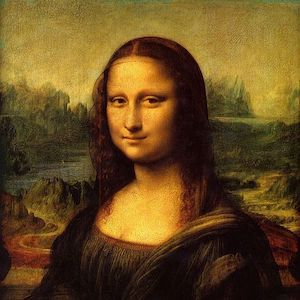
Original:
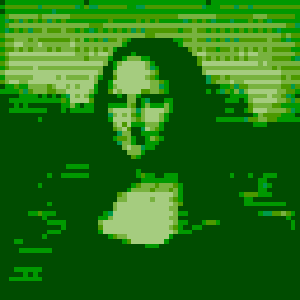
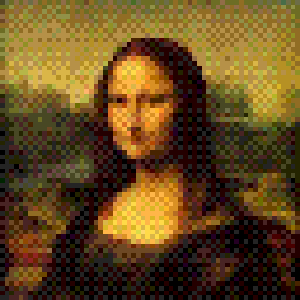
Example results:
 |
 |
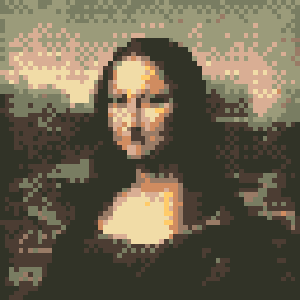 |
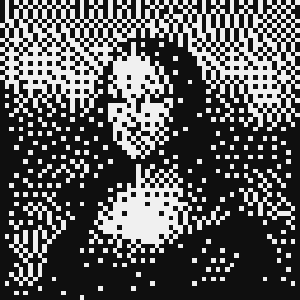 |
Table of contents
g++ src/* -Iinclude -lsfml-graphics -o makeitpixel
 Alex Fenton 💻 |
In the wiki you'll find a detailed explanation of how MakeItPixel works and how to configure it.
makeitpixel [-h] [-c FILE] [-x JSON] [-o DIR] FILES..
| Option | Description |
|---|---|
-h, --help |
Print this help message and exit. |
-x, --config CONFIG |
Set the CLI configuration as a JSON formatted string. |
-c, --config-file PATH |
Set the configuration file. |
-o, --output-dir DIR |
Set the output directory for the generated images. |
There are two levels of configuration:
The configuration is specified in JSON format. Configuration parameters will be explained in detail below.
The first step of the process is reducing the size of the image. The parameters involved are:
width: Maximum width of the resultant image. Must be a number (default = 64).height: Maximum height of the resultant image. Must be a number (default = 64).select_pixel: Scaling down an image results on a loss of information, so this parameter tells what pixels to keep:
| Value | Effect |
|---|---|
"min" |
Take the darker pixels. Results in darker images. |
"max" |
Take the lighter pixels. Results in lighter images. |
"med" |
Take the median pixel. Results in sharper images. |
"avg" (default) |
Take the median pixel. Results in smoother images. |
normalize: To take advantage of the color processing to be performed later, may want to normalize the image (Make the lightest color white and the darkest, black).
| Value | Effect |
|---|---|
"no" (default) |
Don't perform any normalization. |
"pre" |
Normalize before scaling. |
"post" |
Normalize after scaling. |
The second step, optionally, is reducing the color space of the image. Certain strategies might require palette configuration.
quantization: Strategy for choosing the new color of a pixel.
| Value | Effect |
|---|---|
"none" (default) |
Skip this step and leave the image as it is after scaling. |
"bit1", "bit2", ..., "bit8" |
Set the bits available to represent color for each RGB channel. "bit1" reduces the space to just 8 colors and "bit8" results in no change (equivalent to "none"). |
"closest_rgb" |
Choose the color from the palette that's closer in the RGB space. Useful for rich palettes. |
"closest_gray" |
Choose the color from the palette with a closer gray value. Useful for sequential palettes. |
dithering: Object with parameters for dithering, listed below.
dithering.method: Algorithm for dithering to apply during the quantization.
| Value | Effect |
|---|---|
"none" (default) |
Quantize without dithering. |
"floydsteinberg" |
Use the Floyd-Steinberg algorithm, based on error propagation. |
"ordered" |
Use a matrix for an ordered dithering algorithm. |
dithering.matrix: For ordered dithering. Matrix to use: "Bayes2", "Bayes4" (default) or "Bayes8", that result in squared patch-like patterns; "Horizontal2" or "Horizontal4", that result in horizontal patterns; "Vertical2" or "Vertical4", that result in vertical patterns.
dithering.threshold: Not implemented (default = 0).
dithering.sparsity: For ordered dithering. Distance expected between the possible values of each RGB channel in the reduced color space.
| Value | Effect |
|---|---|
"auto" (default) |
Compute most convenient sparsity for the quantization strategy and/or palette. |
| Any number between 0 and 255 | Specify manually the distance. A 0 value results in no dithering at all. |
If you are using a quantization strategy that requires a palette, you can configure it with the following parameters:
palette
palette.main: A single color to use as reference. Must be a string with an hexadecimal value (default = "00ff00").palette.scheme: Color scheme to generate the base colors of the palette from the main one.
| Value | Base colors | Shifted hue degrees |
|---|---|---|
"mono" |
1 | 0 |
"analogous" (default) |
3 | 30, 60 |
"complementary" |
2 | 180 |
"split_complementary" |
3 | 150, 210 |
"triadic" |
3 | 120, 240 |
"rectangle" |
4 | 60, 180, 240 |
"square" |
4 | 90, 180, 270 |
palette.spectre: Defines how the palette is extended from the base colors, adding brighter and darker colors.
| Value | Effect |
|---|---|
"linear" |
Only add darker values for the darker base color and the same for the brighter ones. Results in sequential palettes. |
"complete" |
Add darker and brighter values for each base color. Result in richer palettes. |
palette.inter: Aproximate number of intermediate darker and brighter values.palette.disparity: Factor between 0 and 1 to get the darker and brighter values of the palette by interpolation. A value of 0 results in leaving only the base colors; a value of 1 includes black and white in the palette. Must be a number between 0 and 1 (default = 0.85).You will find example configuration files to showcase the usage of different parameters in the examples folder.
Make It Pixel uses the MIT License, a copy of which you can find here, in the repo.
The external library SFML is licensed under the zlib/png license.
more like this
TachiSnap — Pixel Snapper for animation pixel artists. Rust + WebAssembly client-side tool for cleaning up AI-generated…
search projects, people, and tags