🎵 Simple Music Player New Gen
Trailer.mp4
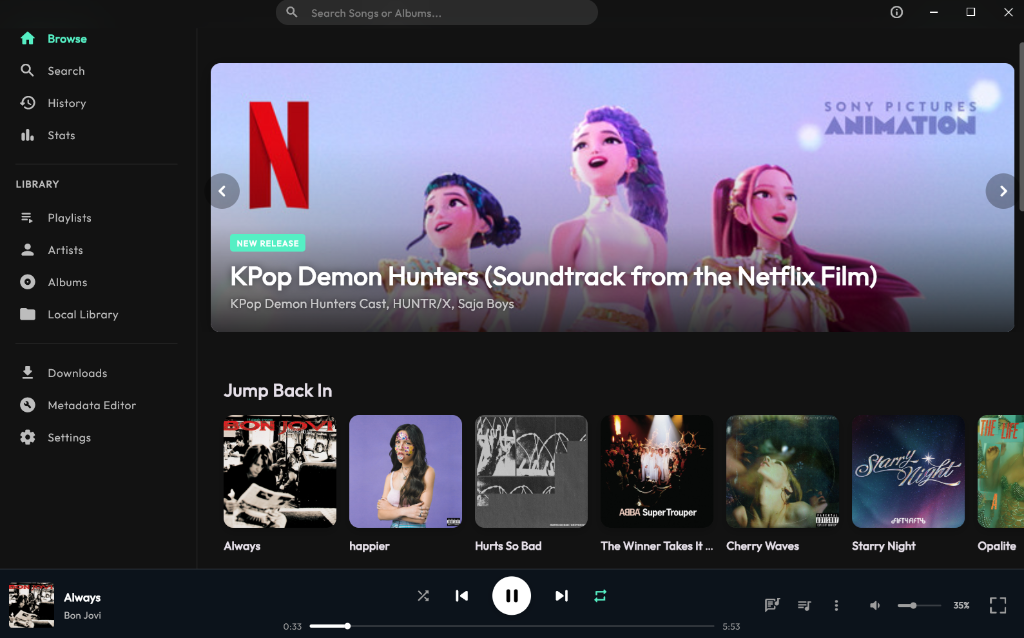
A stunning, modern, and feature-rich music player built with Flutter. Experience your local music collection and high-resolution tracks with a beautiful Glassmorphism UI and powerful tools. Available on Windows, macOS, Android, and iOS.




Support me here


✨ Key Features
🎨 Stunning UI/UX
- Glassmorphism Design: A sleek, modern interface with frosted glass effects and dynamic backgrounds
- Custom Window Frame: A fully custom, borderless window experience that blends seamlessly with your desktop
- Themes: Beautiful dark mode and accent color customization
- Smart Art: Dynamic album art that adapts to your music, with automatic online fetching from Spotify
- Spotify Canvas: Dynamic video backgrounds while in full-screen mode, automatically fetched from Spotify
- Artist Profile Banners: Stunning, dynamic artist banners fetched automatically via Spotify Web API to elevate the visual aesthetic of artist profile pages
🎧 Advanced Audio Experience
- Powerful Equalizer: Fine-tune your audio with a built-in multi-band equalizer (Android supported)
- Audio Visualizer: Watch your music come to life with real-time audio waveform visualization
- Sleep Timer: Fall asleep to your favorite tunes with a customizable timer (hours, minutes, or songs)
- Playback Queue: Persistent queue that remembers your playlist between sessions
- Remove Song in Queue: Swipe left from a song in queue to remove it
- Multiple Audio Versions: Choose between different versions of a song (original, acoustic, live, etc.)
- Wide Format Support: Plays MP3, FLAC, WAV, AAC, M4A, OGG, Opus, AIFF, and ALAC files
- Native DSD Support: High-fidelity playback for DSF and DFF files with detailed metadata extraction
- Gapless & Crossfade: Smooth transitions between tracks with customizable crossfade duration
- CUE Sheet Parser: Automatic split and parse standard CUE sheets index references, letting you play and browse individual tracks from single-file album rips
- Stream Auto-Recommendations: Advanced YouTube Music recommendation engine that automatically streams and queues the next perfect track based on your current playback
🎤 Lyrics & Metadata
- Synced Lyrics: Sing along with time-synced lyrics (LRC) fetched automatically from LRCLIB.net
- Lyrics Panel: Beautiful, scrollable lyrics view with auto-scroll and tap-to-seek
- Lyrics Romanization: Automatically romanize lyrics for Korean (Hangul → Revised Romanization), Japanese (Kanji/Hiragana/Katakana → Romaji), and Chinese (Hanzi → Pinyin with tone marks)
- Lyrics Translation: Translate lyrics in real-time to 14 languages — English, Indonesian, Korean, Japanese, Chinese, Spanish, French, German, Portuguese, Thai, Vietnamese, Arabic, Russian, and Hindi
- Import SRT: Import subtitle files (SRT) as synced lyrics for any song
- Save Lyrics to SRT: Export currently loaded lyrics to SRT subtitle format
- TTML Synced Lyrics: Full support for parsing and loading time-synchronized lyrics in TTML format (used by Apple Music) for pinpoint lyric tracking
- AI Lyrics Generator: Built-in integration with a local/remote AI Lyrics API to generate or auto-transcribe highly accurate lyrics in real-time
- Metadata Editor: Edit song tags, album art, and details directly within the app
- Smart Recognition: Search and fetch missing metadata and album art using Spotify's database
- Wikipedia Integration: Artist information and biographies fetched from Wikipedia
🌟 Smart Downloader & Streaming
- YouTube Search & Play: Full-fledged search engine to stream high-quality audio directly from YouTube in real-time
- Apple Music Integration: Search and stream lossless Apple Music audio streams (ALAC/AAC) or download them locally with full metadata and high-fidelity tags
- YouTube Support: Download tracks directly with high-quality audio extraction
- Bulk Downloads: Queue multiple songs for download at once
- Resilient Downloading: Robust error handling prevents crashes even if network issues occur
- Automatic Metadata: Tags downloaded files with correct artist, title, and album art from Spotify
- Import Spotify Playlist: Paste your Spotify playlist link to import the entire playlist. Stream or download all tracks directly from the app
- Import YouTube Music Playlist: Support for importing entire YouTube playlists via link
- FLAC Streaming and Download: You can stream or download all songs with lossless quality if available. (Just adjust your settings preferences)
📊 Statistics, Profiles & Leaderboards
- Custom Profile & Titles System: Personalize your profile with custom nicknames, listening titles, and global rankings
- Google OAuth Integration: Securely log in using your Gmail account to synchronize listening statistics, play history, and customized profiles seamlessly across multiple devices
- Global Leaderboard: Join global listening charts to compete and share milestones with other listeners in the community
- Play Statistics: Track your listening habits with detailed stats
- Listening History: See your recently played songs
- Top Artists & Albums: Discover your most-played music
- Shareable Stats: Generate beautiful stat cards to share on social media
- Cloud Sync: Play counts, history, and listening stats fully synchronized across all devices in real-time via PocketBase
📚 Library Management
- Smart Library: Browse by Songs, Albums, Artists, or Playlists
- Local Music Player: Full support for reading and managing your local song library with fast indexing
- Custom Playlists: Create and manage your own playlists
- Shareable Playlists: Share your curated playlists with friends via unique 6-digit codes
- M3U Playlist Import/Export: Seamlessly import or export custom playlists in standard M3U format for cross-player compatibility
- Search: Powerful search across your entire library
- Folder Import: Import music from any folder on your computer
- Album/Artist Pages: Detailed pages with all tracks, info, and actions
- Daily Mixes: Auto-generated based on your listening and recommendations systems. You can add them to a playlist too.
🛠️ Power User Tools
- Discord Rich Presence: Show what you're listening to on your Discord profile
- Auto-Updates: Seamless background updates via GitHub releases
- Taskbar Integration: Control playback from Windows taskbar thumb buttons (SMTC)
- Mini Player: Compact, always-on-top window for minimal distraction
- Full-Screen Mode: Immersive full-screen player with Canvas video support
- Listening Party: Merged Connect to Control as Listening Party. Forget about passing your phone to others song requests. You can now share the QR code and let others search and add songs to your queue. You will be a party host!
- Admin Dashboard: Hidden admin panel for managing users and viewing metrics
☁️ Cloud Features
- PocketBase Backend: Self-hosted or cloud-based sync server
- Metrics Tracking: Anonymous usage statistics
- Remote Control Server: Real-time playback control from any device
- Secure API: Protected endpoints with admin authentication
🚀 Installation
📦 Download
Go to the Releases page and download the file for your platform:
| Platform |
File |
Install Method |
| Windows |
.exe |
Run installer |
| macOS |
.zip |
Extract and run setup script |
| Android |
.apk |
Enable unknown sources, tap to install |
| iOS |
.ipa |
Sideload (see below) |
OR
| Platform |
Download |
| Windows |
 |
| macOS |
 |
| Android |
 |
| iOS |
 |
📖 Installation Guide
🪟 Windows
Download the .exe installer
Run the installer
Done! Launch from Start menu
🍎 macOS
Download and extract the .zip file
Double-click SimpleMusicPlayer_Setup.command
Done! The app will launch automatically
💡 First stream: macOS may ask to allow binaries (yt-dlp, ffmpeg). Go to System Preferences → Privacy & Security and click "Allow Anyway"
📖 See README.txt in the ZIP for detailed instructions
🤖 Android
Minimum Requirement: Android 7.0 (API Level 24) or higher.
Recommended: Android 14 (API Level 34).
Download the .apk file
Enable "Install from unknown sources" in Settings
Tap the APK to install
Done!
📱 iOS (Sideloading Required)
⚠️ Note: iOS requires sideloading because this app is not on the App Store. Apps sideloaded with a free Apple ID expire every 7 days and must be re-installed.
📖 Full Guide: See IOS_SIDELOAD_GUIDE.md for detailed instructions, troubleshooting, and all installation methods.
🛠️ For Developers
If you want to build from source or fork the project, check out the Setup Guide to configure API keys and backend services.
# Clone the repository
git clone https://github.com/Momotz4G/simple-music-player-2.git
cd simple-music-player-2

# Install dependencies
flutter pub get

# Configure environment (see SETUP.md)
# Then run:
flutter run -d windows   # Windows
flutter run -d macos     # macOS
flutter run              # Android (with device connected)
⚠️ Limitations
- Daily Download Cap: To ensure service quality and fair usage, downloads are limited to 50 songs per day per user
- iOS Sideloading: iOS requires sideloading (not on App Store). Apps expire every 7 days with a free Apple ID
- Equalizer: Audio equalizer only works on Android
- Internet Required: Some features require internet (lyrics, metadata, streaming, remote control)
🔒 Privacy Policy
- Anonymous ID: Your machine's hardware information is hashed to create a unique, anonymous ID
- No Personal Data: We don't collect names, emails, or personal information
- Usage Only: The ID is used only for download rate limiting and abuse prevention
- Local First: All your music and playlists are stored locally on your device
🛠️ Tech Stack
| Category |
Technology |
| Framework |
Flutter |
| Language |
Dart |
| Audio Engine |
just_audio + media_kit |
| Local Database |
Isar (High-performance NoSQL) |
| Cloud Backend |
PocketBase (self-hosted or cloud) |
| State Management |
Riverpod |
| Lyrics API |
LRCLIB.net |
| Metadata API |
Spotify Web API |
| Windows Integration |
bitsdojo_window, smtc_windows, window_manager |
| Downloader |
yt-dlp, ffmpeg |
| Rich Presence |
flutter_discord_rpc |
| Styling |
Custom Glassmorphism components |
📸 Screenshots
🖥️ Desktop
| Home |
Full Screen |
Stats |
|
Coming soon |
Coming soon |
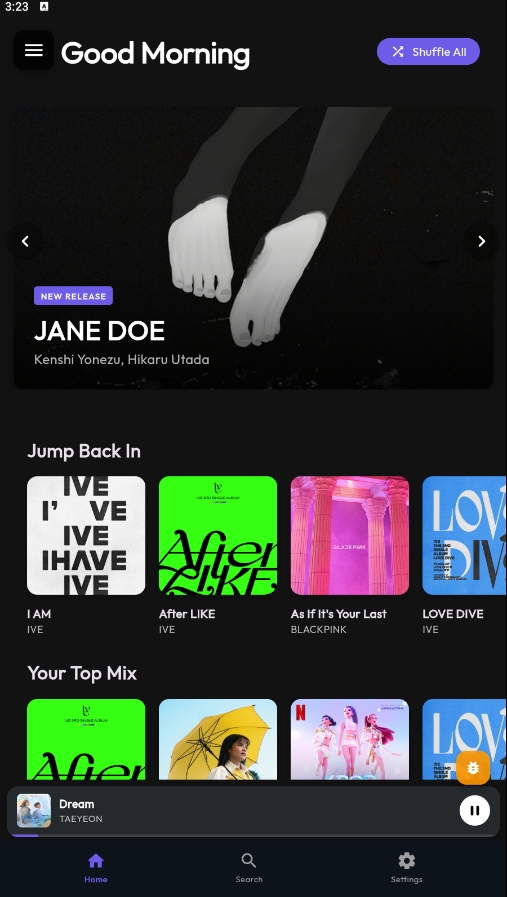
📱 Mobile
| Home |
Player (Video) |
Stats |
 |
Mobile_Full_Screen.mp4
|
Coming soon |
🎥 Feature Demos
| Listening Party |
Import Spotify Playlist |
Listening_Party_Demo.mp4
|
Import_Spotify_Playlist.mp4
|
| Host a party and let friends queue songs |
Import entire playlists instantly |
🤝 Contributing
Contributions, issues, and feature requests are welcome! Feel free to check the issues page.
- Fork the Project
- Create your Feature Branch (
git checkout -b feature/AmazingFeature)
- Commit your Changes (
git commit -m 'Add some AmazingFeature')
- Push to the Branch (
git push origin feature/AmazingFeature)
- Open a Pull Request
:scales: Legal Disclaimer & Liability Waiver
This project is an open-source, experimental media player client developed for personal customization, data interoperability, and local playback research.
- Non-Affiliation: This project is independent and is NOT affiliated, associated, authorized, endorsed by, or in any way officially connected with Tidal, Spotify, or any of their subsidiaries or affiliates. All product and company names are trademarks™ or registered® trademarks of their respective holders.
- Content Delivery & Third-Party APIs: This application functions strictly as a neutral frontend user interface. It does not host, store, index, or redistribute any copyrighted media files or audio streams. Any integration with external services is purely client-driven or restricted for demonstration purposes.
- Resource Respect: To prevent accidental network congestion and respect external web resources, the application ecosystem enforces a strict daily rate-limit (maximum 50 requests per day per user) to maintain standard web citizenship.
- No Warranty & Limitation of Liability: This software is provided "AS IS", without warranty of any kind, express or implied (as defined by the MIT License). The developer assumes absolutely no liability for how users interact with the software, nor for any potential violation of third-party Terms of Service. Users are solely responsible for compliance with local laws and platform regulations.
📝 License
Distributed under the MIT License. See LICENSE for more information.
🙏 Acknowledgments
Made with ❤️ by Momotz4G
 Momotz4G