perplexity-cli
🧠 A simple command-line client for the Perplexity API. Ask questions and receive answers directly from the terminal! 🚀🚀🚀
Python★ 176
🙏 Please CLI - Minimalistic New Tab Page CLI Tool with a greeting, date and time, inspirational quotes and your person…
 NayamAmarshe
git clone https://github.com/NayamAmarshe/please.gitNayamAmarshe/pleaseFor updates, questions and more:


pip3 install please-cli --upgradeMake sure you have Python 3 installed on your computer.
Open your terminal and paste the command below:
pip install please-cli

# If you get an error about 'pip not found', just replace pip with pip3.
To run please everytime you open the terminal:
# FOR BASH
echo 'please' >> ~/.bashrc

# FOR ZSH
echo 'please' >> ~/.zshrc

# FOR FISH
set fish_greeting please
Or if you prefer to run please once a day:
# FOR BASH
echo 'please daily' >> ~/.bashrc

# FOR ZSH
echo 'please daily' >> ~/.zshrc

# FOR FISH
set fish_greeting please daily
That's it! Check if please command works in your terminal.
Go to the releases section.
Download the latest release WHL file.
Open terminal and paste the command below:
pip install --user ~/Downloads/please_cli*

# If you get an error about 'pip not found', just replace pip with pip3.
Change the path of the file if you downloaded it elsewhere.
To run please everytime you open the terminal:
# FOR BASH
echo 'please' >> ~/.bashrc

# FOR ZSH
echo 'please' >> ~/.zshrc

# FOR FISH
set fish_greeting please
That's it! Check if please command works in your terminal.
Getting a command not found: please error? That means the Python modules installation folder is not in PATH.
To fix this:
echo 'export PATH="$PATH:$HOME/.local/bin"' >> ~/.bashrc
and restart the terminal.
Some of these commands may not be in the latest release.
# Show time, quotes and tasks
please

# Add a task
please add "TASK NAME"

# Delete a task
please delete <TASK NUMBER>

# Mark task as done
please do <TASK NUMBER>

# Edit task name
please edit <TASK NUMBER> <NEW NAME>

# Mark task as undone
please undo <TASK NUMBER>

# Show tasks even if all tasks are marked as done
please showtasks

# Move task to specified position
please move <OLD NUMBER> <NEW NUMBER>

# Toggle Time between 24 hours and 12 hours format
please changetimeformat

# Change your name
please callme "NAME"

# Delete all done tasks
please clean

# Reset all settings and tasks
please setup
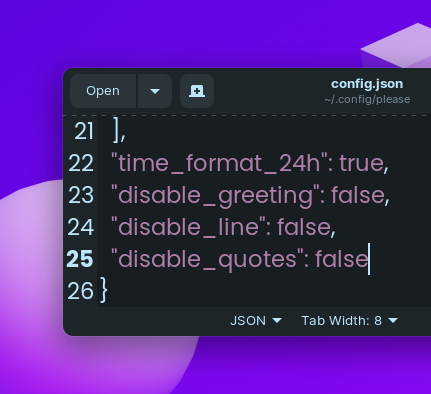
1.Navigate to ~/.config/please
2. Open config.json
3. Change "diable_greeting": false to "diable_greeting": true (All lowercase).
1.Navigate to ~/.config/please
2. Open config.json
3. Change "diable_line": false to "diable_line": true (All lowercase).
1.Navigate to ~/.config/please
2. Open config.json
3. Change "diable_quotes": false to "diable_quotes": true (All lowercase).
curl -sSL https://install.python-poetry.org | python3 -
cd to the project directory and run virtual environment:poetry shell # OR THIS, IF 'poetry shell' doesn't work . "$(dirname $(poetry run which python))/activate"
poetry install
please will be available to use as a command in the virtual environment after using poetry install.python please/please.py
poetry build
poetry publish -u <username> -p <password>
Open your terminal and type:
pip uninstall please-cli
and also edit your .zshrc or .bashrc file and remove the line that says please at the end of the file.
more like this
🧠 A simple command-line client for the Perplexity API. Ask questions and receive answers directly from the terminal! 🚀🚀🚀
meine 🌒 - A CLI file manager and system utility built with Textual. It combines intuitive command parsing with rich t…
search projects, people, and tags