coffee.tmux
☕ Coffee - Visual tmux Plugin Manager
 PraaneshSelvaraj
git clone https://github.com/PraaneshSelvaraj/coffee.tmux.gitPraaneshSelvaraj/coffee.tmux☕ Coffee - Modern tmux Plugin Manager
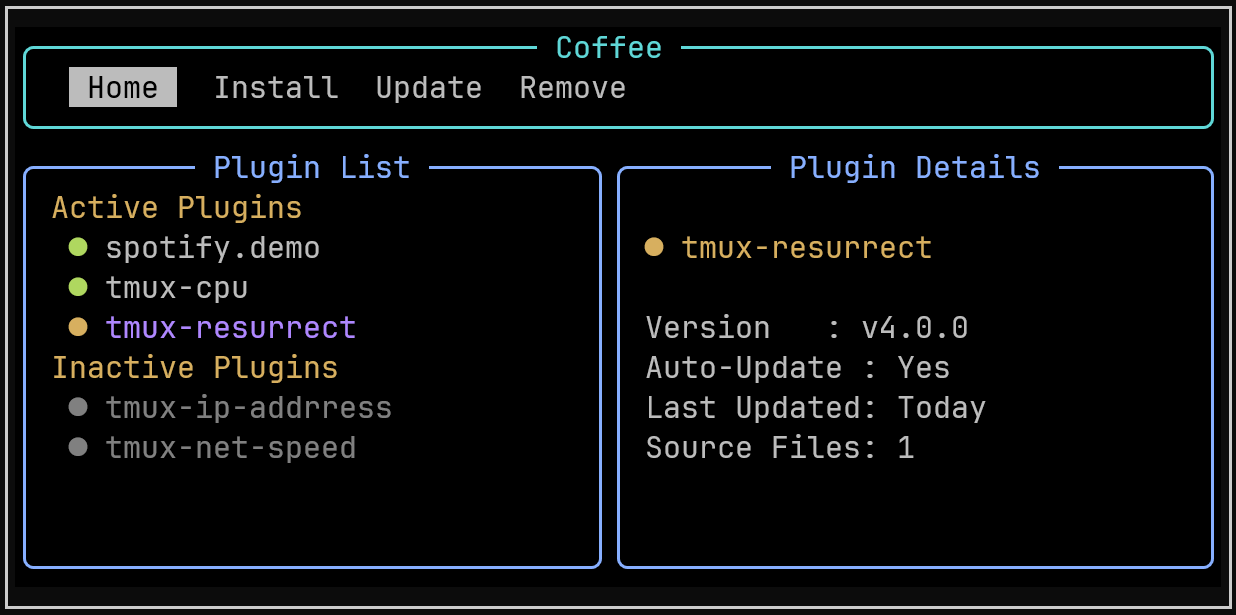
Coffee.tmux is a modern and intuitive tmux plugin manager with powerful CLI and terminal UI (TUI). It empowers users to easily install, update, enable/disable, and remove tmux plugins with rich progress feedback and asynchronous operations.
Why Coffee.tmux?
If you’ve used TPM, you know how useful it is, but also how easily .tmux.conf can turn into a long, messy file as setups grow, making debugging harder and often leaving you hoping everything just works.
Coffee.tmux keeps the same git-native simplicity and adds clean YAML configuration, a proper CLI, and a modern TUI, so managing tmux plugins stays natural and fast.
Features
🚀 Modern Interface
- Rich Terminal UI (TUI) with tabbed navigation and detailed plugin information
- Comprehensive CLI with intuitive commands and progress feedback
- Real-time plugin status showing version, update status, source files, and last updated
📦 Smart Plugin Management
- YAML-based configuration - cleaner than .tmux.conf declarations
- Version locking with rollback capabilities via lock files
- Selective updates - choose which plugins to update
⚡ Performance & Reliability
- Asynchronous operations with progress bars for faster installs/updates
- Git-native - direct repository cloning, tag checkout, and branch switching
- Atomic transactions - failed operations don't break your setup
- Enable/disable plugins without reinstallation
Installation
Prerequisites
- tmux 3.0+
- Python 3.10+
- git
Clone
git clone https://github.com/PraaneshSelvaraj/coffee.tmux ~/.local/share/coffee
Environment Setup
Coffee.tmux runs in its own dedicated Python environment to avoid dependency conflicts with your system Python.
Run the installer:
cd ~/.local/share/coffee
./install.sh
Coffee always runs using this environment. You do not need to activate it manually.
Add Coffee CLI to PATH
export PATH="$HOME/.local/share/coffee/bin:$PATH"
Add this line to your shell config file (e.g. ~/.bashrc or ~/.zshrc) to make it permanent.
tmux Configuration
Add the following to your .tmux.conf (or $XDG_CONFIG_HOME/tmux/tmux.conf):
source-file ~/.local/share/coffee/coffee.tmux
After editing your tmux config, reload it with:
tmux source-file ~/.tmux.conf
Setting up Plugins
Coffee.tmux is now installed and integrated with tmux. The next step is configuring your plugins.
Migrating from TPM
If you already use TPM, Coffee can migrate your setup automatically.
coffee migrate
Coffee.tmux will scan your tmux config, detect existing TPM plugins, and generate minimal Coffee YAML configs
This process is safe and non-destructive. Coffee.tmux does not modify or delete your tmux config.
Fresh Setup
Create plugin configurations under:
~/.config/tmux/coffee/plugins/
Each plugin is defined in its own YAML file.
Minimal Plugin Configuration
This is all you need to install a plugin.
# ~/.config/tmux/coffee/plugins/tmux-resurrect.yaml
url: "tmux-plugins/tmux-resurrect"
Coffee.tmux automatically detects source files and manages installation and updates.
Installing Plugins
After setup and reloading tmux, run:
coffee install
This installs all plugins configured in your YAML files.
Advanced Plugin Configuration
For users who want full control.
# ~/.config/tmux/coffee/plugins/tmux-resurrect.yaml
name: "tmux-resurrect"
url: "tmux-plugins/tmux-resurrect"
tag: "v3.0.0"
skip_auto_update: false
source: ["resurrect.tmux"]
Fields:
name: Explicit plugin nameurl: GitHub repo path<owner>/<repo>(required)tag: Optional GitHub tagskip_auto_update: Disable automatic updates (default: false)source: List of plugin source script files loaded by tmux
Multiple Plugins per File
One plugin per file is the recommended approach. However, you can also group multiple plugins in a single YAML file using a list:
# ~/.config/tmux/coffee/plugins/my-plugins.yaml
- url: "tmux-plugins/tmux-sensible"
- url: "tmux-plugins/tmux-resurrect"
Files are loaded in alphabetical order, so plugin sourcing order is determined first by filename, then by position within the file.
Usage
CLI Commands
coffee install # Install configured plugins
coffee update # Check for plugin updates
coffee upgrade # Upgrade plugins with available updates
coffee upgrade tmux-sensible # Upgrade a specific plugin
coffee remove tmux-sensible # Remove a plugin
coffee list # List installed plugins
coffee info tmux-sensible # Show plugin details
coffee enable tmux-sensible # Enable a plugin
coffee disable tmux-sensible # Disable a plugin
TUI Interface
Launch the TUI interface by pressing the keybinding (e.g., prefix + C).
Navigate with keys:
H- Home tab (view installed/enabled plugins)I- Install tab (view and install plugins from config)U- Update tab (check and apply updates)R- Remove tab (remove plugins)
Use j/k or arrow keys to move selections, Space to mark/toggle, and follow on-screen controls.
Contributing
Contributions are welcome! See CONTRIBUTING.md for guidelines on:
- Setting up your development environment
- Reporting issues and requesting features
- Coding style and tests
- Submitting pull requests
License
This project is licensed under the MIT License - see the LICENSE file for details.
Acknowledgements
Inspired by tmux-plugins/tpm, and powered by rich and textual.
Contact
Maintainer: Praanesh S
GitHub: PraaneshSelvaraj
Email: praaneshselvaraj2003@gmail.com
For questions or support, please open an issue on GitHub.
more like this