r2
Free open-source Cloudflare R2 desktop client and S3 GUI for macOS, Windows, and Linux. Manage Cloudflare R2, AWS S3, M…
TypeScript★ 50
file manager in a buffer for Helix editor
 Ra77a3l3-jar
git clone https://github.com/Ra77a3l3-jar/oil.hx.gitRa77a3l3-jar/oil.hxA file manager plugin for Helix that lets you edit your filesystem like a buffer — create, rename, and delete files and directories without ever leaving the editor.
Heavily inspired by oil.nvim.
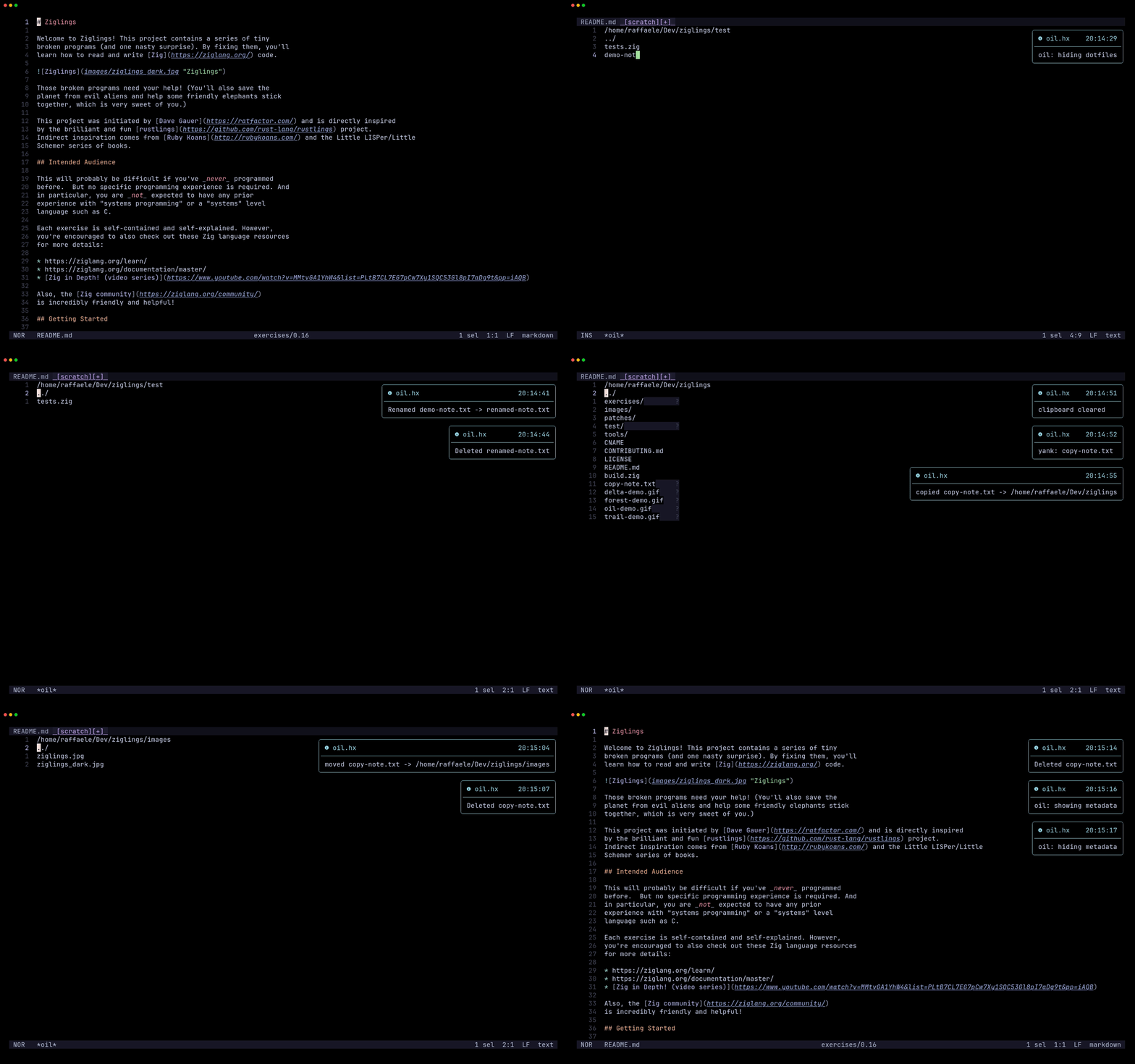
1. Install the plugin-enabled fork of Helix by following the instructions here.
2. Install oil.hx via forge:
forge pkg install --git https://github.com/Ra77a3l3-jar/oil.hx.git
3. Load the plugin by adding this to your init.scm:
(require "oil/oil.scm")

;; Optional: set defaults (both #false by default)
;; (oil-configure! show-dotfiles show-git-ignored)
(oil-configure! #false #false)
oil.hx depends on notify.hx and pulls it in automatically via forge
its messages (saved/renamed/deleted files and errors) are shown as popup notifications with no extra setup.
| Command | Description |
|---|---|
:oil |
Open the file manager in the current directory |
:oil-enter |
Enter the directory under the cursor |
:oil-up |
Navigate to the parent directory |
:oil-back |
Navigate to the parent directory |
:oil-save |
Apply all pending edits to the filesystem |
:oil-refresh |
Reload the buffer, discarding unsaved changes |
:oil-close |
Close the buffer |
:oil-yank |
Yank (copy) the entry under the cursor to the oil clipboard |
:oil-cut |
Cut the entry under the cursor to the oil clipboard |
:oil-paste |
Paste the oil clipboard entry into the current directory |
:oil-clipboard-clear |
Clear the oil clipboard |
:oil-root |
Jump to the git repository root (or helix cwd) |
:oil-toggle-hidden |
Toggle visibility of hidden dotfiles and directories |
:oil-toggle-git-ignored |
Toggle visibility of git-ignored files and directories |
When inside a git repository, oil.hx automatically runs git status and shows inline hints next to each entry:
| Hint | Meaning |
|---|---|
~ |
Modified |
+ |
Staged (new file) |
→ |
Renamed |
? |
Untracked |
! |
Ignored |
You can bind the commands to keys either in config.toml or in init.scm.
config.toml:
[keys.normal.space.o]
o = ":oil"
e = ":oil-enter"
b = ":oil-back"
g = ":oil-root"
s = ":oil-save"
r = ":oil-refresh"
q = ":oil-close"
h = ":oil-toggle-hidden"
i = ":oil-toggle-git-ignored"

[keys.normal.space.o.m]
y = ":oil-yank"
x = ":oil-cut"
p = ":oil-paste"
c = ":oil-clipboard-clear"
init.scm:
(keymap (global)
  (normal
    (space
      (o
        (o ":oil")
        (e ":oil-enter")
        (b ":oil-back")
        (g ":oil-root")
        (s ":oil-save")
        (r ":oil-refresh")
        (q ":oil-close")
        (h ":oil-toggle-hidden")
        (i ":oil-toggle-git-ignored")
        (m
          (y ":oil-yank")
          (x ":oil-cut")
          (p ":oil-paste")
          (c ":oil-clipboard-clear"))))))
With the above, all commands are reachable under <space>o and clipboard operations under <space>om.
The header line shows active flags: [+h] when dotfiles are visible, [+i] when git-ignored files are visible.
The concept and workflow are directly inspired by oil.nvim by stevearc. This is an adaptation of that idea for the Helix + Steel ecosystem.
more like this
Free open-source Cloudflare R2 desktop client and S3 GUI for macOS, Windows, and Linux. Manage Cloudflare R2, AWS S3, M…
meine 🌒 - A CLI file manager and system utility built with Textual. It combines intuitive command parsing with rich t…
MTT File Manager is a Rust-based Windows file manager with tabbed navigation, rich media previews, deep system integrat…
search projects, people, and tags