dont-track-me-google
Firefox and Chrome extensions to prevent Google from making links ugly.
JavaScript★ 587
Modern Accessible WYSIWYG rich text editor built as a framework-agnostic Web Component that works everywhere.
 Samyssmile
Build a real editor in plain HTML, React, Vue, Svelte, or Angular without locking yourself into a framework-specific editor runtime.
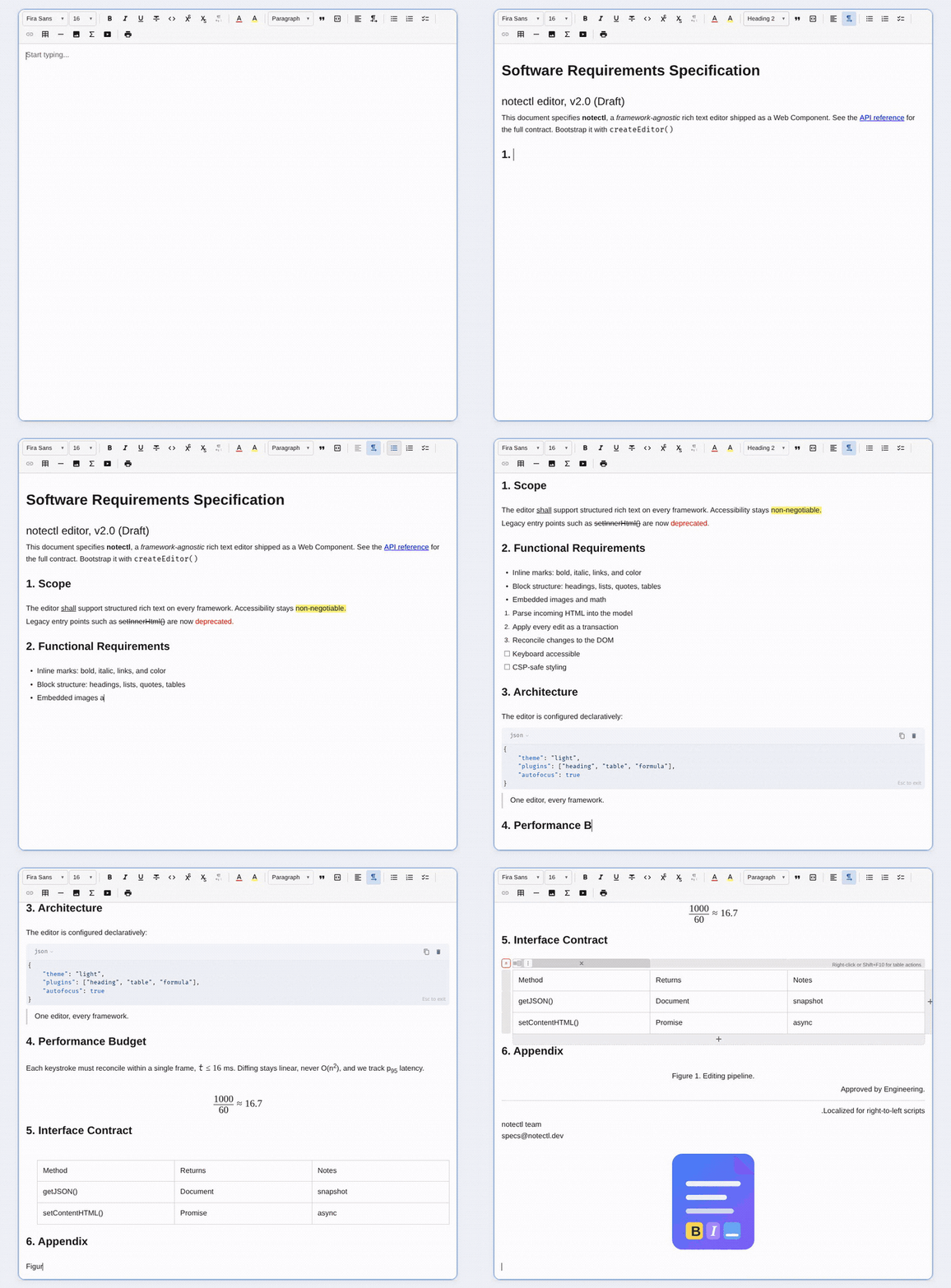
Documentation · Playground · npm: @notectl/core · npm: @notectl/angular
notectl-editor custom elementadoptedStyleSheetsnotectl is built to live inside real products. Here it powers the card description editor in a Trello-style board, sitting naturally next to checklists, due dates, labels, and assignees:
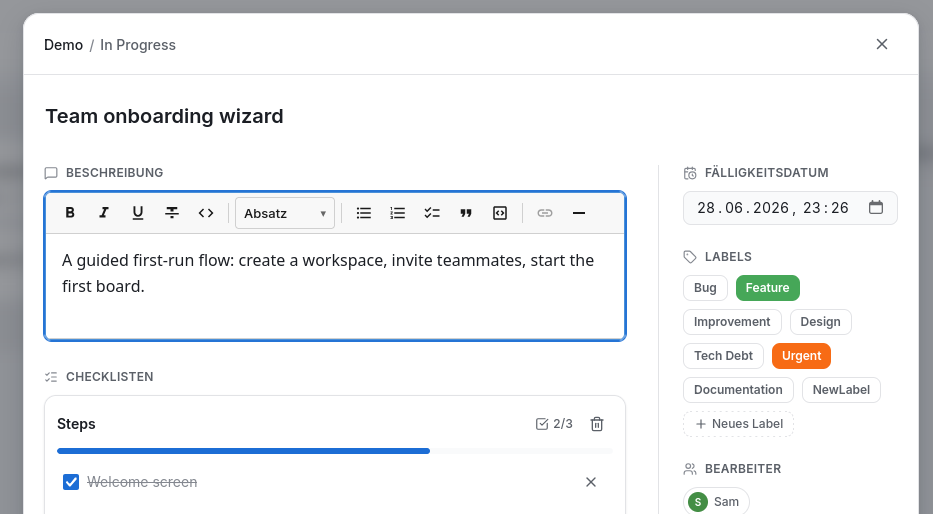
Because the editor is a Web Component, dropping it into an existing card, ticket, or comment surface is just mounting one custom element. You get a full rich-text toolbar, keyboard shortcuts, and accessible markup without pulling a framework-specific editor runtime into your app.
npm install @notectl/core
Requirements:
@notectl/angularThe normal way to embed notectl is to create the Web Component with createEditor(...) and mount it into your app.
<div id="app"></div>
Start with one of the shipped presets:
Minimal preset:
import { createEditor } from '@notectl/core';
import { createMinimalPreset } from '@notectl/core/presets/minimal';

const editor = await createEditor({
  ...createMinimalPreset(),
  placeholder: 'Start typing...',
  autofocus: true,
});

document.getElementById('app')!.appendChild(editor);
Full preset (toolbar, headings, lists, links, tables, code blocks, images, fonts, and more):
import { ThemePreset, createEditor } from '@notectl/core';
import { STARTER_FONTS } from '@notectl/core/fonts/starter';
import { ToolbarOverflowBehavior } from '@notectl/core/plugins/toolbar';
import { createFullPreset } from '@notectl/core/presets/full';

const preset = createFullPreset({
  font: { fonts: STARTER_FONTS },
});

const editor = await createEditor({
  ...preset,
  toolbar: {
    groups: preset.toolbar,
    overflow: ToolbarOverflowBehavior.Flow,
  },
  theme: ThemePreset.Light,
  placeholder: 'Start typing...',
  autofocus: true,
});

document.getElementById('app')!.appendChild(editor);
Use createMinimalPreset() when you want a lean starting point. Use createFullPreset() when you want the standard toolbar and plugin set immediately, including responsive toolbar overflow.
<!doctype html>
<html lang="en">
  <head>
    <meta charset="UTF-8" />
    <meta name="viewport" content="width=device-width, initial-scale=1.0" />
    <title>My editor</title>
    <style>
      #app {
        max-width: 800px;
        margin: 2rem auto;
      }

      notectl-editor {
        --notectl-content-min-height: 320px;
      }
    </style>
  </head>
  <body>
    <div id="app"></div>

    <script type="module">
      import { createEditor } from '@notectl/core';
      import { createMinimalPreset } from '@notectl/core/presets/minimal';

      const editor = await createEditor({
        ...createMinimalPreset(),
        placeholder: 'Write something...',
        autofocus: true,
      });

      document.getElementById('app').appendChild(editor);
    </script>
  </body>
</html>
import { useEffect, useRef } from 'react';
import { createEditor, type NotectlEditor } from '@notectl/core';

export function Editor() {
  const containerRef = useRef<HTMLDivElement>(null);
  const editorRef = useRef<NotectlEditor | null>(null);

  useEffect(() => {
    let mounted = true;

    createEditor({
      placeholder: 'Start typing...',
      autofocus: true,
    }).then((editor) => {
      if (!mounted || !containerRef.current) return;
      containerRef.current.appendChild(editor);
      editorRef.current = editor;
    });

    return () => {
      mounted = false;
      void editorRef.current?.destroy();
    };
  }, []);

  return <div ref={containerRef} />;
}
Vue and Svelte use the same pattern: create the editor on mount, append it to a host element, and call destroy() on unmount.
Use the Angular wrapper if you want template bindings, forms integration, and DI-based defaults.
npm install @notectl/core @notectl/angular
// app.config.ts
import { type ApplicationConfig } from '@angular/core';
import { provideNotectl } from '@notectl/angular';

export const appConfig: ApplicationConfig = {
  providers: [provideNotectl()],
};
// editor.component.ts
import { ChangeDetectionStrategy, Component, signal } from '@angular/core';
import {
  NotectlEditorComponent,
  type Plugin,
  HeadingPlugin,
  LinkPlugin,
  ListPlugin,
  TextFormattingPlugin,
  ThemePreset,
} from '@notectl/angular';

@Component({
  selector: 'app-editor',
  standalone: true,
  imports: [NotectlEditorComponent],
  template: `
    <ntl-editor
      [toolbar]="toolbar"
      [theme]="theme()"
      [autofocus]="true"
    />
  `,
  changeDetection: ChangeDetectionStrategy.OnPush,
})
export class EditorComponent {
  protected readonly theme = signal<ThemePreset>(ThemePreset.Light);

  protected readonly toolbar: ReadonlyArray<ReadonlyArray<Plugin>> = [
    [new TextFormattingPlugin({ bold: true, italic: true, underline: true })],
    [new HeadingPlugin()],
    [new ListPlugin()],
    [new LinkPlugin()],
  ];
}
Full Angular guide: https://samyssmile.github.io/notectl/guides/angular/
If you only want a small editor, import the plugins you need and group them in the toolbar:
import { ThemePreset, createEditor } from '@notectl/core';
import { HeadingPlugin } from '@notectl/core/plugins/heading';
import { LinkPlugin } from '@notectl/core/plugins/link';
import { ListPlugin } from '@notectl/core/plugins/list';
import { TablePlugin } from '@notectl/core/plugins/table';
import { TextFormattingPlugin } from '@notectl/core/plugins/text-formatting';

const editor = await createEditor({
  theme: ThemePreset.Light,
  toolbar: [
    [new TextFormattingPlugin({ bold: true, italic: true, underline: true })],
    [new HeadingPlugin()],
    [new ListPlugin()],
    [new LinkPlugin(), new TablePlugin()],
  ],
  placeholder: 'Start typing...',
  autofocus: true,
});
Each inner array is one visible toolbar group.
await editor.setContentHTML('<p>Hello <strong>world</strong></p>');

const html = await editor.getContentHTML();
const json = editor.getJSON();
const text = editor.getText();
const empty = editor.isEmpty();
You can also react to lifecycle and state events:
editor.on('ready', () => {
  console.log('Editor is ready');
});

editor.on('stateChange', ({ newState }) => {
  console.log('Document changed:', newState.doc);
});
notectl ships plugins for:
Full plugin reference: https://samyssmile.github.io/notectl/plugins/overview/
dompurifypnpm install pnpm build pnpm test pnpm test:e2e pnpm lint pnpm typecheck
MIT
more like this
Firefox and Chrome extensions to prevent Google from making links ugly.
React component with sane defaults to make any element contentEditable
search projects, people, and tags