xmb-bigscreen
XMB for Plasma BigScreen, console-like fullscreen launcher for living room gamepad users
QML★ 50
A fast and efficient umu manager, just as the Romans designed.
 SeongGino
git clone https://github.com/SeongGino/Nero-umu.gitSeongGino/Nero-umuA fast and efficient Proton prefix runner and manager, using umu as its backend for Steam-like compatibility with non-Steam applications.
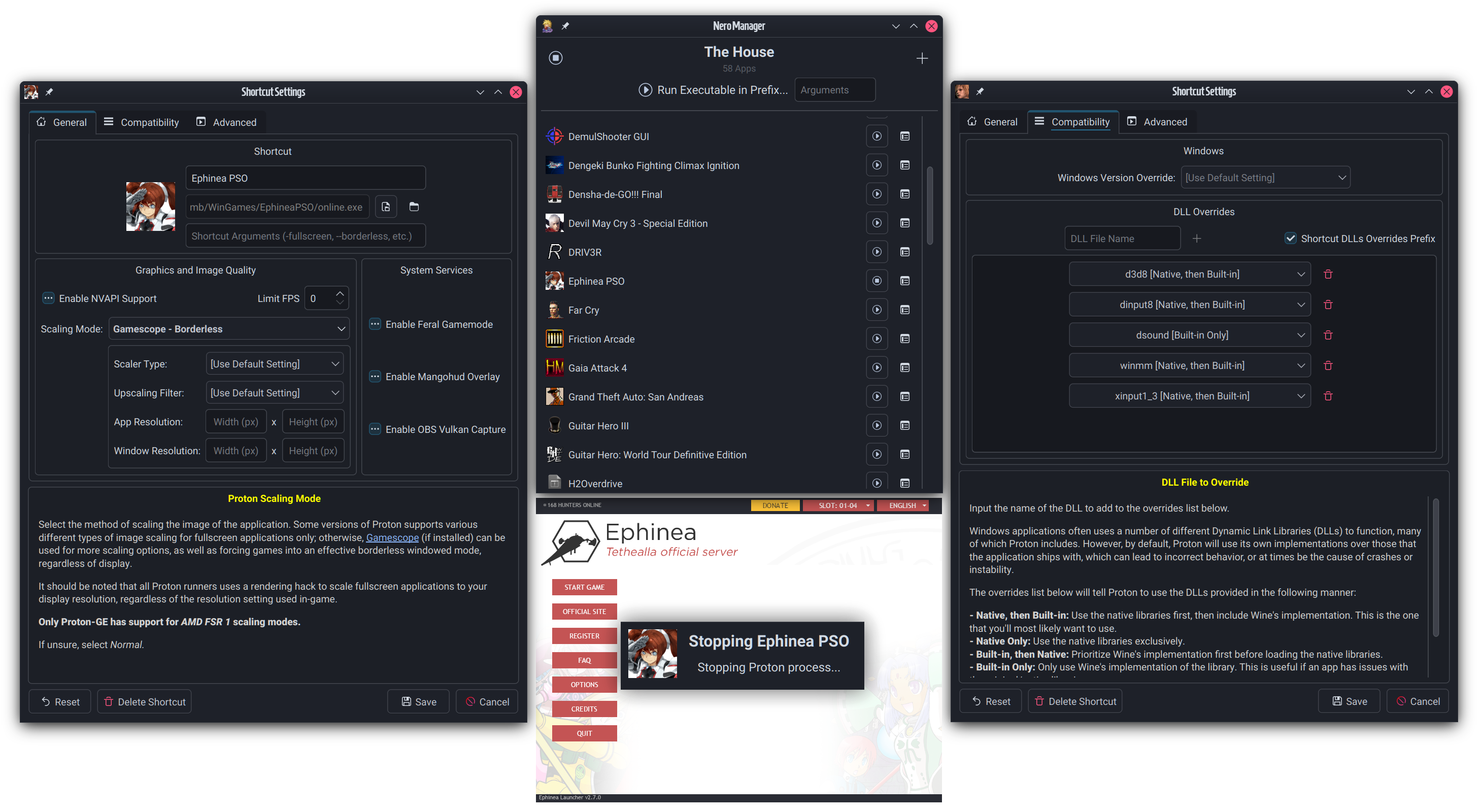
Nero can be started without arguments, which launches the Nero Manager frontend. This is where you make and setup your prefixes, and run shortcuts.
Nero can also be started with CLI arguments - a path to an executable will launch Nero's One-Time Runner popup, which prompts which prefix to run the executable in (using the prefix's current global settings) - else, a prefix to run in can also be specified alongside an executable for a prompt-less startup. See nero-umu --help for more info.
Because Nero itself does NOT manage runners--only prefixes--you need at least one Proton runner available in any of the following directories, in order of search priority:
~/.steam/steam/compatibilitytools.d (runners used with Steam)~/.local/share/Nero-UMU/compatibilitytools.d (Nero's own runners dir, in case Steam isn't installed)
It's highly recommend to use utilities such as ProtonUp-Qt or ProtonPlus to install new Steam runners.Nero's been confirmed to build and work on the following:
For Arch users, Nero can be installed from the AUR @ nero-umu with your favorite helper app. For Nix users, Nero can be installed from the unstable branch @ nero-umu. For others, see building steps below (don't worry, it's not that hard!).
Requirements for building Nero from source:
Qt6/Qt5 - the Base and Network libraries are required.
-DNERO_QT_VERSION=Qt5 to the cmake command.QuaZip - Needed for extracting zip archives (mainly the Discord RPC bridge utility).
sudo pacman -Sy qt6-base qt6-tools qt6-5compat quazip-qt6
sudo dnf install qt6-qtbase-devel qt6-qttools-devel qt6-qt5compat-devel quazip-qt6-devel
sudo apt install build-essential cmake qt6-base-dev qt6-tools-dev qt6-5compat-dev libquazip1-qt6-dev
Additionally, Nero uses the following external components, either implicitly or optionally:
umu-launcher [required] - the Proton runner backend, duh. Can either be installed directly from repos (currently in Arch's multilib), or via the package bundles in the releases page for your distro.winetricks [optional] - if the current Proton runner for a prefix doesn't have a protonfixes/winetricks binary (normally included in the -GE fork, but not upstream), then system Winetricks will be used instead for Winetricks functionality - otherwise, all Winetricks functionality will be disabled.icoextract + icoutils [optional] - used for getting icons from selected executables for shortcut entries. If neither of these exists, icons extraction will be skipped entirely, and only raw .PNG files can be used as icons - a placeholder icon vector from the XDG theme will be used if no image is available.It's a very basic CMake system, so simply run:
mkdir build && cd build
cmake ..
make
The executable nero-umu will be created.
Originally, I (Seong) had no intentions of making another launcher, as I was perfectly content using Bottles in combination with Wine-GE. However, as this fork of Wine has been deprecated for nearly a year now in favor of umu and Proton-GE, this has left non-Steam non-other-launcher users like myself in a bit of a sticky situation; Wine-GE was missing out on more and more critical updates for games, and it's grown increasingly clear that the Wine userbase was being (not-so-subtly) aggressively pushed towards Proton via umu. So it would be fair to assume that the popular launchers have all caught up with this trend, right?
Ehhhhhhhhhhhhhhhhhh
None of these are intended to be sleights against the developers, as they evidently do very good work for the people these apps work for - they just don't work for me and my use case, as someone who has limited disk space and often relies on one prefix for many applications and using Wine DLL overrides often. I'm also in the extra-unfortunate position of being a YouTube video creator that talks about gaming on Linux, and the primary maintainer of an open source Lightgun system where a lot of the functionality and testing relies around having an up-to-date Wine prefix to launch and play Windows-based titles (because fuck trying to use Windows), so I would need to do something.
So here I am presenting to you: something.
Well, most apparent, Nero is meant to be the Proton-running stand-in for original Bottles, for people who are somewhat comfortable managing prefixes, but also made to be inviting for newbies who aren't quite knowledgeable about how Wine works. So if Bottles is your jam, there's a good chance you'll be able to jump right into Nero!
However, if you're looking for deep integration with other storefronts (i.e. GOG, EA, Uplay, etc.), you may be better served by either Heroic or Lutris. That said, actually setting up a prefix just for EA's app (or Origin) or Uplay is actually very easy; just running their installers is usually good enough for most people!
The backend tool that Nero relies on, umu, is allegedly based around a cooking utility from Polynesian culture - however, when I initially heard the name, I could only think of one thing.
Nero (full name Nero Claudius) is the 5th Roman Emperor, known for his contributions to diplomacy, trade, and culture. Some recounts claim that his reign was tyrannical and is viewed in a negative light by these interpretations; meanwhile, certain others made Nero into a genderbent reflection of their historical selves during the Moon Cell Holy Grail War, and often uses umu as a catchphrase. Go figure.
dxvk.conf configuration dialog in shortcut settings.more like this
XMB for Plasma BigScreen, console-like fullscreen launcher for living room gamepad users
Free open-source Cloudflare R2 desktop client and S3 GUI for macOS, Windows, and Linux. Manage Cloudflare R2, AWS S3, M…
search projects, people, and tags