mmWaveSDR
This repository includes the source codes for the mmWave SDR developed at the University of South Carolina for the AERP…
Python★ 59
MISRC Is a multi channel RF capture device for FM RF, S-Video, CVBS RAW capture and anything else, but intended and sup…
 Stefan-Olt
git clone https://github.com/Stefan-Olt/MISRC.gitStefan-Olt/MISRCHardware - Firmware - Software - Usage example
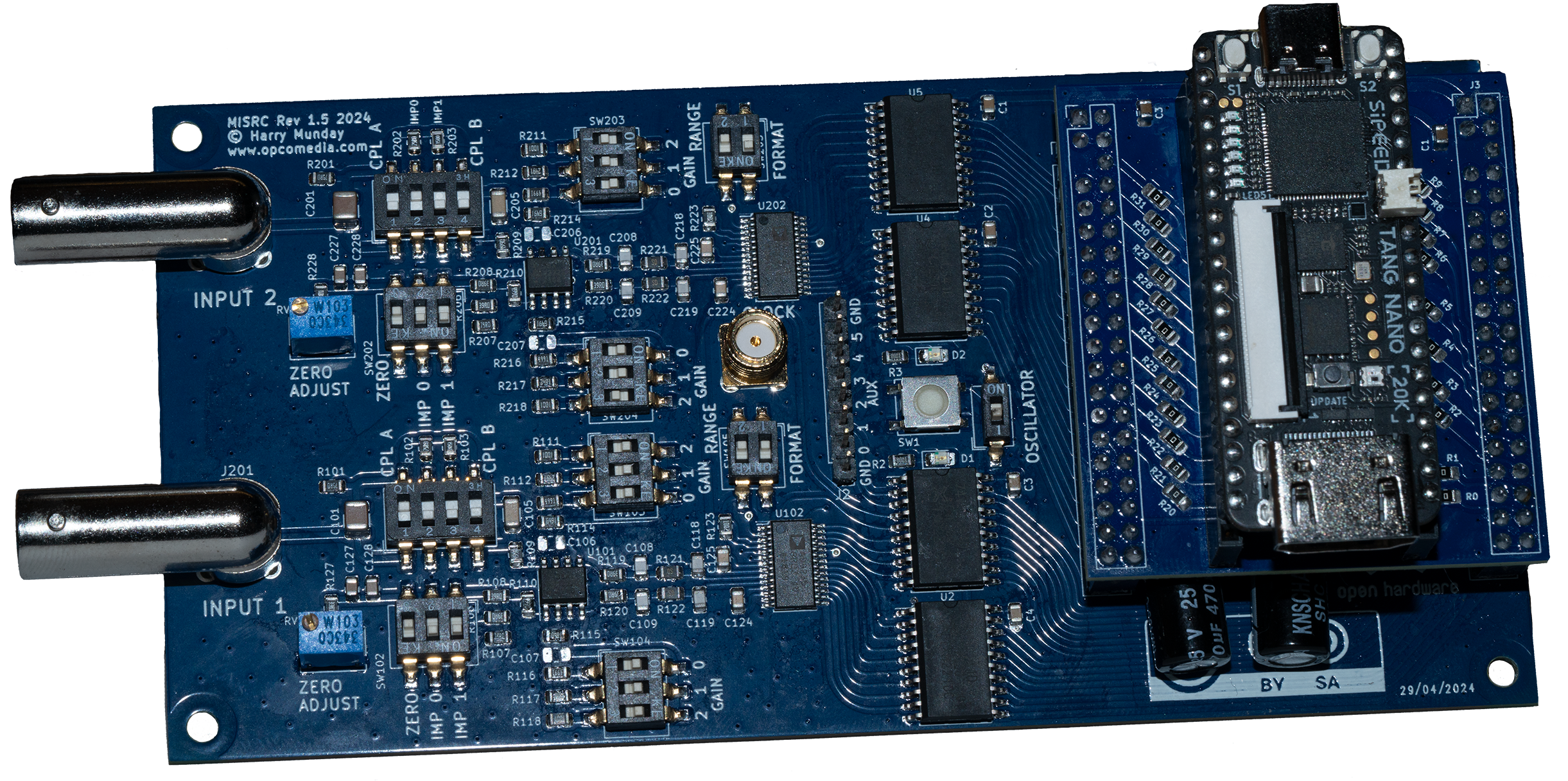
V1.5 with Tang Nano 20k on the FX3 to Tang Nano 20k adaptor PCB.
MISRC is a device to capture two signals at 12-bit and up to 40 MSPS (20 Mhz bandwith) (This could be extended to 80 MSPS in the future) and an additional 8-bit's (2-bit's for v2.5) of binary (auxiliary data) over USB 3.0.
It is intended to capture modulated tape deck RF for software demodulation, but also baseband CVBS/S-Video (Composite) video signals for software decoding, and can be used as a direct stream Oscilloscope but limited to 2vpp input voltage.
The Decode Projects:
Provide decoding for a wide range of videotape formats, HiFi audio and even RAW or Baseband composite decoding with free and powerful software time base correction with full post filtering control over the signal processing.
| Media RF Type | MISRC Support |
|---|---|
| Video FM RF | Yes |
| HiFi FM RF | Yes |
| CVBS RF | Yes |
| S-Video RF | Yes |
Possible capture examples:
Note
It may be useful for other purposes as well, as it is built as a generic ADC with configurable filtering.
Tip
You can support the development and production of the MISRC platform here.
Note
These are off-shelf PCBs and USB 3.0 devices that you add to the MISRC PCB.
Tip
You can order pre-made adaptor PCBs here for V1.5 boards with the headders for the FX3.
To be able to use the Tang Nano 20k to send data over HDMI, it needs to be flashed once via USB connection:
Download the firmare, see releases for the latest version.
Install openFPGALoader
Connect your Tang to a USB 3.0 port via its Type-C, it will need this for 5V power after flashing, but not data from the MISRC.
Run via terminal inside the firmware directory
openFPGALoader -b tangnano20k -f hsdaoh_nano20k_misrc.fs
You have flashed your Tang Nano 20k!
Supported operating systems with direct links to the latest release (also available on the releases tab):
| Operating System | Minimum supported OS version | Download x86_64 (Intel / AMD) | Download arm64 (Apple Silicon / aarch64) |
|---|---|---|---|
| Microsoft Windows | 10 (1803) | misrc_tools-0.5.1-win-x86_64.zip | misrc_tools-0.5.1-win-arm64.zip |
| Apple macOS | 10.15 | misrc_tools-0.5.1-macos-intel-x86_64.tar.gz | misrc_tools-0.5.1-macos-apple-silicon-arm64.tar.gz |
| Linux | libc6 2.35 (Ubuntu 22.04) | misrc_tools-0.5.1-linux-x86_64.tar.gz | misrc_tools-0.5.1-linux-arm64.tar.gz |
Note
The arm64 builds for Windows are untested and considered experimental!
The packages contain two command-line applications, misrc_capture and misrc_extract. For detailed usage information see the misrc_tools readme and the usage example down below.
If you want to build the tools yourself, see the instructions in the misrc_tools readme.
For misrc_capture to be able to access the MS2130 capture device, you need to install a special driver:
Firstly download Zadig
Force the installation of WinUSB (v6.1.7600.16385) or libusb-win32 (v1.2.6.0) driver on your MS2130/MS2131 adapter, on interface 0 leave interface 4 alone.
Interface 0 - USB Video
Interface 4 - HIDDevice
For macOS you do not need to install anything.
misrc_capture.misrc_capture as root (sudo). This is a new security feature by Apple, there is currently no way to bypass it.If you want to run misrc_capture as root, there is no need to install anything on Linux.
But for misrc_capture to be able to access the MS2130 capture device without root privilege (sudo), you need to install a udev-rule and add the user that will use misrc_capture to the plugdev-group.
The pre-build packages contains the script install-udev-rules.sh. On execution (double-click the file or run ./install-udev-rules.sh on the command line) it will install the rule and add the current user to the plugdev group.
Tip
Pre-built Binaries is available on the releases tab.
misrc_capture is a simple command line interface program to capture from MISRC boards using hsdaoh to which leverages data capture over HDMI with MS2130 "U3" cheep HDMI capture cards that have YUV support and full-frame signal acesses.
Create a folder which you wish to capture inside, open it inside terminal and then run misrc_capture.
Example with FLAC compression:
misrc_capture -p -f -l 8 -a video_rf.flac -b hifi_rf.flac
Example RAW:
misrc_capture -a video_rf.s16 -b hifi_rf.s16
Example with AUX pins capture (PCM1802 audio example)
misrc_capture -p -f -l 8 -a video_rf.flac -b hifi_rf.flac -x pcm1802.bin
You can also define its directory path of each RF stream manually:
misrc_capture -p -f -l 8 -a /mnt/my_video_storrage/video_rf.flac -b ../../this/is/a/relative/path/hifi_rf.flac
Press Ctrl+C to copy and Ctrl+P to past your config from a notepad or txt file.
Use <+> to move edit position on the command line to edit the name or command while in terminal and Enter to run the command.
Ctrl+C Will kill the current process, use this to stop the capture manually.
Example:
misrc_capture -p -f -l 8 -a video_rf.flac -b hifi_rf.flac -x baseband_audio.bin
Usage:
-d device_index (default: 0) (select target MS21xx device for capture)-n number of samples to read (default: 0, infinite)-t time to capture (seconds, m:s or h:m:s; -n takes priority, assumes 40msps)-w overwrite any files without asking-a ADC A output file (use '-' to write on stdout)-b ADC B output file (use '-' to write on stdout)-x AUX output file (use '-' to write on stdout)-r RAW 32-Bit data output file (use '-' to write on stdout)-p pad lower 4 bits of 16 bit output with 0 instead of upper 4-A suppress clipping messages for ADC A (need to specify -a or -r as well)-B suppress clipping messages for ADC B (need to specify -a or -r as well)-f compress ADC output as FLAC-l LEVEL set flac compression level (default: 1)-v enable verification of flac encoder output-c number of flac encoding threads per file (default: auto)Connect your 5V USB-C to the Tang Nano for power.
Connect your HDMI cable (copper or fibre) to your Tang Nano for data output to the MS2130 or MS2131.
Connect the desired sources to the BNC inputs and select suitable impedance and AC or DC coupling.
Note
You will want to use 2vpp range rather than 1vpp range to make use of the 12-bits range.
Install OCENAudio or alternatives like Audacity it will see captures as a 40khz 16-bit file.
Run a 3-second test capture in FLAC, to be automatically reloaded for viewing.
misrc_capture -p -f -B -t 3 -a test.flac
Start the capturing process for setting the DC offset then gain:
- Reset clipping LEDs (always on after start or major adjustment)
- Increase gain during capture until clipping LED lights up
- Decrease gain one step and reset clipping LED
- Repeat for the second channel if in use.
Once happy, then do a full test capture to verify.
Caution
MISRC is loosely based on the Domesday Duplicator (DdD) a LaserDisc focused (ld-decode) FM RF Archival device.
It is built around the AD9235 analogue to digital converter by Analog Devices and is heavily based on the evaluation board circuit given in its datasheet with the AD8138 Op-Amp providing adjustable fixed gain.
The MISRC like the DdD it originally used the Cypress FX3 SuperSpeed Explorer board for a USB 3.0 data connection, and using Sigronk for capture, with hopes to not use the DE0 FPGA, this ended with the adoption of the Tang Nano 20k and MS2130 "data over YUV" method being used.
The hardware, firmware and software is released under different open-source licenses. You can read the License here
more like this
This repository includes the source codes for the mmWave SDR developed at the University of South Carolina for the AERP…
High-rate continuous streaming of interleaved dual ADC (I/Q) samples over USB Full‑Speed (FS) using only the built‑in C…
search projects, people, and tags