emby-watchparty
A synchronized watch party application for Emby media servers. Watch videos together with friends in real-time, no matt…
Python★ 51
A minimalist web native image viewer, curation and tagging tool, and media server.
 SteveCastle
A fast, minimal viewer for the images, videos, audio, and comics already on your hard drive. Free and open source. Built for people who have a real media library and would rather look at it than fight their software.
Most media apps want to take over your files: import them into a private library, re-encode them, ask you to sign in. This one doesn't. Point it at a directory and it opens. Your files stay where they are, in the formats you already have, and tags go into a local SQLite database you can copy and back up like any other file. There's no account and nothing phones home.
It's aimed at the kind of library other tools choke on: millions of images and videos piled up over years, mixed formats, comic archives, audio, screenshots, weird old .webms. If you want to view that stuff, tag it, find it again later, and not lose it when some service shuts down, this is for you.
Download free at lowkeyviewer.com for Windows, macOS, and Linux.
The repo also holds two companion projects: Lowkey Media Server (batch processing, AI auto-tagging, transcription, a web UI) and Lowkey Studio (a WebGPU keyframe compositor for editing the media you're looking at). Both are covered below.
.cbz, .cbr) open like directories. Video subtitles get picked up automatically. Audio gets a WebGPU visualizer. Transcripts are editable in place.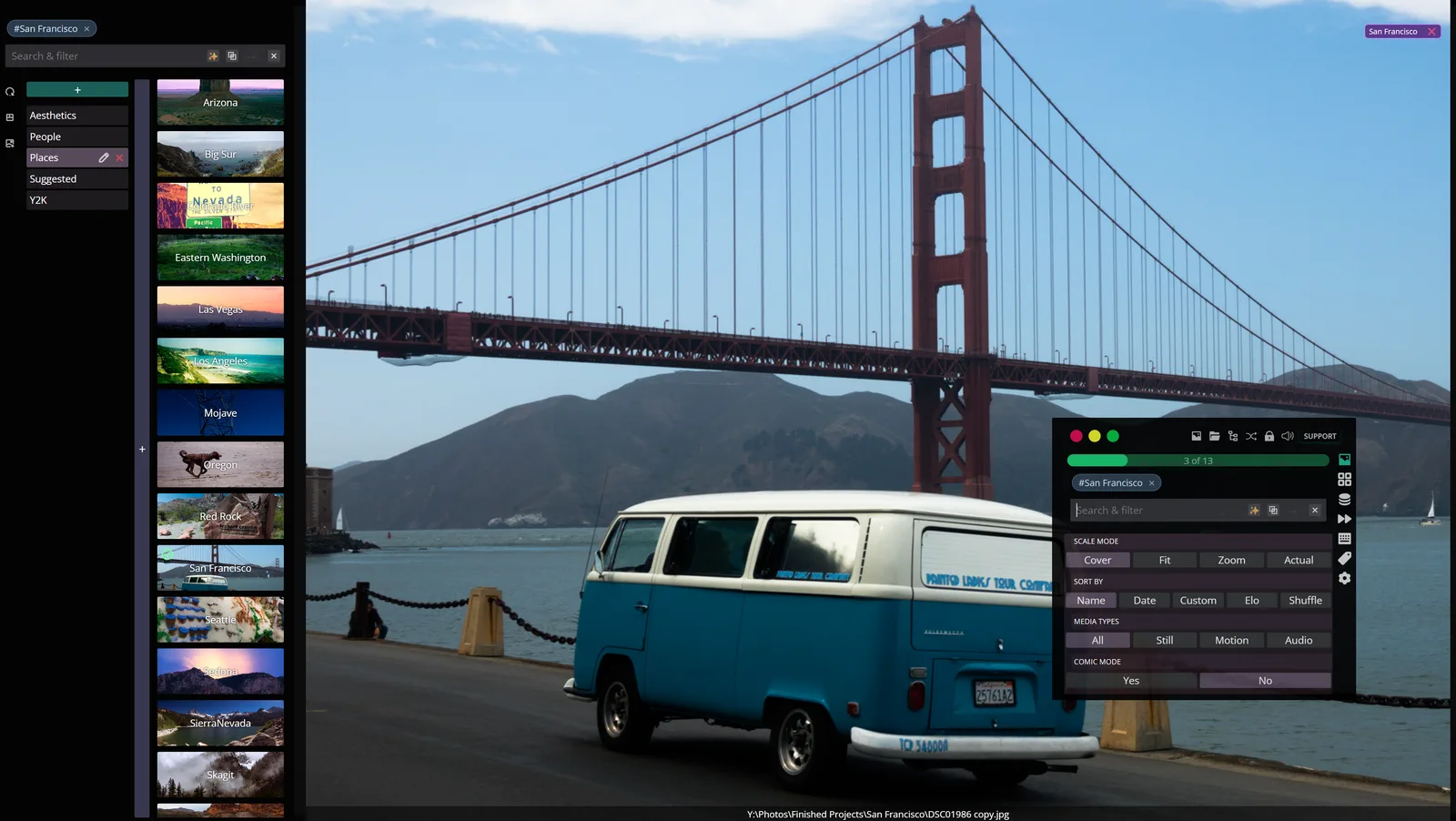
Tag categories down the left, tags with their own cover previews next to them, and the floating command palette over the image. The palette is the same search-and-filter box the sidebar uses, plus scale mode, sort order, and the media-type and comic-mode switches. Almost everything is one keystroke or one drag away rather than buried in a menu.
.cbz and .cbr (CBR uses a bundled UnRAR binary, so it Just Works on every platform)"Big" here is a specific number. The reference library this gets developed against holds over 2 million media items, more than 5 million tag assignments, and hundreds of thousands of vector embeddings. That's what the query engine, the virtualized lists, and the job queue are tuned for. Most of the list below exists because the naive version fell over at that size first.
Lowkey Media Viewer   look at your library, tag it, find things     Electron + React
Lowkey Media Server   do the slow work: transcode, tag, transcribe  Go + SQLite
Lowkey Studio         edit what you're looking at                   WebGPU, browser-native
They ship together because they're one workflow (browse, act on what you found, then change it) and because the viewer and the server literally share a frontend. src/renderer/ is a single React app that runs both as the Electron renderer process and as the web UI the Go server embeds. src/renderer/platform.ts sits in the middle and routes each call to either Electron IPC or HTTP.
A few things hold across all three:
Prebuilt binaries are at lowkeyviewer.com. Builds are signed and notarized on macOS, NSIS-installed on Windows, AppImage on Linux. New releases ship straight from master. The desktop app bundles Studio; the server is a separate download.
Studio alone needs nothing installed. Open lowkeyviewer.com/studio in any browser with WebGPU.
If you'd rather build from source, see Building from source below.
Reach for the server when you don't want the desktop app tied up in a long-running task: auto-tagging 10,000 photos with an AI model, transcribing a 4-hour video, transcoding a library to adaptive HLS, ingesting a YouTube channel. Run it on the same machine as the viewer, or on a NAS or home server.
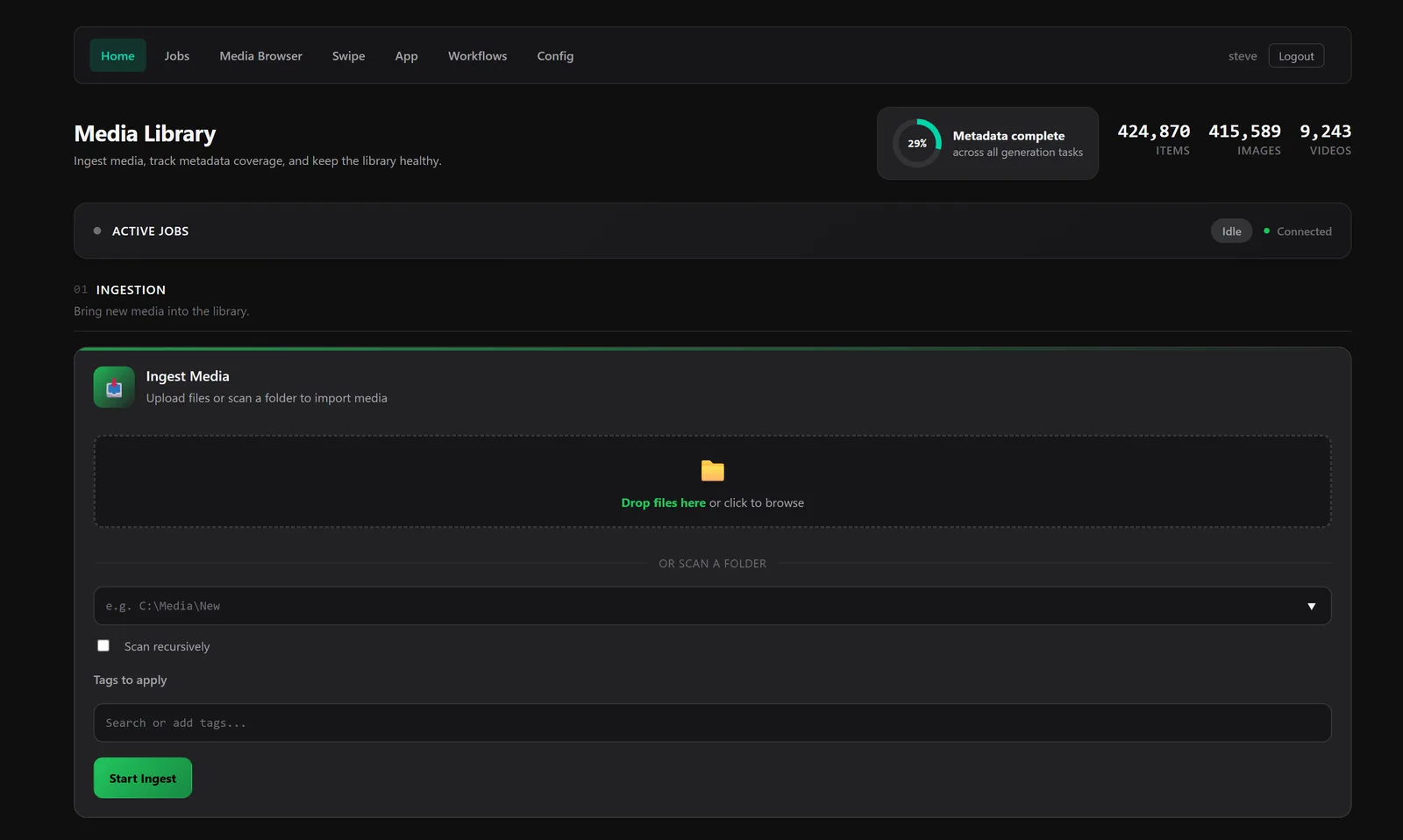
The home page is the library dashboard: item counts, metadata coverage across every generation task, live job status, and ingestion by drag-drop or folder scan. Those counts are snapshot-cached, so nothing here is tallying 400,000 rows while you wait.
What you get:
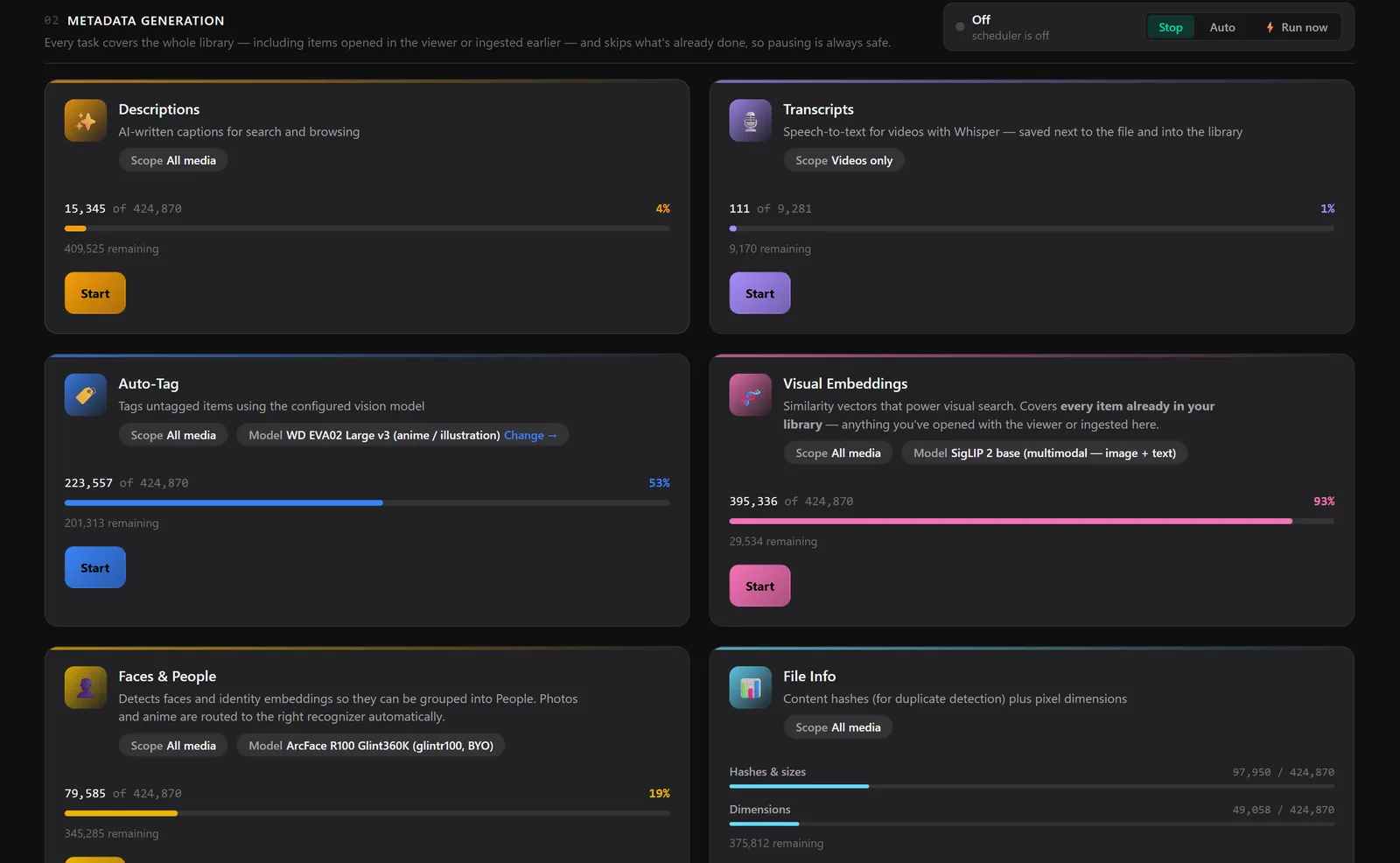
Each metadata task shows coverage over the whole library and picks up where it left off. Every task skips what's already done, so pausing is safe and resuming is just pressing Start again.
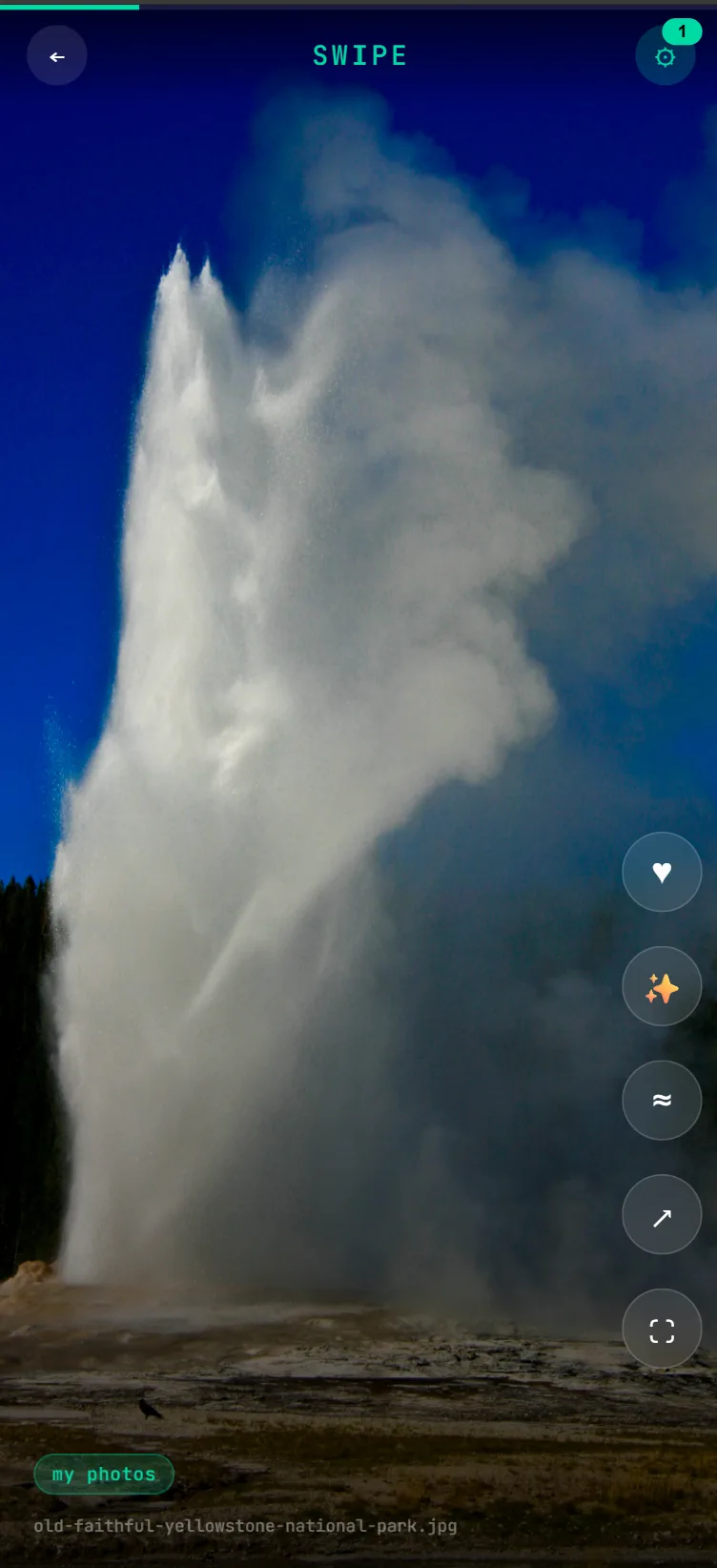
There's also a Swipe mode: a phone-friendly view for triaging a library from the couch. Swipe to like, hop to visually similar items, or open the current one in the full browser.
Authentication is on by default (JWT + bcrypt). First launch creates a temporary admin / admin user and walks you through a setup wizard to replace it.
The viewer detects the server automatically once both are running, and the bulk-job actions turn on.
Get it the same way: prebuilt binaries on lowkeyviewer.com/server, or in Docker. All three products ship from the same release, so the server carries the same version number as the viewer. Full setup, configuration, environment variables, task catalog, and API reference live in media-server/README.md.
A keyframe compositor that runs entirely on WebGPU, in a browser tab, with nothing uploaded anywhere. It's there for the "this clip is almost right" moment, which is usually where a viewer hands you off to a 90 GB install and a subscription.
Try it right now, no download, at lowkeyviewer.com/studio (Chrome/Edge 113+, or any browser with WebGPU). Drop a video on it and it becomes a clip.
Inside the desktop app it's the same code with a shorter path: right-click any image or video → Open in Studio. The file is imported straight into a comp, and when you're done, Save writes the render back over the original (transcoded to match its container by the bundled ffmpeg, with the original held as a backup until the swap succeeds). Images save as a video alongside the source instead of overwriting it. The viewer picks up the change and refreshes in place.
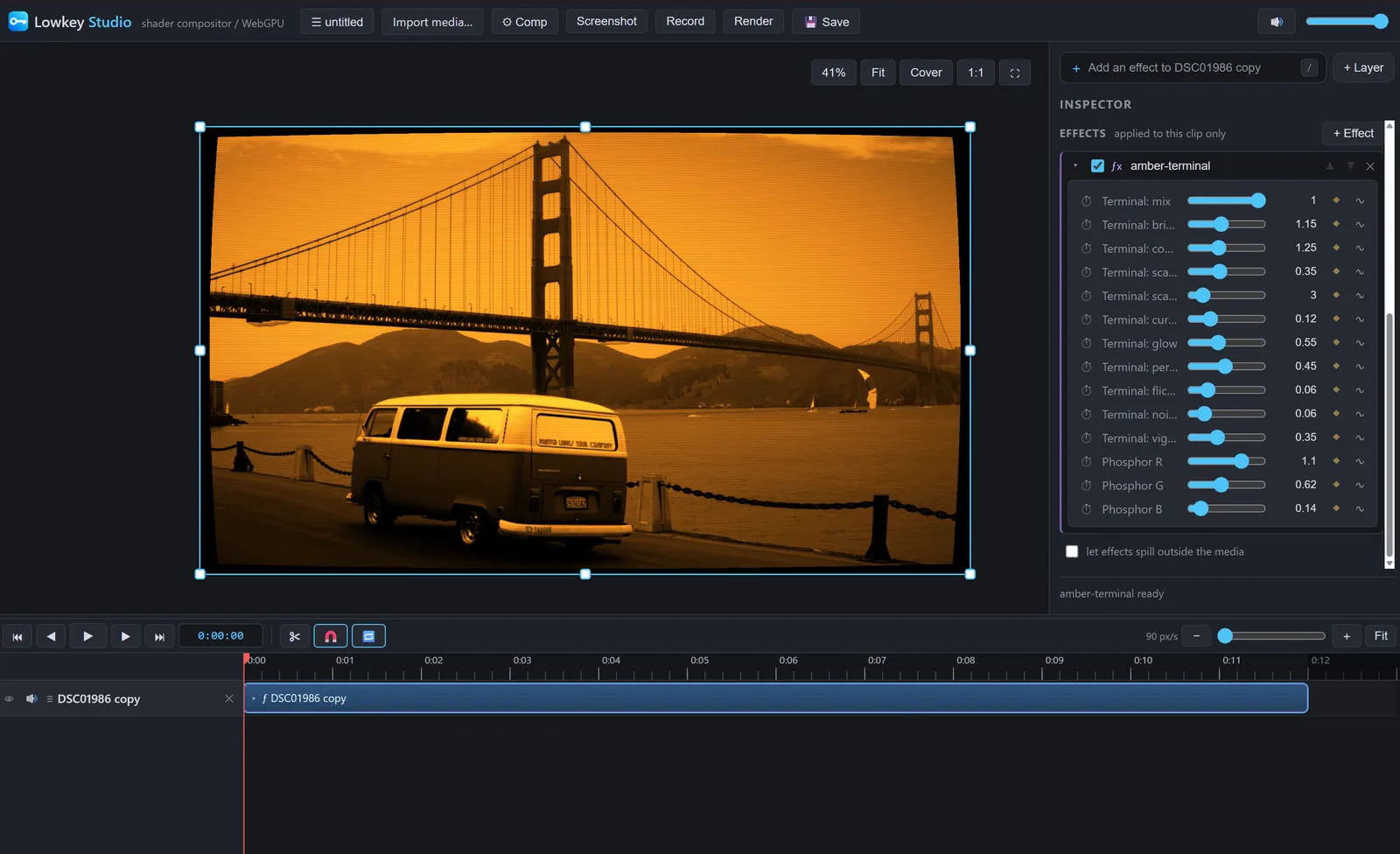
The same photo from the top of this page, handed to Studio and run through an amber-terminal CRT shader. Every parameter on the right has a ⏱ to keyframe it and a ∿ to drive it from an oscillator or the audio track, and Save puts the result back where the file came from.
Studio is a plain static ES-module web app: no bundler, no framework, no backend. That's what lets the same files be a page on the docs site, a tab you can bookmark, and a window inside Electron. In the desktop app it's served over a privileged studio://app custom scheme rather than file://, because ES modules, fetch, and WebGPU all need a real secure origin. Local media reaches it as same-origin routes on that scheme, so there's no CORS and no Node access in the window.
The rendering engine, shader compiler glue, and presets under studio/engine/, studio/vendor/, and studio/shaders/ are vendored from the separate slangfx project. studio/ is the source of truth in this repo, and node studio/publish.mjs syncs it to docs/studio/ for GitHub Pages.
More detail in studio/README.md.
The viewer is an Electron + React + TypeScript app. The server is a single Go binary. Studio is a dependency-free static web app. They live in the same repo because the viewer and server share a React renderer, and the viewer ships Studio inside its own package.
18.x)package.json declares "packageManager": "npm@10.9.0". Yarn is no longer supported, and there's no yarn.lock.npm install npm start # webpack-dev-server + electronmon npm test # builds first, then runs jest npm run package # build a distributable for the current OS
npm run package produces an NSIS installer on Windows, a universal DMG on macOS, and an AppImage on Linux. Artifacts land in release/build/. FFmpeg/FFprobe binaries are auto-downloaded as part of packaging.
npm run build:server   # builds the React UI, embeds it, then go build
cd media-server
./media-server          # or media-server.exe on Windows
Then open http://localhost:10111 and log in as admin / admin.
For faster iteration:
npm run build:web       # build the renderer and copy into media-server/loki-static/
cd media-server
go run .
Re-run build:web after renderer changes or the Go binary will keep serving the old assets. The static files are embedded at compile time.
There's no build step. It's ES modules served as-is.
npm run studio:serve     # http://localhost:8790/studio/  (serves the docs tree)
npm run studio:publish   # copy studio/ → docs/studio/ for GitHub Pages
Edit files under studio/ and reload the page. Run studio:publish before committing so the published copy under docs/studio/ stays in sync, and commit both. npm run package picks up studio/ automatically via extraResources, which is how the Electron build gets its copy.
npm test               # viewer (Jest)
npm run test:server    # server (go test ./...)
loki/
├── src/                # Electron app
│   ├── main/           # Main process (Node): IPC, archives, thumbnails, transcripts,
│   │                   #   studio-window.ts (studio:// scheme + edit-and-save-back)
│   └── renderer/       # React + XState SPA (also embedded by the media server)
├── media-server/       # Go module: HTTP API, auth, job queue, HLS, S3 storage, web UI
│   ├── auth/           # JWT + bcrypt user auth
│   ├── tasks/          # Self-registering task implementations
│   ├── jobqueue/       # SQLite-backed job + workflow DAG engine
│   ├── storage/        # Local + S3-compatible storage registry
│   ├── runners/        # Worker pool that dispatches jobs to task fns
│   ├── embedindex/     # Exact parallel cosine scan over SigLIP2 vectors
│   ├── onnxface/       # Face detection, embedding, and clustering
│   ├── deps/           # On-demand download manager (ffmpeg, yt-dlp, gallery-dl, whisper, onnx)
│   ├── renderer/       # Go HTML templates for the admin web UI
│   └── loki-static/    # Built React renderer embedded at compile time
├── studio/             # Lowkey Studio: static WebGPU compositor (source of truth)
│   ├── engine/         # slangfx-web runtime: multi-pass WebGPU engine + toolchain glue
│   ├── vendor/         # glslang.wasm (GLSL→SPIR-V) + twgsl.wasm (SPIR-V→WGSL)
│   ├── shaders/        # The 78 bundled .slangp effect presets
│   └── publish.mjs     # Sync studio/ → docs/studio/
└── docs/               # Source for lowkeyviewer.com (includes the published studio/)
src/renderer/platform.ts is the abstraction layer that lets the same React code run as the Electron renderer process or as the web UI served by the Go server. Studio shares no code with either. It's deliberately dependency-free so it can be dropped onto any static host, and it talks to the desktop app only through the launch and save routes on the studio:// origin.
.github/workflows/release.yml runs on every push to master:
vX.Y.Z from package.json if the tag doesn't already exist.windows/amd64, darwin/{arm64,amd64}, and linux/amd64.To cut a release: bump the version in package.json, package-lock.json, release/app/package.json, release/app/package-lock.json, docs/index.html, and docs/server/index.html, then push to master.
Fork, branch, and open a pull request against master. If you've forked the project and built something interesting on top, I'd love to hear about it.
MIT. See LICENSE.
more like this
A synchronized watch party application for Emby media servers. Watch videos together with friends in real-time, no matt…
A simple code using OpenCV and C++ to create a ASCII Video based on a MP4 video, or on a Youtube Video.
YiMao · 云海求片助手 — 双核心 Telegram 影视求片机器人。订阅模式:TMDB 智能搜索一键订阅 / 趣味求片模式:AI 生成五层地狱闯关,通关解锁优先求片。深度集成 MoviePilot + Emby/Jellyfin。…
search projects, people, and tags