 SuperCmdLabs
agentlytics
Comprehensive analytics dashboard for AI coding agents — Cursor, Windsurf, Claude Code, VS Code Copilot, Zed, Antigravi…
JavaScript★ 555

Open-source launcher for macOS with Raycast-compatible extensions, voice workflows, and AI-native actions.
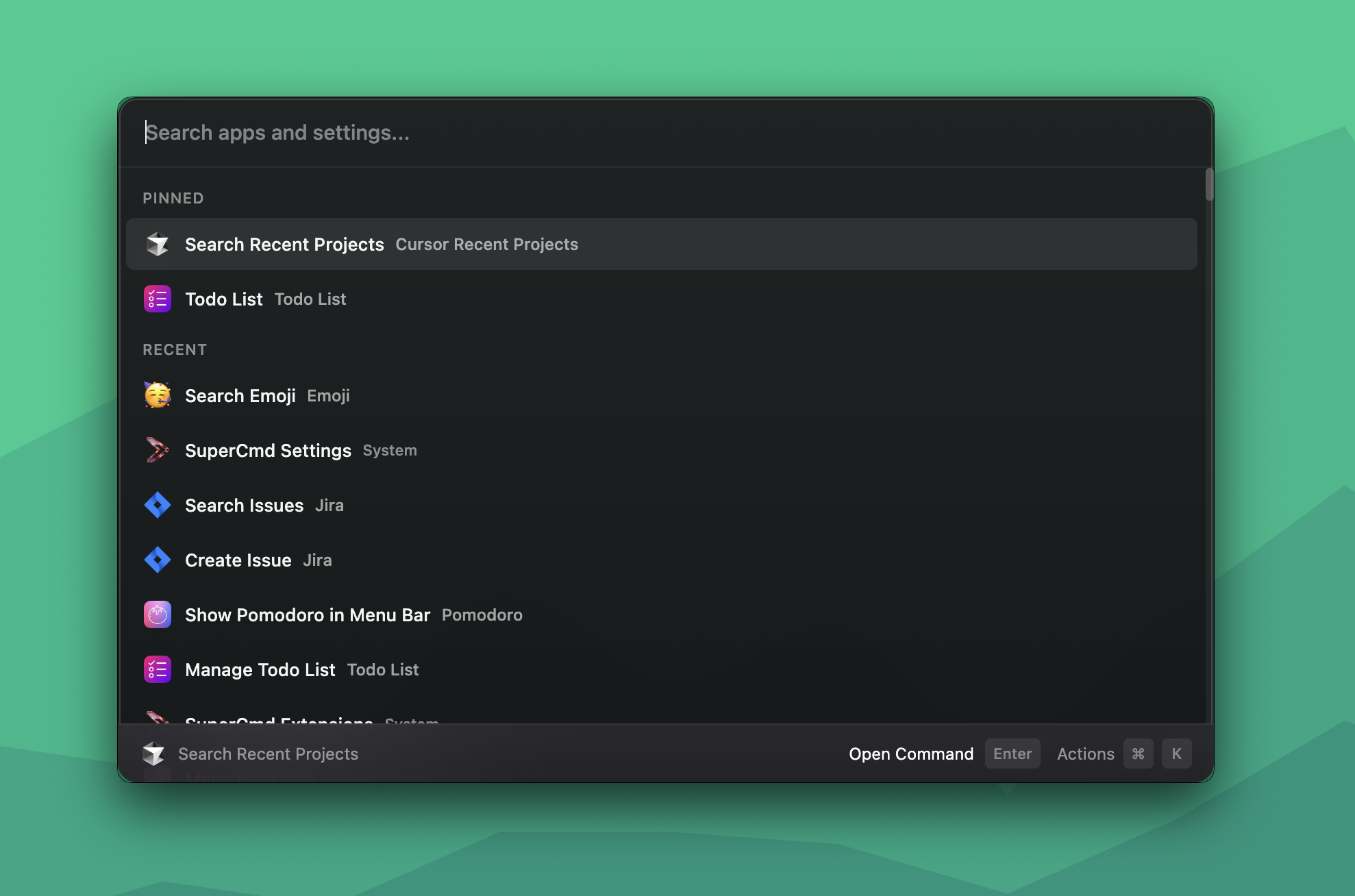
Open-source launcher for macOS: Raycast + Wispr Flow + Speechify + Memory + AI in one app.
SuperCmd gives you Raycast-style extension workflows, hold-to-speak dictation, natural text-to-speech, AI actions backed by configurable providers and memory, notes, canvas, clipboard history, snippet expansion, and window tiling — all from a single keyboard shortcut.

SuperCmd is an Electron + React launcher that focuses on Raycast extension compatibility while remaining community-driven and open source. It ships a full @raycast/api and @raycast/utils compatibility shim so existing Raycast extensions work without modification. For anything that requires tight system integration — hotkeys, window management, speech recognition, clipboard, snippet injection — it drops into Swift and Objective-C to talk directly to macOS frameworks (ApplicationServices, EventKit, AVFoundation, Carbon) for native speed and reliability.
@raycast/api and @raycast/utils shims; install extensions directly from the Raycast store.rayconfig backups with settings, hotkeys, extensions, scripts, quicklinks, snippets, notes, and extension prefssrc/main/ Electron main process, IPC, extension execution, AI, settings
src/renderer/ React UI + Raycast compatibility layer + built-in feature views
src/native/ Swift native helpers (11 binaries)
extensions/ Installed/managed extension data
dist/ Build output
| Path | Purpose |
|---|---|
src/main/main.ts |
Entry point — IPC handlers, window management, global shortcuts |
src/main/preload.ts |
contextBridge — exposes window.electron API to renderer |
src/main/commands.ts |
App/extension/script discovery; getAvailableCommands() with cache |
src/main/extension-runner.ts |
Extension execution engine (esbuild bundle + require shim) |
src/main/extension-registry.ts |
Extension catalog, install, uninstall, update |
src/main/ai-provider.ts |
AI streaming (OpenAI / Anthropic / Ollama / Gemini) via Node http/https |
src/main/settings-store.ts |
JSON settings persistence (AppSettings, cached in memory) |
src/renderer/src/App.tsx |
Root component — wires hooks and routes to views |
src/renderer/src/raycast-api/ |
@raycast/api + @raycast/utils compatibility runtime |
src/renderer/src/hooks/ |
Feature hooks — state and logic, no JSX |
src/renderer/src/views/ |
Full-screen view components — pure UI |
| Binary | Purpose |
|---|---|
calendar-events |
EventKit calendar integration |
color-picker |
System color picker |
get-selected-text |
Extract selected text from frontmost app |
hotkey-hold-monitor |
Hold-to-speak hotkey detection |
hyper-key-monitor |
Caps Lock → Hyper Key remapping |
input-monitoring-request |
Request Input Monitoring permission |
microphone-access |
Microphone permission checks |
snippet-expander |
Keyboard-triggered snippet expansion |
speech-recognizer |
macOS native speech recognition (STT) |
whisper-transcriber |
OpenAI Whisper STT integration |
window-adjust |
Window tiling and resizing (ApplicationServices) |
fast-paste-addon/ |
Node.js native module for fast clipboard paste (Cmd+1–9) |
parakeet-transcriber/ |
Swift package — on-device STT via swift-transformers |
brew install --cask supercmdlabs/supercmd/supercmd
Download the latest .dmg from the Releases page:
SuperCmd-x.x.x-arm64.dmgSuperCmd-x.x.x.dmgOpen the .dmg, drag SuperCmd to your Applications folder, and launch it.
Note: On first launch, macOS may warn that the app is from an unidentified developer. Go to System Settings → Privacy & Security and click "Open Anyway".
SuperCmd needs the following permissions. The app will prompt you on first use, or you can enable them manually in System Settings → Privacy & Security:
| Permission | Why | Required for |
|---|---|---|
| Accessibility | Window management, keystroke injection | Window tiling, snippet expansion |
| Input Monitoring | Global hotkey detection (hold-to-speak, launcher shortcut, hyper key) | Core launcher functionality |
| Microphone | Voice dictation (speech-to-text) | Optional — only if using voice features |
| Automation (AppleScript) | Selected text capture, system automation | Extension actions |
| Calendars | Reading today's events | Optional — only if using schedule feature |
You may need to restart the app after granting permissions.
SuperCmd includes a built-in auto-updater backed by GitHub Releases. You can check for updates manually by searching "Check for Updates" in the launcher, or install a downloaded update on next launch.
SuperCmd can import encrypted Raycast .rayconfig backups from the General settings tab.
It currently imports:
It intentionally skips or only partially maps:
The importer decrypts backups locally and prompts for the backup password before reading the file.
node -vswiftc (Swift compiler)git and npm for extension installationIf you don't have Xcode Command Line Tools:
xcode-select --install
Verify Swift is available:
swiftc --version
If you don't have Homebrew:
/bin/bash -c "$(curl -fsSL https://raw.githubusercontent.com/Homebrew/install/HEAD/install.sh)"
git clone https://github.com/SuperCmdLabs/SuperCmd.git
cd SuperCmd
npm install
The dev script does not compile the Swift native helpers — build them once before your first run:
npm run build:native
This compiles all Swift binaries and native Node modules into dist/native/.
npm run dev
This starts TypeScript watch for the main process, the Vite dev server for the renderer, and Electron in development mode.
npm run build
Runs build:main + build:renderer + build:native in sequence.
npm run package
Output artifacts are generated under out/.
npm run dev              # Start local development (watch + Vite + Electron)
npm run build            # Build main, renderer, and native modules
npm run build:main       # Compile Electron main process TypeScript
npm run build:renderer   # Build renderer with Vite
npm run build:native     # Compile Swift helpers and native modules
npm run package          # Build and package app with electron-builder
npm run package:unsigned # Build unsigned package for local testing
npm run check:i18n       # Check internationalization strings
| Problem | Solution |
|---|---|
swiftc: command not found |
Run xcode-select --install and restart your terminal |
npm install fails on native modules |
Ensure Xcode CLT is installed and up to date: softwareupdate --install -a |
| App launches but hotkeys don't work | Grant Input Monitoring permission (not just Accessibility) and restart the app |
| Window management doesn't work | Grant Accessibility permission — window-adjust.swift checks AXIsProcessTrusted() |
| Extensions fail to install | Verify Homebrew is installed (brew --version) — SuperCmd needs brew-resolved git to clone extensions |
node-gyp build errors |
Check Node.js version (node -v) — requires 22+. Try deleting node_modules and re-running npm install |
| Apple Silicon (M1/M2/M3) issues | Ensure you're running the arm64 version of Node.js, not the x64 version via Rosetta |
Native features missing after npm run dev |
Run npm run build:native first — the dev script doesn't compile Swift binaries |
| Snippet expansion not working | Grant Accessibility permission; snippet-expander uses CGEventPost for keystroke injection |
| Whisper/Parakeet STT not working | Grant Microphone permission in System Settings → Privacy & Security |
Configure everything from the app UI:
enabled = true).| Provider | Setting | Notes |
|---|---|---|
| OpenAI | openaiApiKey |
GPT-4o, GPT-4o-mini, etc. |
| Anthropic (Claude) | anthropicApiKey |
Claude 3.5 Sonnet, Haiku, etc. |
| Google Gemini | geminiApiKey |
Gemini 1.5 Pro, Flash, etc. |
| Ollama | ollamaBaseUrl |
Default http://localhost:11434 — local models |
| OpenAI-compatible | openaiCompatibleBaseUrl + openaiCompatibleApiKey |
Any OpenAI-compatible endpoint |
| Feature | Setting |
|---|---|
| ElevenLabs TTS | elevenlabsApiKey |
| Edge TTS (built-in) | No key required |
| Native macOS STT | No key required |
| Whisper STT | Runs locally — no key required |
| Parakeet STT | Runs locally via swift-transformers — no key required |
| Setting | Purpose |
|---|---|
supermemoryApiKey |
Supermemory API key |
supermemoryClient |
Supermemory client ID |
supermemoryBaseUrl |
Base URL (default: https://api.supermemory.ai) |
supermemoryLocalMode |
Use local Supermemory instance |
All app settings are persisted in:
~/Library/Application Support/SuperCmd/settings.json
Key fields:
{
  "globalShortcut": "Alt+Space",
  "openAtLogin": false,
  "uiStyle": "glassy",
  "fontSize": "medium",
  "appLanguage": "system",
  "ai": {
    "enabled": true,
    "provider": "openai",
    "openaiApiKey": "",
    "anthropicApiKey": "",
    "geminiApiKey": "",
    "ollamaBaseUrl": "http://localhost:11434",
    "elevenlabsApiKey": "",
    "supermemoryApiKey": "",
    "supermemoryBaseUrl": "https://api.supermemory.ai",
    "defaultModel": "openai-gpt-4o-mini",
    "speechToTextModel": "native",
    "textToSpeechModel": "edge-tts"
  }
}
OAuth tokens are stored separately in ~/Library/Application Support/SuperCmd/oauth-tokens.json.
ELEVENLABS_API_KEYSUPERMEMORY_API_KEYSUPERMEMORY_CLIENTSUPERMEMORY_BASE_URLSUPERMEMORY_LOCALSuperCmd is open-source, so you can audit exactly what it does. The short version:
app_started event via Aptabase.api.supercmd.sh for download counts.See SECURITY.md for the full breakdown.
We welcome contributions! See CONTRIBUTING.md for detailed guidelines on development setup, code architecture, PR conventions, and more.
Quick version:
npm run build to verify.Thanks to everyone who has contributed to SuperCmd!




more like this
Comprehensive analytics dashboard for AI coding agents — Cursor, Windsurf, Claude Code, VS Code Copilot, Zed, Antigravi…
XMB for Plasma BigScreen, console-like fullscreen launcher for living room gamepad users
Free open-source Cloudflare R2 desktop client and S3 GUI for macOS, Windows, and Linux. Manage Cloudflare R2, AWS S3, M…
search projects, people, and tags