xmb-bigscreen
XMB for Plasma BigScreen, console-like fullscreen launcher for living room gamepad users
QML★ 50
Minecraft launcher with deduplicated mod storage. Content-addressed library stores mods once, shares across profiles. C…
 Th0rgal
Reproducible profiles. One deduplicated library. Scriptable workflows.
Open source. Built in Rust with Tauri.
What is Shard? • Why Shard? • Installation • Quick Start • Commands
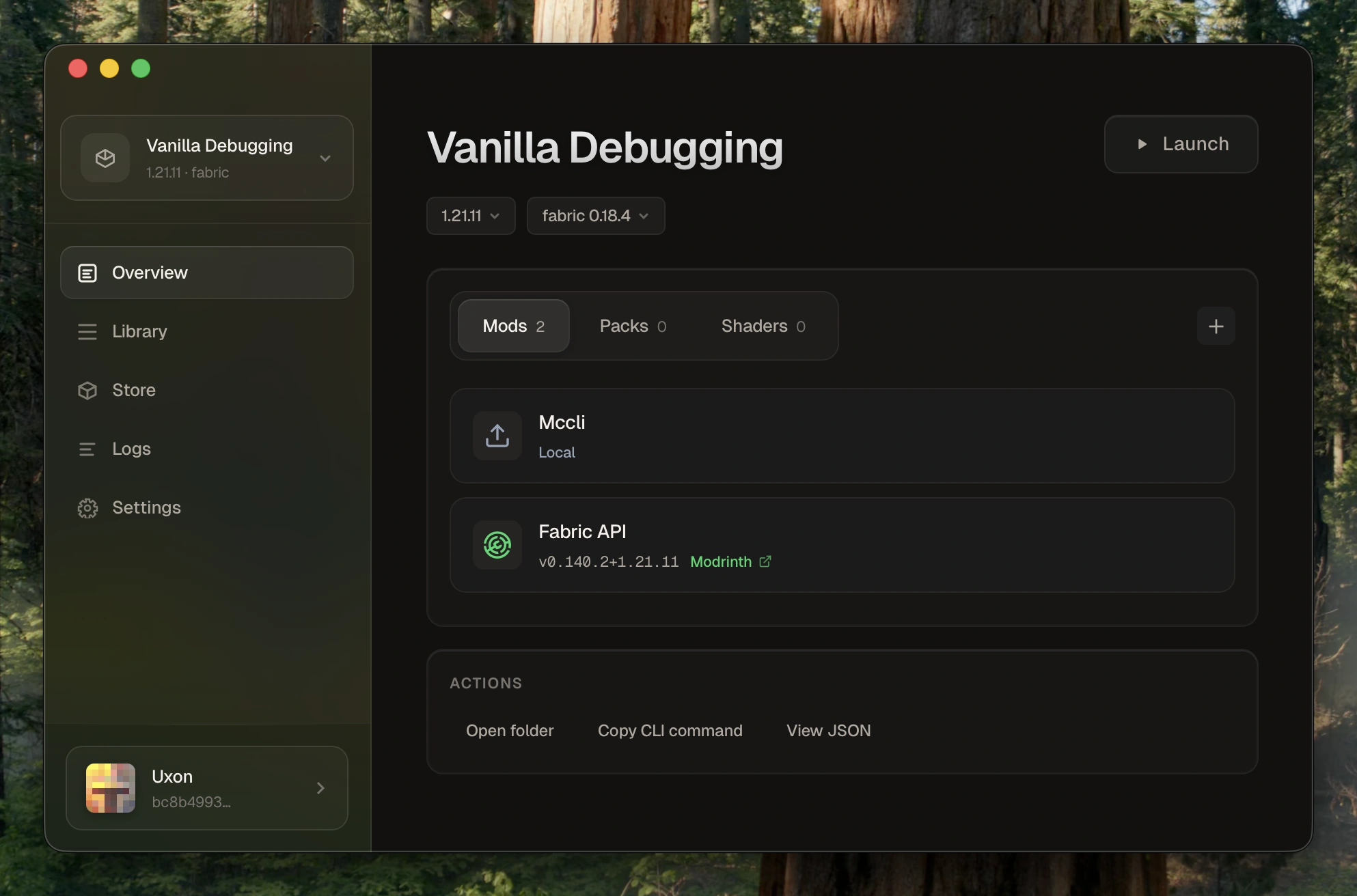
Shard is an open-source Minecraft launcher with a global deduplicated library and declarative profiles (plain JSON). It materializes clean instances from a single source of truth, integrates with Modrinth and CurseForge, and supports scriptable workflows via a CLI, while providing a polished desktop experience. Built in Rust with Tauri for a fast, lightweight app.
Define profiles in plain JSON, install content from Modrinth/CurseForge, and launch clean instances without duplicating the same mods across every pack.
Install the same mod in 10 profiles, it's stored once. Shard uses a SHA-256 content-addressed store, so identical files are never duplicated. No more 50GB of redundant mod copies eating up your drive.
Your entire setup is a single JSON file. Version control it with Git, share it with friends, diff changes between versions, restore it anytime. Profiles are declarative: the launcher materializes clean instances on demand.
Plain JSON on disk. Predictable directory layout. Fully inspectable (no magic sync, no mystery database files, no state you can't see). If something breaks, you can debug it yourself.
A polished desktop UI for everyday play, backed by a serious CLI for scripting. Built in Rust with Tauri for minimal resource usage, responsive behavior, and fast startup.
Inspect every line of code, contribute, or fork. No telemetry, no launcher account required. Your data stays local. Works offline after initial setup.
| Feature | What it means for you |
|---|---|
| Content-Addressed Store | Mods stored once by hash, shared across all profiles |
| Declarative Profiles | JSON manifests you can version control and share |
| Multi-Account | Switch Microsoft accounts instantly with secure token storage |
| Modrinth + CurseForge | Search and install from both platforms in-app |
| All Mod Loaders | Fabric, Forge, Quilt, NeoForge with automatic version resolution |
| CLI + Desktop | Full-featured CLI for automation, polished UI for daily use |
Get the latest release from the download page.
.dmg installer.msi installer.AppImage or .deb packagePrerequisites:
build-essential + GTK/WebKit dev libs (Linux), VS Build Tools (Windows)# Clone and build git clone https://github.com/Th0rgal/shard.git cd shard # CLI only cd launcher && cargo build --release # Binary: target/release/shard # Desktop app cd desktop && bun install && cargo tauri build # Bundle: desktop/src-tauri/target/release/bundle/
# Add your Microsoft account
shard account add

# Create a Fabric 1.21.4 profile
shard profile create my-profile --mc 1.21.4 --loader fabric

# Add a mod from Modrinth
shard mod add my-profile sodium

# Launch
shard launch my-profile
shard list                                    # List all profiles
shard profile create <id> --mc <version>      # Create profile
shard profile create <id> --mc 1.21.4 --loader fabric
shard profile clone <src> <dst>               # Clone profile
shard profile show <id>                       # Show profile details
shard profile diff <a> <b>                    # Compare profiles
shard mod add <profile> <file|url|slug>       # Add mod
shard mod remove <profile> <name|hash>        # Remove mod
shard mod list <profile>                      # List mods

shard resourcepack add <profile> <input>      # Add resourcepack
shard shaderpack add <profile> <input>        # Add shaderpack
shard store search <query>                    # Search Modrinth + CurseForge
shard store search <query> --platform modrinth
shard store info <platform> <project-id>      # Project details
shard store install <profile> <platform> <project-id>
shard account add                             # Add Microsoft account
shard account list                            # List accounts
shard account use <username>                  # Set active account
shard account remove <username>               # Remove account
shard launch <profile>                        # Launch game
shard launch <profile> --account <username>   # Launch with specific account
shard launch <profile> --prepare-only         # Prepare without launching
Shard treats your game setup like code: declarative, reproducible, and efficient.
| Principle | Implementation |
|---|---|
| Single source of truth | Profiles are JSON manifests. Instances are derived artifacts, regenerated on demand. |
| Deduplication | SHA-256 content-addressed store. One file, infinite profiles. |
| No magic | Plain JSON on disk. Predictable layout. Fully inspectable state. |
| Modular | Auth, Minecraft data, and profiles are isolated. Swap or extend without breaking everything. |
| CLI-first | Every feature works from the command line. Script it, automate it, pipe it. |
~/.shard/
├── store/                    # Content-addressed storage
│   ├── mods/sha256/
│   ├── resourcepacks/sha256/
│   └── shaderpacks/sha256/
├── profiles/                 # Profile manifests
│   └── <id>/profile.json
├── instances/                # Materialized game directories
├── minecraft/                # Versions, libraries, assets
├── accounts.json             # Account tokens (keep private)
└── config.json               # Launcher settings
Shard uses Microsoft OAuth for authentication. Set your client credentials via environment or config:
# Environment variables
export SHARD_MS_CLIENT_ID="your-client-id"
export SHARD_MS_CLIENT_SECRET="your-client-secret"  # if required

# Or via CLI
shard config set-client-id <your-client-id>
For CurseForge API access:
export SHARD_CURSEFORGE_API_KEY="your-api-key"
MIT
Built by @Th0rgal
Oraxen •
HackedServer •
AsyncAntiCheat
more like this
XMB for Plasma BigScreen, console-like fullscreen launcher for living room gamepad users
Launcher and management utility for running an Astroneer Dedicated Server on Linux using WINE
search projects, people, and tags