TachiSnap
TachiSnap — Pixel Snapper for animation pixel artists. Rust + WebAssembly client-side tool for cleaning up AI-generated…
HTML★ 50
Inpaint Anything extension performs stable diffusion inpainting on a browser UI using masks from Segment Anything.
 Uminosachi
git clone https://github.com/Uminosachi/sd-webui-inpaint-anything.gitUminosachi/sd-webui-inpaint-anythingInpaint Anything extension performs stable diffusion inpainting on a browser UI using any mask selected from the output of Segment Anything.
Using Segment Anything enables users to specify masks by simply pointing to the desired areas, instead of manually filling them in. This can increase the efficiency and accuracy of the mask creation process, leading to potentially higher-quality inpainting results while saving time and effort.
To install the software, please follow these steps:
Extensions tab on the AUTOMATIC1111's Stable Diffusion Web UI.Install from URL option.https://github.com/Uminosachi/sd-webui-inpaint-anything.git in the URL for extension's git repository field.Install button.--xformers argument to your startup command. For example, run ./webui.sh --xformers or webui.bat --xformersInpaint Anything tab in the Web UI.Download model button, located next to the Segment Anything Model ID. This includes the SAM 2, Segment Anything in High Quality Model ID, Fast Segment Anything, and Faster Segment Anything (MobileSAM).
models directory of this application's repository.Padding options, configuring the scale and balance, and then clicking on the Run Padding button.Anime Style checkbox enhances segmentation mask detection, particularly in anime style images, at the expense of a slight reduction in mask quality.Run Segment Anything button.S key for Fullscreen mode, or the R key to Reset zoom.Create mask button. The mask will appear in the selected mask image area.Expand mask region button: Use this to slightly expand the area of the mask for broader coverage.Trim mask by sketch button: Clicking this will exclude the sketched area from the mask.Add mask by sketch button: Clicking this will add the sketched area to the mask.Run Inpainting button (Please note that it may take some time to download the model for the first time).
Mask area Only option, modifications will be confined to the designated mask area only.Send to txt2img (or img2img).Get prompt from: txt2img (or img2img) button.inpaint (case-insensitive) in its repo_id, will also be added to the Inpainting Model ID dropdown list.
venv/bin/python for Linux and MacOS):venv\Scripts\python.exe
from diffusers import StableDiffusionInpaintPipeline
pipe = StableDiffusionInpaintPipeline.from_pretrained("Uminosachi/dreamshaper_5-inpainting")
exit()
/home/username/.cache/huggingface/hub for Linux and MacOS users, or at C:\Users\username\.cache\huggingface\hub for Windows users.
An error occurred while trying to fetch model name...
Run Cleaner button (Please note that it may take some time to download the model for the first time).inpaint (case-insensitive) in its filename and must be located in the stable-diffusion-webui/models directory.Run ControlNet Inpaint button to start the process.
extensions/sd-webui-controlnet/models directory, and the ControlNet version is updated.inpaint_only preprocessor and the ControlNet inpaint model.extensions/sd-webui-controlnet/models directory.Inpaint upload with any model/extensions/tools you already have in your AUTOMATIC1111.Get mask as alpha of image button: Save the mask as RGBA image, with the mask put into the alpha channel of the input image.Get mask button: Save the mask as RGB image.Get mask button press you can use Send to img2img inpaint button under the mask image to send both input image and mask to the img2img tab.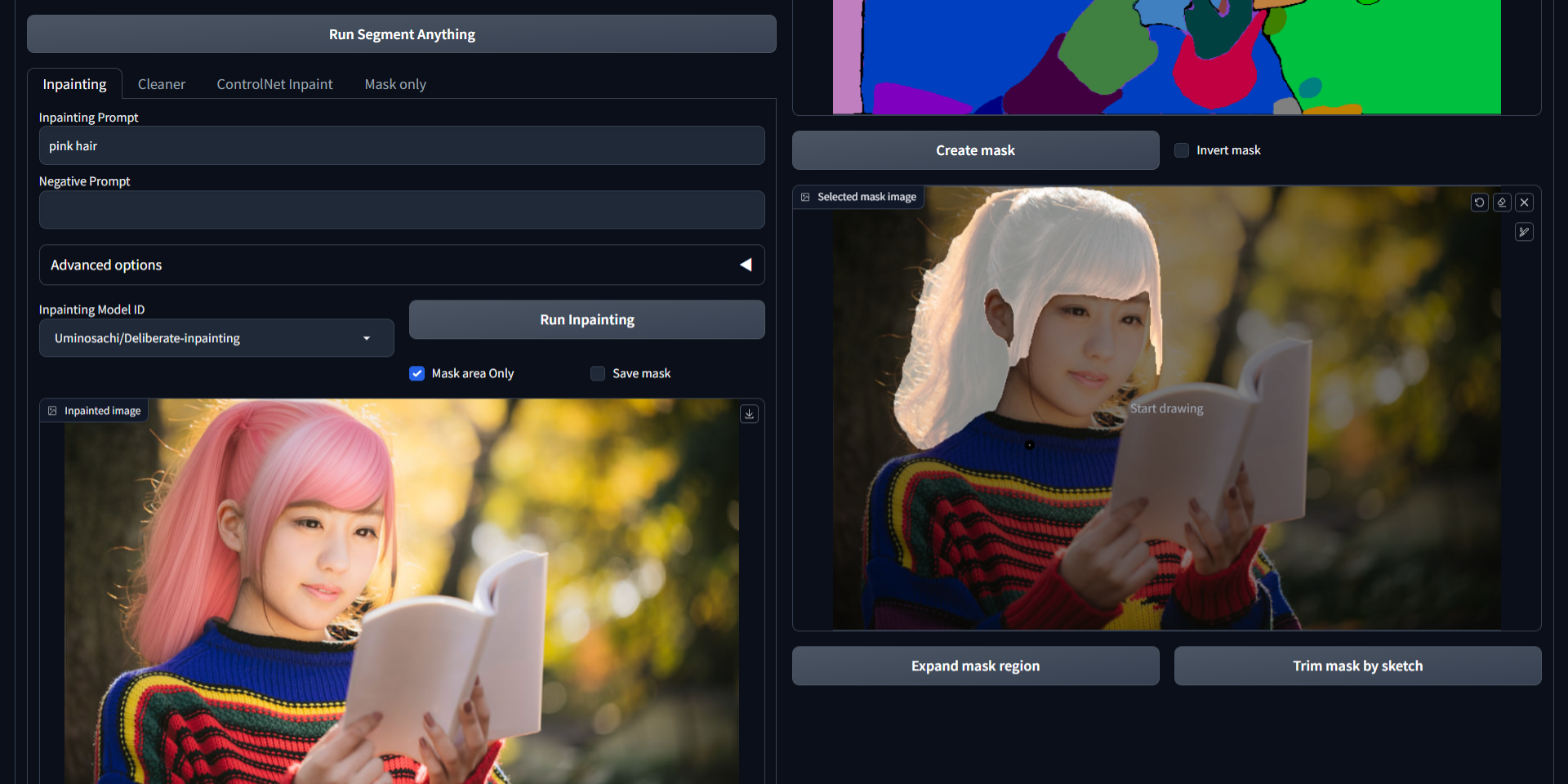
outputs/inpaint-anything directory.outputs/img2img-images directory via the Inpaint Anything section found in the Settings tab on the Web UI.With the Inpaint Anything library, you can perform segmentation and create masks using sketches from other extensions.
The source code is licensed under the Apache 2.0 license.
more like this
TachiSnap — Pixel Snapper for animation pixel artists. Rust + WebAssembly client-side tool for cleaning up AI-generated…
A web app that dynamically generates playable 'Spot the Difference' games from a single text prompt using a multimodal…
Quickly and easily perform downscaling, color palette limiting, and other useful pixel art effects through the extras t…
search projects, people, and tags