godot-FLMusicLib
GDNative library that plays mp3, chiptune and tracker music files using Game Music Emu, Minimp3 and openmpt
C★ 53
BZR Player is an audio player for Windows and Linux supporting a wide array of multi-platform exotic file formats
 aargirakis
Audio player for Windows and Linux supporting a wide array of multi-platform exotic file
formats, written in C++ and Qt with a sound engine based on FMOD.
The first BZR version was released in 2008, the last 1.x in 2019: this is the beginning of the new 2.x version which is
coded pretty much from scratch.
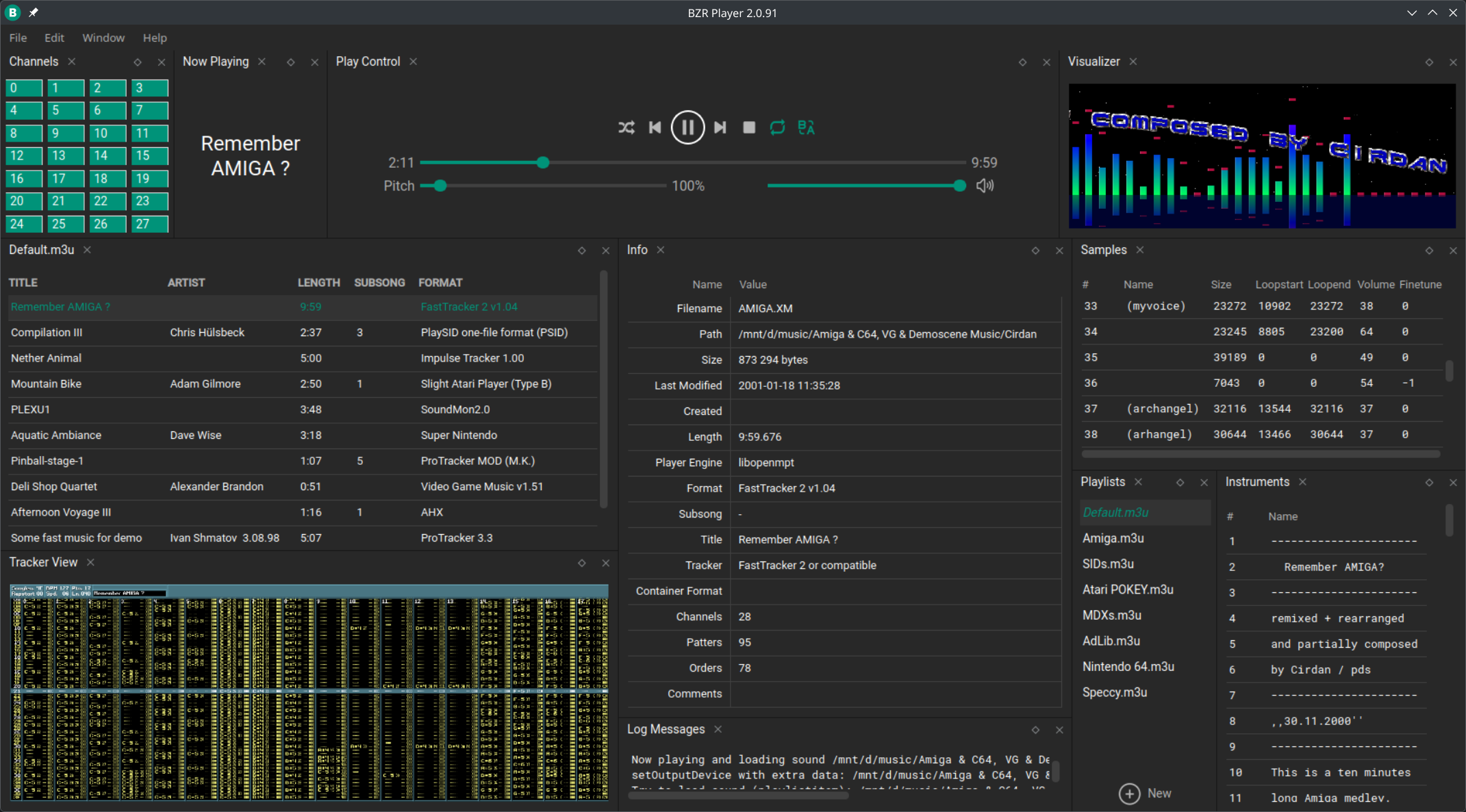
BZR2 is designed with a modular plugin system to support multiple third party audio playback libraries:
In addition to these FMOD itself is used to provide support for both MIDI and network streams playback
Here you can find an (incomplete) list of supported formats samples grouped by plugin
bzr-playerMSYS2 with following packages is required:
base-devel mingw-w64-ucrt-x86_64-cmake mingw-w64-ucrt-x86_64-qt6-base mingw-w64-ucrt-x86_64-qt6-svg
mingw-w64-ucrt-x86_64-qt-advanced-docking-system mingw-w64-ucrt-x86_64-SDL2 mingw-w64-ucrt-x86_64-toolchain
openssl-devel
From the MSYS2 ucrt64.exe command prompt go to the project sources dir (keep in mind Unix-style paths are
required), then start the configuration process executing:
cmake -B cmake-build -S . -DCMAKE_PREFIX_PATH=/ucrt64 -DCMAKE_BUILD_TYPE=[Debug|Release] -G Ninja
To build the project execute:
ninja -C cmake-build
As result of the building process, in the chosen CMake build directory the output directory will be populated with
binaries.
If the Release build type is selected, along with output also output_release directory will be created,
containing the final archive release file
cd /c/BZRPlayer
cmake -B cmake-build -S . -DCMAKE_PREFIX_PATH=/ucrt64 -DCMAKE_BUILD_TYPE=Release -G Ninja &&
ninja -C cmake-build
These are the settings for any IDE that supports CMake:
set the toolchain to <MSYS2_dir>\ucrt64
(e.g. C:\msys64\ucrt64)
set the CMake command with following flags:
-DCMAKE_PREFIX_PATH="<MSYS2_dir>/ucrt64" -G Ninja
(e.g. -DCMAKE_PREFIX_PATH="c:/msys64/ucrt64" -G Ninja)
set additional environment variables MSYSTEM=UCRT64 and PATH=<MSYS2_dir>/usr/bin
(e.g. MSYSTEM=UCRT64;PATH=c:/msys64/usr/bin)
set the CMake application runner to build All targets with app as executable
(optional) set CMake executable to <MSYS2_dir>\ucrt64\bin\cmake.exe
(e.g. C:\msys64\ucrt64\bin\cmake.exe)
The BZR2 installer for Windows, which is scripted in Nullsoft Scriptable Install System (NSIS), can be only compiled using WSL2 or cross-compiled on Linux, since contains Linux specific code (mostly the bash script for the XDG MIME types handling), also MSYS2 is currently not viable since the required NSIS plugins are still missing.
NSIS (3.10 or newer) with following plugins (check AUR entries) is required:
nsis-accesscontrol-binnsis-nsarray-binnsis-nsprocess-binnsis-registry-binIn order to build the Windows installer put the target binaries in src/inst/nsis/bin then enter src/inst/nsis
directory and execute: makensis -DVERSION="<any_version>" bzr2_setup.nsi
As result of the building process bzr-player-<any_version>-win64.exe will be generated in the same directory.
In order to build BZR2 following packages are required:
On Arch-based distros:
base-devel cmake dos2unix libglvnd ninja patchutils qt6-base qt-advanced-docking-system
qt6-declarative qt6-svg sdl2-compat vulkan-headers
On Debian-based distros:
build-essential cmake dos2unix libglvnd0 libsdl2-dev libvulkan-dev ninja-build patchutils
qt6-base-dev qt6-base-private-dev qt6-declarative-dev qt6-svg-dev
libqt-advanced-docking-system-dev]
(libqt-advanced-docking-system-dev4
for Ubuntu 24.04 and equivalent)
On Fedora-based distros:
@c-development @development-tools cmake dos2unix ninja-build qt6-qtbase-devel qt6-qtsvg-devel
Qt-Advanced-Docking-System-devel sdl2-compat-devel vulkan-headers which
Go to the project sources dir then start the configuration process executing:
cmake -B cmake-build -S . -DCMAKE_PREFIX_PATH=/usr -DCMAKE_BUILD_TYPE=[Debug|Release] -G Ninja
To build the project execute:
ninja -C cmake-build
cd ~/bzr-player &&
cmake -B cmake-build -S . -DCMAKE_PREFIX_PATH=/usr -DCMAKE_BUILD_TYPE=Debug -G Ninja &&
ninja -C cmake-build
For running BZR2 following packages are required:
On Arch-based distros:
qt6-base qt6-svg qt-advanced-docking-system
On Debian-based distros:
libqt6core6 libqt6network6 libqt6openglwidgets6 libqt6svg6 libqt6xml6
libqt-advanced-docking-system4
(libqt-advanced-docking-system4
for Ubuntu 24.04 and equivalent)
On Fedora-based distros:
qt6-qtbase qt6-qtsvg Qt-Advanced-Docking-System
On Linux, as result of the building process, in the chosen CMake build directory the output directory will be
populated with binaries.
If the Debug build type is selected BZR2 will use development paths instead of system ones: this means all paths
will refer to the output directory (including the user settings and the executable's RPATH) ensuring a complete
isolation from any other (real) BZR2 installation (ideal for development purposes).
If Release build type is selected then the system paths will be used (this also means generated binaries will work
only if they are installed in the correct system paths)
By default, the CMake configuration stage will download all needed libraries and files. Add -DOFFLINE_MODE=1 to CMake
command for switching to offline mode.
Offline mode doesn't guarantee that the build will include the latest versions of the files with unmanaged version
You can find us on Discord for feedback and discussion
more like this
GDNative library that plays mp3, chiptune and tracker music files using Game Music Emu, Minimp3 and openmpt
Oscillody is a free, real-time, oscilloscope-based audio visualizer. You can import up to 4 stems, customize the visual…
search projects, people, and tags