 aaronjanse
AsciiDots - Esoteric Language
An esolang inspired by ascii art
                   _ _ _____        _
    /\            (_|_)  __ \      | |
   /  \   ___  ___ _ _| |  | | ___ | |_ ___
  / /\ \ / __|/ __| | | |  | |/ _ \| __/ __|
 / ____ \\__ \ (__| | | |__| | (_) | |_\__ \
/_/    \_\___/\___|_|_|_____/ \___/ \__|___/
Featured on Hacker News, Motherboard (slashdot comments), and i-programmer.
AsciiDots is an esoteric programming language based on ascii art. In this language, dots, represented by periods (.), travel down ascii art paths and undergo operations.
See its documentation and online demo to learn more.
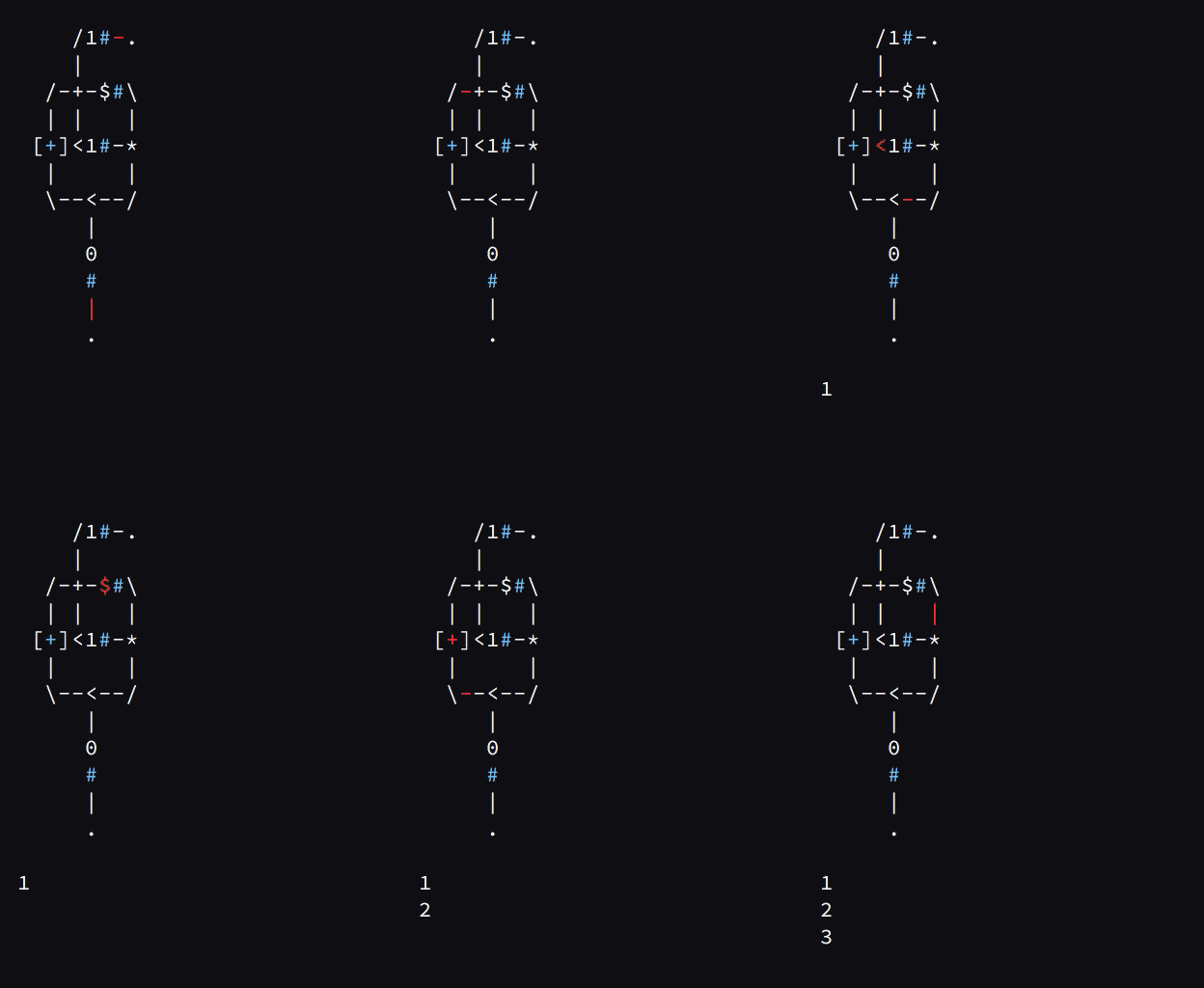
Table of Contents
Samples
Hello world:
.-$"Hello, World!"
($'.-#40-$_a#-#36-$_a#-#39-$_a#)
Counter:
     /1#-.
     |
   /-+-$#\
   | |   |
  [+]<1#-*
   |     |
   \--<--/
      |
      0
      #
      |
      .
Semi-compact factorial calculator:
 /---------*--~-$#-&
 | /--;---\| [!]-\
 | *------++--*#1/
 | | /1#\ ||
[*]*{-}-*~<+*?#-.
 *-------+-</
 \-#0----/
Code-golfed counter (15 bytes) by @ddorn:
/.*$#-\
\{+}1#/
Installing
Note
The easiest way to try asciidots is through its online demo or Try it Online (tio.run)
Using pip:
pip install asciidots
Using Docker Hub:
Run sample program from this repo:
docker run -ti --rm aaronduino/asciidots samples/hello_world.dots
Run local file test.dots:
docker run -ti --rm -v $PWD:/data aaronduino/asciidots /data/test.dots
From source:
git clone https://github.com/aaronjanse/asciidots
pip install -r requirements.txt
# and only if on windows:
python -m pip install windows-curses
Run it from source using:
python __main__.py [arguments]
or alias it to asciidots using:
# on Ubuntu, replace `.bash_profile` with `.bashrc`
echo "alias asciidots='python $(pwd)/__main__.py'" >> ~/.bash_profile
source ~/.bash_profile
Using the Interpreter
The interpreter for this language is the __main__.py file. It can be run from the terminal using the python command. The first argument is the dots file that you wish the interpreter to run.
Here's an example of running the counter sample program (the working directory is the dots repo folder):
$ asciidots ./samples/counter.dots
Here is the list of available flags:
-t [ticks]        Run the program for a specified number of ticks (Default to 0: no limit)

-o [output-limit] Run the program for a specified number of outputs (Default to 0: no limit)

-s                Run without printing ANYTHING to the console. Useful for benchmarking

-d                Run the program in debug mode. It shows the program and highlights the dots with red. Press enter to step the program once.

Some extra flags when debugging:
-a [delay]        Step the program automatically, using the specified delay in seconds. Decimal numbers are permitted, and so is 0.

-w                Run the program without using ncurses. This can fix problems related to Windows.

-l [line-count]   When not in compatibility mode, reserve the specified number of the lines for displaying the program
This is how one might debug the program found at samples/counter.dots for 300 ticks, while running it automatically with a delay of 0.05 seconds per tick:
$ asciidots samples/counter.dots -t 300 -d -a 0.05
More Examples
Hello, World!
.-$"Hello, World!"
Test if two input values are equal:
       /-$"Equal"
       |
.-#?-*-~-$"Not equal"
     | |
     \[=]
       |
       ?
       #
       |
       .
Counter:
     /1#-.
     |
   /-+-$#\
   | |   |
  [+]<1#-*
   |     |
   \--<--/
      |
      0
      #
      |
      .
Fibonacci Sequence Calculator:
/--#$--\
|      |
>-*>{+}/
| \+-/
1  |
#  1
|  #
|  |
.  .
Find prime numbers:
%$T

        .
        |
        #
        3
        |
        @
        1
        |
/--*--*-<--\
|  |  |   /+----\
|  #  |   v+-0@-~-\
|  2  | /->~*{%}/ |
|  |  | 1  |\-+---/
|  |  | @  ^\ |
\-{+}-+-*  01 |
      | |  ## |
      | v--*+-/
      | |  ||
    /-* |  *+--\
    | T |  ||  |
    # $ # /~/  |
    0 # 1 */   |
    | | | |    |
    \->-+-~----<-#$-2#-.
        \-/


 /--------\
 T        |
 *--------~
 |        |
 \-*----@[=]
   |      |
   \--#1--/
And a game!
/-""$-.
|
\--$"Pick a number between 1 and 255 (inclusive)"\
/------------------------------------------------/
\--$"I will correctly guess that number after no more than 8 tries"\
/---------------------------------------------------------------""$/
\--$"After each of my guesses, respond with: "\
/---------------------------------------------/
\--$"     '2' if I guess too high,"\
/----------------------------------/
\--$"     '1' if I guess too low,"\
/---------------------------------/
\--$"  or '0' if I guess correctly"\
/----------------------------------/
|
|                             /->-\
|         /--------------\ /-[-]| |
#         |           /#1\-~--+[+]|
6         |          /*-{-}*  | | |
4  /2#\   |     /----~-----+--+-+-+-#7-$a_#-$"I won! Good game!"-&
|/{/}-*---*     *----/     |/-~-/ |
||    |/--+-----+------\   \+-/   |
\>----~#  #     \-?#-*-+----/     |
      |1  1  /$""-$#-/ |          |
      \/  |  ~---------*----------<-821#-.
          \--/
This work is licensed under a Creative Commons Attribution-ShareAlike 4.0 International License.
more like this