svelte-audio-waveform
Generate stunning audio waveforms with Svelte 5 and Canvas. Transform an array of peak data into beautifully rendered,…
Svelte★ 51
Realtime audio analysis in Python to extract audio features from streaming audio and send them over OSC to any client a…
 aiXander
git clone https://github.com/aiXander/Realtime_PyAudio_FFT.gitaiXander/Realtime_PyAudio_FFTA low-latency localhost server that captures live audio (microphone, line-in, soundcard, or loopback device) and streams perceptually-tuned audio features to any app that wants to react to sound — VJ tools, game engines, creative coding sketches, custom scripts.
It computes:
[0, 1] signal.low / mid / high signals (so
every UI knob that shapes a band's visible track also tunes its detector —
there's no second pipeline to dial in). Emits clean rising-edge
/audio/onset/{low,mid,high} events per detected transient, each with its
own per-band sensitivity / refractory / transient-τ tuning so kicks, snares,
and hats can be triggered independently. The low stream also feeds a
slowly-smoothed /audio/bpm octave-folded into [60, 180].These features are published to:
End-to-end input-to-OSC latency target: 8–15 ms. The PortAudio callback is allocation-free and runs zero DSP — every filter, FFT, and smoother runs in worker threads using vectorized NumPy / SciPy paths that drop into optimized C, so the realtime path stays fast, even under load. The server runs on a Raspberry Pi without a sweat.
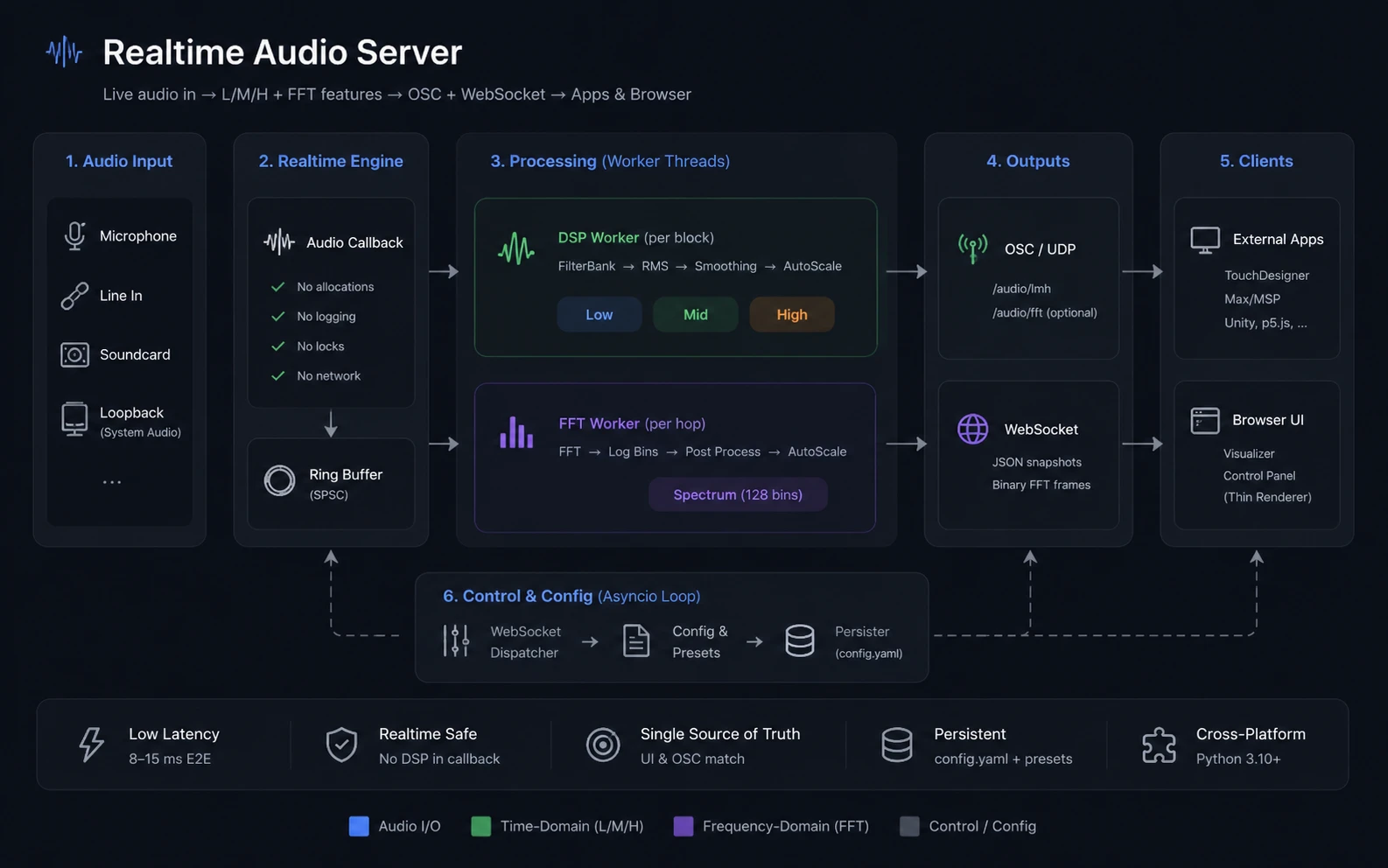
The browser is a thin renderer. All signal processing — smoothing, peak normalization, gating, tanh compression, strength blending, spatial peak smearing — happens server-side, in the same code path that feeds OSC. What you see in the FFT graph is byte-identical to the
/audio/fftOSC payload, so you can tune every knob from the UI and trust the picture matches what downstream apps receive.
The browser UI also sends control messages back (toggle FFT, change band
crossovers, switch input device, change smoothing, save/load presets). All
settings persist to configs/main.yaml, so the server boots back into the
last-used state.
See realtime_audio_server_plan.md for the full design spec.
Requires Python 3.10+ and PortAudio.
1. Install PortAudio
# macOS
brew install portaudio

# Ubuntu / Debian
sudo apt install libportaudio2 portaudio19-dev
2. Install the server (from the repo root)
Uses minimal dependencies, should be safe to install anywhere.
pip install -e ".[dev]"
audio-server                    # reads ./configs/main.yaml, opens WS on 8765, UI on 8766
audio-server --open             # also opens the UI in your default browser
audio-server --no-ws            # headless OSC-only mode
audio-server --config /path/to/cfg.yaml --log-level DEBUG
Equivalent to python -m server.main.
The browser UI is available at http://127.0.0.1:8766 once the server
is running. Don't open ui/index.html directly with file:// — ES modules
won't load.
This server is designed to be a feature provider for other projects. There are two integration paths, and they can be used together:
| Path | Direction | Best for |
|---|---|---|
| OSC / UDP | server → clients | Lowest latency, every audio block. TouchDesigner, Max/MSP, Unity, p5.js, custom receivers. |
| WebSocket | full-duplex | Runtime control (toggle FFT, switch device, retune bands, save/load presets) and richer feature payloads. |
The server can run with both enabled (default), or in OSC-only headless
mode (--no-ws).
OSC is sent to every destination listed under osc.destinations in
configs/main.yaml. Default is 127.0.0.1:9000. Add more (or change the
port) by editing the YAML and restarting:
osc:
  destinations:
    - { host: 127.0.0.1, port: 9000 }
    - { host: 192.168.1.42, port: 7000 }
  send_fft: false              # set true to also stream /audio/fft
| Address | Args | Rate | Notes |
|---|---|---|---|
/audio/meta |
sr:i blocksize:i n_fft_bins:i low_lo:f low_hi:f mid_lo:f mid_hi:f high_lo:f high_hi:f |
Once at startup, again on device/FFT/cutoff change | Three independent bandpass edges (Hz). Use this to size your spectrum buffer and learn the actual sample rate the device opened at. |
/audio/lmh |
low:f mid:f high:f |
Every audio block (~187 Hz @ 48k/256) | Auto-scaled to ~[0, 1] (peak follower + soft noise gate + tanh). These are the values VJ tools want. |
/audio/onset/low/audio/onset/mid/audio/onset/high |
1:i |
One message per detected onset on that band | Rising-edge trigger only — no 0s are sent. Each band has its own sensitivity / refractory_s / slow_tau_s so kicks / snares / hats can be triggered independently. Refractory clamps each stream to its own ceiling (default 250 / 180 / 120 ms → ~240 / 333 / 500 onsets/sec). Detection runs on the post-processed band signal — retune by tuning the band until it pulses cleanly on the transients of interest. |
/audio/bpm |
bpm:f |
Every audio block (~187 Hz @ 48k/256) | Slowly-smoothed estimate derived from the low onset stream (only kick/sub-band events are tempo-shaped), octave-folded into [60, 180]. 0.0 while the tracker hasn't locked yet, or after > 5 s of silence (so a stale tempo doesn't bleed into the gap before the next song). |
/audio/fft |
bin_0:f bin_1:f … bin_{N-1}:f |
Every FFT hop (~94 Hz @ hop=512/48k) | Only sent when both fft.enabled: true and osc.send_fft: true. Default: post-processed [0, 1] (per-bin port of the L/M/H pipeline — same VJ-friendly semantics). Set fft.send_raw_db: true to ship raw dB instead. |
All floats are 32-bit. OSC addresses are flat (no nesting).
from pythonosc import dispatcher, osc_server

def lmh(_, low, mid, high):
    print(f"L={low:.2f} M={mid:.2f} H={high:.2f}")

def meta(_, sr, blocksize, n_fft_bins, low_lo, low_hi, mid_lo, mid_hi, high_lo, high_hi):
    print(f"sr={sr} bs={blocksize} fft_bins={n_fft_bins} "
          f"bands=[{low_lo}-{low_hi}] [{mid_lo}-{mid_hi}] [{high_lo}-{high_hi}]")

d = dispatcher.Dispatcher()
d.map("/audio/lmh", lmh)
d.map("/audio/meta", meta)
d.map("/audio/onset/low",  lambda _addr, _one: print("ONSET low"))
d.map("/audio/onset/mid",  lambda _addr, _one: print("ONSET mid"))
d.map("/audio/onset/high", lambda _addr, _one: print("ONSET high"))
d.map("/audio/bpm", lambda _addr, bpm: None)
d.map("/audio/fft", lambda _addr, *bins: None)   # n_fft_bins floats

osc_server.BlockingOSCUDPServer(("127.0.0.1", 9000), d).serve_forever()
TouchDesigner / Max: point an OSC In CHOP / udpreceive at port 9000.
Each /audio/lmh message arrives as three channels.
~[0, 1]. Pre-autoscale
(raw smoothed RMS) is only available over WebSocket
(low_raw / mid_raw / high_raw in the snapshot message). A
/audio/lmh_raw channel is on the v1.1 list.[0, 1] floats — same
per-bin auto-scaler pipeline used for L/M/H, just per FFT bin instead of
per band. So the FFT and L/M/H feeds share the same scale and gate
semantics out of the box. To get the raw dB log spectrum instead (e.g.
for a meter or analyzer), flip fft.send_raw_db: true in
configs/main.yaml (or send set_fft_send_raw_db over WS, or toggle the
"raw dB" checkbox in the UI). The same flag controls the WS binary
frame's contents, so the UI viz always matches what's on the OSC wire.fft.enabled (turns the worker
on) and osc.send_fft (decides whether to ship FFT bins to OSC consumers
in addition to the WS client). You can have FFT enabled for the browser
but skipped on OSC if you don't need it there.Connect to ws://127.0.0.1:8765. The server speaks JSON in both directions,
plus binary frames for FFT data. One WebSocket carries control messages
and data; multiple clients can connect simultaneously.
Text frames, JSON-encoded. type discriminates the message:
type |
Payload (key fields) | When |
|---|---|---|
meta |
sr, blocksize, n_fft_bins, bands{low,mid,high → {lo_hz, hi_hz}}, fft_enabled, fft_db_floor, fft_db_ceiling, fft_f_min, fft_send_raw_db, fft_peak_smear_oct, tau{low,mid,high}, autoscale{tau_attack_s, tau_release_s, noise_floor, strength}, onset{low,mid,high → {sensitivity, refractory_s, slow_tau_s}}, ws_snapshot_hz, device{index, name} |
On connect; re-broadcast after any successful state mutation. Treat this as the source of truth for current settings — the UI reflects every checkbox/slider from the next meta instead of trusting local state. |
snapshot |
seq, low, mid, high, low_raw, mid_raw, high_raw, low_onset, mid_onset, high_onset, bpm, t |
At ws_snapshot_hz (default 60 Hz). low/mid/high are auto-scaled ~[0, 1]; *_raw are pre-autoscale smoothed RMS. low_onset / mid_onset / high_onset ∈ {0, 1} are set on the snapshot following an onset on the matching band (the broadcaster compares per-band monotonic onset counters, so onsets can't fall between WS ticks even when block rate > snapshot rate); bpm is the slowly-smoothed tempo derived from the low-band onset stream, 0 when not yet locked or after > 5 s of silence. |
| (binary) | [type=1:u8][reserved:u8][n_bins:u16 LE][float32 × n_bins LE] |
At FFT hop rate (~94 Hz) when FFT enabled. Binary frame, not JSON. Float interpretation depends on meta.fft_send_raw_db: false (default) → post-processed [0, 1]; true → raw wire dB with -1000 sentinels for empty log bins. The same bytes are what /audio/fft sends on OSC. |
devices |
items: [{index, name, hostapi, default_samplerate, max_input_channels, probed_signal?, probed_at?}] |
On connect, and in reply to list_devices. |
presets |
items: [{name, saved_at}] |
On connect, after save_preset, in reply to list_presets. |
server_status |
cb_overruns, dsp_drops, fft_drops, perf{cb, dsp, fft, ws → {avg_ms, p95_ms, load_pct}, block_period_ms, hop_period_ms, ws_period_ms} |
At 2 Hz. Diagnostics — you usually don't need it. |
error |
reason: string |
In reply to a malformed/invalid inbound message. The server state is unchanged. |
Text frames, JSON. Validation runs before any mutation; on failure you get
an error reply and state is unchanged.
type |
Required fields | Notes |
|---|---|---|
set_fft |
enabled: bool |
Turn the FFT worker on/off. Persisted immediately. |
set_band |
band: "low" | "mid" | "high", lo_hz: number, hi_hz: number, commit?: bool |
Updates one of the three bandpasses. Range per band: lo_hz ≥ 20, hi_hz > lo_hz + 50, hi_hz ≤ 0.45·sr. Bands may overlap. Server-side debounce 50 ms. |
set_smoothing |
tau: {low?: number, mid?: number, high?: number}, commit?: bool |
Each τ in [0.005, 2.0] seconds. Only present bands are mutated. Drives BOTH the L/M/H smoother AND the per-bin FFT smoother (taus interpolated piecewise-linearly in log-frequency from the L/M/H band geometric centers). |
set_autoscale |
tau_attack_s?: number, tau_release_s?: number, noise_floor?: number, strength?: number, commit?: bool |
tau_attack_s ∈ [0.001, 1] s (peak follower attack, default 0.05). tau_release_s ∈ [5, 300] s (release / "rolling window"). noise_floor ∈ [0, 0.1] linear RMS. strength ∈ [0, 1] (1 = fully auto-scaled, 0 = raw). Any subset; missing fields stay unchanged. Drives BOTH the L/M/H AutoScaler and the FFT per-bin FFTPostProcessor. |
set_fft_send_raw_db |
send_raw_db: bool |
Selects the FFT stream sent to OSC AND WS. false (default): post-processed [0, 1]. true: raw wire dB. The UI reflects this from the next meta and the FFT viz switches its y-axis (dB ↔ scaled) accordingly. |
set_fft_peak_smear |
peak_smear_oct: number, commit?: bool |
peak_smear_oct ∈ [0, 3] octaves. Gaussian smear of the per-bin peak follower across the spectrum. 0 = each bin self-normalizes (single-frequency tones over-attenuate); higher = peaks are shared across log-frequency neighborhood so a tone still reads taller than its spectral context. Reflect-padded edges. FFT-only — L/M/H has no spectral neighborhood. |
set_onset |
band: "low" | "mid" | "high", sensitivity?: number, refractory_s?: number, slow_tau_s?: number, abs_floor?: number, commit?: bool |
Tunes one band's onset detector. sensitivity > 1.0 (Schmitt high-threshold multiplier on that band's adaptive novelty floor — higher = stricter). refractory_s > 0 (minimum inter-onset interval; e.g. 0.25 s ≈ 240 onsets/sec ceiling). slow_tau_s > 0 (slow envelope tau — what counts as a "transient" at that band's rate). abs_floor >= 0 (absolute floor on the trigger threshold: high threshold = max(sensitivity × adaptive_avg, abs_floor) — the dominant gate when adaptive novelty collapses during quiet/ambient passages; default 0.10 on the ~[0, 1] band signal). band is required; at least one param field is required. Setters are atomic single-element writes the worker re-reads on its next iteration; no audio glitch. |
list_devices |
probe?: bool |
Returns a devices message. With probe: true the server briefly opens each device and reports which produced signal. |
set_device |
index: int |
Hot-switches the input device. Stream is torn down + rebuilt; sample rate may change; filters/FFT/autoscaler re-init. |
set_n_fft_bins |
n: int |
Range [8, 1024]. Rebuilds the log-bin map atomically. |
set_ws_snapshot_hz |
hz: number, commit?: bool |
Range [15, 240]. Affects WS L/M/H rate only — OSC stays at full block rate, FFT WS frames stay on the FFT worker's clock. |
list_presets |
— | Returns a presets message. |
save_preset |
name: string |
Name 1–64 chars, [A-Za-z0-9_\- ] only. Snapshots DSP / autoscale / FFT view into <config_dir>/preset-<name>.yaml. |
load_preset |
name: string |
Validates each field, applies via the same handlers a slider would, then persists the resulting state to configs/main.yaml. |
Drag-aware persistence. Sliders should send
commit: falsewhile dragging andcommit: trueon release. The audio mutation is applied immediately either way; only the YAML write is debounced (1 s during drag, 50 ms on commit, capped at 250 ms wall-clock from the first dirty change).
const ws = new WebSocket("ws://127.0.0.1:8765");
ws.binaryType = "arraybuffer";

ws.addEventListener("message", (ev) => {
  if (typeof ev.data === "string") {
    const msg = JSON.parse(ev.data);
    if (msg.type === "snapshot") {
      // msg.low / msg.mid / msg.high in ~[0, 1]
    } else if (msg.type === "meta") {
      // current server settings
    }
  } else {
    // binary FFT frame
    const view = new DataView(ev.data);
    const nBins = view.getUint16(2, /*LE*/ true);
    // Values are post-processed [0, 1] by default, or raw wire dB if
    // meta.fft_send_raw_db is true. Check the most recent meta to decide.
    const bins = new Float32Array(ev.data, 4, nBins);
  }
});

ws.addEventListener("open", () => {
  ws.send(JSON.stringify({ type: "set_fft", enabled: true }));
  ws.send(JSON.stringify({ type: "set_band", band: "mid", lo_hz: 200, hi_hz: 4000, commit: true }));
});
import asyncio, json, struct
import websockets

async def main():
    async with websockets.connect("ws://127.0.0.1:8765") as ws:
        await ws.send(json.dumps({"type": "set_fft", "enabled": True}))
        async for frame in ws:
            if isinstance(frame, str):
                msg = json.loads(frame)
                if msg["type"] == "snapshot":
                    print(msg["low"], msg["mid"], msg["high"])
            else:
                _t, _r, n = struct.unpack_from("<BBH", frame, 0)
                # bins = struct.unpack_from(f"<{n}f", frame, 4)

asyncio.run(main())
The L/M/H pipeline (per-band IIR bandpass → RMS → smoother → auto-scaler) and the FFT post-processor share the same control knobs:
set_smoothing drives both the L/M/H exponential smoother AND the
FFT per-bin smoother. The FFT bin τ is piecewise-linearly interpolated
in log-frequency from the L/M/H band geometric-mean centers (so dragging
the "low" τ lazes out the bass FFT bins, the "mid" τ the midrange bins,
etc.).set_autoscale drives both the L/M/H AutoScaler and the FFT
per-bin peak follower (same attack/release/floor/strength).set_band moves the IIR bandpass edges AND re-anchors the FFT
smoothing-τ interpolation onto the new band centers AND retunes the
L/M/H bandwidth-aware noise gate (see below).So the FFT visualizer is more than a spectrum — it's a continuous, high-resolution preview of what every L/M/H knob is doing. Tune until the FFT viz looks the way you want, and the L/M/H output going to OSC will follow the same response shape.
The FFT viz gates per-bin (bins below noise_floor go to 0). L/M/H, by
contrast, integrates total power across the band — so without correction,
widening a band would integrate more sub-floor noise and make L/M/H read
higher even when the FFT viz looks empty in that range. To keep
noise_floor coherent across both, the L/M/H AutoScaler subtracts a
per-band noise budget before its gate:
clean_rms² = max(0, rms² − noise_floor² · n_bins_eff)
where n_bins_eff = max(1, K_lin / N_log) is the average count of linear
rfft bins per FFT-viz log bin in that band — i.e. one log bin's worth of
floor noise. This is exactly the threshold the FFT viz's per-bin gate
uses, so any single log bin visible on the FFT contributes ≥ this much to
integrated band power and survives. (Subtracting the full
K_lin · noise_floor² instead — the broadband-at-floor budget — would
over-penalize narrowband content in wide bands by ~N_log and kill snare
hits that show clearly on the FFT spectrum.) Tuning noise_floor against
the FFT viz now gates the L/M/H consistently with what you see.
(Recomputed automatically when bands, the noise floor, the FFT geometry —
n_bins, f_min, window_size — or sample rate change.)
strength<1) reads the same dB as the FFT vizWith strength=0 the L/M/H output is an "honest dB readout" of the band
content. To make this read the same as the FFT viz over the same frequency
range, the baseline is computed two ways that mirror the FFT
post-processor: it's untilted (the auto-scaler's spectral tilt is for
normalization, not honest dB) and expressed as per-rfft-bin equivalent
amplitude (rms_band / sqrt(K_lin)). The latter cancels the bandwidth
integration — without it, the high band would inflate by ~+24 dB vs an FFT
log bin in the same range. Result: in silence, both views agree
(low-frequency room rumble shows on L and the low FFT bins; quiet
mid/high shows zero in both). The auto-scaled path (strength=1, default
for VJ tools) still uses tilted RMS internally — that's how the
auto-scaler equalizes spectral response.
These two knobs have no L/M/H equivalent:
fft.send_raw_db — selects the wire format. false (default):
post-processed [0, 1]. true: raw dB log spectrum. Toggling switches
both the OSC payload and the UI viz simultaneously.fft.peak_smear_oct — Gaussian smear (in octaves) of the per-bin
peak follower. Without it, a sustained single-frequency tone drives
its bin's peak high enough to fully self-normalize, so the tone bin
reads smaller than its quiet neighbors. Smearing the peak across
log-frequency neighbors keeps the local frequency contour intact while
still flattening the long-term spectral envelope. No L/M/H equivalent
because L/M/H has no spectral neighborhood.Three equivalent ways, depending on what you have:
{"type": "set_fft", "enabled": true}.configs/main.yaml: set fft.enabled: true and restart the
server. (Live edits to configs/main.yaml are not picked up — the
server writes the file but does not watch it.)osc.send_fft: true in
configs/main.yaml, otherwise FFT bins won't be sent over OSC even when
the worker is on.Either set it in configs/main.yaml:
audio:
  device: { name: "BlackHole 2ch", index: 3 }   # name preferred, index advisory
…or pass --device <index> on startup, or send
{"type": "set_device", "index": N} over WS at runtime. To enumerate, send
{"type": "list_devices", "probe": true} and read the devices reply.
For multichannel pro interfaces / aggregate devices where channel 0/1 isn't
the stereo pair you want, use sounddevice's device mapping rather than
relying on the auto stereo mono-mix.
If you don't need the browser UI or runtime control (eg running on a raspberry Pi in performance mode):
audio-server --no-ws
The WS server, broadcaster, and dispatcher are not started; only OSC + the
audio pipeline + persistence run. Change settings by editing
configs/main.yaml and restarting (or temporarily run with WS enabled to
tune via the UI, then drop back to --no-ws).
| Knob | Default | Where to change |
|---|---|---|
| WS server port | 8765 |
configs/main.yaml: ws.port |
| UI HTTP port | 8766 |
configs/main.yaml: ws.http_port |
| OSC destination | 127.0.0.1:9000 |
configs/main.yaml: osc.destinations[] |
| OSC sends FFT | false |
configs/main.yaml: osc.send_fft |
| FFT enabled | false |
WS set_fft or configs/main.yaml: fft.enabled |
| FFT bins | 128 |
WS set_n_fft_bins or configs/main.yaml: fft.n_bins |
| FFT stream over OSC/WS | post-processed [0, 1] |
WS set_fft_send_raw_db (or "raw dB" UI checkbox) or configs/main.yaml: fft.send_raw_db |
| FFT peak smear | 0.3 oct |
WS set_fft_peak_smear or configs/main.yaml: fft.peak_smear_oct |
| Bandpass edges | low 30–250, mid 250–4000, high 4000–16000 Hz |
WS set_band or configs/main.yaml: dsp.{low,mid,high} |
| Smoothing τ (low/mid/high) | 0.15 / 0.06 / 0.02 s — drives both L/M/H and (interpolated) FFT smoother |
WS set_smoothing or configs/main.yaml: dsp.tau |
| Peak-follower attack τ | 0.05 s |
WS set_autoscale.tau_attack_s or configs/main.yaml: autoscale.tau_attack_s |
| Peak-follower release τ | 60 s |
WS set_autoscale.tau_release_s or configs/main.yaml: autoscale.tau_release_s |
| Noise floor | 0.001 linear RMS (~−60 dBFS) — gates FFT per-bin AND L/M/H per-band (bandwidth-aware: subtracts noise_floor² · max(1, K_lin/N_log) from band RMS² — "one FFT-viz log bin's worth of floor noise" — so anything visible on the FFT survives the L/M/H gate) |
WS set_autoscale.noise_floor |
| Autoscale strength | 1.0 |
WS set_autoscale.strength (0 = pass-through raw, 1 = fully scaled) |
| Onset sensitivity (per band) | low/mid/high 3.0 / 3.0 / 3.0 |
WS set_onset {band, sensitivity} or configs/main.yaml: onset.{low,mid,high}.sensitivity (Schmitt high-threshold multiplier on that band's adaptive novelty floor; higher = stricter) |
| Onset refractory (per band) | 0.25 / 0.18 / 0.12 s |
WS set_onset {band, refractory_s} or configs/main.yaml: onset.{low,mid,high}.refractory_s (minimum inter-onset interval; tighter for higher bands since hats are denser than kicks) |
| Onset slow envelope τ (per band) | 0.20 / 0.14 / 0.10 s |
WS set_onset {band, slow_tau_s} or configs/main.yaml: onset.{low,mid,high}.slow_tau_s (what counts as a transient at that band's rate; smaller = stricter) |
| Onset min novelty (per band) | 0.10 linear (10% of full-scale band signal) |
WS set_onset {band, abs_floor} or configs/main.yaml: onset.{low,mid,high}.abs_floor (absolute floor on the trigger threshold — the dominant gate when adaptive novelty is small in quiet/ambient material). |
| WS snapshot rate | 60 Hz |
WS set_ws_snapshot_hz or configs/main.yaml: ws.snapshot_hz |
configs/main.yaml is rewritten automatically every time the UI
changes a setting (atomic, debounced). Make sure its parent directory is
writable. Saved presets live alongside as preset-<name>.yaml.sounddevice's device mapping
rather than relying on the auto stereo mono-mix.tests/ but the suite is empty for now.more like this
Generate stunning audio waveforms with Svelte 5 and Canvas. Transform an array of peak data into beautifully rendered,…
Oscillody is a free, real-time, oscilloscope-based audio visualizer. You can import up to 4 stems, customize the visual…
search projects, people, and tags