perplexity-cli
🧠 A simple command-line client for the Perplexity API. Ask questions and receive answers directly from the terminal! 🚀🚀🚀
Python★ 176
vibe coding 的驾驶舱:左边文件,右边/下边终端,中间看清每一次改动。 / The cockpit for vibe coding: browse files on the left, command agents on the…
 alchaincyf
"AI 帮你一个下午起十个项目,然后它们就再也找不到了。FanBox 帮你把它们找回来。" "AI spins up ten projects in an afternoon. FanBox helps you find them again."
FanBox:Coding Agent 的驾驶舱。指挥 Claude Code、Codex 在本地干活,看清它碰过的每个文件、改过的每一行,随时接手。
FanBox — the cockpit for coding agents: command Claude Code or Codex, see every file and line they change, and take over anytime.
一边浏览、预览、编辑本地文件;一边在内嵌真实终端里跑 Claude Code 或任何 coding agent。
agent 每写一个文件,对应卡片就会亮起来——找回文件 → 运行 agent → 看清改了什么,全部在一个窗口完成。
Browse, preview and edit local files on one side; run Claude Code or any coding agent in a real embedded terminal on the other.
Every time the agent writes a file, its card lights up — find files → run agents → see what changed, all in one window.
⬇ 下载 dmg / Download dmg · Screenshots / 截图 · Features / 功能 · Install / 安装 · Credits / 致谢
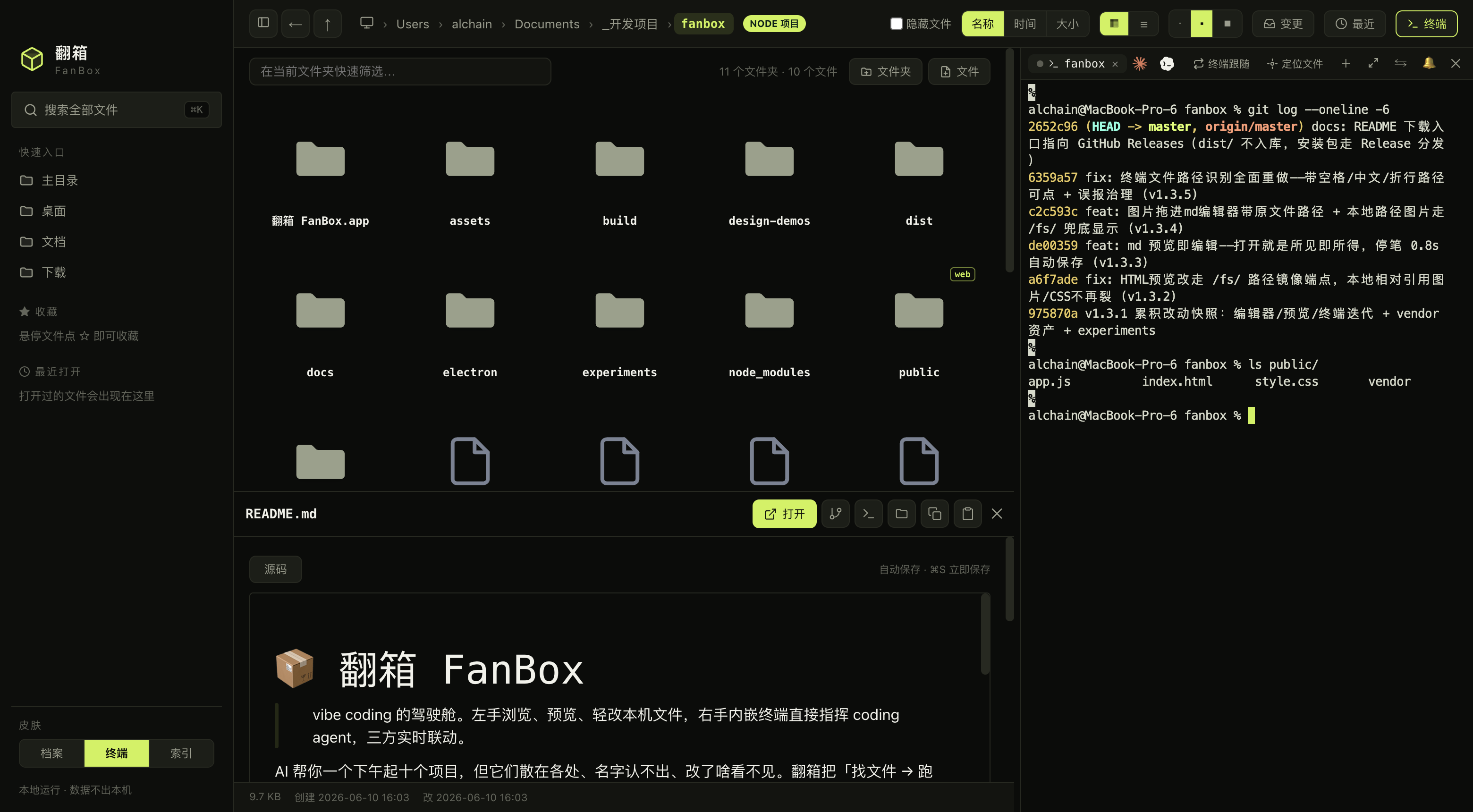
▲ 真机截图:浏览 fanbox 仓库本身,README 原地预览,内嵌终端正在跑 git。本页所有截图均由 Playwright 从实时 App 中直接拍摄,未修图。
Real capture: browsing the fanbox repo itself, README previewed in place, git running in the embedded terminal. All screenshots in this README are taken from the live app via Playwright, unedited.
AI 帮你一个下午起十个项目,但它们散在各处、名字认不出、改了啥看不见。每天的真实流程是:Finder 里翻半天 → 切到 iTerm 启 agent → 再切浏览器看效果,三个窗口来回跳。
AI helps you start ten projects in an afternoon — then they scatter everywhere, the names stop making sense, and you can't see what got changed. The daily reality: dig through Finder → switch to iTerm to launch an agent → switch to the browser to check results. Three windows, endless hopping.
FanBox 把这条链路收进一个窗口:左边文件 × 右边/下边终端 × 原地预览,一个有机整体。它不跟 Finder 拼文件操作,不跟 VS Code 拼编辑,专注「找回 + 预览 + 轻改 + 指挥 agent」这一条链路做到顺手。
FanBox folds that loop into one window: files on the left × terminal on the right/bottom × preview in place. It doesn't compete with Finder on file ops or VS Code on editing. It does one chain well: find → preview → light edits → command the agent.
不做云、不做远程、不做账号。本地、零配置、运行时零依赖。
No cloud, no remote, no accounts. Local-first, zero config, zero runtime dependencies.
界面在 huashu-design 辅助下完成设计,三套皮肤不是换个主题色——配色、字体、图标、代码高亮、终端 ANSI 主题整体随之变化。
The UI was designed with huashu-design. The three skins are not theme-color swaps — palette, typography, icons, code highlighting and terminal ANSI themes all change together:
|
终端 · Volt · 荧光绿 × 炭黑 × 等宽字,工业仪器面板感(默认) Volt · neon green × charcoal × monospace, industrial instrument panel (default) |
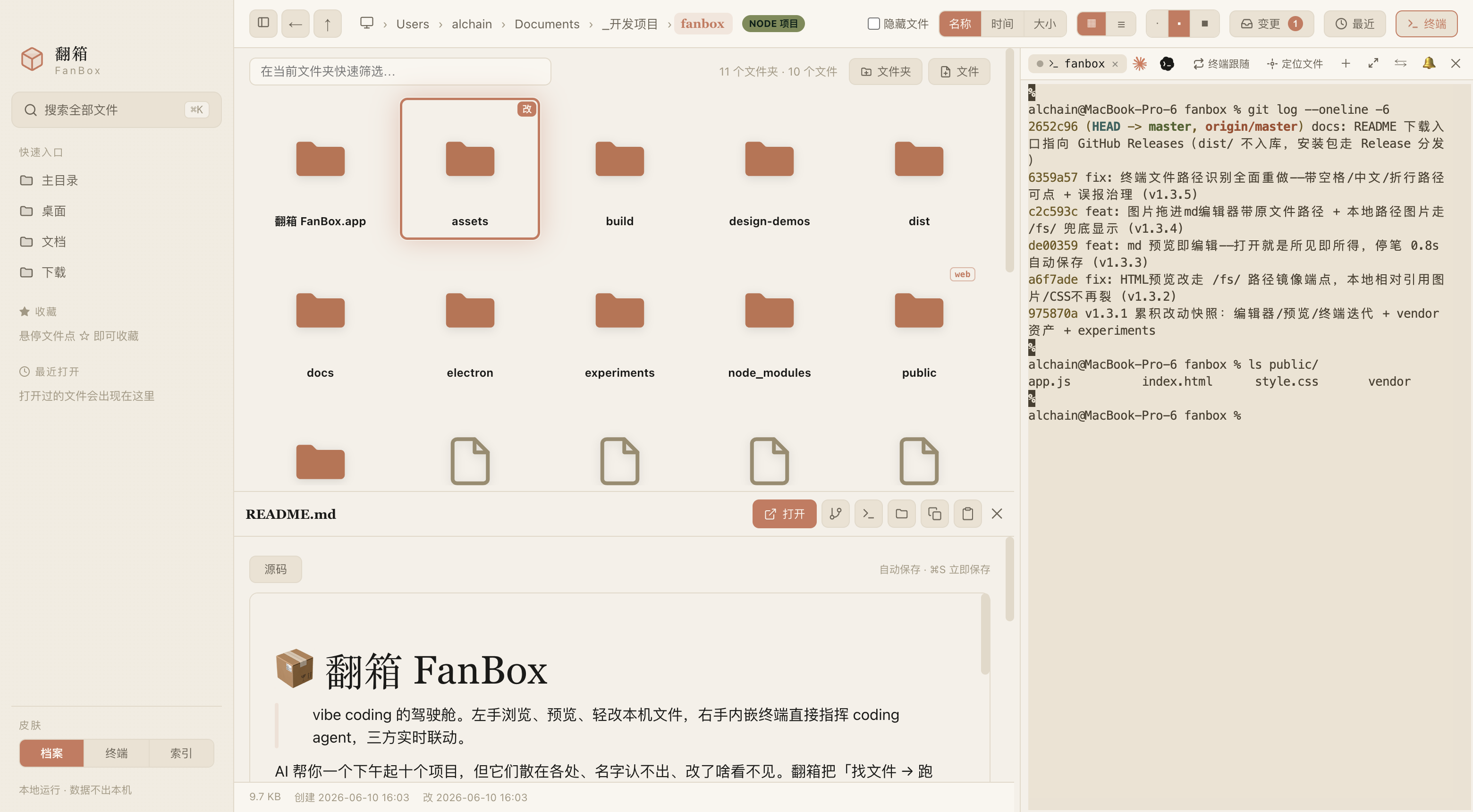 |
档案 · Archive · 奶油纸 × 赤陶橙 × 衬线,温暖纸感档案馆 Archive · cream paper × terracotta × serif, a warm paper archive |
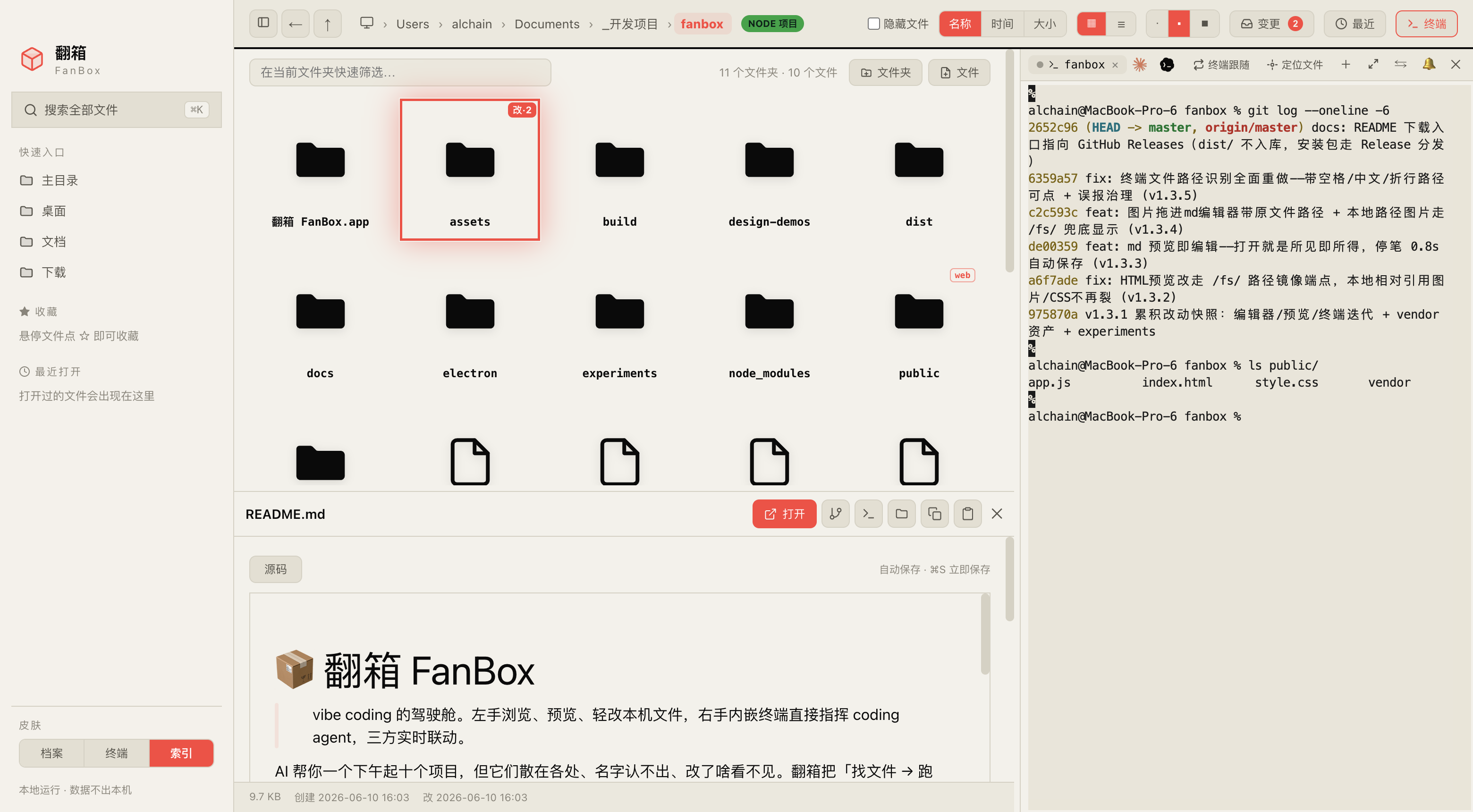 |
索引 · Index · 黑白 × 信号红/绿 × 巨号字,编辑式索引日报 Index · black & white × signal red/green × oversized type, editorial index daily |
⌘↵ 用编辑器整包打开项目;内容:关键词 切全文搜索。⌘↵ opens the project in your editor; content:keyword switches to full-text search.claude --resume / codex resume 接上当时的上下文。claude --resume / codex resume in the embedded terminal.素材/、或先标注再发。素材/ (assets) folder, or annotate before sending./usage 同源)+ 本地 token 统计;Codex 限额快照 + 窗口重置识别。/usage) plus local token statistics; Codex window snapshots with reset detection.du 口径的真实占用条形榜,可下钻,专治「电脑空间又满了」。du-accurate bars per folder, drill-down, for the "my disk is full again" moments.~/.fanbox/config.json 的 agents 数组可自定义命令或追加新 agent。agents array in ~/.fanbox/config.json overrides commands or adds new agents.富文本 / 阅读 / 源码 / 排版 四档随时切;少数文件富文本往返会丢内容(校验不过),只灰掉富文本、默认落在只读阅读模式,文章照看,要改点源码。Rich / Read / Source / Typeset switch sits on top; when a file can't survive a WYSIWYG round-trip, only Rich is disabled — it falls back to the rendered read-only view, not raw source.lark-doc / dukou skill)。FanBox 自己不存任何平台凭证、不内建任何第三方 SDK,指令只粘不回车——你看得见、能改、能拒,最后那一下永远由人来点。从 Releases 下载最新 .dmg,拖进「应用程序」即可。Apple Silicon (arm64) 原生。
Download the latest .dmg from Releases and drag it into Applications. Native Apple Silicon (arm64).
已用 Developer ID 证书签名 + hardened runtime,并通过 Apple 公证(notarization),双击直接打开,不用右键。
Signed with a Developer ID certificate + hardened runtime and notarized by Apple — just double-click to open, no right-click workaround needed.应用内置更新提醒:检测到 GitHub 上有新 Release 时,右下角会弹一条提示引导下载,不强更、可对单个版本「不再提醒」。
Built-in update notifications: when a new release lands on GitHub, a capsule appears at the bottom right. Never forced; individual versions can be muted.
我自己没有 Windows 电脑,没法稳定验证 Windows 版的体验,也不了解 Windows 用户的操作习惯,所以官方不出 Windows 版。但社区里有同学基于 FanBox 拓展了 Windows 版本,想在 Windows 上体验的朋友可以试试,谢谢他们的工作 🙏。
⚠️ 这些都不是我的改造,我没有参与开发、也没法对它们的体验和安全负责。请自行评估后使用。
I don't own a Windows machine and can't reliably verify a Windows build or judge what Windows users need, so there is no official Windows version. The community has built Windows ports of FanBox — if you're on Windows, give one a try, and thanks to the maintainers 🙏.
⚠️ These are not my builds. I'm not involved in their development and can't vouch for their experience or security. Use at your own discretion.
| 移植 / Port | 链接 / Link |
|---|---|
| daodao166888/fanbox-windows | Releases |
| cookiesheep/fanbox(v2.3.0 Windows) | Release |
node server.js
浏览器打开 http://localhost:4567。零依赖、零 build,clone 下来就能跑。网页版只有文件浏览/搜索/预览(内嵌终端和编辑器靠 Electron 提供)。
Open http://localhost:4567. Zero dependencies, zero build — clone and run. The web version covers browsing/search/preview (the embedded terminal and editors need Electron).
npm install
npm run app          # electron . 启动完整桌面版 / full desktop app
npm run dist         # 打包签名 .dmg(产物在 dist/,不入 git)/ build & sign the .dmg (output in dist/)
打包遇到 Electron 下载被墙:
ELECTRON_MIRROR="https://registry.npmmirror.com/-/binary/electron/" npm run dist
| 操作 / Action | 键 / Key | 操作 / Action | 键 / Key |
|---|---|---|---|
| 全局搜索 / Global search | ⌘K |
用编辑器打开 / Open in editor | ⌘↵ |
| 折叠侧栏 / Toggle sidebar | ⌘B |
后退 / Back | ⌘[ |
| 当前目录筛选 / Filter current folder | / |
打开/预览 / Open/preview | ↵ |
| 结果上下选择 / Navigate results | ↑ ↓ |
关闭 / Close | Esc |
界面设计在 huashu-design 辅助下完成——三套皮肤的方向探索、组件质感、反 AI slop 审查都出自它的工作流。图标是档案暖色陶土箱体 + 米纸 squircle,从 SVG 一路生成到 icns。
The UI was designed with huashu-design — skin direction exploration, component polish and anti-AI-slop review all come from its workflow. The icon is a terracotta archive box on a rice-paper squircle, generated from SVG all the way to icns.
每个开发阶段由 5 个独立 subagent 扮演不同角色(重度 vibe coder / 原生审美设计师 / 零文档新用户 / 终端十年老兵 / 破坏性质量官),审「成品 + 真机截图 + 代码」打分,全部 ≥90 分且无红线才算达标。评分标准见 docs/05-验收角色与评分标准.md。
Each development phase is reviewed by 5 independent subagents playing different roles (heavy vibe coder / native-taste designer / zero-docs newcomer / ten-year terminal veteran / destructive QA), scoring the product + live screenshots + code. Everything ships at ≥90 with zero red lines. See docs/05-验收角色与评分标准.md.
FanBox 的核心能力来自这些出色的开源项目:
FanBox's core capabilities come from these excellent open-source projects:
| 项目 / Project | 用在哪 / Used for | License |
|---|---|---|
| Electron | 桌面壳,让零依赖 Node 后端长出真实终端和原生能力 The desktop shell that gives a zero-dependency Node backend a real terminal and native powers |
MIT |
| node-pty | 伪终端,内嵌终端的「真 shell」来源 The pseudo-terminal behind the embedded "real shell" |
MIT |
| xterm.js | 终端渲染(含 addon-webgl GPU 加速、addon-fit 自适应、addon-unicode11 CJK 宽字符) Terminal rendering (addon-webgl GPU acceleration, addon-fit, addon-unicode11 for CJK) |
MIT |
| Monaco Editor | 代码/JSON 编辑与 Git diff 视图,VS Code 同款内核 Code/JSON editing and Git diff view, the VS Code core |
MIT |
| Milkdown(Crepe) | Markdown 所见即所得编辑 Markdown WYSIWYG editing |
MIT |
| marked | Markdown 预览渲染 Markdown preview rendering |
MIT |
| highlight.js | 代码语法高亮 Syntax highlighting |
BSD-3-Clause |
| esbuild | 把 Milkdown 打成单文件本地 vendor,运行时保持 no-build Bundling Milkdown into a single local vendor file, keeping runtime no-build |
MIT |
| electron-builder | 打包签名 dmg Packaging and signing the dmg |
MIT |
| Playwright | 驱动 Electron 实拍本 README 截图 + UI 验证 Driving Electron for README screenshots + UI verification |
Apache-2.0 |
所有前端依赖都 vendor 到本地(public/vendor/),这是「离线完全可用」的底气,也意味着上面每个项目的代码真实地跑在你机器上。谢谢它们。
Every frontend dependency is vendored locally (public/vendor/) — that's what makes "fully usable offline" true, and it means each project above actually runs on your machine. Thank you.
| 层 / Layer | 用什么 / Stack |
|---|---|
| 后端 / Backend | 零依赖 Node.js server.js(文件 API + 静态服务 + 缩略图)Zero-dependency Node.js server.js (file APIs + static serving + thumbnails) |
| 桌面壳 / Desktop shell | Electron 33 + node-pty(asarUnpack 原生模块) Electron 33 + node-pty (asarUnpack native module) |
| 终端 / Terminal | xterm.js + WebGL + unicode11 |
| 编辑器 / Editors | Monaco(代码)+ Milkdown Crepe(Markdown) Monaco (code) + Milkdown Crepe (Markdown) |
| 打包 / Packaging | electron-builder → 签名 arm64 .dmg electron-builder → signed arm64 .dmg |
fanbox/
├── server.js               # 零依赖 Node 后端(文件 API + 缩略图 + 静态服务)
│                           # Zero-dependency Node backend (file APIs + thumbnails + static)
├── electron/
│   ├── main.js             # 主进程(窗口/pty/剪贴板/fs.watch/菜单)
│   │                       # Main process (window/pty/clipboard/fs.watch/menu)
│   └── preload.js          # 暴露 fanboxPty / fanboxFs / fanboxClipboard
│                           # Exposes fanboxPty / fanboxFs / fanboxClipboard
├── public/
│   ├── index.html
│   ├── style.css
│   ├── app.js              # 前端单页应用 / Frontend single-page app
│   └── vendor/             # xterm / monaco / milkdown 本地资源
│                           # xterm / monaco / milkdown local assets
├── src-vendor/             # esbuild 入口,产出 public/vendor/milkdown
│                           # esbuild entries producing public/vendor/milkdown
├── build/                  # 图标 + entitlements / Icons + entitlements
├── docs/                   # 概念/PRD/路线图/验收标准
│                           # Concepts/PRD/roadmap/acceptance criteria
└── experiments/            # 实验脚本(含 README 截图脚本)
                            # Experiment scripts (incl. README screenshot script)
花叔 Huashu——AI Native Coder,独立开发者。代表作:小猫补光灯(App Store 付费榜 Top1)。
Huashu (花叔) — AI Native Coder, indie developer. Known for Cat Light (App Store paid chart Top 1).
| 平台 / Platform | 链接 / Link |
|---|---|
| 🌐 官网 / Web | bookai.top · huasheng.ai |
| 𝕏 Twitter | @AlchainHust |
| 📺 B站 / Bilibili | 花叔 |
| 📕 小红书 / Xiaohongshu | 花叔 |
| 💬 公众号 / WeChat | 微信搜「花叔」 / Search "花叔" |
更多 AI 造物:
More AI creations:
Finder 帮你管理文件。IDE 帮你写代码。FanBox 帮你看清 AI 在你机器上干了什么。
Finder manages your files. IDEs write your code. FanBox shows you what AI did on your machine.
MIT License © 花叔 Huashu
more like this
🧠 A simple command-line client for the Perplexity API. Ask questions and receive answers directly from the terminal! 🚀🚀🚀
Comprehensive analytics dashboard for AI coding agents — Cursor, Windsurf, Claude Code, VS Code Copilot, Zed, Antigravi…
Free open-source Cloudflare R2 desktop client and S3 GUI for macOS, Windows, and Linux. Manage Cloudflare R2, AWS S3, M…
meine 🌒 - A CLI file manager and system utility built with Textual. It combines intuitive command parsing with rich t…
search projects, people, and tags