 amebalabs
agentlytics
Comprehensive analytics dashboard for AI coding agents — Cursor, Windsurf, Claude Code, VS Code Copilot, Zed, Antigravi…
JavaScript★ 555
SwiftKey
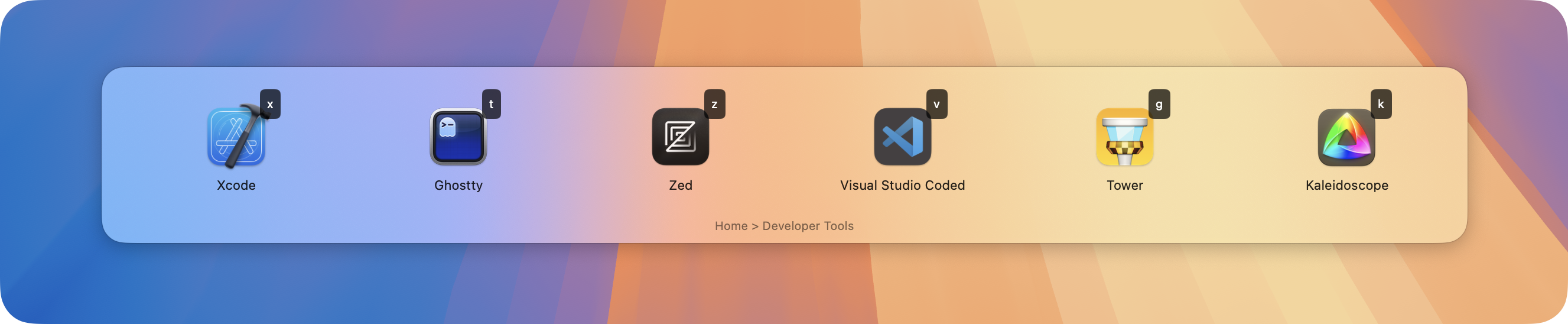
SwiftKey is a powerful macOS productivity tool that provides quick access to applications, shortcuts, and custom actions through customizable keyboard shortcuts and an elegant overlay interface.
Applications folderbrew tap melonamin/formulae brew install swiftkey
SwiftKey uses YAML for configuration. Here's a comprehensive set of examples demonstrating all available options and common use cases:
# Simplest example - just key, title, and action
- key: "c"
  title: "Launch Calculator"
  action: "launch:///System/Applications/Calculator.app"

# With custom icon (from SF Symbols)
- key: "n"
  icon: "note.text"
  title: "Launch Notes"
  action: "launch:///System/Applications/Notes.app"
# Basic submenu
- key: "b"
  icon: "bookmark.fill"
  title: "Bookmarks"
  submenu:
    - key: "t"
      title: "TechCrunch"
      action: "open://https://techcrunch.com"
    - key: "v"
      title: "The Verge"
      action: "open://https://www.theverge.com"

# Nested submenus
- key: "d"
  icon: "folder.fill"
  title: "Development"
  submenu:
    - key: "e"
      title: "Editors"
      submenu:
        - key: "v"
          title: "VS Code"
          action: "launch:///Applications/Visual Studio Code.app"
        - key: "x"
          title: "Xcode"
          action: "launch:///Applications/Xcode.app"
    - key: "t"
      title: "Terminal"
      action: "launch:///System/Applications/Terminal.app"
# Batch mode - all items in submenu will execute when selecting this item
# Using batch: true flag
- key: "s"
  icon: "bolt.fill"
  title: "Start Workflow"
  batch: true  # Execute all submenu items at once
  submenu:
    - key: "1"
      title: "Open Mail"
      action: "launch:///System/Applications/Mail.app"
    - key: "2"
      title: "Open Calendar"
      action: "launch:///System/Applications/Calendar.app"
    - key: "3"
      title: "Open Slack"
      action: "launch:///Applications/Slack.app"

# Alternative: Press and hold Option (⌥) key when selecting any submenu
# to execute all items in batch mode
# Sticky items - UI stays open after execution
- key: "v"
  icon: "volume.3.fill"
  title: "Volume Up"
  action: "shell://osascript -e 'set volume output volume (output volume of (get volume settings) + 10)'"
  sticky: true  # UI stays open after executing this action

- key: "m"
  icon: "volume.fill"
  title: "Mute Toggle"
  action: "shell://osascript -e 'set volume output muted (not output muted of (get volume settings))'"
  sticky: true

# Alternative: Press and hold Option (⌥) key when selecting any item
# to invert its sticky behavior (non-sticky items become sticky and vice versa)
# Show notification after execution
- key: "r"
  icon: "text.append"
  title: "Run Script"
  action: "shell://~/scripts/update_database.sh"
  notify: true  # Show notification when script completes
# Hidden items - not shown in UI but can be activated with key or hotkey
- key: "h"
  title: "Hidden Action"
  action: "shell://say 'Secret action activated'"
  hidden: true
  hotkey: "cmd+shift+h"

# Single hidden item in submenu will still be shown despite being hidden
- key: "s"
  title: "Special Menu"
  submenu:
    - key: "x"
      title: "Only Item (Hidden but Still Shown)"
      action: "shell://say 'I am shown because I am the only item in this submenu'"
      hidden: true
# Dynamic menu - content generated by a script
- key: "p"
  icon: "terminal"
  title: "Running Processes"
  action: "dynamic://dynamic_menu.sh"
# Global hotkey for direct action
- key: "c"
  title: "Launch Calculator"
  action: "launch:///Applications/Calculator.app"
  hotkey: "cmd+ctrl+c"  # Global shortcut: Cmd+Ctrl+C

# Global hotkey to open specific submenu
- key: "d"
  title: "Development Tools"
  hotkey: "cmd+shift+d"  # Global shortcut: Cmd+Shift+D
  submenu:
    - key: "1"
      title: "VS Code"
      action: "launch:///Applications/Visual Studio Code.app"
    - key: "2"
      title: "Terminal"
      action: "launch:///System/Applications/Terminal.app"
# Developer Workflow
- key: "d"
  icon: "hammer.fill"
  title: "Developer Tools"
  submenu:
    - key: "c"
      title: "VS Code"
      action: "launch:///Applications/Visual Studio Code.app"
    - key: "g"
      title: "Git Operations"
      submenu:
        - key: "s"
          title: "Git Status"
          action: "shell://'cd ~/projects/current && git status'"
          notify: true
        - key: "p"
          title: "Git Pull"
          action: "shell://'cd ~/projects/current && git pull'"
          notify: true
    - key: "b"
      title: "Build Project"
      action: "shell://'cd ~/projects/current && make build'"
      notify: true
    - key: "t"
      title: "Run Tests"
      action: "shell://'cd ~/projects/current && make test'"
      notify: true

# System Administration
- key: "s"
  icon: "gear"
  title: "System Tools"
  submenu:
    - key: "d"
      title: "Show Disk Usage"
      action: "shell://'df -h | grep /dev/disk1s1'"
      sticky: true
      notify: true
    - key: "m"
      title: "Show Memory Usage"
      action: "shell://'top -l 1 | grep PhysMem'"
      sticky: true
      notify: true
    - key: "n"
      title: "Network Tools"
      submenu:
        - key: "i"
          title: "External IP"
          action: "shell://'curl -s ifconfig.me'"
          sticky: true
          notify: true
        - key: "p"
          title: "Ping Google"
          action: "shell://'ping -c 4 google.com'"
          sticky: true
          notify: true
    - key: "r"
      title: "Restart Services"
      batch: true
      submenu:
        - key: "1"
          title: "Restart DNS"
          action: "shell://'sudo killall -HUP mDNSResponder'"
          notify: true
        - key: "2"
          title: "Flush DNS Cache"
          action: "shell://'sudo dscacheutil -flushcache'"
          notify: true

# Quick Actions
- key: "q"
  icon: "bolt.fill"
  title: "Quick Actions"
  submenu:
    - key: "e"
      title: "Empty Trash"
      action: "shell://'osascript -e \"tell application Finder to empty trash\"'"
      notify: true
    - key: "c"
      title: "Copy SSH Key"
      action: "shell://'pbcopy < ~/.ssh/id_rsa.pub && echo \"SSH key copied to clipboard\"'"
      notify: true
    - key: "s"
      title: "Take Screenshot"
      action: "shell://'screencapture -i ~/Desktop/screenshot-$(date +%Y%m%d-%H%M%S).png'"
      notify: true
launch:// — Launch applicationsopen:// — Open URLsshell:// — Execute shell commandsshortcut:// — Run Apple Shortcutsdynamic:// — Generate dynamic menuskey — Single character trigger keyicon — SF Symbol name or omit for automatic iconstitle — Display titleaction — Action to executesticky — Keep overlay open after execution (optional). Alternative: hold ⌥ (Option) key to invert the sticky behavior.notify — Show notification after execution (optional)batch — Execute all submenu items (optional). Alternative: hold ⌥ (Option) key for batch execution.hidden — Item is not shown in UI but can be triggered by key or hotkey (optional, defaults to false). Note: If a submenu contains only a single hidden item, it will still be shown.submenu — Nested menu items (optional)hotkey — Global keyboard shortcut (optional)SwiftKey allows you to assign global hotkeys to menu items. Hotkeys work even when the overlay is not visible.
Supported hotkey formats:
cmd, ctrl, alt, shiftcmd+shift+actrl+alt+pcmd+f12shift+spaceHotkeys can:
SwiftKey supports deep linking through the swiftkey:// URL scheme:
swiftkey://open?path=a,b,c
This opens the menu and navigates through the specified path.
This project is licensed under the MIT License - see the LICENSE file for details.
more like this
Comprehensive analytics dashboard for AI coding agents — Cursor, Windsurf, Claude Code, VS Code Copilot, Zed, Antigravi…
XMB for Plasma BigScreen, console-like fullscreen launcher for living room gamepad users
Free open-source Cloudflare R2 desktop client and S3 GUI for macOS, Windows, and Linux. Manage Cloudflare R2, AWS S3, M…
search projects, people, and tags