chinese-hershey-font
Convert Chinese Characters to Single-Line Fonts using Computer Vision
Python★ 161
Fast, offline OCR for Node.js & C++. PP-OCRv6 with Core ML / WebGPU hardware acceleration — recognize text in images wi…
 arcships
git clone https://github.com/arcships/light-ocr.gitarcships/light-ocr
English | 简体中文
Fast, offline OCR for Node.js and C++.
Recognize text in PDF, JPEG, PNG, or raw image data directly on your machine. light-ocr returns lines in reading order with confidence scores and quadrilateral coordinates. For Node.js, the npm package includes PP-OCRv6 Small, PDFium, and prebuilt components for macOS, Linux, and Windows.
Node.js 22 and 24 are supported.
npm install @arcships/light-ocr
import { createEngine } from "@arcships/light-ocr";
import { readFile } from "node:fs/promises";

const engine = await createEngine();
const result = await engine.recognizeEncoded(
  await readFile("image.jpg"),
);

for (const line of result.lines) {
  console.log(line.text, line.confidence, line.box);
}

await engine.close();
createEngine() automatically chooses the right execution mode for the current platform. If your application already decodes images, recognize() also accepts GRAY8, RGB8, BGR8, and RGBA8 pixel data.
Small remains the stable default. N2 also provides two opt-in preview packages under the next tag; all three expose the same API, types, result schema, and error model, while each install contains only its selected model.
| Tier | Package / command | Model payload | Status |
|---|---|---|---|
| Small | @arcships/light-ocr / light-ocr |
~30 MB | stable default |
| Tiny | @arcships/light-ocr-tiny@next / light-ocr-tiny |
~6.3 MB | preview; 49 languages, no Japanese |
| Medium | @arcships/light-ocr-medium@next / light-ocr-medium |
~139 MB | preview; quality-first |
Tiny and Medium stay on next until real use shows a clear reason to promote them; they do not change what npm install @arcships/light-ocr installs.
The light-ocr command is available after install — no extra setup:
# Recognize text + coordinates
light-ocr image.png --format json

# Just text
light-ocr image.png --format text

# PDF pages, using the renderer already included by npm
light-ocr report.pdf --pages 1-10 --format text

# Detect text regions only (no recognition)
light-ocr detect image.png

# Region of interest
light-ocr recognize image.png --region 100,80,640,320 --format json

# Engine info
light-ocr info --version

# System diagnostics (hardware and providers)
light-ocr doctor --json
Image commands are recognize (default), detect (boxes only), info
(version diagnostics), and doctor (system diagnostics). A .pdf path routes
directly to document OCR; document handles explicit multi-source jobs. Output
uses a versioned schemaVersion: 1 contract. EXIF orientation is corrected
automatically. See the CLI design and
npm README for full reference.
PDF and multi-page OCR are built into @arcships/light-ocr. The matching
PDFium binary and checksum-pinned Noto Sans SC fallback font are carried by
the same platform npm package as the OCR runtime. This keeps PDFs that reference
common non-embedded Chinese fonts renderable before OCR, with no postinstall
script, runtime download, compiler, system-font requirement, or separate
package to install.
# Single PDF with default 150 DPI
light-ocr report.pdf

# Page range with streaming JSONL output
light-ocr report.pdf --pages 1-10 --format jsonl

# Multiple images as one document
light-ocr document scan1.png scan2.png scan3.png --format text
Programmatic API:
import { recognizeDocument } from "@arcships/light-ocr";

// Stream pages from a PDF
for await (const page of recognizeDocument("report.pdf", { dpi: 200 })) {
  console.log(page.index, page.lines.length, page.source.kind);
}

// Multiple images
for await (const page of recognizeDocument([buf1, buf2, buf3])) {
  console.log(page.index, page.lines);
}
An Agent Skill is included for AI agents that can call local commands. It provides scenario-driven workflows, a decision flow for command selection, and exit code reference:
tiled mode preserves small and dense text in high-resolution images.⭐ Like light-ocr? Give it a star — it helps others discover the project and keeps us motivated!
The npm package provides the following six builds. The default createEngine() call uses Auto mode:
| Platform | Auto mode |
|---|---|
| macOS on Apple Silicon | Core ML on macOS 15+, then CPU |
| macOS on Intel | CPU |
| Linux x64 with glibc | WebGPU through Vulkan, then CPU |
| Linux arm64 with glibc | CPU |
| Windows x64 | WebGPU through D3D12, then CPU |
| Windows arm64 | CPU |
Applications that need explicit control can choose auto, cpu, apple, or webgpu through the execution option.
Version 0.3.0 was measured on three real devices:
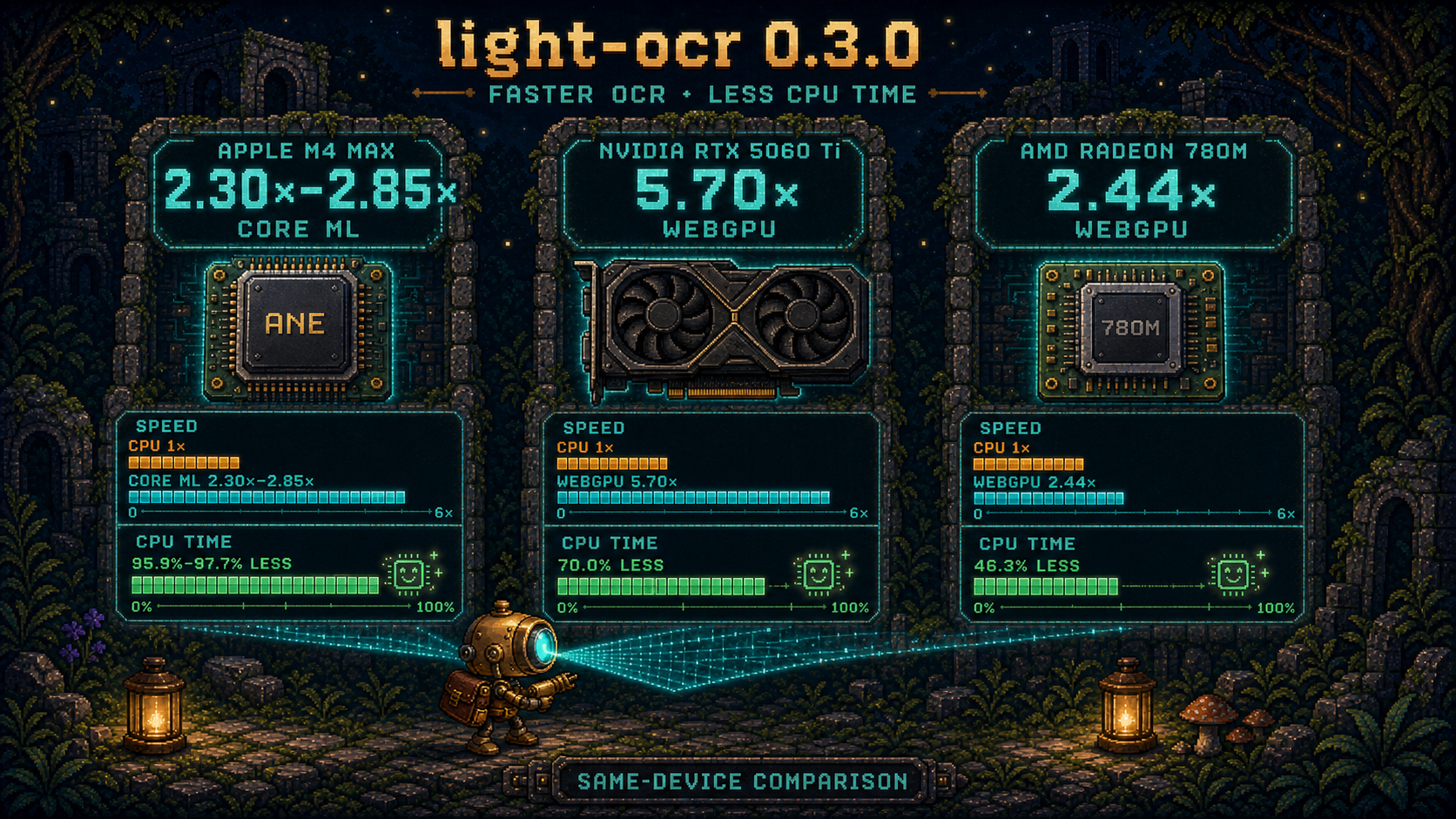
| Device | Acceleration | End-to-end speedup | OCR process CPU time |
|---|---|---|---|
| Apple M4 Max | Core ML | 2.30× on HELLO 123; 2.85× on a dense form |
95.91%–97.67% less |
| NVIDIA RTX 5060 Ti on Linux | WebGPU / Vulkan | 5.70× overall across 14 test images | 69.97% less |
| AMD Radeon 780M on Windows | WebGPU / D3D12 | 2.44× overall across 14 test images | 46.33% less |
These are same-machine comparisons with the CPU path, and results vary by workload and hardware. For the 14-image results, overall speedup is the sum of the per-image CPU median times divided by the sum of the WebGPU median times. The CPU column measures cumulative OCR process CPU time over the same workloads, rather than an instantaneous system-utilization sample; lower CPU time leaves more capacity for the rest of the application while OCR is active. The Apple run passed its locked CPU-parity thresholds; both WebGPU runs were byte-identical to CPU FP32 on all 14 images. See the 0.3.0 release report for complete measurements and methodology.
C++ projects build the static library from source and link the light_ocr::core CMake target. The API accepts decoded GRAY8, RGB8, BGR8, or RGBA8 pixels; start with the C++ API guide and build instructions.
Issues and pull requests are welcome — see CONTRIBUTING.md for guidelines. All participants are expected to follow our Code of Conduct.
light-ocr is available under the Apache License 2.0.
more like this
Convert Chinese Characters to Single-Line Fonts using Computer Vision
🎥🤟 8 minimalistic templates for tfjs mediapipe handpose and facemesh
TachiSnap — Pixel Snapper for animation pixel artists. Rust + WebAssembly client-side tool for cleaning up AI-generated…
search projects, people, and tags