perplexity-cli
🧠 A simple command-line client for the Perplexity API. Ask questions and receive answers directly from the terminal! 🚀🚀🚀
Python★ 176
Stop configuring your AI stack. Start using it. One command brings a complete pre-wired LLM stack with hundreds of serv…
 av
av
Setup your local LLM stack effortlessly.
# Starts fully configured Open WebUI and Ollama
harbor up

# Now, Open WebUI can do Web RAG and TTS/STT
harbor up searxng speaches
Harbor is a CLI and companion app that lets you spin up a complete local LLM stack—backends like Ollama, llama.cpp, or vLLM, frontends like Open WebUI, plus supporting services like SearXNG for web search, Speaches for voice chat, and ComfyUI for image generation—all pre-wired to work together with a single harbor up command. No manual setup: just pick the services you want and Harbor handles the Docker Compose orchestration, configuration, and cross-service connectivity so you can focus on actually using your models.

quickhop, deephop, autocheck, diffscope) with harbor launch --workflow routing, grok CLI launch support, and faster HF downloads via hf_transfer.env corruption when several Harbor commands run at once and stops harbor doctor from hanging on non-interactive stdinharbor doctor with timeout-guarded compose checks and early exit for --check modeharbor launch command, ik_llama.cpp service, Boost workflows and tools moduleharbor how backed by mi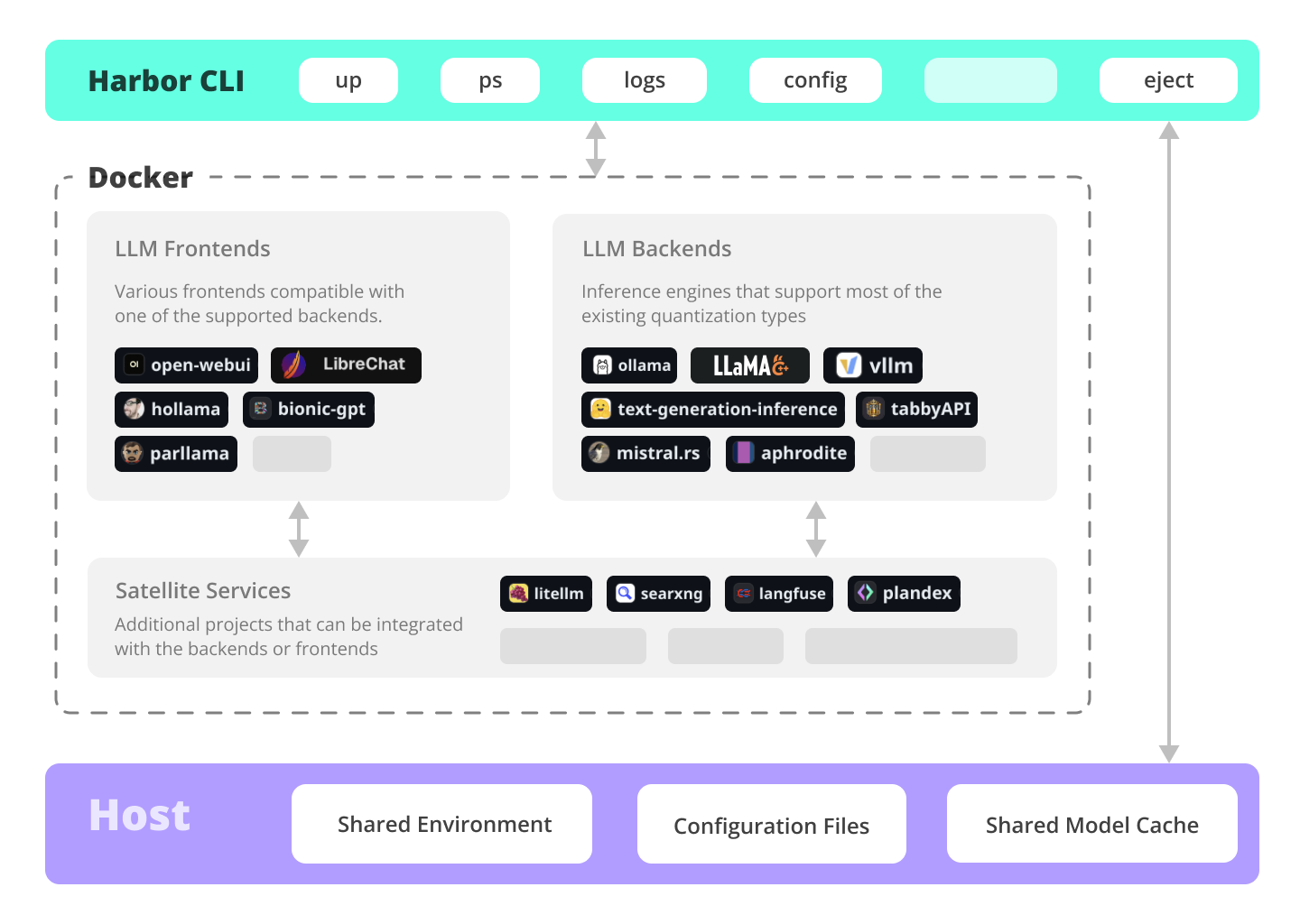
Run LLMs and related services locally, with no or minimal configuration, typically in a single command or click.
# All backends are pre-connected to Open WebUI
harbor up ollama
harbor up llamacpp
harbor up vllm

# Host-native Metal/GPU inference on macOS
harbor up dmr
harbor up mlx
harbor up omlx

# Set and remember args for llama.cpp
harbor llamacpp args -ngl 32
Use Harbor backends from installed coding and agent CLIs without hand-editing each tool's provider config. harbor launch starts or detects a Harbor OpenAI-compatible backend, wires the selected model into the host tool, and leaves the tool running in your current project directory.
# Run Codex against an explicit Harbor backend and model
harbor launch --backend ollama --model qwen3.5:4b codex

# Add Harbor Boost web search and URL-reading tools
harbor launch --web --backend ollama --model qwen3.5:4b codex

# Write adapter config without starting the tool
harbor launch --config opencode

# Force the container service when a name also has a host adapter
harbor launch --service opencode --help
Supported host tools include claude, codex, copilot, droid, grok, hermes, mi, openclaw, opencode, pi, pool, and vscode.
Harbor Boost chains agentic modules—web research, deliverable audits, scope checks, and style passes—into custom workflows. harbor launch --workflow routes coding agents through a single Boost module instead of the raw backend model.
# Two-hop research before answering
harbor launch --workflow deephop --backend ollama --model qwen3.5:4b codex

# Fast web research before answering
harbor launch --workflow quickhop --backend ollama --model qwen3.5:4b codex

# Deliverable audit before the final answer
harbor launch --workflow autocheck --backend ollama --model qwen3.5:4b codex
Modules quickhop and deephop auto-start SearXNG. Define multi-step workflows with HARBOR_BOOST_WORKFLOWS or workflows.yaml, and mount your project with boost.workspace so agents can verify real file paths—see Boost configuration and the modules reference.
Harbor supports most of the major inference engines as well as a few of the lesser-known ones. On macOS, Docker Model Runner, MLX, and oMLX run inference on the host with Metal acceleration — no containers needed for the compute.
# We sincerely hope you'll never try to run all of them at once
harbor up vllm llamacpp tgi litellm tabbyapi aphrodite sglang ktransformers mistralrs airllm

# Host-native inference (macOS Metal / Linux GPU)
harbor up dmr mlx omlx
Enjoy the benefits of MCP ecosystem, extend it to your use-cases.
# Manage MCPs with a convenient Web UI
harbor up metamcp

# Connect MCPs to Open WebUI
harbor up metamcp mcpo
Harbor includes ComfyUI + Flux + Open WebUI integration.
# Use FLUX in Open WebUI in one command
harbor up comfyui
Harbor includes SearXNG that is pre-connected to a lot of services out of the box: Perplexica, ChatUI, Morphic, Local Deep Research and more.
# SearXNG is pre-connected to Open WebUI
harbor up searxng

# And to many other services
harbor up searxng chatui
harbor up searxng morphic
harbor up searxng perplexica
harbor up searxng ldr
Harbor includes multiple services for build LLM-based data and chat workflows: Dify, LitLytics, n8n, Open WebUI Pipelines, FloWise, LangFlow
# Use Dify in Open WebUI
harbor up dify
Setup voice chats with your LLM in a single command. Open WebUI + Speaches
# Speaches includes OpenAI-compatible SST and TTS
# and connected to Open WebUI out of the box
harbor up speaches
You can access Harbor services from your phone with a QR code. Easily get links for local, LAN or Docker access.
# Print a QR code to open the service on your phone
harbor qr
# Print a link to open the service on your phone
harbor url webui
Harbor includes a built-in tunneling service to expose your Harbor to the internet.
[!WARN] Be careful exposing your computer to the Internet, it's not safe.
# Expose default UI to the internet
harbor tunnel

# Expose a specific service to the internet
# ⚠️ Ensure to configure authentication for the service
harbor tunnel vllm

# Harbor comes with traefik built-in and pre-configured
# for all included services
harbor up traefik
Harbor Boost allows you to easily script workflows and interactions with downstream LLMs.
# Use Harbor Boost to script LLM workflows
harbor up boost
Save and manage configuration profiles for different scenarios. For example - save llama.cpp args for different models and contexts and switch between them easily.
# Save and use config profiles
harbor profile save llama4
harbor profile use default

# Import profiles from a URL
harbor profile use https://example.com/path/to/harbor-profile.env
Harbor keeps a local-only history of recent commands. Look up and re-run easily, standalone from the system shell history.
# Lookup recently used harbor commands
harbor history
Ready to move to your own setup? Harbor will give you a docker-compose file replicating your setup.
# Eject from Harbor into a standalone Docker Compose setup
# Will export related services and variables into a standalone file.
harbor eject searxng llamacpp > docker-compose.harbor.yml
AnythingLLM ⦁︎ AstrBot ⦁︎ BionicGPT ⦁︎ Chat Nio ComfyUI ⦁︎ Hollama ⦁︎ HuggingFace ChatUI ⦁︎ KoboldCpp LibreChat ⦁︎ Lobe Chat ⦁︎ Mikupad ⦁︎ ol1 Omnichain ⦁︎ Onyx ⦁︎ Open WebUI ⦁︎ oterm Parllama ⦁︎ SillyTavern ⦁︎ Voicebox
AirLLM ⦁︎ Aphrodite ⦁︎ faster-whisper-server ⦁︎ ik_llama.cpp KoboldCpp ⦁︎ KTransformers ⦁︎ Lemonade ⦁︎ llama.cpp lmdeploy ⦁︎ mistral.rs ⦁︎ Modular MAX ⦁︎ Needle Nexa SDK ⦁︎ Ollama ⦁︎ openedai-speech ⦁︎ Parler Docker Model Runner ⦁︎ MLX ⦁︎ oMLX ⦁︎ SGLang ⦁︎ Speaches TabbyAPI ⦁︎ Text Generation Inference ⦁︎ vLLM
Activepieces ⦁︎ Agent Zero ⦁︎ aichat ⦁︎ Aider Airweave ⦁︎ AstrBot ⦁︎ autogpt ⦁︎ Beszel Bifrost ⦁︎ Bolt.new ⦁︎ Browser Use ⦁︎ cloudflared cmdh ⦁︎ Cognee ⦁︎ DBHub ⦁︎ DeerFlow Dify ⦁︎ Docling ⦁︎ Drawio ⦁︎ Fabric facts ⦁︎ Flowise ⦁︎ gptme ⦁︎ Harbor Bench Harbor Boost ⦁︎ Hermes Agent ⦁︎ Home Assistant ⦁︎ JupyterLab K6 ⦁︎ Karakeep ⦁︎ Khoj ⦁︎ KoboldCpp Kotaemon ⦁︎ LangFlow ⦁︎ LangFuse ⦁︎ Latent Scope LibreTranslate ⦁︎ LiteLLM ⦁︎ LitLytics ⦁︎ llama-swap lm-evaluation-harness ⦁︎ Local Deep Research ⦁︎ LocalAI ⦁︎ MCP Forge mcpo ⦁︎ MetaMCP ⦁︎ mi ⦁︎ MindsDB ML Intern ⦁︎ Morphic ⦁︎ n8n ⦁︎ nanobot Netdata ⦁︎ npcsh ⦁︎ OmniParser ⦁︎ Open Design Open Interpreter ⦁︎ Open Notebook ⦁︎ Open Terminal ⦁︎ Open WebUI Pipelines OpenClaw ⦁︎ OpenCode ⦁︎ OpenFang ⦁︎ OpenHands OptiLLM ⦁︎ Perplexica ⦁︎ PhotoPrism ⦁︎ Plandex Postiz ⦁︎ Presenton ⦁︎ Promptfoo ⦁︎ Qdrant RAGLite ⦁︎ Repopack ⦁︎ Resume Matcher ⦁︎ ROS MCP Server SearXNG ⦁︎ Sim Studio ⦁︎ Solo CLI ⦁︎ SQL Chat SuperGateway ⦁︎ SurfSense ⦁︎ TextGrad ⦁︎ tokscale Traefik ⦁︎ txtai RAG ⦁︎ Unsloth ⦁︎ Unsloth Studio Webtop ⦁︎ Windmill
See services documentation for a brief overview of each.
# Run Harbor with default services:
# Open WebUI and Ollama
harbor up

# Run Harbor with additional services
# Running SearXNG automatically enables Web RAG in Open WebUI
harbor up searxng

# Speaches includes OpenAI-compatible SST and TTS
# and connected to Open WebUI out of the box
harbor up speaches

# Run additional/alternative LLM Inference backends
# Open Webui is automatically connected to them.
harbor up llamacpp tgi litellm vllm tabbyapi aphrodite sglang ktransformers

# Host-native backends for macOS (Metal acceleration, no containers)
harbor up dmr
harbor up mlx
harbor up omlx

# Run different Frontends
harbor up librechat chatui bionicgpt hollama

# Get a free quality boost with
# built-in optimizing proxy
harbor up boost

# Use FLUX in Open WebUI in one command
harbor up comfyui

# Use custom models for supported backends
harbor llamacpp model https://huggingface.co/user/repo/model.gguf

# Manage models for host-native backends
harbor dmr pull ai/mistral
harbor dmr ls
harbor mlx pull mlx-community/Qwen3.5-4B-4bit
harbor omlx pull mlx-community/Qwen3.5-4B-4bit

# Access service CLIs without installing them
# Caches are shared between services where possible
harbor hf scan-cache
harbor hf download google/gemma-2-2b-it
harbor ollama list

# Shortcut to HF Hub to find the models
harbor hf find gguf gemma-2
# Use HFDownloader and official HF CLI to download models
harbor hf dl -m google/gemma-2-2b-it -c 10 -s ./hf
harbor hf download google/gemma-2-2b-it

# Where possible, cache is shared between the services
harbor tgi model google/gemma-2-2b-it
harbor vllm model google/gemma-2-2b-it
harbor aphrodite model google/gemma-2-2b-it
harbor tabbyapi model google/gemma-2-2b-it-exl2
harbor mistralrs model google/gemma-2-2b-it
harbor opint model google/gemma-2-2b-it
harbor sglang model google/gemma-2-2b-it

# Convenience tools for docker setup
harbor logs llamacpp
harbor exec llamacpp ./scripts/llama-bench --help
harbor shell vllm

# Tell your shell exactly what you think about it
harbor opint
harbor aider
harbor aichat
harbor cmdh

# Use fabric to LLM-ify your linux pipes
cat ./file.md | harbor fabric --pattern extract_extraordinary_claims | grep "LK99"

# Open services from the CLI
harbor open webui
harbor open llamacpp
# Print yourself a QR to quickly open the
# service on your phone
harbor qr
# Feeling adventurous? Expose your Harbor
# to the internet
harbor tunnel

# Config management
harbor config list
harbor config set webui.host.port 8080

# Create and manage config profiles
harbor profile save l370b
harbor profile use default
# Import profile from a URL
harbor profile use https://example.com/path/to/harbor-profile.env

# Lookup recently used harbor commands
harbor history

# Eject from Harbor into a standalone Docker Compose setup
# Will export related services and variables into a standalone file.
harbor eject searxng llamacpp > docker-compose.harbor.yml

# Run a built-in LLM benchmark with
# your own tasks
harbor bench run

# Gimmick/Fun Area

# Argument scrambling, below commands are all the same as above
# Harbor doesn't care if it's "vllm model" or "model vllm", it'll
# figure it out.
harbor model vllm
harbor vllm model

harbor config get webui.name
harbor get config webui_name

harbor tabbyapi shell
harbor shell tabbyapi

# 50% gimmick, 50% useful
# Ask harbor about itself
harbor how to ping ollama container from the webui?
In the demo, Harbor App is used to launch a default stack with Ollama and Open WebUI services. Later, SearXNG is also started, and WebUI can connect to it for the Web RAG right out of the box. After that, Harbor Boost is also started and connected to the WebUI automatically to induce more creative outputs. As a final step, Harbor config is adjusted in the App for the klmbr module in the Harbor Boost, which makes the output unparsable for the LLM (yet still undetstandable for humans).

more like this
🧠 A simple command-line client for the Perplexity API. Ask questions and receive answers directly from the terminal! 🚀🚀🚀
meine 🌒 - A CLI file manager and system utility built with Textual. It combines intuitive command parsing with rich t…
search projects, people, and tags