nautilus-copy-path
Configurable extension for Nautilus to copy path, URI, name or content
 chr314
git clone https://github.com/chr314/nautilus-copy-path.gitchr314/nautilus-copy-pathNautilus Copy Path/Name
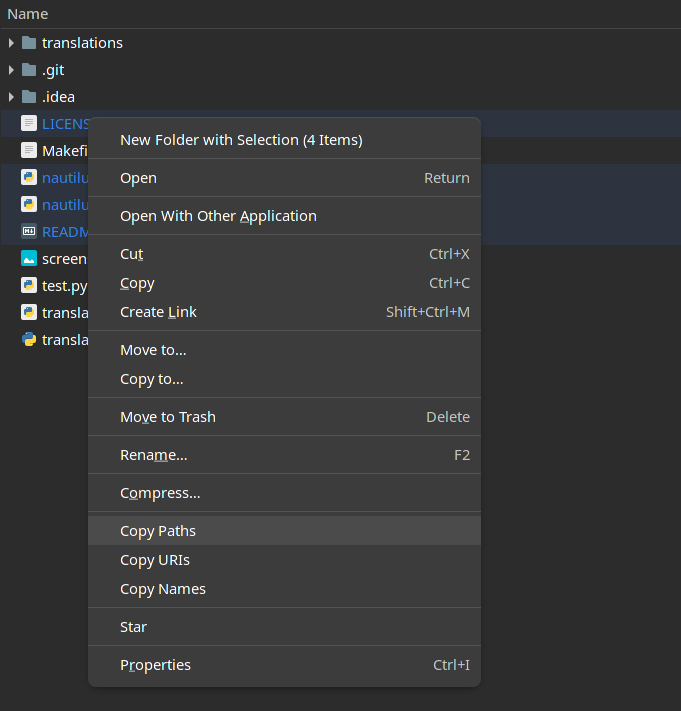
Installation
AUR
yay -S nautilus-copy-pathoryaourt -S nautilus-copy-path- Restart the Nautilus (
nautilus -q)
Fedora Copr 
- Add this repo
sudo dnf copr enable xariann/tools - Install the package
sudo dnf install nautilus-copy-path - Restart the Nautilus (
nautilus -q)
Net Install
curl -L https://raw.githubusercontent.com/chr314/nautilus-copy-path/master/net-installer.sh | bash
Manual installation
Install Dependencies
Fedora sudo dnf install nautilus-python python3-gobject
Ubuntu sudo apt install python3-nautilus python3-gi
Arch sudo pacman -S python-nautilus python-gobject
Download & Install the Extension
-
git clone https://github.com/chr314/nautilus-copy-path.git -
cd nautilus-copy-path -
make install -
Restart the Nautilus (
nautilus -q) if not seeing the options.
Uninstallation
-
cd path/to/nautilus-copy-path -
make uninstall -
Restart the Nautilus (
nautilus -q) if still seeing the options after uninstall.
Keyboard Shortcuts
Default Keyboard Shortcuts
| Action | Shortcut |
|---|---|
| Copy Paths | Ctrl + Shift + C |
| Copy URIs | Ctrl + Shift + U |
| Copy Names | Ctrl + Shift + D |
| Copy Files Content | Ctrl + Shift + G |
Configuration
configuration file: config.json
example:
{
  "items": {
    "path": true,
    "uri": true,
    "name": true,
    "content": true
  },
  "selections": {
    "clipboard": true,
    "primary": true
  },
  "shortcuts": {
    "path": "<Ctrl><Shift>C",
    "uri": "<Ctrl><Shift>U",
    "name": "<Ctrl><Shift>D",
    "content": "<Ctrl><Shift>G"
  },
  "language": "auto",
  "separator": ", ",
  "escape_value_items": false,
  "escape_value": false,
  "name_ignore_extension": false
}
Currently supported languages
- Arabic
- Chinese
- Danish
- English
- Finnish
- French
- German
- Greek
- Italian
- Japanese
- Norwegian
- Polish
- Portuguese
- Romanian
- Russian
- Spanish
- Swedish
- Turkish
- Ukrainian
- Vietnamese
Add new translations
Translations files are in translations directory
example: English Translation
-
Copy the english translation file (
en.json), the new file name must be the new language code (e.g.es.json) -
Translate the values in the new file
-
Add information in the README in the section Currently supported languages about new language
-
Create Pull Request with the new translation
more like this