EverShelf
EverShelf: Your pantry's best friend. A self-hosted, open source smart pantry manager with AI expiry tracking, barcode…
 dadaloop82
🏠 EverShelf
Self-hosted pantry management system — Track your food inventory, scan barcodes, get AI-powered recipe suggestions, and reduce waste.
🚀 Try the live demo — no installation required!
▶ Open Live Demo · 🌐 Project Website · 📖 Wiki
The demo runs with mock pantry data. AI features are fully enabled. All write operations are safely sandboxed.

⚠️ Name disambiguation: There is an unrelated iOS app also called EverShelf, developed and published by Joshumi Technologies LLC on the Apple App Store. That application is a completely separate, independent product with no affiliation, association, or collaboration with this open-source project. This repository has no connection to Joshumi Technologies LLC, its products, or its services.
Release notes live in CHANGELOG.md — this README covers what EverShelf is, what it can do, and how to run it.
✨ Features
🫀 NEW — Health Bridge & Fuel Mode
EverShelf can sync daily activity from your phone and use it to generate recipes that match your calorie/protein budget — no meal diary, no extra apps to log food.
| Health Bridge (Android APK) | Lightweight gateway that reads Health Connect (steps, active kcal, workouts, sleep, distance, resting HR…) and posts daily aggregates to your EverShelf server |
| QR pairing | Settings → Health generates a QR with server URL + token — scan once from the phone; same Wi‑Fi as the server |
| Keep-alive | Persistent notification + battery-optimization exemption so OEM killers don’t stop background sync |
| Fuel Mode (“at my pace”) | Recipe generation uses biological profile + today’s activity + pantry stock; silent intake from pantry “use” and cooked recipes only |
| Weather influence (optional) | Off by default. Settings → Recipes: pick a city (Open-Meteo, no API key). When Fuel Mode generates a recipe, local conditions (hot / cold / rain…) bias dish style — e.g. heat → fresh, cold plates |
| Settings → Health | Profile (sex, age, height, weight, goal, activity), master enable switch, bridge download / unlink |
Download (always latest build):
evershelf-health-bridge.apk
Setup notes: evershelf-health-bridge/README.md
🧠 NEW — AI providers (pick exactly one)
EverShelf AI features (product ID, expiry OCR, recipes, chat, prices…) all go through one configured backend. Settings → API Keys (or .env):
| Master switch | AI_ENABLED — if off, no AI feature runs |
| Google Gemini | Cloud default — set GEMINI_API_KEY |
| OpenAI (cloud) | Official OpenAI API — OPENAI_API_KEY (+ optional OPENAI_BASE_URL / OPENAI_MODEL) |
| Llama (local / remote) | Any OpenAI-compatible server: Ollama, llama.cpp, vLLM… — set LLAMA_BASE_URL (+ optional LLAMA_MODEL / LLAMA_API_KEY) |
| Connection test | In Settings → API Keys: run a ping and see latency in ms |
Providers are mutually exclusive (AI_PROVIDER=gemini|openai|llama). Credentials for inactive providers are ignored.
🤖 NEW — MCP Server (AI Agent Integration)
EverShelf ships a Model Context Protocol server so Claude Desktop, Cursor, Home Assistant LLM, Open WebUI, and other MCP hosts can query and update your pantry in natural language.
| Tool | What it does |
|---|---|
get_inventory |
List stock by location |
get_expiring_soon |
Items expiring in N days |
get_pantry_stats |
Dashboard totals |
get_shopping_list |
Current shopping list |
get_smart_shopping |
AI restock predictions |
add_shopping_items |
Add to shopping list |
use_inventory_item |
Record consumption |
suggest_recipe |
AI recipe from pantry |
Setup: mcp-server/README.md — Node.js 20+, configure EVERSHELF_URL + optional EVERSHELF_TOKEN.
Example: "What's expiring this week?" → "Suggest a dinner from the fridge" → "Add milk to the shopping list" → "I used 2 eggs".
🏠 Home Assistant Integration
EverShelf has a native Home Assistant integration available on HACS.
Connect your pantry to your smart home in minutes — no YAML, no manual sensor setup.
What you get:
| 16 sensors | Expiry counts, stock levels by location (pantry / fridge / freezer), shopping list total, AI API usage, last backup timestamp, days to next expiry |
| 6 binary sensors | Expired items, expiring items, expiring today, shopping list active, backup overdue, Bring! connected |
| 5 action buttons | Refresh data, Refresh prices, Suggest Recipe (AI — result as HA notification), Sync smart shopping, Clear expired rows |
| Shopping list todo | Bidirectional sync — add, remove, check off items directly from HA |
| Expiry calendar | Every product's expiry date as a native HA calendar event — works with the calendar card and any calendar automation |
| Quick-add text entity | Type a product name in HA to instantly add it to the shopping list (great for voice assistants / Assist) |
| 6 services | add_to_shopping, mark_used, refresh, suggest_recipe, refresh_prices, clear_expired |
| Auto-discovery | Detected automatically via Zeroconf/mDNS when avahi-daemon runs on the EverShelf host |
| 5 languages | English, Italian, German, French, Spanish |
Requires a self-hosted EverShelf instance. The integration talks directly to your server — no cloud involved.
Full documentation: ha-evershelf on GitHub
📦 Inventory Management
- Corporate list UX — Unified row cards with swipe backgrounds; tap or swipe left opens Use; swipe right opens edit; product detail sheet (2×2 actions) from dashboard and quick-access chips
- Edit from everywhere — Pencil on the Use page (and discard modal) opens the same inventory edit sheet as the list / home detail flows
- Favourite products — Star on each inventory row; favourites stay pinned in a Favourites section at the top of the list (state on the product, survives restocks)
- Custom storage locations — Settings → add places beyond Pantry / Fridge / Freezer / Other (e.g. Cellar, Garage); they appear in filters and location pickers
- Piece fractions — Use form accepts ¼-piece steps for produce sold by the piece (e.g. ½ avocado); server keeps fruit/veg in pcs, not grams
- Export / import inventory — Download the full inventory as a UTF-8 CSV (Excel-compatible) or open a print-ready page to save as PDF; CSV import with schema legend, validation preview, and double confirm before writing
- Barcode scanning — Scan products with your phone camera using QuaggaJS; last 20 scanned products saved as tappable chips so you can re-select them without rescanning
- Continuous scan — Add several barcodes in a row without leaving the camera (shopping / continuous mode); sealed packs with different best-before dates stay as separate stock rows
- AI identification — Take a photo and let the configured AI provider identify the product, with suggestions from your existing inventory; gracefully shows a friendly message when AI quota is exhausted instead of a raw API error
- Smart locations — Track items across Pantry, Fridge, Freezer, and Other
- Expiry tracking — Automatic shelf-life estimation based on product type and storage
- Opened product tracking — Reduced shelf-life calculation when packages are opened; opened-product expiry is now also checked when building banner alerts (not just the dashboard section)
- Vacuum-sealed support — Extended expiry dates for vacuum-sealed items; products sealed under vacuum are only flagged as expired after a configurable grace period past the printed date (
VACUUM_EXPIRY_EXTENSION_DAYS, default 30 days, configurable in.env) - Anomaly detection — Banner alerts for suspicious quantities and consumption predictions with inline correction; dismiss button now shows the current inventory quantity so the action is unambiguous ("Quantity is correct (2 pcs)")
🤖 AI-Powered (Gemini · OpenAI · Llama)
Works with the provider chosen above — same features whether you use Gemini cloud, OpenAI cloud, or a local/remote Llama-compatible endpoint.
- Expiry date reading — Photograph a label and extract the expiry date automatically
- Product identification — Point your camera at any product for instant recognition
- Existing product matching — AI scan shows matching products already in your pantry before suggesting new ones
- Storage & shelf-life hint — When adding a new product, AI suggests the optimal storage location and shelf-life in the background; shown as an inline AI badge next to the expiry estimate
- Recipe generation — Get personalized recipes based on what's in your pantry; streams live via Server-Sent Events so results appear as they are generated. With Mealie configured, EverShelf picks from your saved cookbook first (offline cache supported) before falling back to AI in Auto mode
- Recipe stock hints — Each pantry ingredient shows how much you have and what remains after use; when the leftover would be less than 5% of the full sealed package (10% for an already-opened partial pack), the recipe automatically uses everything on hand to avoid waste
- Smart chat assistant — Ask questions about your inventory, get cooking tips
- Shopping suggestions with tips — AI-powered purchase recommendations, each enriched with a short practical buying/storing tip
- Anomaly explanation — "Explain" button on anomaly banners explains in plain language why a discrepancy likely occurred and what to do
- Model fallback (Gemini) — Gemini endpoints walk a model chain on quota or unavailable-model errors
- Graceful no-key / AI-off state — When AI is disabled or credentials are missing, AI entry points show a friendly message; the header button is visually greyed with an amber dot
🛒 Shopping List
- EverShelf built-in list (default) — Shopping list is stored on the server (
shopping_list); no external app required (SHOPPING_MODE=internal) - Generic shopping names — Products are grouped by type (e.g. “Milk”, “Cold cuts”, “Cooking cream”) rather than brand
- Auto-add on depletion — When a product (and its generic family) reaches zero, it is added to the EverShelf list automatically
- Optional Bring! mirror — Set
SHOPPING_MODE=bringplus Bring credentials to sync the same list to the Bring! app; disabling Bring does not disable the EverShelf list - Smart predictions — Know what you'll need before you run out
- Auto-remove on scan — Products are removed from the shopping list when scanned in shopping mode
- Restocking templates — Save named product bundles and apply them to the shopping list or inventory in one tap
- 15-day remove block — After Bought / remove, cron will not silently re-add that family for
SHOPPING_REMOVED_BLOCK_DAYS(default 15); finishing the product again clears the block - List deduplication — Generic + specific names merge into one row
- Bring catalog keys — When mirroring to Bring!, product types resolve to a German catalog key for icon/category display
🍳 Cooking Mode
- ♻️ Zero-waste tips — For each cooking step that generates reusable scraps (peels, cooking water, egg whites, cheese rinds, bread crusts, vegetable tops, etc.), a dismissible ♻️ tip card appears with a practical reuse idea; tips are generated by the AI provider as part of the recipe; opt-in toggle in Settings (default OFF)
- Step-by-step guidance — Follow recipes with a hands-free cooking interface
- Text-to-Speech — Voice readout of recipe steps; browser Web Speech API, native Android TTS via kiosk
_kioskBridge.speak()(main-thread safe), or custom REST endpoint (Home Assistant); kiosk tablets always prefer the native bridge over server-side TTS; retries voice loading for up to 10 seconds with a fallback refresh button - Auto-read on navigate — Each step is read aloud automatically when you tap Next or Previous; the first step is read when entering cooking mode
- Timer voice alerts — 10-second countdown warning spoken aloud before each timer expires; expiry announced vocally when time is up
- Recipe completion — "Bon appétit!" announced via TTS when the last step is confirmed
- Built-in timer — Automatic timer suggestions based on recipe instructions
- Ingredient tracking — Mark ingredients as used during cooking; leftover quantities prompt a "move to another location" flow
📊 Dashboard
- Waste tracking — Monitor consumed vs. wasted products over 30 days
- Anti-waste report — Personalised waste rate vs. national average with annual kg estimate; shown above the expiring-items list
- Expiry alerts — Visual warnings for expired and soon-to-expire items
- Opened products panel — Tracks partially-used items; expiry is recalculated from the opening date using AI (Gemini) + per-category rule fallback; whole sealed packages always keep their original manufacturer expiry; conf items with mixed whole + fractional units are shown as two separate entries
- Freezer shelf-life — Granular per-product estimates (USDA/EFSA): fish 120 d, poultry 270 d, whole red-meat cuts 365 d, mince 120 d, vegetables/fruit 270 d, generic 180 d; AI + cache still take priority over rules
- Safety ratings — Smart assessment of expired product safety (by category and location); expired unsafe items shown with a red danger banner and a discard action as the primary action
- Expired product banner — Products that have passed their effective shelf-life (including opened-product reduced expiry) appear in the top notification banner; icon, colour and title adapt to the actual safety level (✅ green for safe, 👀 amber to check, 🚫 red for danger); high-risk items get a prominent discard action
- Quick recipe bar — One-tap recipe suggestion using expiring products
- Anomaly banner — Scrollable banner with suspicious quantities and consumption prediction mismatches, with one-tap correction or inline edit
- Expired/expiring alerts — Priority-sorted banner notifications for expired and soon-to-expire products with use, throw, edit, and dismiss actions
- Swipe navigation — Touch swipe or tap arrows/dots to browse banner notifications
- Quick-access buttons — Recently used and most popular products shown on the inventory page for fast access
🎨 Corporate UI (v1.7.57+)
App-wide visual system documented in docs/CORPORATE-UI.md.
corporate.css— Second stylesheet layer on top ofstyle.css; does not replace layout/dark-mode logic- Consistent components — Gradient primary/success/warning/accent buttons, pill tabs, elevated cards, blurred modal overlays, unified form inputs and quantity controls
- Touch-first — 48px minimum button height; large CTAs at 52px; active press feedback (
scale(0.98)) - Inventory — Swipe-colored row backgrounds, category headers, hidden static hints; one-time demo animation on first visit
- Shopping & settings — Matching row cards, settings tabs, and section cards
- Dark mode — Corporate tokens respect existing light/dark/auto theme variables
🌙 Appearance
- Dark mode — Three modes: Light, Dark, and Auto (time-based: dark from 20:00 to 07:00, light otherwise); applies immediately without page reload; auto mode re-evaluates every 5 minutes, so night/day transitions happen automatically even on always-on kiosk displays; theme is applied before the first render to prevent a white flash
- Global settings tab — A dedicated ⚙️ General tab groups all system-wide settings (language, currency, theme, screensaver, zero-waste tips, export) at the top of the Settings panel
�️ Database Maintenance
- Automatic cleanup — Recipes older than
RECIPE_RETENTION_DAYS(default 7) and transactions older thanTRANSACTION_RETENTION_DAYS(default 7) are deleted automatically on every cron cycle; SQLiteVACUUMruns after each cleanup to keep the file compact - Manual cleanup — Trigger immediately via
GET /api/?action=db_cleanup - Compact by default — Fresh installs stay small; large accumulated databases shrink back to a few hundred KB within one cron cycle
�📱 Progressive Web App
- Mobile-first design — Optimized for phones, works on tablets and desktop
- Installable — Add to home screen for a native app experience
- Multi-device — All user data (shopping tags, pinned items, location preferences, scan history) is stored server-side in SQLite and shared across every device on the same instance; no data is siloed in a single browser's localStorage
📶 Offline Mode
- Automatic detection — Full-screen overlay appears immediately on network loss; shows a "Continue offline" button after 3 s, and auto-enters offline mode after 8 s
- Local inventory cache — Inventory is synced to
localStorageat every startup and on each successful API call; the offline view always reflects the last known state - Write queue — Add, use, update and delete operations performed while offline are queued locally and synced to the server automatically on reconnect (including after a page refresh)
- Optimistic UI — Queued writes are applied immediately to the local cache so the interface stays responsive
- Offline-computed stats — Expiring and expired items are derived client-side from the cache; dashboard stat cards show real counts instead of zeros
- AI/network sections hidden — Anti-waste chart, nutrition analysis, recipe generator, price fetching, and AI chat are hidden in offline mode; the inventory, history, and manually-managed shopping list remain fully functional
- Broken image fallback — External product images (Open Food Facts, etc.) that fail to load are replaced with a neutral grey placeholder, keeping the layout intact
- Startup recovery — If the page is refreshed while operations are queued, they are detected and synced automatically on the next successful startup
- Buffered error reporting —
remoteLogandreportErrorcalls made while offline are stored locally and flushed to the server (and to GitHub issues) when the connection is restored
⚖️ Smart Scale Integration (Add-on)
- Bluetooth gateway — Connects a BLE smart scale to EverShelf via local WebSocket
- SSE relay — Server-side relay avoids mixed-content (HTTPS→WS) issues
- Auto-discovery — Server scans LAN to find the gateway automatically
- Auto weight reading — When adding/using a product with unit g/ml, weight fills automatically
- 10g threshold — Ignores readings that haven't changed enough between products
- Duplicate-reading prevention — Server-side 12-second dedup window rejects a second scale-triggered deduction of the same product, guarding against BLE multi-fire
- ml conversion hint — Shows "weight in grams → will be converted to ml" when product unit is ml
- Stability + auto-confirm — 10s stable wait + 5s countdown before confirming
- Real-time status — Scale connection indicator always visible in the header
- Multi-protocol — Supports Bluetooth SIG Weight Scale, Body Composition, Xiaomi Mi Scale 2 and 100+ models
- Built into kiosk (v1.7.20+) — BLE gateway runs as an integrated foreground service inside the EverShelf Kiosk app; no separate APK needed.
📺 Android Kiosk Mode (Add-on)
- Dedicated tablet app — Full-screen WebView wrapper for wall-mounted kitchen tablets
- True kiosk lock — Screen pinning blocks home/recent buttons
- Setup wizard — 6-step guided configuration (language, welcome, permissions, server URL, BLE scale scan, screensaver, summary)
- Smart auto-discovery — Scans the LAN in parallel (60 threads, TCP pre-check, ports 80/443/8080/8443) with real-time UI feedback; correctly identifies the device's Wi-Fi/Ethernet subnet (VPN and cellular interfaces are filtered out)
- Built-in BLE scale gateway —
GatewayServiceforeground service; BLE scanning + WebSocket server:8765run directly inside the kiosk app. Select your scale in step 5 of the wizard — no external app required - Scale auto-configuration — After selecting the BLE device, the wizard writes
scale_enabledandscale_gateway_url=ws://127.0.0.1:8765to the server automatically - Camera & mic permissions — Full hardware access for barcode scanning and voice; grant button transforms to a green confirmation after granting
- Native TTS bridge —
_kioskBridge.speak(text, rate, pitch)uses Android TextToSpeech on the main thread; locale follows kiosk language;stopSpeech()andisTtsReady()for cooking mode - Hard refresh — ↻ button clears WebView cache to pick up web app updates
- Update notifications — Checks GitHub releases every 6h, shows banner when updates available
- SSL support — Accepts self-signed certificates
- Android kiosk app —
evershelf-kiosk/— v1.7.20 APK via GitHub Releases
🚀 Quick Start
Prerequisites
- Web server with PHP 8.0+ (Apache or Nginx)
- PHP extensions:
pdo_sqlite,curl,mbstring,json - HTTPS recommended (required for camera access on mobile)
Installation
Option A: Docker (recommended)
Pre-built images are published to GHCR (ghcr.io/dadaloop82/evershelf).
# 1. Clone the repository (for compose + .env)
git clone https://github.com/dadaloop82/EverShelf.git
cd EverShelf

# 2. Create configuration file
cp .env.example .env
nano .env   # AI_ENABLED + AI_PROVIDER=gemini|openai|llama + provider credentials

# 3. Pull the pre-built image and start
docker compose pull
docker compose up -d

# → Open http://localhost:8080
To rebuild from source instead: docker compose build --no-cache && docker compose up -d.
Option B: Manual
# 1. Clone the repository
git clone https://github.com/dadaloop82/EverShelf.git
cd EverShelf

# 2. Create configuration file
cp .env.example .env

# 3. Set permissions
chmod 755 data/
chmod 664 data/.gitkeep
chown -R www-data:www-data data/

# 4. Edit your configuration
nano .env
Configuration (.env)
# AI — master switch + exclusive provider: gemini | openai | llama
AI_ENABLED=true
AI_PROVIDER=gemini
GEMINI_API_KEY=your_api_key_here
# OpenAI cloud:
# OPENAI_BASE_URL=https://api.openai.com/v1
# OPENAI_MODEL=gpt-4o-mini
# OPENAI_API_KEY=sk-…
# Llama local/remote (Ollama, llama.cpp, vLLM…):
# LLAMA_BASE_URL=http://127.0.0.1:11434/v1
# LLAMA_MODEL=llama3.2
# LLAMA_API_KEY=

# Optional: Bring! shopping list integration
BRING_EMAIL=your_email@example.com
BRING_PASSWORD=your_password

# Optional: Text-to-Speech for cooking mode
TTS_URL=http://your-home-assistant:8123/api/events/tts_speak
TTS_TOKEN=your_long_lived_token
TTS_ENABLED=true

# Optional: DB retention and cleanup (applied automatically each cron cycle)
RECIPE_RETENTION_DAYS=7        # delete recipe plans older than N days
TRANSACTION_RETENTION_DAYS=90   # delete stock transactions older than N days (min 30 enforced)

# Optional: Vacuum-sealed expiry grace period
VACUUM_EXPIRY_EXTENSION_DAYS=30 # extra days before vacuum-sealed items are flagged expired

# Optional: Gemini cost rates (USD per million tokens, for the Info tab cost estimate)
GEMINI_COST_25F_IN=0.15
GEMINI_COST_25F_OUT=0.60
GEMINI_COST_20F_IN=0.10
GEMINI_COST_20F_OUT=0.40

# Optional: Security — protect all API endpoints
# Set a strong random string; clients send it as X-API-Token header (or ?api_token= for HA)
API_TOKEN=

# Optional: Legacy alias for API_TOKEN (settings save only)
SETTINGS_TOKEN=

# Optional: Demo mode — block all write operations at the router level
DEMO_MODE=false

# Optional: Logging
# LOG_LEVEL sets the minimum severity written to disk (DEBUG / INFO / WARN / ERROR)
# DEBUG also logs every SQL query executed against the database
LOG_LEVEL=INFO
LOG_ROTATE_HOURS=24   # hours before opening a new log file (default: 24)
LOG_MAX_FILES=14      # maximum number of rotated files to keep (default: 14)
Web Server Configuration
Apache (.htaccess)
The app works out of the box with Apache if placed in the web root or a subdirectory. Make sure mod_rewrite is enabled and AllowOverride All is set.
<Directory /var/www/html/evershelf>
    AllowOverride All
    Require all granted
</Directory>
Nginx
server {
    listen 80;
    server_name your-server.local;
    root /var/www/html/evershelf;
    index index.html;

    location /api/ {
        try_files $uri $uri/ =404;
        location ~ \.php$ {
            fastcgi_pass unix:/run/php/php8.2-fpm.sock;
            fastcgi_param SCRIPT_FILENAME $document_root$fastcgi_script_name;
            include fastcgi_params;
        }
    }

    # Deny access to sensitive files
    location ~ /\.env { deny all; }
    location ~ /data/ { deny all; }
    location ~ /backup\.sh { deny all; }
}
HTTPS Setup (Recommended)
Camera access requires HTTPS on most mobile browsers. Options:
- Let's Encrypt with Certbot (for public-facing servers)
- Self-signed certificate (for local network only)
- Reverse proxy (e.g., Caddy, Traefik) with automatic TLS
Cron Job (Optional)
Set up a cron job for smart shopping predictions:
# Run every 5 minutes
*/5 * * * * php /path/to/evershelf/api/cron_smart_shopping.php >> /path/to/evershelf/data/cron.log 2>&1
Backup (Optional)
The included backup.sh creates local daily backups of your database:
# Run daily at 3 AM
0 3 * * * /path/to/evershelf/backup.sh
Google Drive Backup (Optional)
EverShelf supports automatic daily backups to Google Drive via OAuth 2.0. This works on any server, including private IP / local network setups (no public domain required).
Setup:
- Go to console.cloud.google.com and select or create a project.
- Enable the Google Drive API (
APIs & Services → Enable APIs → Google Drive API). - Go to
APIs & Services → Credentials → Create Credentials → OAuth client ID. - Application type: Web application.
- Add
http://localhostas an Authorized Redirect URI (this is the key — it works even without a real domain). - Copy Client ID and Client Secret into EverShelf Settings → Backup.
- Enter your Google Drive Folder ID (the last part of the folder URL).
- Click Authorize with Google and sign in.
- The browser will redirect to
http://localhostand may show a connection error — this is expected. Copy the full URL from the address bar (e.g.http://localhost/?code=4%2F0A...) and paste it into the field that appears in EverShelf, then click Submit.
Note: While the OAuth app is in Testing status in Google Cloud Console, you must add your Google account as a test user under
APIs & Services → OAuth consent screen → Test users.
🏗️ Architecture
evershelf/
├── index.html              # Single-page application (SPA)
├── manifest.json           # PWA manifest
├── .env.example            # Configuration template
├── backup.sh               # Local database backup script
├── LICENSE                 # MIT License
│
├── api/
│   ├── index.php           # Main API router (all endpoints)
│   ├── database.php        # SQLite schema, migrations, helpers
│   └── cron_smart_shopping.php  # Background job for predictions
│
├── assets/
│   ├── css/
│   │   ├── style.css       # Layout, legacy components, dark mode, :root tokens
│   │   └── corporate.css   # App-wide unified UI (buttons, cards, forms, lists)
│   ├── js/app.js           # All application logic
│   └── img/                # Static images
│
├── docs/
│   └── CORPORATE-UI.md     # Design system reference
│
├── mcp-server/             # MCP companion for AI agents
│   └── README.md
│
└── data/                   # Runtime data (gitignored)
    ├── evershelf.db         # SQLite database (auto-created)
    ├── backups/            # Local DB backups
    └── *.json              # Token/cache files

evershelf-scale-gateway/    # ⚖️ Android BLE gateway [DEPRECATED — integrated into kiosk v1.7.20+]
    ├── README.md           # Deprecation notice + legacy docs
    └── app/src/            # Kotlin Android source (WebSocket + BLE)

evershelf-kiosk/            # 📺 Android kiosk app (add-on)
    ├── README.md           # Setup & feature docs
    └── app/src/            # Kotlin Android source (WebView wrapper)
API Endpoints
| Category | Action | Method | Description |
|---|---|---|---|
| Products | search_barcode |
GET | Find product by barcode |
lookup_barcode |
GET | Look up barcode on Open Food Facts | |
product_save |
POST | Create or update a product | |
products_list |
GET | List all products | |
| Inventory | inventory_list |
GET | List inventory items |
inventory_add |
POST | Add product to inventory | |
inventory_use |
POST | Use/consume from inventory | |
inventory_summary |
GET | Count by location | |
| AI | gemini_identify |
POST | Identify product from photo |
gemini_expiry |
POST | Read expiry date from photo | |
gemini_chat |
POST | Chat with AI assistant | |
generate_recipe |
POST | Generate recipe from inventory | |
gemini_product_hint |
POST | Storage location + shelf-life hint | |
gemini_shopping_enrich |
POST | Enrich shopping suggestions with tips | |
gemini_anomaly_explain |
POST | Plain-language anomaly explanation | |
| Shopping | bring_list |
GET | Get Bring! shopping list |
bring_add |
POST | Add items to Bring! | |
smart_shopping |
GET | Smart shopping predictions | |
| Settings | get_settings |
GET | Get server configuration |
save_settings |
POST | Update server configuration |
🔒 Security Notes
- Credentials are stored in
.env(server-side, never committed to Git) - Database stays local — never pushed to remote repositories
- Apache/Nginx hardening —
.env,data/, andlogs/are blocked from direct HTTP access - API token — set
API_TOKENin.envto requireX-API-Tokenon all API calls (Home Assistant:?api_token=) - API keys are never exposed to the browser —
get_settingsreturns only boolean flags (gemini_key_set,ha_token_set, …) - GitHub Issues token — stored encrypted as
GH_ISSUE_TOKEN_ENC+GH_ISSUE_TOKEN_KEY(seescripts/encrypt-gh-token.php) - Settings write protection —
save_settingsrequires the same API token when configured; validated withhash_equals - Demo / public mode — set
DEMO_MODE=trueto block all write operations at the PHP router level before any business logic runs - The API uses parameterized SQL queries (PDO prepared statements) against injection
- Input validation on all inventory operations (quantity bounds, location whitelist)
- Consider adding reverse-proxy authentication (e.g. Authelia, Nginx
auth_basic) if the server is accessible from the internet
🛠️ Development
# Run PHP's built-in server for local development
php -S localhost:8080 -t /path/to/evershelf

# Check PHP syntax
php -l api/index.php
php -l api/database.php
The application uses no build tools — edit files directly and refresh.
📋 Roadmap
Feature requests, bug reports and planned work are tracked in the EverShelf Roadmap GitHub Project.
🌐 Translations
The app supports multiple languages via JSON translation files in the translations/ folder.
| Language | Status |
|---|---|
| 🇮🇹 Italian (it) | ✅ Complete (base) |
| 🇬🇧 English (en) | ✅ Complete |
| 🇩🇪 German (de) | ✅ Complete |
| 🇫🇷 French (fr) | ✅ Complete |
| 🇪🇸 Spanish (es) | ✅ Complete |
Want to add your language? See the Translation Guide — just copy translations/it.json, translate the values, and submit a PR!
🤝 Contributing
Contributions are welcome! See CONTRIBUTING.md for detailed guidelines.
- Fork the repository
- Create a feature branch (
git checkout -b feature/my-feature) - Commit your changes (
git commit -m 'Add my feature') - Push to the branch (
git push origin feature/my-feature) - Open a Pull Request
Easiest way to start — translate EverShelf into your language
Translations are just JSON files. No coding, no setup — fork → edit → PR.
translations/
├── it.json   ✅ Italian (base)
├── en.json   ✅ English
├── de.json   ✅ German
├── fr.json   ✅ French
├── es.json   ✅ Spanish
├── pt.json   ❌ Portuguese — wanted!
├── nl.json   ❌ Dutch — wanted!
└── ...       ❌ Your language here!
👉 See issue #93 to claim a language.
Other ways to contribute
| What | Skill needed |
|---|---|
| 🐛 Report a bug | None |
| 📖 Improve the wiki | Markdown |
| 🌍 Add a translation | JSON editing |
| 🎨 Fix a CSS/UI issue | CSS / HTML |
| ⚙️ Implement a feature | PHP / JS |
| ⭐ Star the repo | Clicking |
👉 Browse help wanted issues for good starting points.
Read CONTRIBUTING.md for the full guide (branch naming, code style, how to run locally).
💬 Community
Join the conversation in GitHub Discussions:
- Vote on upcoming features — tell us what to build next
- Show your setup — share your kitchen kiosk
- Ask questions — get help from the community
📄 License
This project is licensed under the MIT License — see the LICENSE file for details.
👨💻 Author
Stimpfl Daniel — evershelfproject@gmail.com
- Website: evershelfproject.dadaloop.it
- GitHub: @dadaloop82
📸 Screenshots
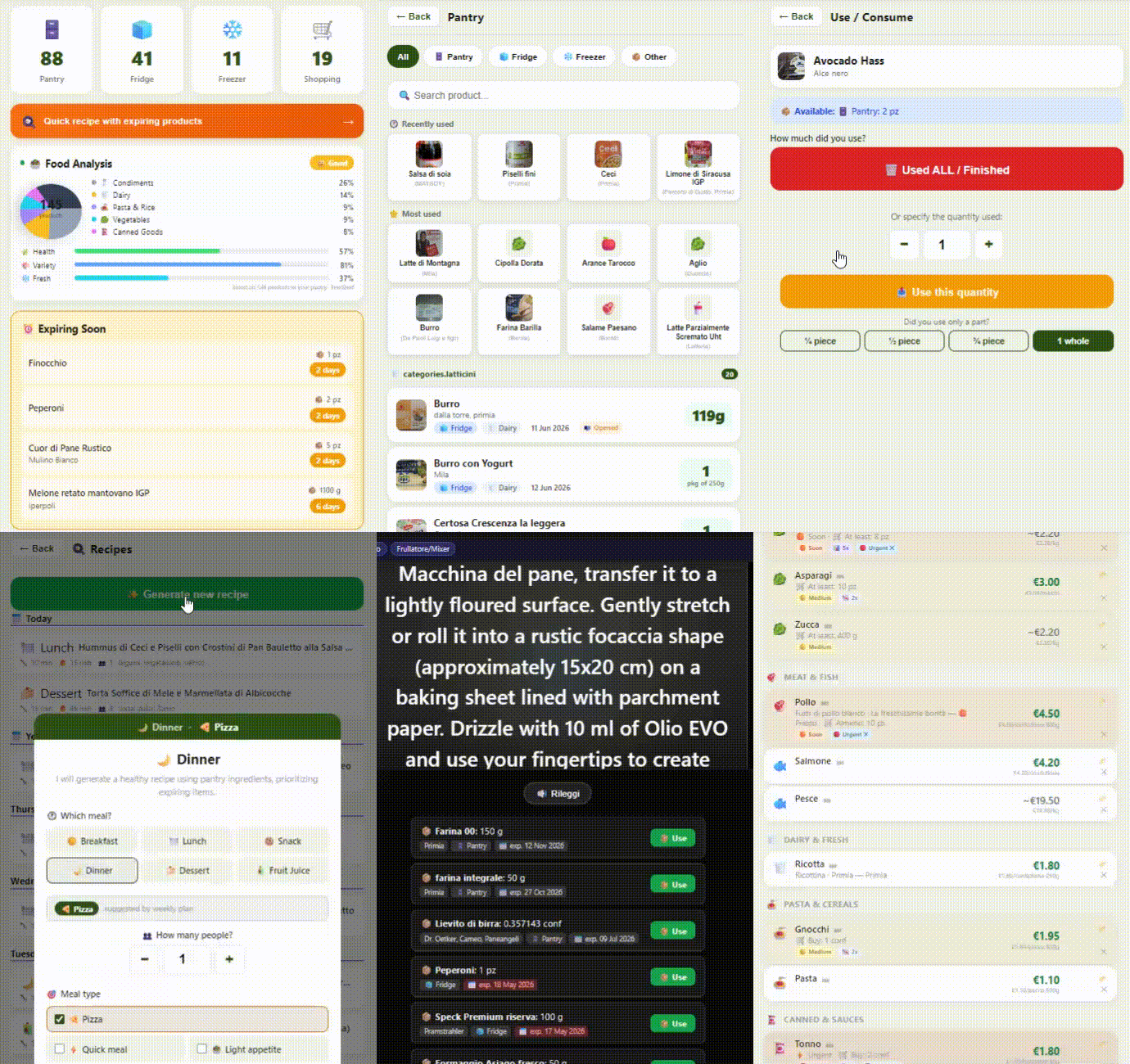
For a live walkthrough with real data and full AI enabled, visit the live demo — no installation required.
Corporate UI screenshots (List page, product sheet, dashboard cards): see assets/img/screenshots/README.md.
Want to contribute additional screenshots? See CONTRIBUTING.md — PRs welcome!
more like this