agentlytics
Comprehensive analytics dashboard for AI coding agents — Cursor, Windsurf, Claude Code, VS Code Copilot, Zed, Antigravi…
JavaScript★ 555
A modern UI card system for Home Assistant focused on clean design, smooth interactions and real usability
 danielmigueltejedor
git clone https://github.com/danielmigueltejedor/nodalia-cards.gitdanielmigueltejedor/nodalia-cards
A cohesive, app-like card system for modern Home Assistant dashboards.
Installation · Cards · Quick start · Support · Translate
Nodalia Cards is a custom Home Assistant frontend card suite built as one visual system rather than a collection of unrelated components. Shared design tokens, motion, interactions and editors give Home Assistant a polished, consistent experience across mobile, tablet and desktop.
Important
Inclusion in the default HACS catalogue is currently in progress. Until it is approved, install Nodalia Cards through HACS as a custom Dashboard repository using the steps below.
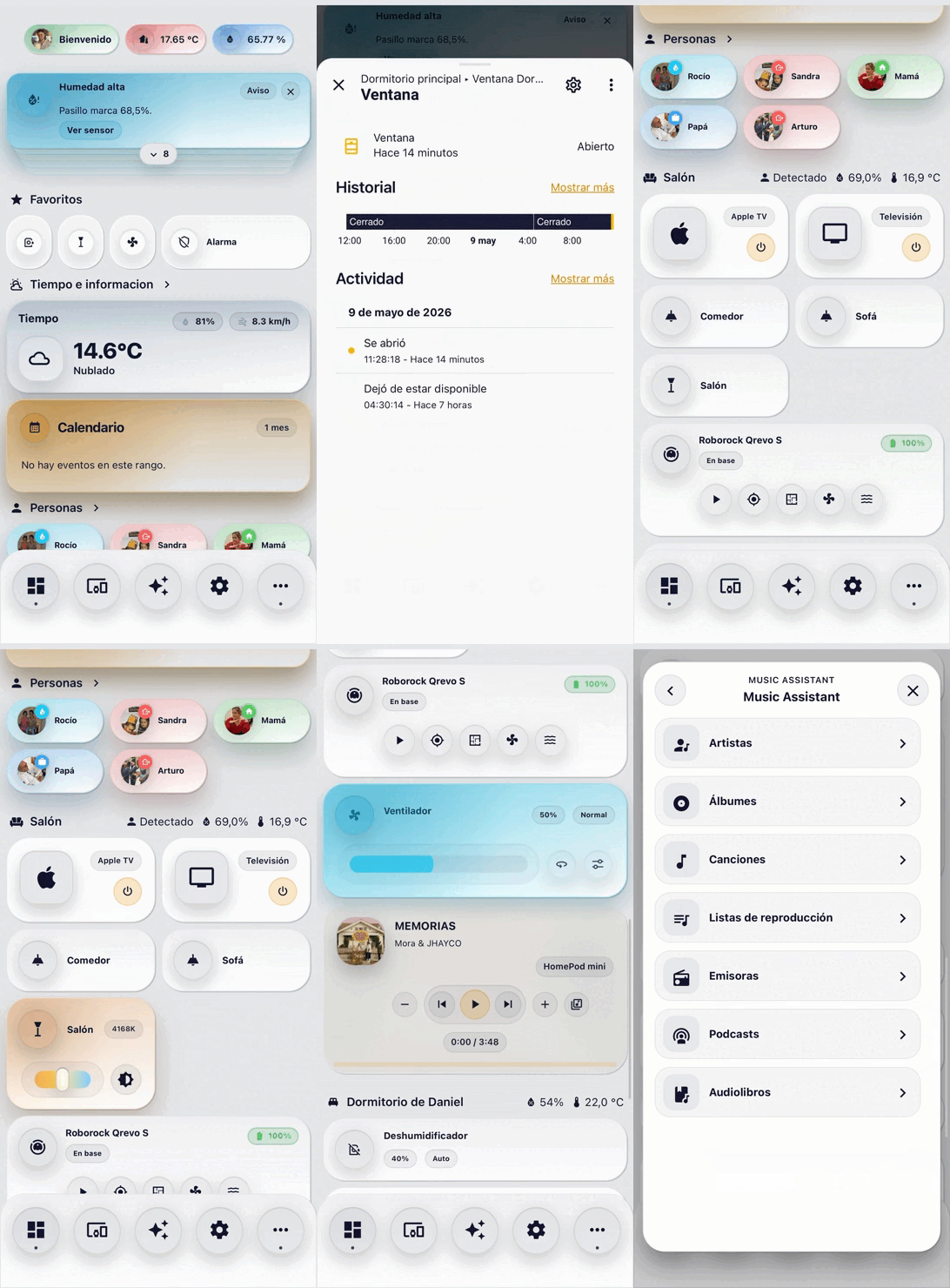
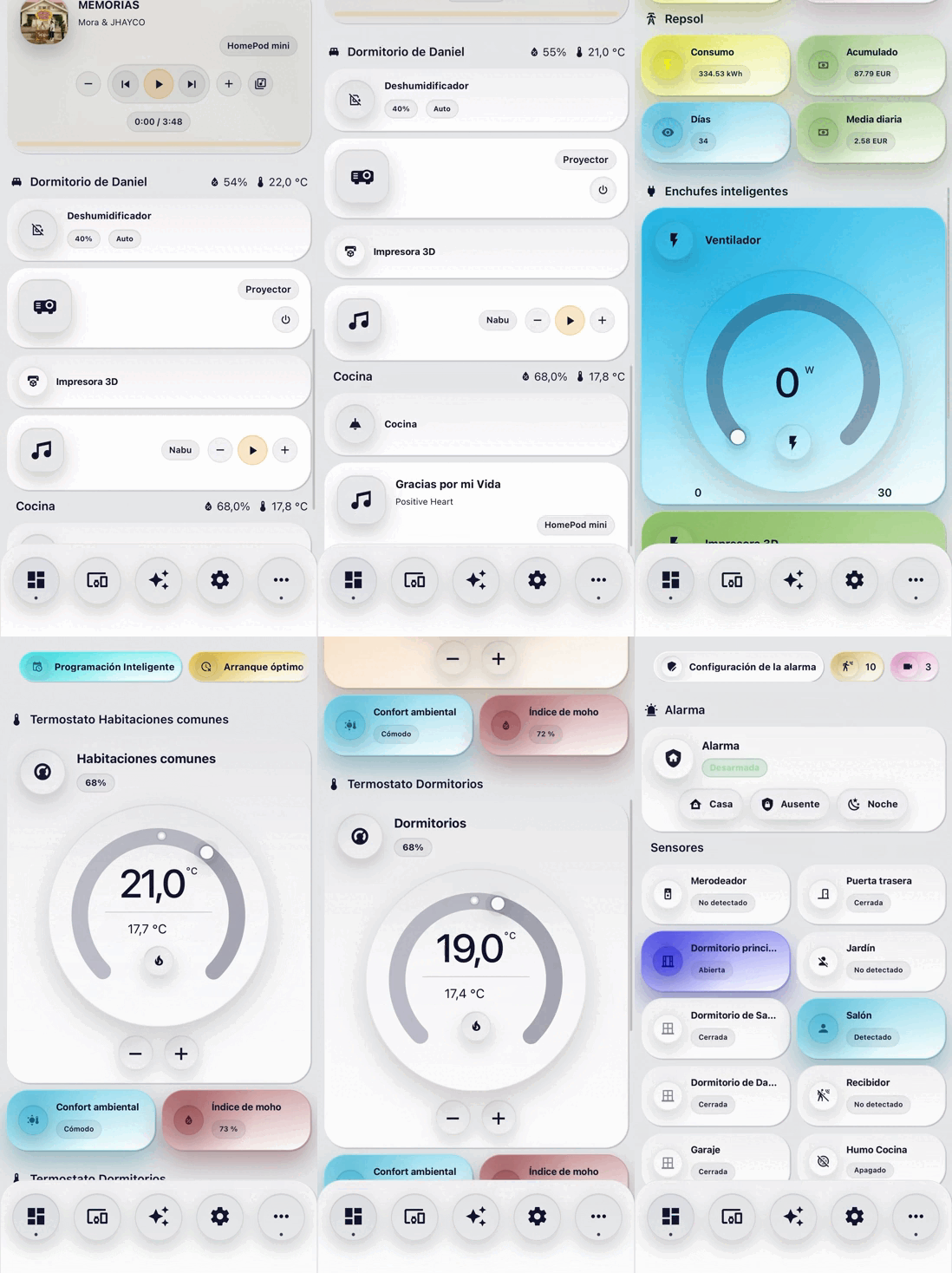
| Design | Experience | Integration |
|---|---|---|
| Shared visual language | Mobile-first layouts | Native Home Assistant selectors |
| Consistent spacing and surfaces | Smooth, purposeful motion | Integrated visual editors |
| Theme-aware colours | Tactile controls and haptics | Minimal generated YAML |
| Cohesive popup system | Responsive cards and dialogs | Context-aware entities and services |
The suite is designed for real daily dashboards: one interaction model, predictable configuration and a consistent finish across every card.
| Everyday controls | Insight and context | Spaces and navigation |
|---|---|---|
| Light | Circular Gauge | Navigation Bar |
| Fan | Graph | Room Summary |
| Humidifier | Power Flow | Person |
| Cover | Weather | Scenes |
| Climate | Calendar | Favourites |
| Alarm Panel | Notifications | Insignia |
| Media Player | News | Entity |
| Vacuum | Camera | Advanced Vacuum |
Every card is registered with the custom:nodalia-… prefix. The complete set currently includes:
custom:nodalia-navigation-barcustom:nodalia-media-playercustom:nodalia-light-cardcustom:nodalia-fan-cardcustom:nodalia-humidifier-cardcustom:nodalia-circular-gauge-cardcustom:nodalia-graph-cardcustom:nodalia-power-flow-cardcustom:nodalia-cover-cardcustom:nodalia-climate-cardcustom:nodalia-alarm-panel-cardcustom:nodalia-advance-vacuum-cardcustom:nodalia-entity-cardcustom:nodalia-fav-cardcustom:nodalia-insignia-cardcustom:nodalia-person-cardcustom:nodalia-scenes-cardcustom:nodalia-weather-cardcustom:nodalia-calendar-cardcustom:nodalia-notifications-cardcustom:nodalia-vacuum-cardcustom:nodalia-news-cardcustom:nodalia-camera-cardcustom:nodalia-room-summary-cardAll Nodalia cards include a visual editor designed to fit naturally into Home Assistant:
Only settings that differ from the defaults are written to YAML, keeping dashboard configuration readable and portable.
Until the default HACS listing is approved:
https://github.com/danielmigueltejedor/nodalia-cards.If a card does not appear immediately after installation or an update, perform a hard refresh or clear the Home Assistant frontend cache.
/nodalia/nodalia-cards.js
That single file includes both the cards and their visual editors. It also enables native background notifications, shared dismissals and climate schedules without packages, helpers or user-created automations.
If a card does not appear immediately after an update, perform a hard refresh or clear the Home Assistant frontend cache.
dist/nodalia-cards.js to your /config/www/ directory.URL: /local/nodalia-cards.js
Type: module
Add a card through the dashboard visual editor, or start with one of these minimal examples.
type: custom:nodalia-light-card
entity: light.living_room
type: custom:nodalia-calendar-card
calendars:
  - entity: calendar.home
type: custom:nodalia-advance-vacuum-card
entity: vacuum.roborock
map_source:
  image: image.roborock_map
calibration_source:
  camera: true
| Feature | Documentation |
|---|---|
| Climate setpoint scheduling | Native weekly schedules |
| Advanced Vacuum compatibility | Platforms, live room tracking and fallbacks |
| News Card | Layouts, sources and configuration |
| Shared styling | Theme variables and card-mod reference |
| Background mobile notifications | Native delivery and legacy fallback |
| Translations | Contributor guide |
| Maturity | Branch / tag | Intended use |
|---|---|---|
| Stable | main, vX.Y.Z |
Recommended for daily dashboards |
| Release candidate | vX.Y.Z-rc.N |
Final compatibility and release validation |
| Beta | beta, vX.Y.Z-beta.N |
Feature-complete preview for broader testing |
| Alpha | alpha, vX.Y.Z-alpha.N |
Active development; breaking changes are possible |
HACS installs the latest stable release by default. To test a prerelease, open Nodalia Cards in HACS, choose Redownload → Need a different version?, and select the desired alpha, beta or RC tag.
Stable changes are documented in the changelog. Detailed prerelease notes live in CHANGELOG-PRERELEASES.md, and longer-term work is tracked in the roadmap.
Nodalia Cards currently includes Spanish, English, German, French, Italian, Dutch, Norwegian, Portuguese, Russian, Greek, Chinese and Romanian.
Help review or extend the project on Crowdin. Translation pull requests are also welcome; follow the translation guide to keep runtime and editor strings synchronized.
Thanks to every tester, translator and contributor helping make the suite more useful, especially @Sppedtech, @flippedcracker, @loicloiseau, @pqpxo, @jjanssen95, @alfonsoluna, @Scraft08YT and @ryatesKT.
Nodalia Cards is released under the MIT License.
Designed and maintained by Daniel Miguel Tejedor.more like this
Comprehensive analytics dashboard for AI coding agents — Cursor, Windsurf, Claude Code, VS Code Copilot, Zed, Antigravi…
A specialized swipe card for todo lists in Home Assistant with custom styling
ESPHome Modbus TCP↔RTU Bridge – Transparent bridge for ESP8266/ESP32 that lets multiple Modbus TCP clients communicate…
search projects, people, and tags