tilf
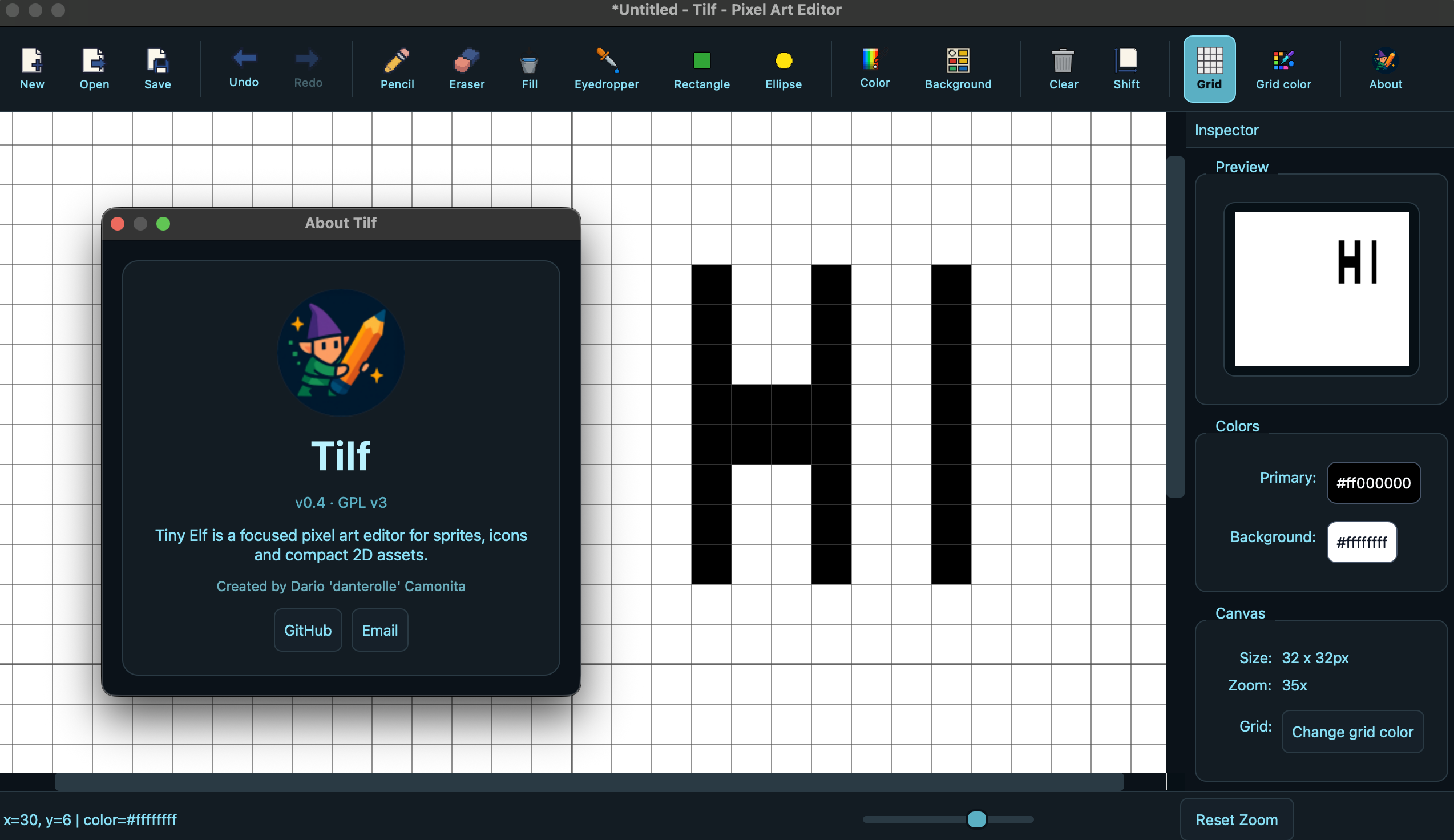
Tilf (Tiny Elf) is a free, simple yet powerful pixel art editor built with PySide6. It’s designed for creating sprites,…
 danterolle
git clone https://github.com/danterolle/tilf.gitdanterolle/tilfTilf — Pixel Art Editor

Tilf (Tiny Elf) is a simple yet powerful pixel art editor built with PySide6. It’s designed for creating sprites, icons, and small 2D assets with essential drawing tools, live preview, undo/redo, export options and much more. Check features.
There are several Pixel Art Editors that do the same things and even much more (animations, etc...), but many require an account registration or the insertion of an e-mail or have a certain business model.
I'm not interested in all that; my goal is to be able to create sprites freely, with (almost) zero dependencies, zero setup time, zero installations:
Tilf starts and I begin to draw what I want.
It runs on Windows, MacOS and GNU/Linux.
Download the latest release from the releases page.
Downloads: Windows · MacOS · GNU/Linux
I’m aware that the code quality isn’t great. I didn’t prioritize it when writing this. This project was something I put together during my spare time, and a lot of it could be written much better. There's definitely room for improvement, so I'm more than happy to accept PRs from anyone willing to contribute.
Why doesn't this tool have many commits?
Because I mainly used it for learning and personal purposes. Publish it as an Open Source project might be interesting for others as well.
Table of Contents
- Goals
- Features
- Requirements
- Build on MacOS and GNU/Linux
- Release automation
- About Windows
- Keyboard Shortcuts for file operations
- Save and Auto-Save
- Tips and Known Limits
- Troubleshooting - Work In Progress
- Contributing
- License
- Contact
Goals
- Single executable (cross-platform)
- No accounts, no emails or registrations required
- Completely free/open source with all features unlocked
- Focused on small sprites and assets
- Works offline without internet connection. No online platforms.
- Almost zero dependencies: Python standard library + PySide6
- Zero installation or setup time needed
Features
- Drawing tools:
- Pencil
- Eraser
- Fill (bucket)
- Eyedropper
- Rectangle (stroke)
- Ellipse (stroke)
- Canvas:
- New image with custom dimensions
- Zoom 1–50x (mouse wheel, macOS pinch gesture, Ctrl/Cmd + scroll, or slider)
- Editable background color (alpha supported)
- Optional grid with customizable color
- Clear canvas
- Workflow:
- Undo/Redo with history up to 50 states
- Drag & drop images to open
- Real-time preview in a side dock (you can move it wherever you want)
- Import/Export:
- Open PNG, JPEG/JPG, BMP
- Export to PNG (with or without transparency), JPEG/JPG, BMP
Handy details:
- Hold Shift while drawing rectangles/ellipses to constrain to squares/circles
- Grid is shown when zoom (cell size) is at least 4
- Clicking a pixel with the foreground color switches to drawing with the background color. Otherwise, the foreground color is used. Holding down Alt or Option forces the use of the background color.
Requirements
- Python 3, virtualenv
- OS: Windows, MacOS or GNULinux
- Dependencies:
- Runtime: PySide6
- Development/build: Ruff, mypy, PyInstaller
I did not use uv or poetry for this project; I don't think it is necessary to introduce a tool of that kind for a project that is, all things considered, simple.
Local development environment
python3 -m venv env
source env/bin/activate
python -m pip install --upgrade pip
python -m pip install -e ".[dev]"
python main.py
On MacOS and GNU/Linux, the Makefile can do the same setup:
make install
make dev
make check
Build on MacOS and GNU/Linux
- Clone the repository:
git clone https://github.com/danterolle/tilf.git && cd tilf
- This project has a Makefile that automates all the necessary build and cleanup operations for Tilf (for MacOS and GNU/Linux only), so we just need to run:
make
- The executable will be in the
distfolder.
./tilf
Enjoy!
Release automation
GitHub Actions builds release assets for Linux, MacOS and Windows when a version tag is pushed:
git tag -a vX.Y -m "vX.Y"
git push origin main vX.Y
The release workflow creates:
tilf_X.Y-Linux.tar.xztilf_X.Y-MacOS.ziptilf_X.Y-Windows.exe
About Windows
Run from source
- Clone the repository by using Git Bash:
git clone https://github.com/danterolle/tilf.git
cd tilf
- Create a virtual environment:
py.exe -m venv env
- Activate the virtual environment:
./env/Scripts/activate
- Install the dependencies:
pip install -e ".[dev]"
Note:
- And finally, run the application:
py.exe ./main.py
Build executable .exe
- Clone the repository by using Git Bash:
git clone https://github.com/danterolle/tilf.git
cd tilf
./env/Scripts/activate
- Install the dependencies:
pip install -e ".[dev]"
- Run PyInstaller:
pyinstaller --name tilf --onefile --windowed --icon assets/icon.icns --add-data assets:assets --add-data style.qss:. main.py
- The executable will be in the
distfolder.
./tilf
Keyboard Shortcuts for file operations
- File:
- New: Ctrl+N
- Open: Ctrl+O
- Save: Ctrl+S
- Edit:
- Undo: Ctrl+Z
- Redo: Ctrl+Y
- View:
- Fit to window: Ctrl+0
- 100% zoom: Ctrl+1
- Zoom: mouse wheel, macOS pinch gesture, Ctrl/Cmd + scroll or View presets
- Pan: trackpad/touchpad scroll or middle-mouse drag
- Tools:
- Pencil: B
- Eraser: E
- Bucket: G
- Eyedropper: I
- Rectangle: R
- Ellipse: C
- Use the background color: hold Alt/Option
- Shapes:
- Constrain to square/circle: hold Shift
Save and Auto-Save
- Export formats:
- PNG: optionally keep transparency.
- JPEG/JPG, BMP: no transparency.
On close, if there are unsaved changes, a recovery .png is automatically saved into a tilf_autosaves folder next to the startup script, with a timestamped filename.
Tips and Known Limits
- Undo/Redo history is capped at 50 states to limit memory usage.
- Large flood fills may take longer on big images.
- The grid appears when zoom (cell size) is at least 4.
- Very large images may impact performance; Remember: Tilf targets compact pixel art and sprites.
Troubleshooting - Work In Progress
ModuleNotFoundError: No module named 'PySide6'
Ensure your virtualenv is active and run:
pip install pyside6
Contributing
- Open issues for bugs or feature requests.
- For PRs, please keep the code style consistent and explain changes clearly.
- Feature ideas are welcome (e.g. advanced fills, selections, layers). Thank you!
License
GPL v3.0, see the LICENSE file for details.
Contact
- Developer: Dario 'danterolle' Camonita
- E-mail: danterolle@catania.linux.it
more like this
r2
Free open-source Cloudflare R2 desktop client and S3 GUI for macOS, Windows, and Linux. Manage Cloudflare R2, AWS S3, M…
facenox
Open-source, offline-first face recognition attendance platform that runs on any webcam.
lineboi3000
lineboi3000 is a way cool graphical interface for drawing, painting, adding EFX, and then sending your designs to a pen…