agentlytics
Comprehensive analytics dashboard for AI coding agents — Cursor, Windsurf, Claude Code, VS Code Copilot, Zed, Antigravi…
JavaScript★ 555
Local cockpit for Codex imagegen, pixel art, image editing, animation, and sprite-sheet workflows.
 dreiachse-cyber
git clone https://github.com/dreiachse-cyber/image-cockpit-for-codex-workflows.gitdreiachse-cyber/image-cockpit-for-codex-workflowsLocal image production cockpit for Codex-era workflows.
This project is unofficial and not affiliated with OpenAI. It is a local workspace for generating pixel art, then turning selected pixel-art assets into animation frames and sprite sheets.
The maintainer is also developing DemonBlade Pixel: Hyakki Senkou (妖刀ピクセル:百鬼潜行), a 2D bullet-hell action roguelite with pixel-art characters, bosses, and effects. It launches on Steam on November 12, 2026.
Game artwork in this section belongs to DemonBlade Pixel: Hyakki Senkou and is not covered by this repository's MIT license.
Image Cockpit is designed to run on a local machine where Codex is installed. The app itself does not call OpenAI APIs and does not require an API key.
Pixel art generation is routed through the local Codex handoff. When codex exec can use the imagegen skill / built-in image_gen path, complex prompts can produce real raster images and return them to codex-handoff/outbox/. The app itself still does not call OpenAI APIs directly.
For development and fallback checks, the app also includes a built-in procedural PNG generator. It is local and deterministic, meant to keep API and import flows testable without external services. It is not the primary image-quality path and is not a replacement for Codex imagegen.
Instead, the cockpit writes local handoff jobs for Codex:
codex-handoff/
  inbox/   # JSON jobs created by Image Cockpit
  assets/  # selected source images copied for a job
  outbox/  # images or metadata returned by Codex/user workflows
Codex, the user, or another local workflow can read the inbox job, create or revise assets, and place results in the outbox. Results can then be imported through the Local Inbox / Import flow.
When IMAGE_COCKPIT_CODEX_AUTORUN=1, the local handoff server will try to start codex exec after writing a job. The app still does not call OpenAI APIs directly; it only launches the locally installed Codex command. On Windows, the server prefers a terminal-runnable Codex CLI discovered under %LOCALAPPDATA%\OpenAI\Codex\bin\... over the WindowsApps desktop shim when IMAGE_COCKPIT_CODEX_COMMAND=codex. If no runnable Codex command is available, the job remains in codex-handoff/inbox/ for manual pickup and the UI unlocks instead of waiting forever.
The local API also exposes GET /api/codex/runner so the UI can show whether the configured Codex command is ready, disabled for manual handoff, or unavailable before a job is created.
The local generation endpoint is POST /api/generate. It writes deterministic fallback PNGs to codex-handoff/outbox/ and returns data URLs so the browser can add them to the history immediately.
Bundled animation sheets under public/samples/ are retained as README demo assets, release-audit fixtures, and local import QA inputs. The in-app Official Animation Library remains hidden for now, so these files are not presented as a supported built-in library surface.
Manual handoff steps are documented in docs/usage/manual-handoff.md.
The prompt-only imagegen handoff smoke result is recorded in docs/qa/imagegen-handoff-smoke.md.
The MIT license in this repository covers the repository contents. It does not license, assign, or clear rights for generated images, sprites, animation sheets, animation packs, or other user outputs.
Generated outputs are user-controlled. Image Cockpit does not provide legal clearance or guarantee copyrightability, exclusivity, non-infringement, or commercial suitability of generated assets. Users are responsible for their prompts, input images, provider terms, project requirements, and jurisdiction-specific legal review.
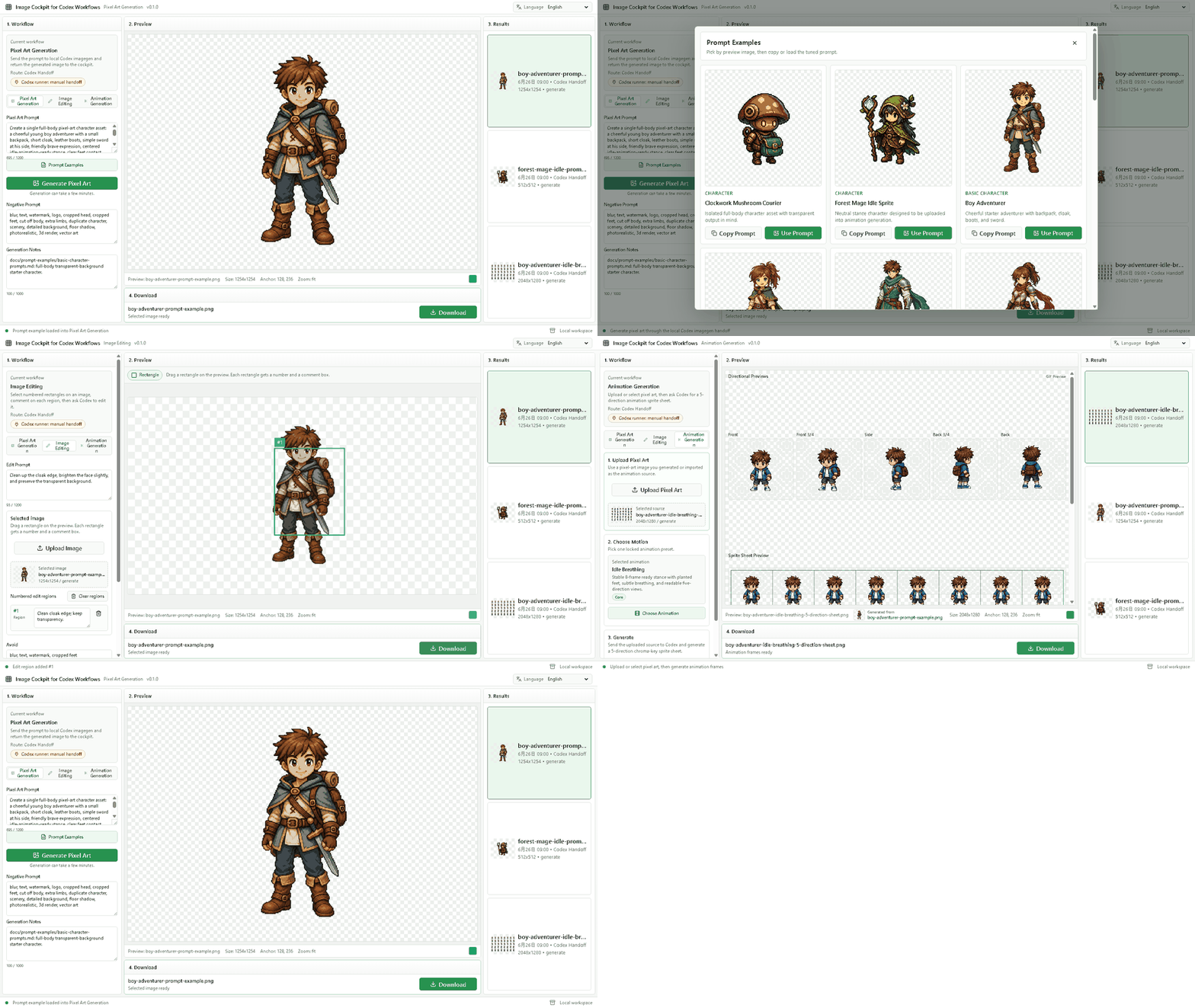
Pixel Art Generation:
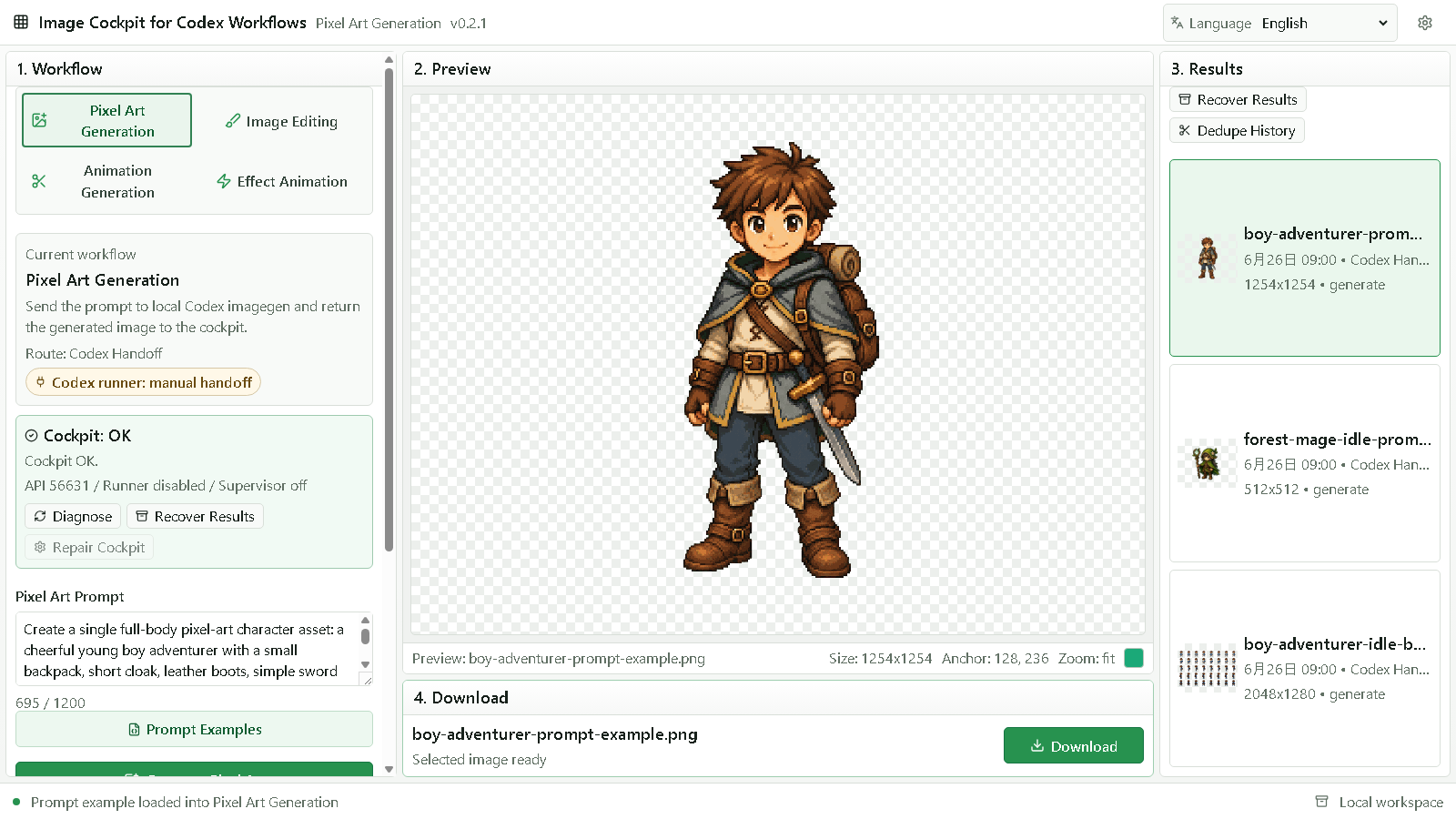
Prompt Examples:
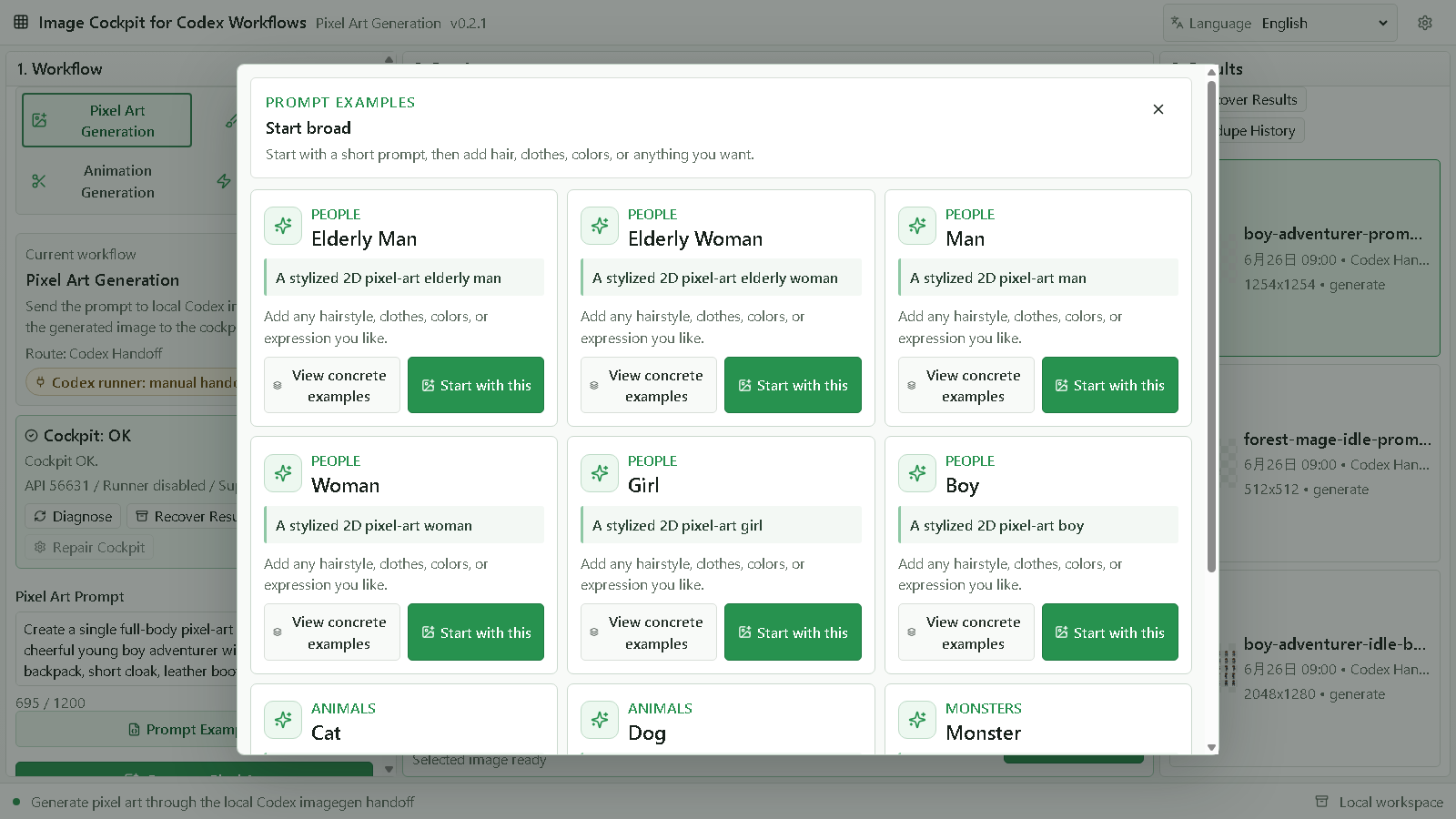
Image Editing:
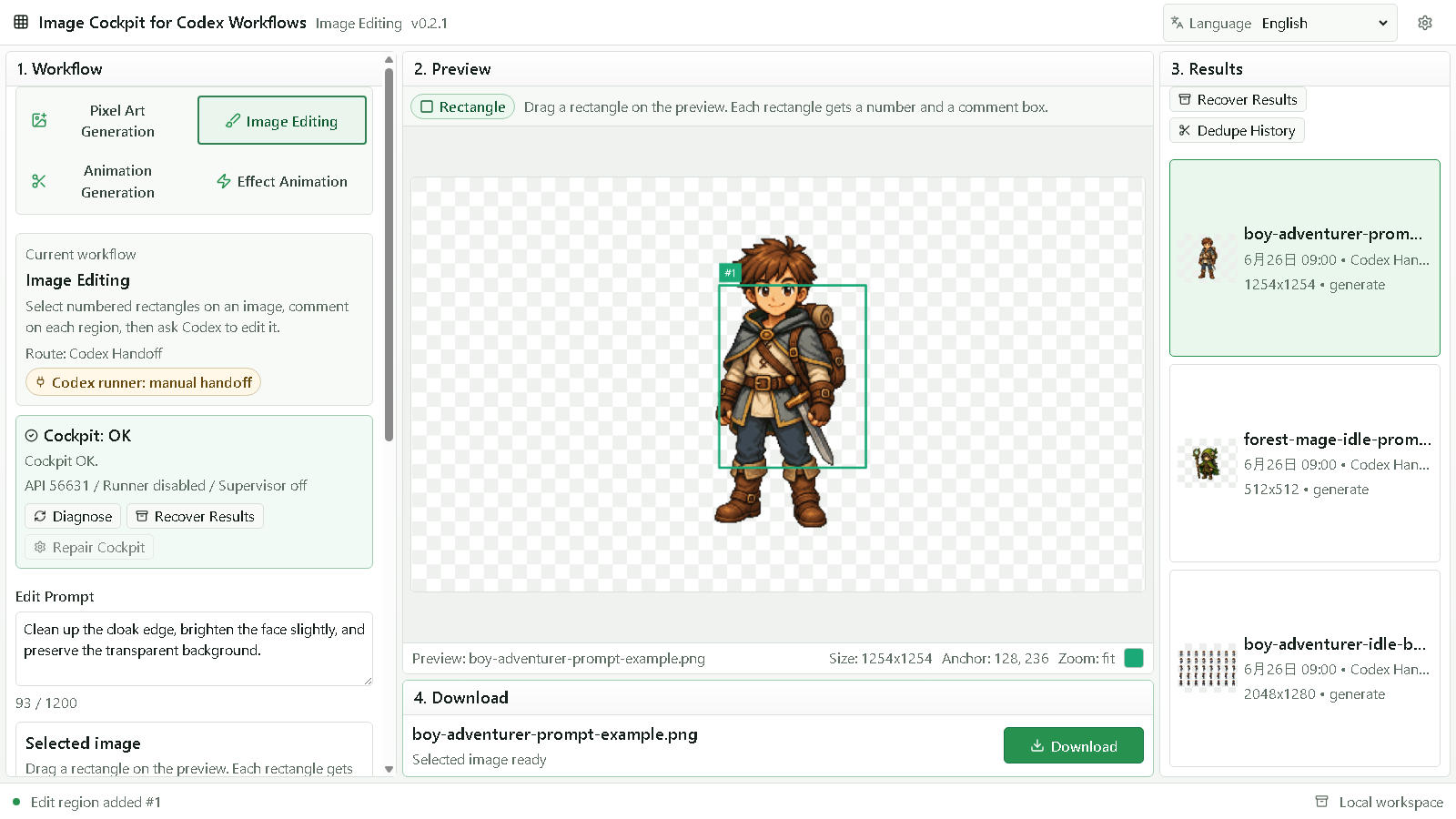
Animation Generation:
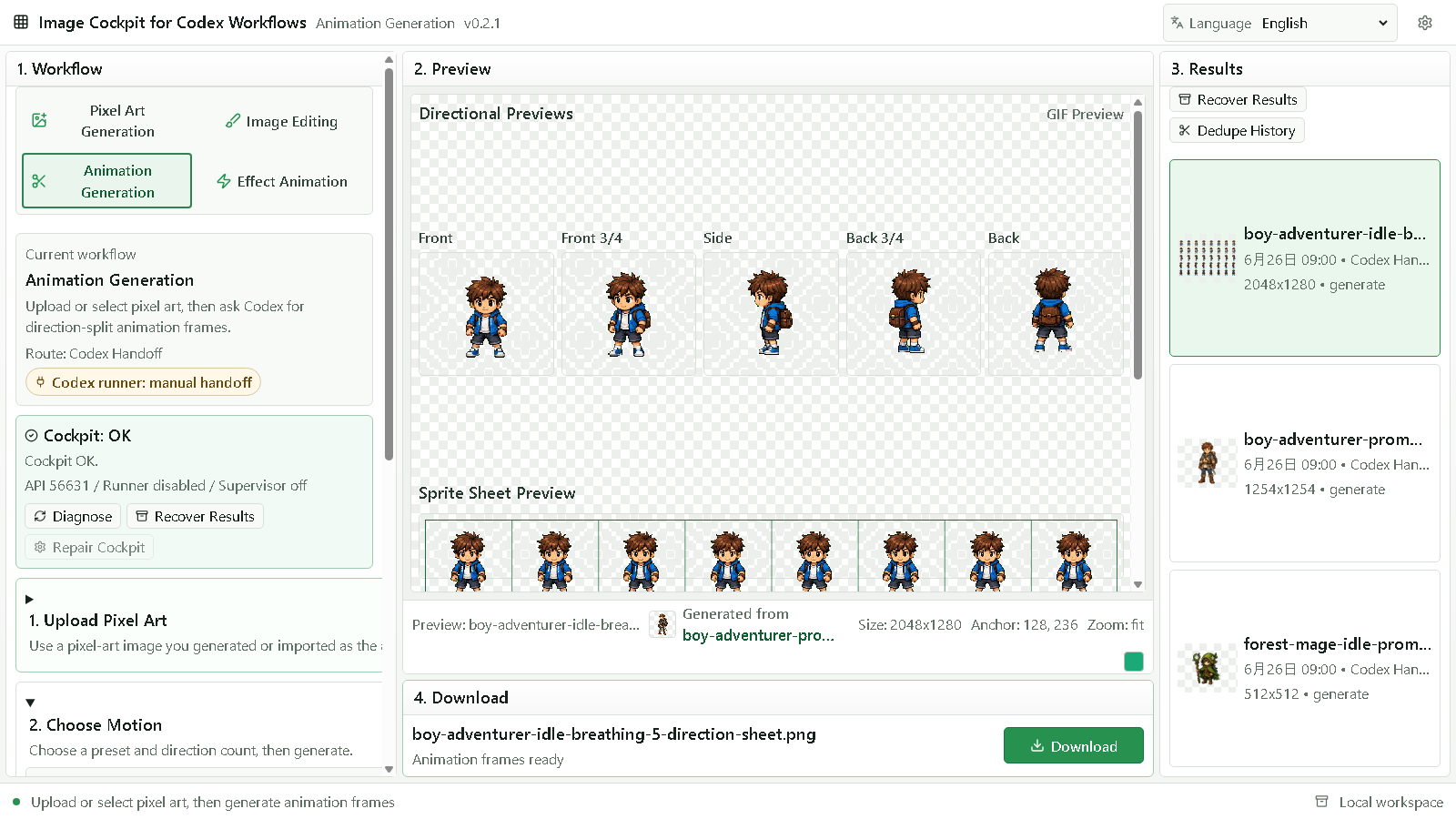
npm install
npm run dev:all
npm run dev:all starts both the local handoff API and the Vite app. If the default Vite port is busy, Vite will print the actual local URL.
You can still run the two processes separately:
npm run dev:server
npm run dev
Optional handoff location:
Copy-Item .env.example .env
# Set IMAGE_COCKPIT_HANDOFF_DIR to a local folder if you want jobs written elsewhere.
# Set IMAGE_COCKPIT_CODEX_COMMAND if Codex is installed under a custom executable path.
npm run dev:server
Codex autorun settings:
IMAGE_COCKPIT_CODEX_AUTORUN=1       # 0 disables autorun and keeps manual handoff only
IMAGE_COCKPIT_CODEX_COMMAND=codex   # executable used for `codex exec`
IMAGE_COCKPIT_CODEX_SANDBOX=workspace-write
IMAGE_COCKPIT_CODEX_APPROVAL=never
IMAGE_COCKPIT_CODEX_HELP_ARGS_JSON= # optional JSON array for wrapper preflight args
IMAGE_COCKPIT_CODEX_EXEC_ARGS_JSON= # optional JSON array for wrapper exec args
IMAGE_COCKPIT_ALLOW_MOCK_RUNNER=0  # keep 0 outside automated smoke tests
The default runner command is equivalent to codex exec -c approval_policy="<approval>" --sandbox <sandbox> -. Advanced wrapper setups can set the two JSON arg arrays when the executable needs extra fixed arguments before the Image Cockpit prompt is piped on stdin.
Image Cockpit refuses to report a mock/test runner as ready unless IMAGE_COCKPIT_ALLOW_MOCK_RUNNER=1 is set explicitly for automated smoke tests. A mock runner proves lifecycle wiring only; it is not a real Codex imagegen backend.
Runner status and logs are written locally:
codex-handoff/
  status/  # runner state per job
  logs/    # stdout/stderr from codex exec
Runner preflight can be checked directly:
Invoke-RestMethod http://127.0.0.1:8787/api/codex/runner
For a local setup diagnosis without starting the UI:
npm run doctor
npm run doctor verifies required files, handoff folder writability, and Codex command availability. It reports the requested command, the actual launchCommand, and resolved command paths. If Codex cannot be launched but local handoff is usable, it reports a warning instead of failing.
If the app becomes slow, fails to load, or Chrome reports Out of Memory after many generated results, open safe mode first:
http://127.0.0.1:<port>/?safe=1
To clear only Image Cockpit browser-side saved state for the current local origin, open:
http://127.0.0.1:<port>/reset-local-state.html
The reset page does not delete repository files, generated PNG files, or codex-handoff/outbox artifacts.
One-command local review:
npm run verify
This runs the same required checks as the release path:
npm run doctor
npm run typecheck
npm test
npm run build
npm run smoke
npm run release:audit
GitHub Actions runs the same verification path through .github/workflows/ci.yml.
npm run smoke covers fallback local image generation, fallback local sprite sheet generation, manual handoff mode, imagegen handoff instructions, an unapproved mock-runner guard, and an explicitly approved mock autorun runner that reaches ready, creates a job, records completed, writes a PNG to the outbox, and imports that PNG through the Local Inbox endpoint. This proves the local workflow and runner lifecycle wiring without claiming that the installed Codex executable completed successfully on every machine.
Optional local browser review smoke:
npm run ui:smoke
npm run ui:smoke starts the local API and Vite app with a temporary handoff folder, opens a headless Chrome/Edge session, verifies the three workspace tabs, verifies the Prompt Examples button sits directly below the Pixel Art Prompt field and opens a modal that can load a tuned prompt into Pixel Art Generation, checks Pixel Art Generation / Image Editing / Animation Generation, clicks pixel art generation through Codex Handoff, clicks animation generation through the local animation route, and checks download actions.
Optional README screenshot refresh:
npm run capture:readme
npm run capture:readme starts a temporary local API and Vite app, seeds safe demo data in an isolated browser profile, and refreshes the README screenshots under docs/demo/readme/.
Optional real Codex runner smoke:
npm run codex:smoke
npm run codex:smoke starts the local API with a temporary handoff folder and asks the installed Codex CLI to complete a no-image handoff job by writing a Markdown sidecar into outbox. It is intentionally not part of CI because it requires a runnable local Codex installation.
Optional real imagegen smoke:
npm run imagegen:smoke
npm run imagegen:smoke starts the local API with a temporary handoff folder, creates a prompt-only pixel art generation job, waits for local codex exec to return a PNG through imagegen / built-in image_gen, and verifies that the returned image is larger than a placeholder. It can take several minutes and is not part of CI.
Owner-review local sweep:
npm run review:local
npm run review:local runs npm run verify, npm run ui:smoke, and npm run codex:smoke in sequence. Use it on a Codex-installed review machine when validating local handoff behavior.
Use docs/review/mvp-review-report.md for the v0.1.0 review history, QA evidence, and known constraints.
CHANGELOG.mddocs/release/v0.2.1-release-notes.mddocs/qa/v0.2.1-release-prep.mddocs/release/v0.1.8-release-notes.mddocs/qa/v0.1.8-release-prep.mddocs/release/v0.1.7bugfix-release-notes.mddocs/release/v0.1.7-release-notes.mddocs/qa/v0.1.7-release-prep.mddocs/release/v0.1.6-release-notes.mddocs/qa/v0.1.6-release-prep.mddocs/release/v0.1.5-release-notes.mddocs/qa/v0.1.5-release-prep.mddocs/release/v0.1.4-release-notes.mddocs/qa/v0.1.4-release-prep.mddocs/release/v0.1.3-release-notes.mddocs/qa/v0.1.3-release-prep.mddocs/release/v0.1.2-release-notes.mddocs/qa/v0.1.2-release-prep.mddocs/release/v0.1.1-release-notes.mddocs/qa/v0.1.1-release-prep.mddocs/release/v0.1.0-release-notes.mddocs/release/v0.1.0-owner-review.mddocs/release/v0.1.0-final-audit.mddocs/release/v0.1.0-acceptance-evidence.mddocs/release/v0.1.0-owner-decision.mddocs/release/v0.1.0-checklist.mddocs/release/v0.1.0-runbook.mddocs/usage/manual-handoff.md.github/workflows/ci.ymlLICENSECONTRIBUTING.mdSECURITY.mdCODE_OF_CONDUCT.mdSee docs/roadmap/release-roadmap.md for the current product direction and next release priorities.
The current demo GIF is docs/demo/mvp-demo.gif. See docs/demo/mvp-demo-capture.md for the capture plan. Current QA screenshots live under docs/qa/.
more like this
Comprehensive analytics dashboard for AI coding agents — Cursor, Windsurf, Claude Code, VS Code Copilot, Zed, Antigravi…
TachiSnap — Pixel Snapper for animation pixel artists. Rust + WebAssembly client-side tool for cleaning up AI-generated…
search projects, people, and tags