runal
a creative coding environment for the terminal :fireworks:
 emprcl
Runal
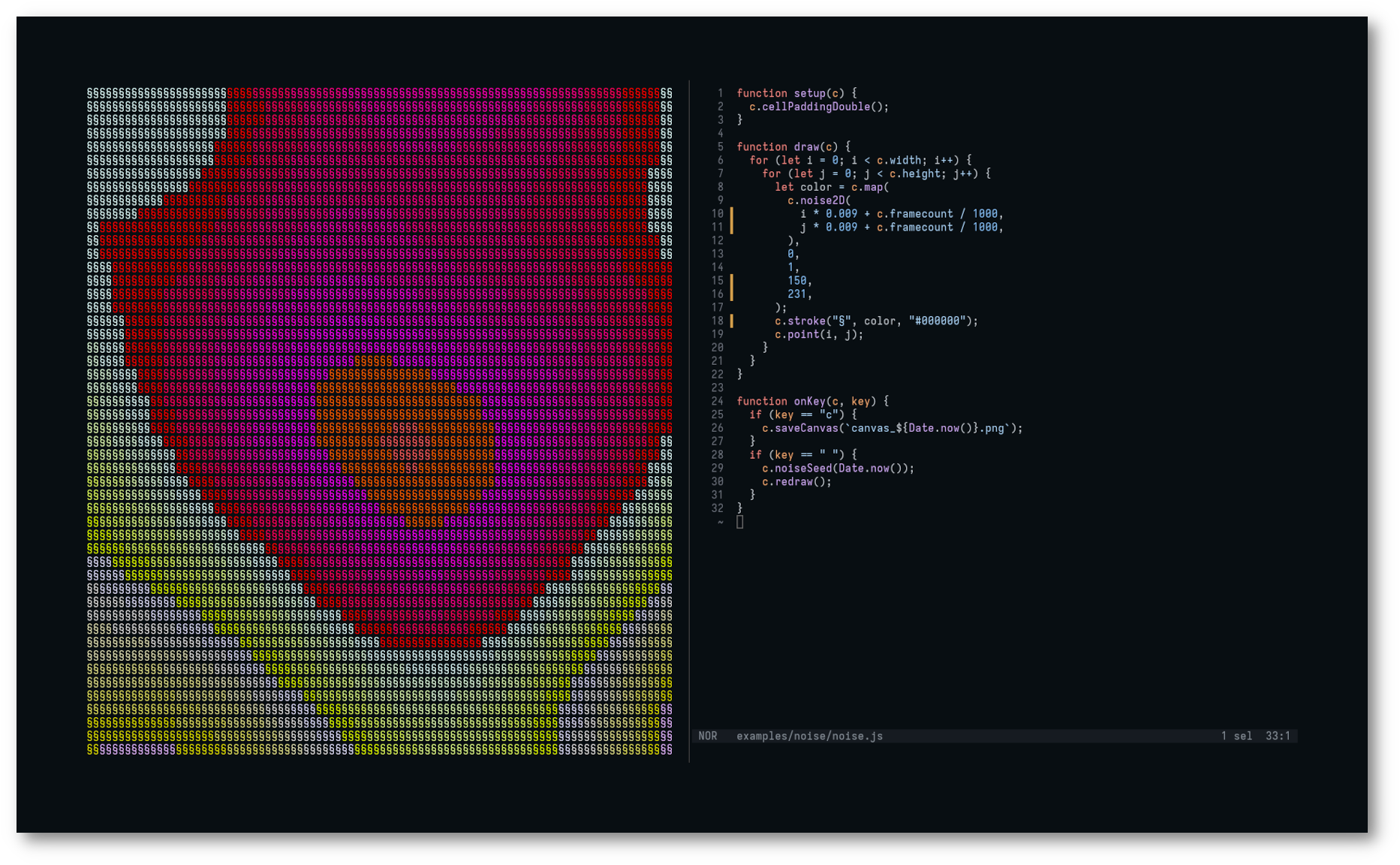
Runal is a text-based creative coding environment for the terminal. It works similarly as processing or p5js but it does all the rendering as text. It can either be programmed with JavaScript, or used as a Go package.
Runal is a work-in-progress. The API should not be considered as stable until it reaches 1.0.
Feel free to open an issue.
Installation
Supported platforms
Prebuilt binaries are available for the following platforms:
| OS | Architectures |
|---|---|
| Linux | x86-64 (amd64), arm64, armv7, armv6 |
| macOS | Intel (amd64), Apple Silicon (arm64) |
| Windows | x86-64 (amd64) |
The Linux arm builds cover the Raspberry Pi: use arm64 for the 64-bit Raspberry Pi OS, and armv7 / armv6 for the 32-bit Raspberry Pi OS (armv6 targets the Pi 1 / Zero).
Quick-install
On linux or macOS, you can run this quick-install bash script:
curl -sSL empr.cl/get/runal | bash
Packages
Homebrew (macOS & Linux)
brew tap emprcl/tap
brew trust emprcl/tap
brew install runal
Scoop (Windows)
scoop bucket add emprcl https://github.com/emprcl/scoop-bucket
scoop install runal
AUR
https://aur.archlinux.org/packages/runal
Manual installation
Linux & macOS
Download the last release for your platform.
Then:
# Extract files
mkdir -p runal && tar -zxvf runal_VERSION_PLATFORM.tar.gz -C runal
cd runal

# Run runal
./runal

# Run runal demo
./runal -demo
Windows
We recommend using Windows Terminal with a good monospace font like Iosevka to display Runal correctly on Windows.
Unzip the last windows release and, in the same directory, run:
; Run runal
.\runal.exe

; Run runal demo
.\runal.exe -demo
Build it yourself
You'll need go 1.26 minimum. Although you should be able to build it for either linux, macOS or Windows, it has only been tested on linux.
# Linux
make GOLANG_OS=linux build

# macOS
make GOLANG_OS=darwin build

# Windows
make GOLANG_OS=windows build

# Raspberry Pi OS
make GOLANG_OS=linux GOLANG_ARCH=arm64 build
Usage
JavaScript runtime
You can use JavaScript for scripting your sketch. Your js file should contain a setup and a draw method. Both methods take a single argument (here c) representing a canvas object that holds all the available primitives:
// sketch.js

function setup(c) {}

function draw(c) {}
You can add extra methods onKey, onMouseMove, onMouseClick, onMouseRelease and onMouseWheel to catch keyboard and mouse events:
function onKey(c, e) {}
function onMouseMove(c, e) {}
function onMouseClick(c, e) {}
function onMouseRelease(c, e) {}
function onMouseWheel(c, e) {}
And you can then execute the file with:
./runal -f sketch.js
The js file will be automatically reloaded when modified, no need to restart the command.
Standalone executable
You can create a standalone executable from the JavaScript file specified with -f using -o [FILE]:
./runal -f sketch.js -o sketch

# Run the standalone executable
./sketch
Go package
Because Runal is written in Go, you can also use it as a Go package.
// sketch.go
package main

import (
	"context"
	"os"
	"os/signal"

	"github.com/emprcl/runal"
)

func main() {
	runal.Run(context.Background(),	setup, draw, runal.WithOnKey(onKey), runal.WithOnMouseClick(onMouseClick))
}

func setup(c *runal.Canvas) {}

func draw(c *runal.Canvas) {}

func onKey(c *runal.Canvas, e runal.KeyEvent) {}
func onMouseClick(c *runal.Canvas, e runal.MouseEvent) {}
Then, simply build it:
go run sketch.go
Documentation
Check the API reference. You can also check some examples in the examples directory.
Contributing
Contributions are very welcome, even if you're a beginner! Whether it's code, documentation, bug reports, examples, or just ideas, you're encouraged to join in.
Just be kind, inclusive, and patient. We're all here to learn and build something cool together.
How to contribute:
- Start with a discussion or open an issue to report a bug or suggest an enhancement. Please check if one already exists on the same topic first.
- Open a Pull Request. Please keep it small and focused.
You can also contribute by sharing what you've made with Runal on GitHub, social media, or anywhere else. We'd love to see it!
Acknowledgments
Runal uses a few awesome packages:
- dop251/goja for the JavaScript engine
- fsnotify/fsnotify for watching file changes in realtime
- charmbracelet/lipgloss for handling colors
more like this
handpose-facemesh-demos
🎥🤟 8 minimalistic templates for tfjs mediapipe handpose and facemesh