mightyscape-1.2
A maintained extension collection for Inkscape, working on Windows and Linux
 eridur-de
| gitea | none |
|---|---|
| include_toc | true |
MightyScape for Inkscape

In short: A maintained extension collection for Inkscape. There are 241 extension folders with 479 .inx files inside. We also take part at the official Inkscape Extensions Gallery (with single extension uploads).
About MightyScape
Looking to get more productive we started using some more special Inkscape extensions. We love Inkscape. And we love things like 3d printing, laser cutting, vinyl cutting, pen plotting, maths, physics, geometry, patterns, 2D drawings, 3D CAD, embroidery and more stuff. All this you can do with Inkscape! We recognized that there is no good source to pull extensions in a quick and clean way. Each developer puts his own code on his hidden/unknown repository and often without enough documentation or visible results for common understanding. Many plugins are completely unknown that way, and a lot of extensions are forked x times or are unmaintained. So many of them do not work with recent Inkscape or were never tested with newer versions so far.
MightyScape's aim is to provide support for the most recent Inkscape versions only. It's not the general target to support all older systems because there are too much things to maintain simultaneously: changes in operating systems, Python, Python modules, Inkscape and other external dependencies. It's not worth to make spaghetti code to keep everyting working on all versions!
Note
The naming "mightyscape-1.2" is from a time where Inkscape had very less releases per year and previously there were older mightyscape repositories, which are archived now. Time is going on and the Inkscape developers are releasing more frequently. Nowadays, the versioning of MightyScape stalls and will not increase by newly created git repositories with higher version number in it's project name.
What and why?
This is a one-to-bundle-them-all collection of hundreds of additional functions to Inkscape (extensions) for the new Python 3 based version 1.X including documentation, made for makers and artists. All plugins where sorted into custom categories (to avoid overloading the standard extension menu of Inkscape). You can find most of them in sub menu "FabLab Chemnitz". We renamed and cleaned a lot of *.inx files and *.py files. We applied some function renamings, id changes (for preferences.xml clean-keeping), spelling fixes, formattings and parameter corrections.
It took years to search and find all them on the web (so much different possible sources where to find!), to read, to comment (report issues), to fix problems, to test, to document and to provide them online. Many extensions were nearly lost in translation.
At least this repo will help to bring alife some good things and will show hidden gold. It meshes things together in a fresh and bundled way - with ease of use and minimum installation stress. A lot of code is not at the optimum. A mass of bugs has to be fixed and different tools should be improved in usage generally. This package will show errors more quickly. So hopefully a lot of new code fixes is result from this package. Maybe some people help to make all the stuff compatible with the most recent Inkscape.
Licensing and credits
- This is not a repository to steal the work of others. The credits go to each developer, maintainer, commiter, issue reporter and so on. Please have a look at the meta.json in each directory to get information about licenses and authors for each extension.
- All plugins are open source licensed and are GNU GPL compatible. See https://www.gnu.org/licenses/license-list.html#GPLCompatibleLicenses for more details.
- All plugins were taken from each git repo's master branch (if git/svn available). There might exist some development branches, fork branches or issue comments which might resolve some issues or enhance functionality of provided plugins. To check for recent github forks use https://techgaun.github.io
- A mass of plugins were fixed by ourselves in countless hours
- Credits for creation of the MightyScape project: Mario Voigt / FabLab Chemnitz
Structure
The structure of this repo is intended to be easy. MightyScape does not work with any releases or feature branches. Just copy the complete MightyScape folder (or the particular folders you want) to your Inkscape's extension directory.
Warning
We know that this repo contains unsecure executable files! You will find redundancies in this repo like node.exe (NodeJS). We did it this way to give easy possibilty to only pick the extensions you want.
Installation
Warning
Please read this first before opening issues! This documentation does not maintain any progressive information about installing or handling Inkscape itself. Depending to the operating system and the installed modules the all-over size of MightyScape is around 2 GB (which is sadly very much).
Compability
MightyScape was tested to be compatible with Inkscape 1.4.4 (dcaf3e7d, 2026-05-05)
Supported Inkscape versions
-
Windows
-
- regular installation with Setup (*.msi / *.exe)
- portable (compressed archive)
- Windows App Store
- WinGet (
winget install -e --id Inkscape.Inkscape) - Chocolatey (
choco install inkscape)
-
Linux
- regular installation from package manager like dnf/yum or apt (see here)
- snap package. Important: has to be installed with
--dev-modedue to permission restrictions in default mode - Flatpak package. Possible permission fixed might be overcome with Flatseal
- AppImage - put it somewhere on your system
- Ubuntu/Kubuntu
sudo add-apt-repository universesudo add-apt-repository ppa:inkscape.dev/stablefor stable releases orsudo add-apt-repository ppa:inkscape.dev/trunkfor develop trunksudo apt updatesudo apt install inkscape
- Fedora/CentOS
sudo dnf install inkscape
-
macOS
- regular installation by *.dmg file
Installation
Warning
Please read this first before opening issues! This documentation does not maintain any progressive information about installing or handling Inkscape itself. Depending to the operating system and the installed modules the all-over size of MightyScape is around 2 GB (which is sadly very much).
Installation dirs (overview)
There are two places where Inkscape extensions can be located by default, either install (global) directory or user directory. We usually put the extensions in the user's data directory, because if we would put it to the installation folder of Inkscape, we would risk deletion by upgrading. If we put them to the user directory we do not lose them.
| OS | user directory | global directory |
|---|---|---|
| Linux (Ubuntu, Fedora), Flatpak, AppImage | /$HOME/.config/inkscape/extensions/ |
/usr/share/inkscape/extensions/ |
| Snap | /$HOME/snap/inkscape/common/extensions |
/snap/inkscape/current/share/inkscape/extensions |
| Windows .msi/.exe Setup | %AppData%\inkscape\extensions\ |
C:\Program Files\inkscape\extensions\ |
| Windows App Store | %AppData%\inkscape\extensions\ |
C:\Program Files\WindowsApps\25415Inkscape.Inkscape_%VERSION%_x64__9waqn51p1ttv2\VFS\AppData\inkscape\extensions\ |
Please also refer to the official documentation.
Installation of prerequisites
Git
Git is required to install some of the required Python modules (and repo cloning). On Linux, git usually defaults to be installed. On Windows we need to install it. Please visit https://git-scm.com/downloads/win or use chocolatey.
Tip
Info: You can ignore this step if you use our bundled installer script (way 1)!
Python / Astral UV
MightyScape heavily relies on a Python interpreter. As we need to install external dependencies (Python modules, partially with C bindings), we cannot stick to the bundled msys2 Python version, which comes with Inkscape. So we need to use a virtualenv on Linux or Windows. To speedup the process, we use the uv tool from Astral for this.
Here you can find a list of default modules Inkscape is shipped with.
Info: You can ignore this step if you use our bundled installer script (way 1)!
Additional Python modules
The following extra libraries are required for some of the extensions within the MightyScape package. Those are listed in our requirements.txt file (and tied into pyproject.toml and used by uv). We are installing them together with MightyScape in the next section.
Installation of MightyScape - way 1: installer (preferred way)
Tip
New: We provide an all-in-one installer for Linux and Windows. Just use the following commands.
Warning
The installer is able to install MightyScape for several installations in parallel. However, this is not a good idea. It could mess around with the preferences.xml file and might invalidate some of the other installation's configuration. Be careful!
Linux
curl -s -L https://y.stadtfabrikanten.org/mightyscape-linux | bash
This redirects to https://raw.githubusercontent.com/eridur-de/mightyscape-1.2/refs/heads/master/mightyscape-install.sh
Windows
curl -s -L https://y.stadtfabrikanten.org/mightyscape-windows > %TEMP%\mightyscape-install.cmd & %TEMP%\mightyscape-install.cmd
This redirects to https://raw.githubusercontent.com/eridur-de/mightyscape-1.2/refs/heads/master/mightyscape-install.cmd
Note
Note: The installer might prompt for system reboot. In this case please re-run the installer to continue. The installer makes use of Chocolatey. Due to some missing packets (like xmlstartlet) we did not make use of winget.
Note
Note: if openmesh fails to install on Windows, please see here.
Installation of MightyScape - way 2: zip archives (mirrors)
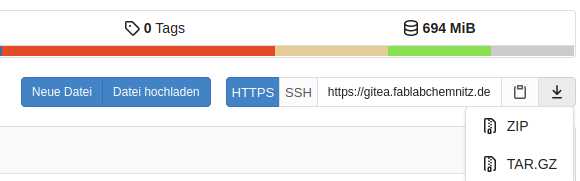
You can also download the whole git project as .zip or .tar.gz bundled archive from https://gitea.fablabchemnitz.de/FabLab_Chemnitz/mightyscape-1.2. You can convert that directory to work with git later on, using our central upgrade extension.
Note
Please note: for installing Python modules you still need to install Git for Windows, if you are on Windows. You will have to install all Python modules in the project for yourself. Please refer Additional Python modules.
The Download buttons can be found here:
Installation of MightyScape - way 3: only some parts
If you only want to download single parts of MightyScape, use one of the following mirrors:
- https://gitea.fablabchemnitz.de/FabLab_Chemnitz/mightyscape-1.2-zipmirror
- https://github.com/eridur-de/mightyscape-1.2-zipmirror
You should put the extracted files into your Inkscape user extension directory (see table at the beginning).
[!NOTE] Please note: The zipmirror repository is not as recent as the main repository.
Adjusting the Python interpreter of Inkscape (required for all installation types)
As we use non-default Python, we need to adjust the main configuration of Inkscape to apply this change by adding a custom python-interpreter command in Inkscape default configuration (preferences.xml).
[!INFO] Our installer script applies this change for you automatically! But you can dot it manually!
Warning
The interpreter's path must be absolute. Relative paths will fail!
On Linux this might look like:
vim $HOME/.config/inkscape/preferences.xml
  <group
     id="extensions"
     python-interpreter="/home/youruser/.config/inkscape/extensions/mightyscape-1.2/bin/python3"
On Windows this might look like:
notepad %appdata%\inkscape\preferences.xml
  <group
     id="extensions"
     python-interpreter="C:\Users\youruser\AppData\Roaming\inkscape\extensions\mightyscape-1.2\Scripts\pythonw.exe"
Tip
If you get a nasty popup window within Inkscape each time you are executing an extension, please double check if you really use pythonw.exe. Do not use python.exe.
Warning
Our custom Python environment on Windows will make the official Inkscape Extensions Manager impossible to run. The reason is the library pygobject.
Upgrading
Upgrading MightyScape
There are two ways to upgrade MightyScape. Choose from:
-
If you installed MightyScape using
git clone, just go to the git directory and rungit pullor use the extensionAbout/Upgrade MightyScape, which can be found inExtensions→FabLab Chemnitz: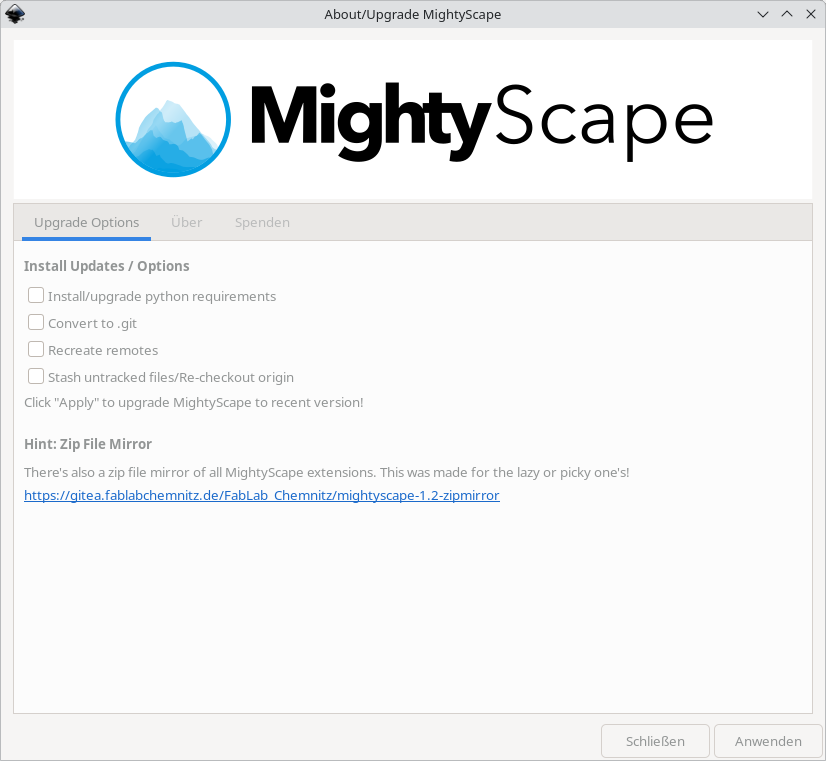
-
If you previously downloaded a bulk zip file from github or gitea, just replace the content of the containing folder with the new files.
Upgrading Python modules
Sometimes it can be helpful to install missing or upgrade Python modules. You can use our About/Upgrade MightyScape extension to do this, run again the installer or just execute manually:
Linux
cd $HOME/.config/inkscape/extensions/mightyscape-1.2/ && uv pip install --upgrade -r requirements.txt
Windows
cd %AppData%\inkscape\extensions\mightyscape-1.2\ & uv pip install --upgrade -r requirements.txt
Issues, questions, documentation, examples
This repo has two remotes:
- https://gitea.fablabchemnitz.de/FabLab_Chemnitz/mightyscape-1.2 (root repo origin from our organization)
- https://github.com/eridur-de/mightyscape-1.2 (repo for public collaboration)
You can create your issues and questions here.
Tip
You find a lot of documentation at the sub pages of https://y.stadtfabrikanten.org/mightyscape-overview. Please have a look there first (make use of the search function).
Donate to keep alive!
We are the Stadtfabrikanten e.V., running the FabLab Chemnitz since 2016. A FabLab is an open workshop that gives people access to machines and digital tools like 3D printers, laser cutters and CNC milling machines.
You like our work and want to support us? Each penny helps us to keep this project alive. You can donate to our non-profit organization by different ways.
You can also directly support the developers:
Please also support the Inkscape developers as well!
Share
Spread and share MightyScape to Inkscape users and empower them by ...
QR Code

Links
- https://y.stadtfabrikanten.org/mightyscape.qr
- https://y.stadtfabrikanten.org/mightyscape
- https://y.stadtfabrikanten.org/mightyscape-overview
Thanks for using our extension and helping us!
more like this