dont-track-me-google
Firefox and Chrome extensions to prevent Google from making links ugly.
JavaScript★ 587
🗂️ FileRise – lightweight, self-hosted file manager & storage hub with granular ACLs, resumable uploads, encrypted fol…
 error311
FileRise is a self-hosted web file manager and storage hub with WebDAV, sharing, and per-folder ACLs. Drag & drop uploads, OnlyOffice integration, and optional folder-level encryption at rest — all in one PHP app you control.
Quick links: Website • Docs • Live demo • Install • FileRise Pro
Built for: anyone who wants a fast, self-hosted file manager, storage hub, client portal, and AI workflow workspace on their own infrastructure.
Core (MIT): full open-source FileRise feature set (ACLs, folder and file sharing, uploads, tags/search, PDF previews, and more), plus multiple local roots and WebDAV sources for storage-hub workflows.
Pro: adds user groups, client portals, automation, additional source adapters, gateway shares, search everywhere/audit tooling, and a permissions-aware AI workspace for structured extraction, organization, approvals, and scoped copilots.
FileRise Pro AI Chat: Extract Invoice Fields to JSON and CSV
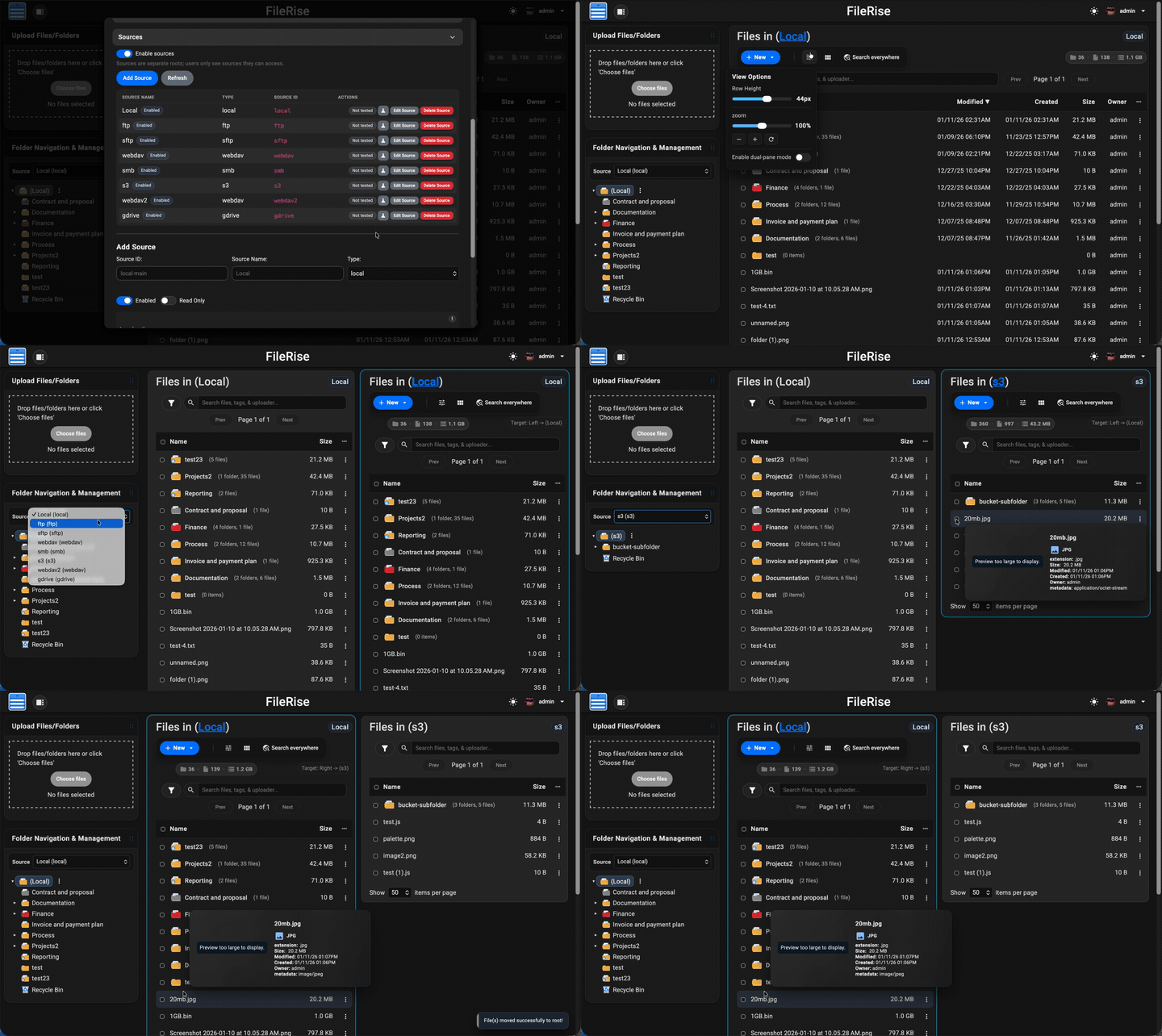
pdftoppm./ search).localStorage.api.php?spec=1 (from openapi.json.dist) with a Redoc UI at api.php (login required).https://example.com/files)FR_BASE_PATH or send X-Forwarded-PrefixX-Forwarded-* headers and Kubernetes ingress setupsFull list of features: Full Feature Wiki
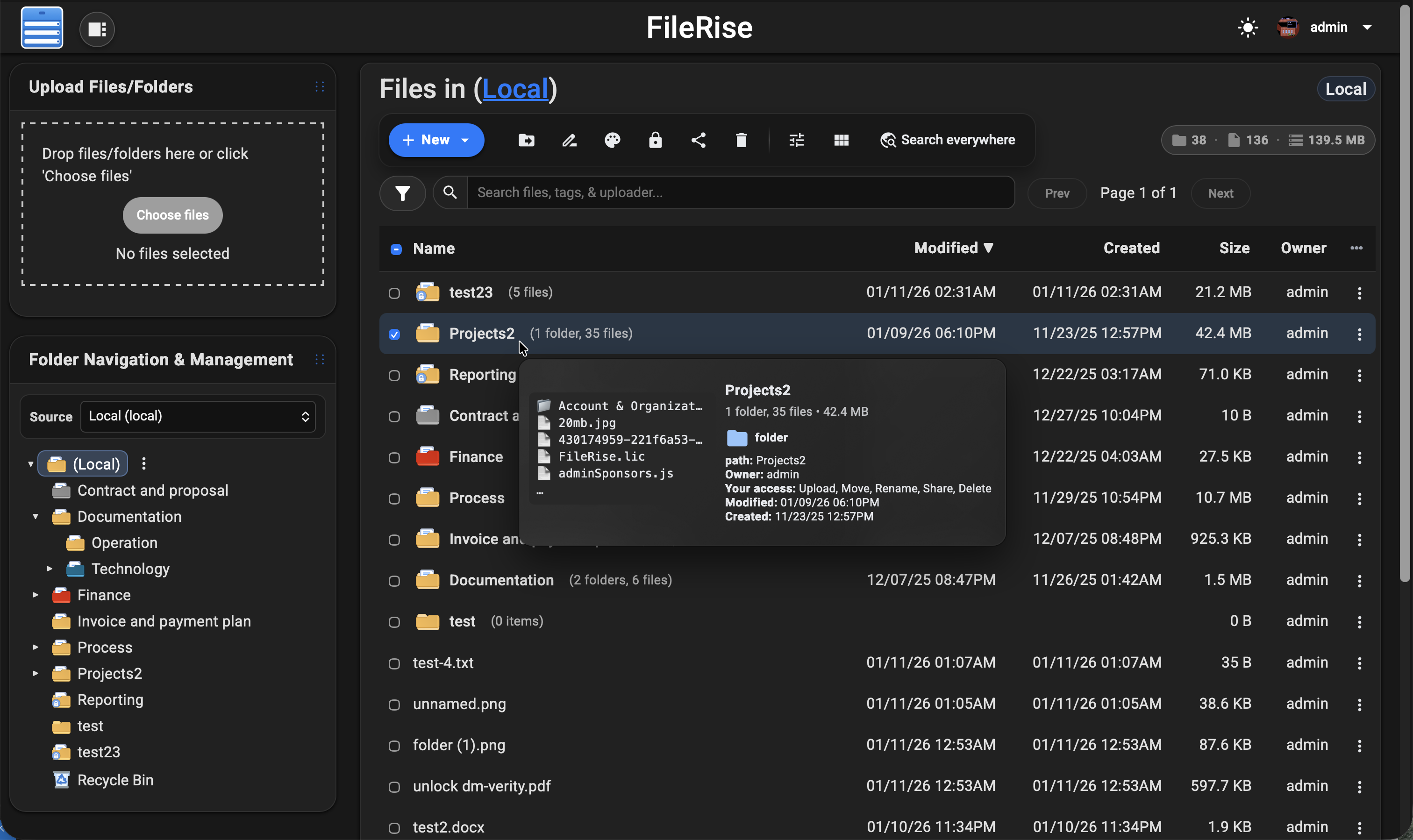
💡 Looking for FileRise Pro (brandable header, user groups, client upload portals, license handling)? Check out filerise.net – FileRise Core stays fully open-source (MIT).
demo / password: demo)If you open an issue/discussion, please include:
The easiest way to run FileRise is the official Docker image.
✅ Tip: For stability, pin a version tag (example:
error311/filerise-docker:vX.Y.Z) instead of:latest. See Releases for current versions.
Pristine Docker installs can omit PERSISTENT_TOKENS_KEY. FileRise will generate a unique key on first start and persist it in metadata/persistent_tokens.key.
If you prefer to manage the key yourself, set one before first start:
export PERSISTENT_TOKENS_KEY="$(openssl rand -hex 32)"
docker run -d \
  --name filerise \
  -p 8080:80 \
  -e TIMEZONE="America/New_York" \
  -e TOTAL_UPLOAD_SIZE="10G" \
  -e SECURE="false" \
  -e SCAN_ON_START="true" \
  -e CHOWN_ON_START="true" \
  -v ~/filerise/uploads:/var/www/uploads \
  -v ~/filerise/users:/var/www/users \
  -v ~/filerise/metadata:/var/www/metadata \
  error311/filerise-docker:latest
Then visit:
http://your-server-ip:8080
On first launch you’ll be guided through creating the initial admin user.
💡 After the first run, you can set
CHOWN_ON_START="false"if permissions are already correct and you don’t want a recursivechownon uploads/metadata on every start.⚠️ Uploads folder recommendation
It’s strongly recommended to bind
/var/www/uploadsto a dedicated folder (for example~/filerise/uploadsor/mnt/user/appdata/FileRise/uploads), not the root of a huge media share.🔐 Persistent tokens key note
Keep
/var/www/metadatapersistent. On a pristine install, FileRise writes the generated persistent tokens key tometadata/persistent_tokens.key. If you choose to manage the key via env instead, keep that value stable for the life of the instance.If you really want FileRise to sit “on top of” an existing share, use a subfolder (e.g.
/mnt/user/media/filerise_root) instead of the share root, so scans and permission changes stay scoped to that folder.
services:
  filerise:
    image: error311/filerise-docker:latest
    container_name: filerise
    ports:
      - "8080:80"
    environment:
      TIMEZONE: "America/New_York"
      TOTAL_UPLOAD_SIZE: "10G"
      SECURE: "false"
      PERSISTENT_TOKENS_KEY: "${PERSISTENT_TOKENS_KEY:-}" # optional; blank = pristine installs auto-generate and persist a key in metadata
      SCAN_ON_START: "true"   # auto-index existing files on startup
      CHOWN_ON_START: "true"  # fix permissions on uploads/metadata on startup
    volumes:
      - ./uploads:/var/www/uploads
      - ./users:/var/www/users
      - ./metadata:/var/www/metadata
Bring it up with:
docker compose up -d
You can leave PERSISTENT_TOKENS_KEY blank for pristine installs, or set it in your shell / .env if you want to manage the key yourself:
export PERSISTENT_TOKENS_KEY="$(openssl rand -hex 32)"
| Variable | Required | Example | What it does |
|---|---|---|---|
TIMEZONE |
✅ | America/New_York |
PHP / container timezone. |
TOTAL_UPLOAD_SIZE |
✅ | 10G |
Max total upload size per request; also used to set PHP/Apache upload limits. |
SECURE |
✅ | false |
true when running behind HTTPS / a reverse proxy, else false. |
PERSISTENT_TOKENS_KEY |
Optional | openssl rand -hex 32 |
Secret used to encrypt stored secrets (tokens, permissions, admin config). If omitted on a pristine install, FileRise auto-generates and persists one in metadata/persistent_tokens.key; existing installs without an explicit key stay on the legacy compatibility path until rotated. |
SCAN_ON_START |
Optional | true |
If true, runs a scan once on container start to index existing files. |
CHOWN_ON_START |
Optional | true |
If true, recursively normalizes ownership/permissions on uploads/ + metadata/. |
PUID |
Optional | 99 |
If running as root, remap www-data user to this UID (e.g. Unraid’s 99). |
PGID |
Optional | 100 |
If running as root, remap www-data group to this GID (e.g. Unraid’s 100). |
FR_PUBLISHED_URL |
Optional | https://example.com/files |
Public URL when behind proxies/subpaths (share links, portals, redirects). |
FR_BASE_PATH |
Optional | /files |
Force a subpath when the proxy strips the prefix (overrides auto-detect). |
FR_TRUSTED_PROXIES |
Optional | 127.0.0.1,10.0.0.0/8 |
Comma-separated IPs/CIDRs for trusted proxies; only these can supply the client IP header or proxy-auth identity header. |
FR_IP_HEADER |
Optional | X-Forwarded-For |
Header to trust for the real client IP when the proxy is trusted. |
Full list of common env variables: Common Environment variables Full reference: Environment Variables (Full Reference)
Other useful env vars (optional):
FR_WEBDAV_MAX_UPLOAD_BYTES(WebDAV upload cap in bytes;0= unlimited),
FR_ENCRYPTION_MASTER_KEY(32-byte key: hex orbase64:...),
VIRUS_SCAN_ENABLED/VIRUS_SCAN_CMD/VIRUS_SCAN_EXCLUDE_DIRS/CLAMAV_AUTO_UPDATE,
LOG_STREAM(error/access/both/none),
HTTP_PORT/HTTPS_PORT/SERVER_NAME,
SHARE_URL(override share endpoint;FR_PUBLISHED_URLpreferred).🧩 Traefik + subpath note (Kubernetes): use
StripPrefixand rely onX-Forwarded-Prefix+FR_PUBLISHED_URL.
See: Deployments Wiki More deployment docs: Install Setup
Short version: FileRise expects data at /var/www/{uploads,users,metadata} and your web server must point to the public/ folder (for example DocumentRoot /var/www/filerise/public).
Docker is the recommended deployment path. Manual installs on a standard PHP web server are supported, but more restrictive shared-hosting environments are best-effort and may not support every feature or background-worker workflow.
On a pristine manual install, FileRise generates a unique key on first request and persists it in metadata/persistent_tokens.key. Keep that file with your backups. Existing installs that previously used the legacy built-in key remain on the compatibility path until an administrator performs a controlled rotation.
Full guide + troubleshooting:
Installation & setup • Upgrade & migration • Reverse proxy & subpath
json, curl, zip (and usual defaults)sudo mkdir -p /var/www/uploads /var/www/users /var/www/metadata sudo chown -R www-data:www-data /var/www/uploads /var/www/users /var/www/metadata # adjust web user if needed sudo chmod -R 775 /var/www/uploads /var/www/users /var/www/metadata
cd /var/www
sudo mkdir -p filerise
sudo chown -R $USER:$USER /var/www/filerise
cd /var/www/filerise

VERSION="vX.Y.Z"  # replace with the tag you want
ASSET="FileRise-${VERSION}.zip"

curl -fsSL "https://github.com/error311/FileRise/releases/download/${VERSION}/${ASSET}" -o "${ASSET}"
unzip "${ASSET}"
/var/www/filerise/public, then visit http://serverip/.If you install FileRise outside /var/www/filerise, keep the data dirs in /var/www or update the paths in config/config.php.
FR_PUBLISHED_URL (and FR_BASE_PATH if needed).Back up these paths (Docker volumes or host directories):
/var/www/uploads (file data)/var/www/users (users, ACLs, admin config, Pro license)/var/www/metadata (indexes, tags, logs)Notes:
/var/www/metadata/log and can be rotated or pruned./var/www/metadata/persistent_tokens.key with the rest of metadata/.PERSISTENT_TOKENS_KEY consistent when restoring backups./var/www/metadata so the generated persistent tokens key survives container recreation.PERSISTENT_TOKENS_KEY or let a pristine install generate one and then back up metadata/persistent_tokens.key.SECURE="true" when behind TLS/reverse proxy.FR_TRUSTED_PROXIES and FR_IP_HEADER; proxy-header login also requires FR_TRUSTED_PROXIES.FR_PUBLISHED_URL (and FR_BASE_PATH if needed) so share links are correct./uploads (serve only public/ and deny access to /uploads, /users, /metadata).FR_FFMPEG_PATH if not on PATH).VIRUS_SCAN_ENABLED=true), optional VIRUS_SCAN_EXCLUDE_DIRS path excludes.Once enabled in the Admin panel, FileRise exposes a WebDAV endpoint (e.g. /webdav.php). Use it with:
https://your-host/webdav.php/https://your-host/webdav.php/dav://your-host/webdav.php/WebDAV operations honor the same ACLs as the web UI.
Docs: WebDAV Wiki
If you run an ONLYOFFICE Document Server you can open/edit Office documents directly from FileRise (DOCX, XLSX, PPTX, ODT, ODS, ODP; PDFs view-only).
Configure it in Admin → ONLYOFFICE:
https://docs.example.com)Docs: ONLYOFFICE Wiki
Example:
docker pull error311/filerise-docker:latest
# or pin a specific version from Releases
/var/www/uploads, /var/www/users, /var/www/metadata, and your config).Please report vulnerabilities responsibly via the channels listed in SECURITY.md.
Contributions are welcome — from bug fixes and docs to translations and UI polish.
See CONTRIBUTING.md for guidelines.
If FileRise saves you time or becomes your daily driver, a ⭐ on GitHub or sponsorship is hugely appreciated:
FileRise is my project. I use AI like a tool for some tasks (e.g., translations/snippets), but the architecture, core code, and ongoing maintenance are mine.
FileRise Core is released under the MIT License – see LICENSE.
It bundles a small set of well-known client and server libraries (Bootstrap, CodeMirror, DOMPurify, Fuse.js, Resumable.js, sabre/dav, etc.).
All third-party code remains under its original licenses.
The official Docker image includes the ClamAV antivirus scanner (GPL-2.0-only) for optional upload scanning.
See THIRD_PARTY.md and the licenses/ folder for full details.
more like this
Firefox and Chrome extensions to prevent Google from making links ugly.
Free open-source Cloudflare R2 desktop client and S3 GUI for macOS, Windows, and Linux. Manage Cloudflare R2, AWS S3, M…
meine 🌒 - A CLI file manager and system utility built with Textual. It combines intuitive command parsing with rich t…
search projects, people, and tags