perplexity-cli
🧠 A simple command-line client for the Perplexity API. Ask questions and receive answers directly from the terminal! 🚀🚀🚀
Python★ 176
红/蓝队环境自动化部署工具 | Red/Blue team environment automation deployment tool
 ffffffff0x
A brand-new IaC automated deployment tool RedC, built on Terraform + Wails GUI for automated multi-cloud deployment and project orchestration—give it a try!

Start • Options • Example • FAQ • License

English | 简体中文
Within the WgpSec Infra stack, f8x is the host-side software provisioning layer. It can be used independently, or delivered remotely by RedC to cloud hosts as the execution engine behind the software store, batch tool installation, and node bootstrap workflows. In the same stack, redc-template provides scenario and template assets, while RedC handles multi-cloud orchestration, lifecycle management, SSH access, plugins, and AI-driven operations.
Download
EdgeOne Pages Link
wget -O f8x https://f8x.wgpsec.org/f8xcurl -o f8x https://f8x.wgpsec.org/f8xgithub raw
wget -O f8x https://raw.githubusercontent.com/ffffffff0x/f8x/main/f8xcurl -o f8x https://raw.githubusercontent.com/ffffffff0x/f8x/main/f8xusage
bash f8x -h
Recommended to add to environment variables
wget -O f8x https://raw.githubusercontent.com/ffffffff0x/f8x/main/f8x && mv --force f8x /usr/local/bin/f8x && chmod +x /usr/local/bin/f8x
f8x -hcurl -o f8x https://raw.githubusercontent.com/ffffffff0x/f8x/main/f8x && mv --force f8x /usr/local/bin/f8x && chmod +x /usr/local/bin/f8x
f8x -hSystem Dependency
f8x basically doesn't need any dependencies, it is made to help you install various dependencies😁
f8x-ctf
This script is used to deploy CTF environments (Web、Misc、Crypto、Pwn、Iot)
wget -O f8x-ctf https://raw.githubusercontent.com/ffffffff0x/f8x/main/f8x-ctf
bash f8x-ctf -helpcurl -o f8x-ctf https://raw.githubusercontent.com/ffffffff0x/f8x/main/f8x-ctf
bash f8x-ctf -helpf8x-dev
Deployment of middleware, database (apache、nginx、tomcat、Database、php)
wget -O f8x-dev https://raw.githubusercontent.com/ffffffff0x/f8x/main/f8x-dev
bash f8x-dev -helpcurl -o f8x-dev https://raw.githubusercontent.com/ffffffff0x/f8x/main/f8x-dev
bash f8x-dev -helpThe following options are currently supported by f8x
Batch installation
-b : install Basic Environment (gcc、make、git、vim、telnet、jq、unzip and other basic tools)-p : install Proxy Environment (Warning : Use only when needed)-d : install Development Environment (python3、pip3、Go、Docker、Docker-Compose、SDKMAN)-k (a/b/c/d/e): install Pentest environment (hashcat、ffuf、OneForAll、ksubdomain、impacket and other Pentest tools)-worker : install a non-interactive security Worker environment and write /tmp/f8x-worker-report.json; failed installs reference per-capability logs under /tmp/f8x-worker-logs/-s : install Blue Team Environment (Fail2Ban、chkrootkit、rkhunter、shellpub)-f : install Other Tools (AdguardTeam、trash-cli、fzf)-cloud : install Cloud Applications (Terraform、Serverless Framework、wrangler)-all : fully automated deployment (Compatible with CentOS7/8,Debain10/9,Ubuntu20/18,Fedora33)Development Environment
-docker : install docker-lua : install lua-nn : install npm & NodeJs-go : install go-oraclejdk(8/11): install oraclejdk-openjdk : install openjdk-py3(7/8/9/10) : install python3-py2 : install python2-pip2-f : force install pip2 (It is recommended to run with the -python2 option failing)-perl : install perl-ruby : install ruby-rust : install rust-code : install code-server-chromium : install Chromium (Used with rad, crawlergo in the -k option)-phantomjs : install PhantomJSBlue Team Service
-binwalk : install binwalk-binwalk-f : force install binwalk (It is recommended to run if the -binwalk option fails)-clamav : install ClamAV-lt : install LogonTracer (High hardware configuration requirements)-suricata : install Suricata-vol : install volatility-vol3 : install volatility3Red Team Service
-aircrack : install aircrack-ng-bypass : install Bypass-goby : install Goby (The client side requires a graphical environment, the server side does not.)-wpscan : install wpscan-yakit : install yakitRed Team Infrastructure
-awvs14 : install AWVS14 (~1.04 GB)-cs : install CobaltStrike 4.3-cs45 : install CobaltStrike 4.5-frp : install frp-interactsh : install interactsh (https://github.com/projectdiscovery/interactsh)-merlin : install merlin (https://github.com/Ne0nd0g/merlin)-msf : install Metasploit-nps : install nps-pupy : install pupy (https://github.com/n1nj4sec/pupy)-rg : install RedGuard (https://github.com/wikiZ/RedGuard)-sliver : install sliver-server && client (https://github.com/BishopFox/sliver)-sliver-client : install sliver-client-sps : install SharPyShell (https://github.com/antonioCoco/SharPyShell)-viper : install Viper (~2.1 GB)Docker-based environment deployment
-arl : install ARL (~872 MB)-mobsf : install MobSF (~1.54 GB)-nodejsscan : install nodejsscan (~873 MB)-vulhub : install vulhub (~210 MB)-vulfocus : install vulfocus (~1.04 GB)-TerraformGoat: install TerraformGoatMiscellaneous Services
-asciinema : install asciinema-bt : install 宝塔服务-clash : install clash (https://github.com/juewuy/ShellClash)-nginx : install nginx-ssh : install ssh (RedHat is available by default, no need to reinstall)-ssr : install ssr-zsh : install zshAI-Friendly Tool Management
-install <tool> : Install a single tool by name (e.g. -install nuclei, -install nmap)--list-tools : Output all 117 available tools as JSON (for AI Agent parsing)--list-tools table : Output all available tools as a human-readable table--search <keyword> : Fuzzy search tools by name (e.g. --search scan)Note:
--list-toolsand--searchdo not require root privileges.
Other
-clear : Clean up system usage traces-info : View system information-optimize : Improve device options and optimize performance-remove : Uninstall some vps cloud monitoring-rmlock : Run the Unlock module-swap : Configuring swap partitions-update : Update f8x-upgrade : Upgrade Pentest tools-h View Help
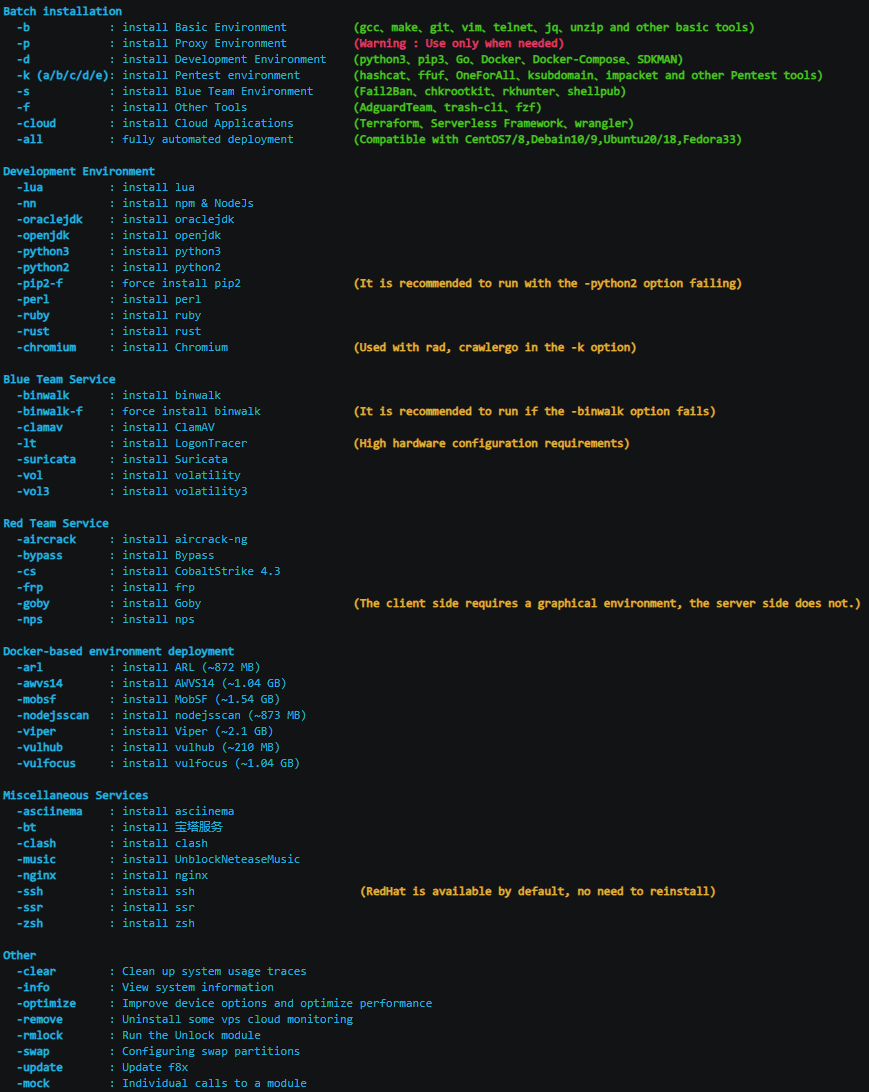
-all Fully automated deployment
Take vultr vps as an example
CentOS 7 |
Debian 10 |
|---|---|
Fedora 33 |
Ubuntu 20.10 |
What does the -p option do?
Want f8x to run in CI/CD, but not interactive?
Just create an empty file IS_CI in /tmp
touch /tmp/IS_CI
wget -O f8x https://raw.githubusercontent.com/ffffffff0x/f8x/main/f8x && mv --force f8x /usr/local/bin/f8x && chmod +x /usr/local/bin/f8x
f8x -k

f8x has joined 404Team 404StarLink 2.0 - Galaxy
create by ffffffff0x
more like this
🧠 A simple command-line client for the Perplexity API. Ask questions and receive answers directly from the terminal! 🚀🚀🚀
search projects, people, and tags