TerevintoSoftware.StaticSiteGenerator
An ASP.NET Core tool for generating static websites from MVC views.
C#★ 72
Tool to turn your Instagram export data into a website that you can share after deleting your Instagram!
 greg-randall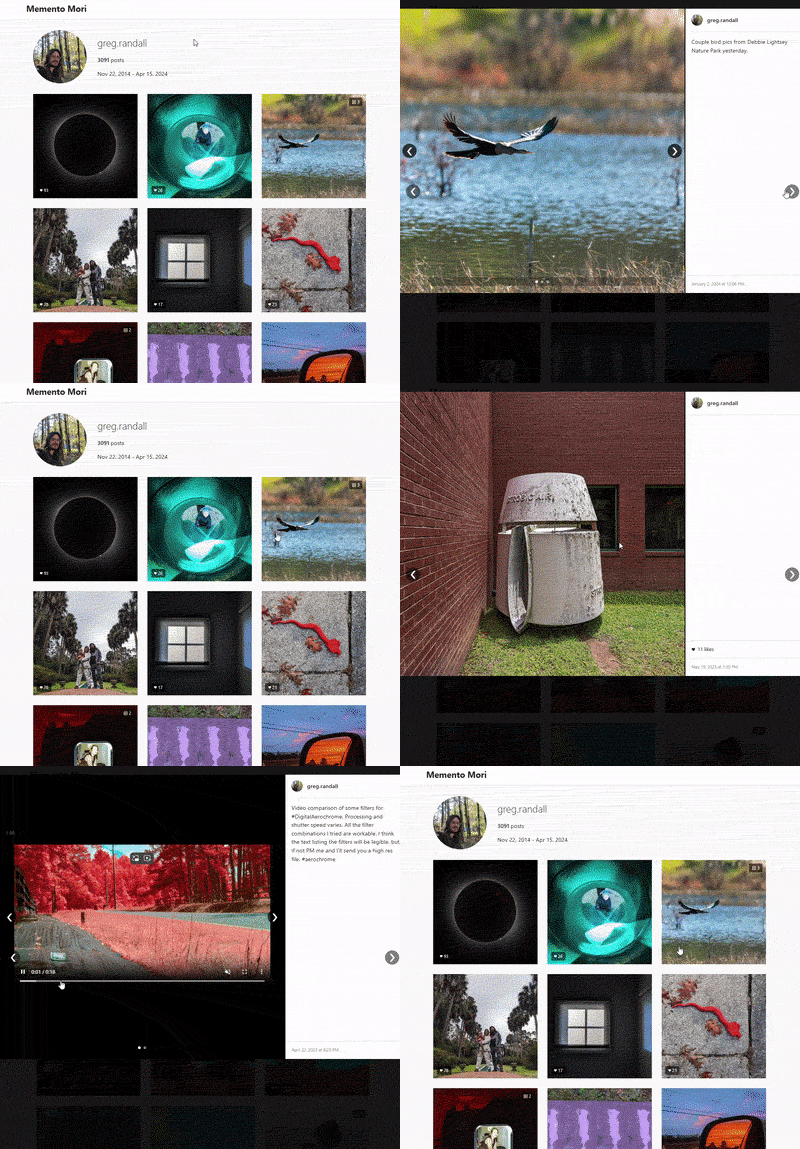
Memento Mori is a tool that converts your Instagram data export into a beautiful, standalone viewer that resembles the Instagram interface. The name "Memento Mori" (Latin for "remember that you will die") reflects the ephemeral nature of our digital content. You can see an example at https://gregr.org/instagram/.
If you find a bug that you're able to fix please create a pull request, otherwise create an issue!
Get your Instagram data export zip, throw it in with this code, and run this command:
docker compose run --rm memento-mori
#Then open output/index.html in your browser
DO NOT share your raw Instagram export online! It contains sensitive data you probably don't want to share:
Only share the generated output folder after processing with this tool.
Memento Mori processes your Instagram data export and generates a static site with your posts and stories, copying all your media files into an organized structure that can be viewed offline or hosted on your own website.
Docker Compose is the easiest way to run Memento Mori without installing any dependencies. Many thanks to CarsonDavis for building out all the dockerizing code (as well as generally making my code better):
# Build the Docker image
docker compose build

# Run with default settings
docker compose run --rm memento-mori

# Run with specific arguments
docker compose run --rm memento-mori --output /output/my-site --quality 90

# Add Google Analytics tracking
docker compose run --rm memento-mori --gtag-id G-DX1ZWTC9NZ

# Serve the output folder locally to preview in your browser
python3 -m http.server -d output
By default, Docker will:
If you prefer running the tool directly without Docker:
# Install package and dependencies
pip install -e .

# Or install dependencies manually
pip install ftfy==6.3.1 Jinja2==3.0.3 MarkupSafe==2.1.5 opencv_python==4.10.0.84 Pillow==11.1.0 tqdm==4.67.1 python_magic==0.4.27

# Run the CLI
python -m memento_mori.cli

# Serve the output folder locally to preview in your browser
python3 -m http.server -d output
The CLI supports the following arguments:
Options:
--input PATH Path to data (ZIP or folder). If not specified, auto-detection will be used.
--output PATH Output directory for generated website [default: ./output]
--threads INTEGER Number of parallel processing threads [default: core count - 1]
--search-dir PATH Directory to search for exports when auto-detecting [default: current directory]
--quality INTEGER WebP conversion quality (1-100) [default: 70]
--max-dimension INTEGER Maximum dimension for images in pixels [default: 1920]
--thumbnail-size WxH Size of thumbnails [default: 292x292]
--no-auto-detect Disable auto-detection (requires --input to be specified)
--gtag-id ID     Google Analytics tag ID (e.g., 'G-DX1ZWTC9NZ') to add tracking to the generated site
--verbose, -v    Enable verbose output for debugging
Note: Auto-detection is enabled by default and will look for exports in the current directory. Use --no-auto-detect if you want to disable this feature and specify an input path manually.
# Auto-detect export in current directory
python -m memento_mori.cli

# Specify input file/folder and output directory
python -m memento_mori.cli --input path/to/export.zip --output my-site

# Use specific number of threads and image quality
python -m memento_mori.cli --threads 8 --quality 90

# Specify search directory for auto-detection
python -m memento_mori.cli --search-dir ~/Downloads

# Use custom thumbnail size
python -m memento_mori.cli --thumbnail-size 400x400

# Specify maximum image dimension
python -m memento_mori.cli --max-dimension 1600

# Disable auto-detection (requires specifying input)
python -m memento_mori.cli --no-auto-detect --input path/to/export.zip

# Add Google Analytics tracking
python -m memento_mori.cli --gtag-id G-DX1ZWTC9NZ

# Enable verbose debugging output
python -m memento_mori.cli --verbose
After the tool finishes processing your Instagram data:
index.html file in this directory with your web browser to view your Instagram archiveFor those who prefer the deprecated PHP implementation, there are a few notes in the deprecated_php_utility folder, but basically extract your data into the folder with the php file, and run
# Run from command line
php index.php
When requesting your data from Instagram, the export you receive contains your content but in a format that's intentionally difficult to navigate and enjoy. Memento Mori solves this problem by transforming your archive into an intuitive, familiar interface that brings your memories back to life.
Instagram, like many social platforms, has undergone significant "enshittification" - a term coined to describe how platforms evolve:
more like this
An ASP.NET Core tool for generating static websites from MVC views.
A simplified build system for static sites and single-page webapps, based on Webpack 3.
search projects, people, and tags