meine
meine 🌒 - A CLI file manager and system utility built with Textual. It combines intuitive command parsing with rich t…
Python★ 50
Plug and Play Real-Time Object Detection App with Tensorflow and OpenCV
 gustavz
git clone https://github.com/gustavz/realtime_object_detection.gitgustavz/realtime_object_detectionRealtime Object Detection based on Tensorflow's Object Detection API and DeepLab Project
Version 1: use branch r1.0 for the original repo that was focused on high performance inference of
ssd_mobilenet
(x10 Performance Increase on Nvidia Jetson TX2)
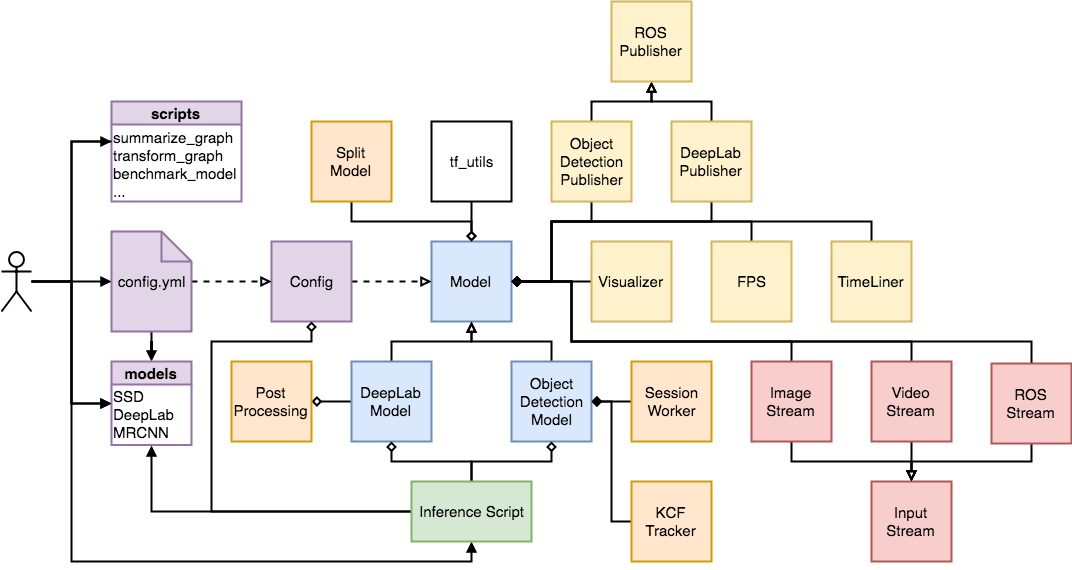
Version 2: use branch Master or to be additionally able to run and test Mask-Detection Models, KCF-Tracking and DeepLab Models (merge of the repo realtime_segmenation)
ROS Support: To use this Repo as ROS-Package including detection and segmentation ROS-Nodes use branch ros. Alternativley use the repo objectdetection_ros
The Idea was to create a scaleable realtime-capable object detection pipeline that runs on various systems.
Plug and play, ready to use without deep previous knowledge.
The project includes following work:
research/object_detection as well as research/deeplab modelsssd_mobilenet speed hack, which splits the model in a mutlithreaded cpu and gpu session. timeline files measuring the exact time consumption of each operation in your modelscripts/config.sample.yml named config.yml and only change configurations inside this file VISUALIZE to False, SPLIT_MODEL to False, scripts/ run bash build_kcf.sh to build it and set USE_TRACKER to True to use it SPLIT_MODEL)from rod.model import ObjectDetectionModel, DeepLabModel
from rod.config import Config
model_type = 'od' #or 'dl'
input_type = 'video' #or 'image'
config = Config(model_type)
model = ObjectDetectionModel(config).prepare_model(input_type) #or DeepLabModel
model.run()
python + objectdetection_video.py or objectdetection_image.py or deeplab_video.py or deeplab_image.py or allmodels_image.pyTo make use of the tools provided inside scripts/ follow this guide:
config_tools.sh to your needs / according to your systemsource config_tools.sh and in the same terminal run only once source build_tools.sh to build the tools. this will take a while. source config_tools.sh(due to the exported variables) and after that you are able to run the wanted scripts always from the same terminal with source script.sh.test_results/Use the following setup for best and verified performance
Note: tensorflow v1.7.0 seems to have massive performance issues (try to use other versions)
ssd_mobilenet:.xml, .mat, .csv, .record, .txt annotationstensorflow/models fork which includes yolov2 and mask_rcnn_mobilenet_v1_cocomore like this
meine 🌒 - A CLI file manager and system utility built with Textual. It combines intuitive command parsing with rich t…
search projects, people, and tags