miikun
Simple Markdown Editor
 hiro0218
git clone https://github.com/hiro0218/miikun.githiro0218/miikunmiikun

A simple Markdown editor built for focused writing.
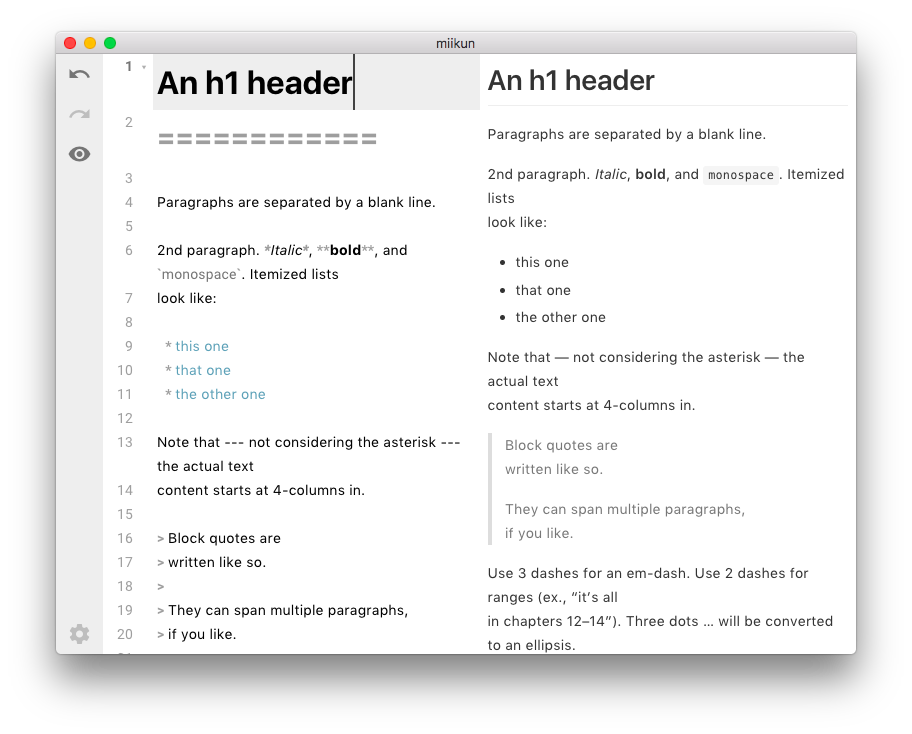
miikun is an Electron + React + TypeScript desktop Markdown editor I built because I wanted a simple place to write. It
edits plain .md and .txt files, saves password-protected .mii files, and keeps the UI quiet so the
document stays in front.
Use it when you want local files, native desktop shortcuts, tabs, and preview without a workspace or account.
Highlights
- Simple local editing for
.md,.txt, and encrypted.miifiles - Multi-tab workflow with dirty-state indicators, tab closing, and drag reordering
- Optional live Markdown preview with tables, checkboxes, footnotes, anchors, definition lists, and Shiki syntax highlighting
- Password prompt for opening and saving
.miifiles - Native desktop menus and shortcuts for file, edit, preview, theme, zoom, and window controls
- Light, dark, and system themes, plus an Always on Top mode for reference notes
- Drag-and-drop file opening
- URL paste helper that turns a pasted URL into a Markdown link when the page title can be read
Quick Start
Prerequisites:
- Node.js
- npm
Install dependencies and launch the Electron app:
npm install
npm run electron:serve
The development server is managed by electron-vite and Vite. Browser-only npm run serve / npm run build
scripts are not defined because the renderer uses Electron and Node APIs directly.
Everyday Use
| Action | Shortcut / Path |
|---|---|
| New tab | CmdOrCtrl+T or CmdOrCtrl+N |
| Open file | CmdOrCtrl+O or drag a file into the window |
| Save | CmdOrCtrl+S |
| Save as | CmdOrCtrl+Shift+S |
| Close tab | CmdOrCtrl+W |
| Next / previous tab | Ctrl+Tab / Ctrl+Shift+Tab |
| Toggle preview | View -> Toggle Preview Panel |
| Change theme | View -> Theme |
| Always on Top | CmdOrCtrl+Shift+T |
To create an encrypted note, save the document with the .mii extension and enter a password. Opening that
file later asks for the password before the content is loaded.
Development
# Run the Electron app in development
npm run electron:serve

# Build the production desktop app
npm run electron:build

# Build Electron main and renderer output without packaging
npm run prebuild

# Lint JavaScript, TypeScript, and React files
npm run lint

# Type-check TypeScript sources
npm run typecheck

# Check SCSS
npm run lint:scss

# Auto-format SCSS
npm run format:scss
The current production build configuration targets a macOS zip package.
Architecture
miikun keeps the Electron main process small and puts the editor workflow in the React renderer. Third-party libraries are isolated behind adapter modules so the rest of the app depends on app-facing APIs instead of direct library imports.
Key areas:
src/adapters/wraps CodeMirror, markdown-it/Shiki, filesystem, encryption, and Electron APIssrc/services/owns editor commands, file operations, render sequencing, menus, and tab document statesrc/components/contains the editor, tab bar, toolbar, drag-and-drop overlay, and password promptsrc/services/andsrc/adapters/define the boundaries between editor state, file operations, preview rendering, and commands
Contributing
Issues and focused pull requests are welcome. Before opening a PR, run:
npm run lint
npm run lint:scss
There is no automated test suite yet. For changes that affect behavior, also launch the app with
npm run electron:serve and verify the edited workflow manually.
License
MIT
more like this
facenox
Open-source, offline-first face recognition attendance platform that runs on any webcam.
markItDown
📱 A React app to preview and edit Markdown✍. You can also export it as HTML.