SwiftUIFontIcon
The easiest way to implement font icons in your SwiftUI project.
 huybuidac
SwiftUIFontIcon
The easiest way to implement font icons in your SwiftUI project.
Usage
The library is super super easy to use, just something like this :)
Text
import SwiftUIFontIcon

// ...

FontIcon.text(.materialIcon(code: .access_alarm))
FontIcon.text(.materialIcon(code: .access_alarm), fontsize: 30)
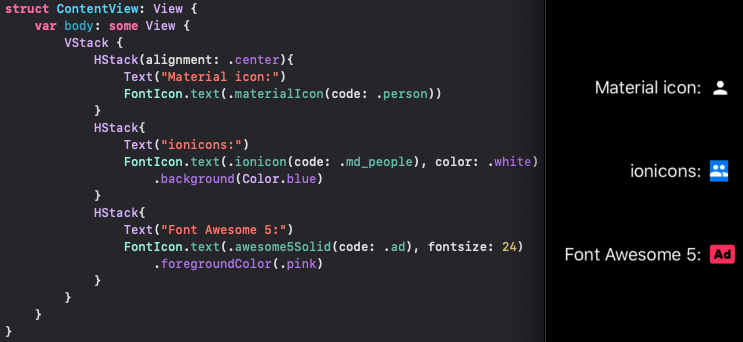
Button
FontIcon.button(.ionicon(code: .md_add_circle), action: {})
FontIcon.button(.materialIcon(code: .settings), action: {}, padding: 8)
    .background(RoundedRectangle(cornerRadius: 4).foregroundColor(.blue))
Installation
Cocoapods (Xcode 11 & Xcode 12)
CocoaPods is a dependency manager for Cocoa projects.
You can install it with the following command:
$ gem install cocoapods
To integrate SwiftUIFontIcon into your Xcode project using CocoaPods, specify it in your Podfile:
use_frameworks!

pod 'SwiftUIFontIcon'
SPM (Xcode 12 only)
The preferred way of installing SwiftUIFontIcon is via the Swift Package Manager.
Xcode 12 integrates with libSwiftPM to provide support for iOS, watchOS, and tvOS platforms.
- In Xcode, open your project and navigate to File → Swift Packages → Add Package Dependency...
- Paste the repository URL (
https://github.com/huybuidac/SwiftUIFontIcon) and click Next. - For Rules, select Branch (with branch set to
master). - Click Finish.
- Open the Project settings, add SwiftUI.framework to the Linked Frameworks and Libraries, set Status to Optional.
Sample
To run the example project of SPM, using xcode 12 beta
To run the example project of Cocoapods, using xcode 11 || 12 beta
Supported fonts
Currently, SwiftUIFontIcon supports:
- Material icon
- Ionicons
- Font Awesome 5 Free
more like this
chinese-hershey-font
Convert Chinese Characters to Single-Line Fonts using Computer Vision