perplexity-cli
🧠 A simple command-line client for the Perplexity API. Ask questions and receive answers directly from the terminal! 🚀🚀🚀
Python★ 176
Cross-platform desktop application for content-aware file organization and renaming. Supports local and remote LLMs, pr…
 hyperfield






AI File Sorter is a cross-platform desktop application that uses AI to organize files and suggest cleaner, more consistent names for images, documents, and supported audio/video files. It is designed to reduce clutter, improve consistency, and make files easier to find later, whether for review, archiving, or long-term storage.

The app can analyze picture files locally with built-in visual LLM backends and suggest meaningful, human-readable names. For example, a generic file like IMG_2048.jpg can be renamed to something descriptive such as clouds_over_lake.jpg. It can also analyze supported document files and propose clearer names based on their text content. AI File Sorter can also clean up messy audio and video filenames by using the metadata already stored inside supported media files. If tags such as year, artist, album, or title are available, the app can turn them into a clear suggestion like 2024_artist_album_title.mp3, which you can review, edit, or ignore before any change is applied.
AI File Sorter helps tidy up cluttered folders such as Downloads, external drives, or NAS storage by automatically grouping files based on their names, extensions, folder context, taxonomy normalization, and cached categorization results.
Instead of relying only on fixed rules, the app combines LLM output with taxonomy matching, optional whitelists, consistency hints from the current session and recent cached assignments for similar file types, and locally approved review decisions when available. This helps keep labels more consistent over time, while still letting you review and adjust everything before anything is applied.
Categories (and optional subcategories) are suggested for each file, and for supported file types, rename suggestions are provided as well. Once you confirm, the required folders are created automatically and files are sorted accordingly.
Privacy-first by design:
AI File Sorter can run entirely on your device, using local text and visual models such as Gemma 3 4B IT and other supported GGUF backends. The same Gemma 3 4B IT GGUF can be used on its own as a local text model, while visual image analysis additionally requires a matching mmproj file. No files, filenames, images, or metadata are uploaded anywhere, and no telemetry is sent. An internet connection is only needed if you explicitly choose to enable a remote model.
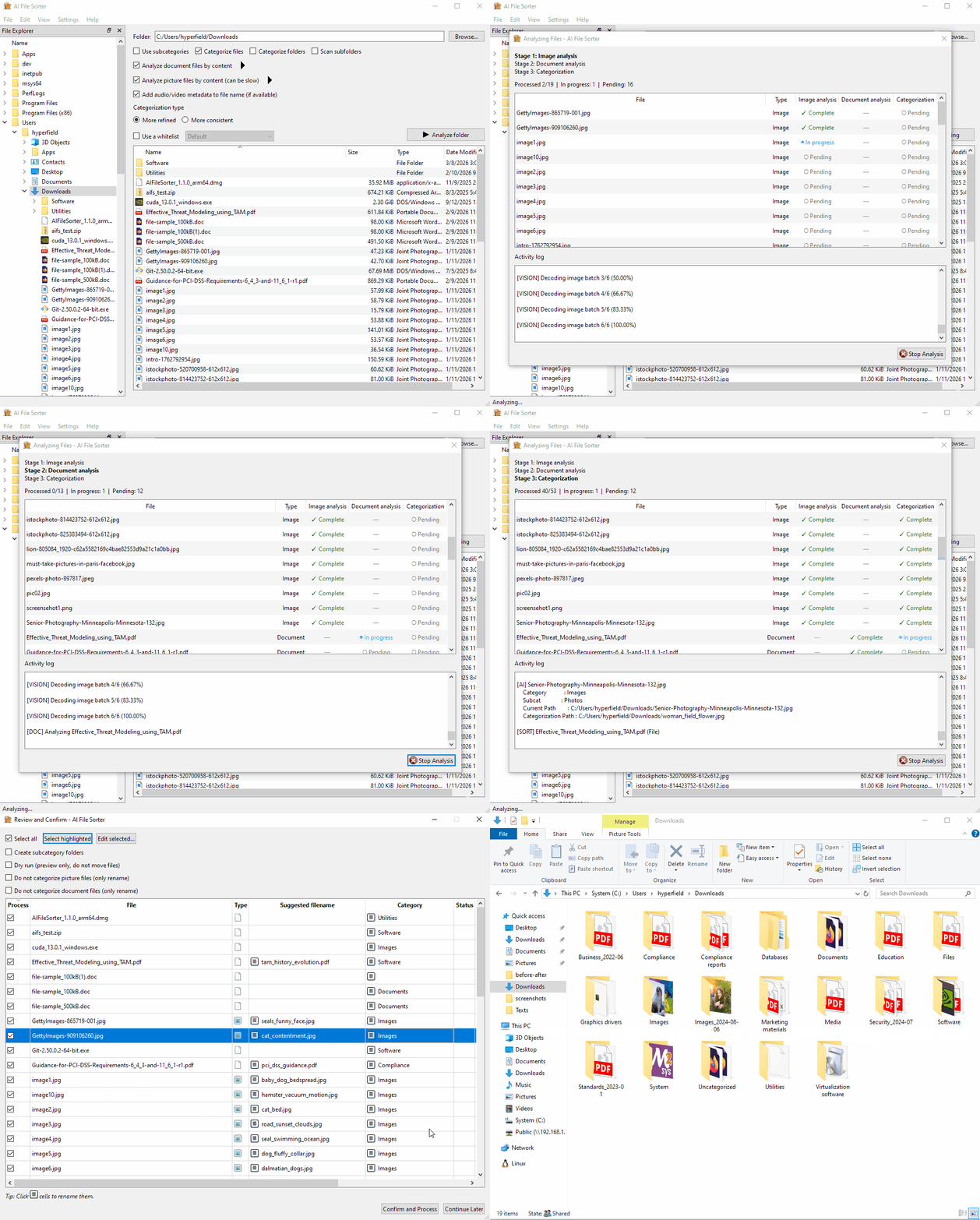
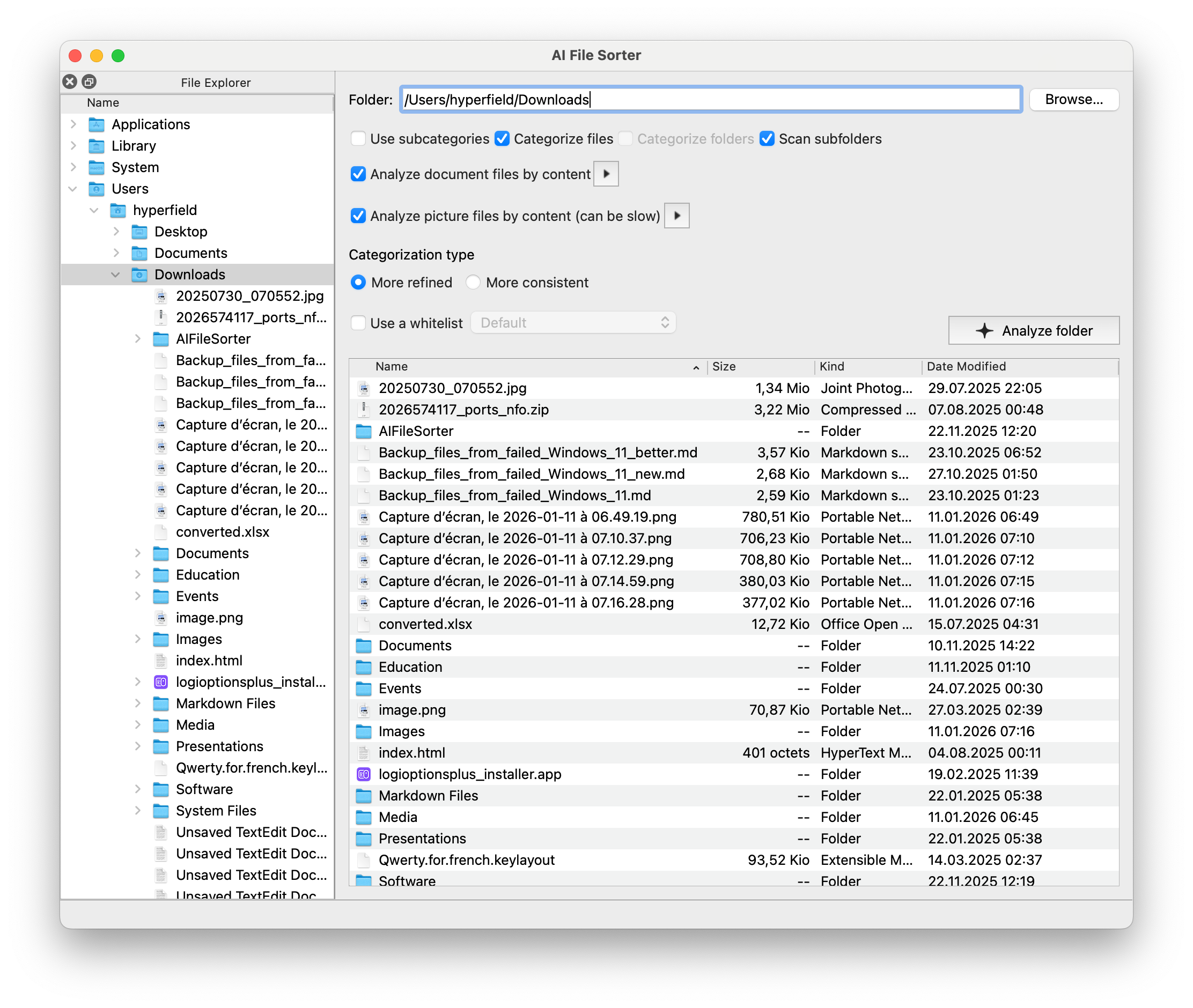
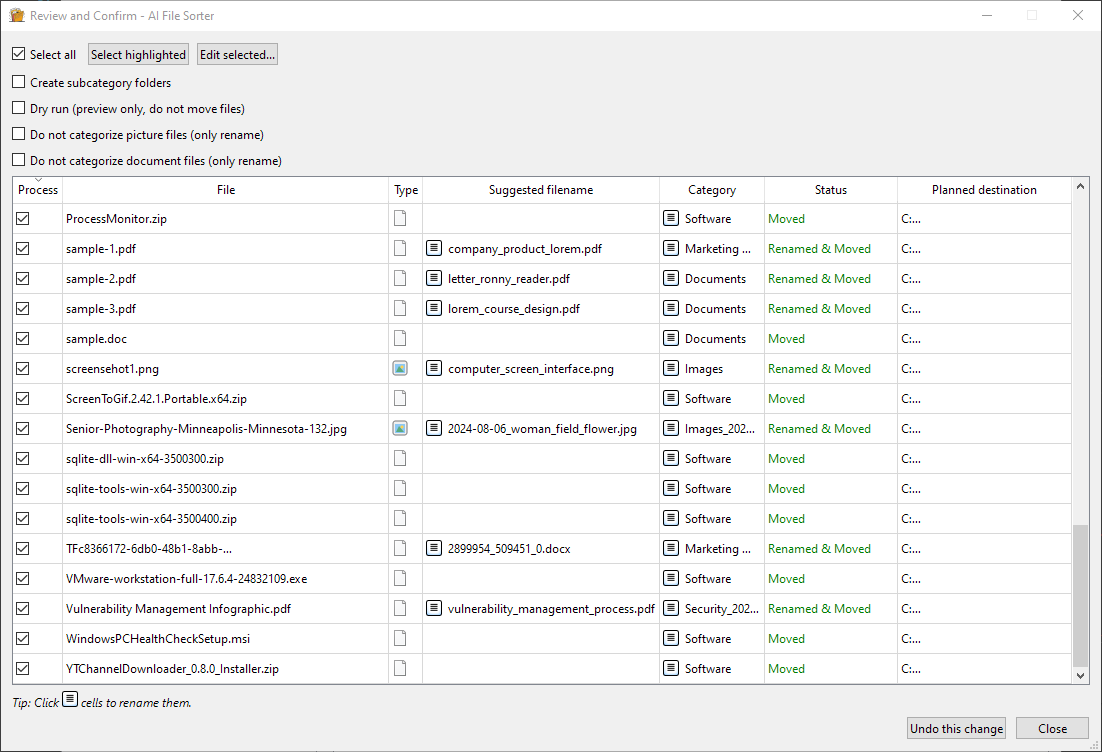
See CHANGELOG.md for the full history.
Default and Documents lists are auto-created only when no lists exist, and multiple named lists can be kept for different projects.Image analysis uses local MTMD-backed visual LLM backends to describe image contents and (optionally) suggest a better filename. This runs locally and does not require an API key.
As of 1.8.0, Gemma 3 4B IT is the default visual backend. The app also gives screenshots, webpage captures, dashboards, forms, mockups, and other UI-like images extra prompt guidance so categories describe what is shown on screen instead of misclassifying the image as the software artifact itself.
The app currently exposes two built-in visual backends: the default Gemma 3 4B IT and LLaVA 1.6 Mistral 7B. In the current embedded runtime, all supported local visual backends require two GGUF files: the main text model and a matching mmproj projector file.
The Gemma 3 4B IT GGUF is also available as a built-in local text/categorization model. When used only for categorization or document analysis, it runs as a normal text model and does not need mmproj. If you already downloaded the Gemma 3 text GGUF for image analysis, the local text-model entry reuses that same file automatically. The extra mmproj file is only required for visual image analysis.
The Select LLM dialog includes an "Image analysis models" section with backend-specific downloads:
mmproj file (GGUF): The multimodal projector that maps image embeddings into the model token space so the backend can accept images.Both files are required for the selected backend. If either one is missing, image analysis is disabled and the app will prompt to open the Select LLM dialog to download them. The download URLs can be overridden with backend-specific environment variables such as LLAVA_MODEL_URL / LLAVA_MMPROJ_URL or GEMMA3_4B_MODEL_URL / GEMMA3_4B_MMPROJ_URL (see Environment variables).
Image analysis adds six related checkboxes to the main window:
YYYY-MM-DD from image metadata to the category label when available. Disabled when rename-only is enabled.The separate top-level checkbox Add audio/video metadata to file name (if available) controls metadata-based rename suggestions for supported audio/video files. See Audio/video metadata filename suggestions.
Document analysis uses the same selected LLM (local or remote) to extract text from supported document files, summarize content, and optionally suggest a better filename. No extra model downloads are required.
.txt, .md, .rtf, .csv, .tsv, .json, .xml, .yml/.yaml, .ini/.cfg/.conf, .log, .html/.htm, .tex, .rst.pdf (embedded PDFium by default; CLI fallback via pdftotext is available only if you explicitly configure -DAI_FILE_SORTER_REQUIRE_EMBEDDED_PDF_BACKEND=OFF).docx, .xlsx, .pptx, .odt, .ods, .odp (embedded libzip+pugixml in bundled builds; CLI fallback uses unzip if you build without vendored libs).doc, .xls, .ppt are not currently supported.Source builds: embedded extractors are used by default. If the vendored PDFium artifacts are missing for your target platform, CMake now fails loudly instead of silently disabling PDF content extraction. You can opt back into the old CLI fallback with -DAI_FILE_SORTER_REQUIRE_EMBEDDED_PDF_BACKEND=OFF.
YYYY-MM from metadata when available. Disabled when rename-only is enabled.Let AI File Sorter turn embedded media tags into clean, consistent filenames for your music and video library. When enabled, the app reads supported metadata fields and builds a polished suggested name in the format year_artist_album_title.ext. As with all rename suggestions, nothing is changed until you review and confirm it.
.aac, .aif, .aiff, .alac, .ape, .flac, .m4a, .mp3, .ogg, .oga, .opus, .wav, .wma.3gp, .avi, .flv, .m4v, .mkv, .mov, .mp4, .mpeg, .mpg, .mts, .m2ts, .ts, .webm, .wmvID3v1/ID3v2), FLAC (Vorbis comments), OGG/OGA/Opus (Vorbis comments), and MP4-family containers such as .m4a, .mp4, .m4v, .mov, and .3gp (MP4/MOV metadata atoms).MediaInfoLib, the same rename flow can also use metadata exposed by MediaInfo for additional supported containers when available.The System compatibility check runs a quick benchmark that estimates how well your system can handle:
You can launch it from the menu (File → System compatibility check…). It only runs if at least one local or visual LLM is downloaded, and it won’t auto-rerun if it's already been run.
What it does:
Tip: quit CPU/GPU‑intensive apps before running the check for more accurate results.
g++ or clang++ on Linux/macOS, MSVC 2022 on Windows).qt6-base-dev / qt6-tools on Linux, brew install qt on macOS, or a Qt 6 MSVC kit / qtbase via vcpkg on Windows).curl, sqlite3, fmt, spdlog, libmediainfo (required for full source builds), and the prebuilt llama libraries shipped under app/lib/precompiled on Linux/Windows or app/lib/precompiled-* for macOS variant builds. On Windows, these non-Qt libraries are supplied through the app/vcpkg.json manifest.apt/dnf/pacman/brew/vcpkg). The build rejects vendored MediaInfo submodules and checked-in binaries.-DAI_FILE_SORTER_REQUIRE_EMBEDDED_PDF_BACKEND=OFF only if you intentionally want the pdftotext fallback.aifilesorter.exe auto-detects the best available backend and now prefers CUDA over Vulkan when both are available, falling back to CPU/OpenBLAS automatically. On Linux, the same applies through run_aifilesorter.sh; when a dedicated CPU runtime bundle is absent, the launcher can also reuse the staged Vulkan payload for CPU/OpenBLAS fallback, so CUDA is never required to run the app.File categorization with local LLMs is completely free of charge. If you prefer to use a remote workflow (ChatGPT, Gemini, or a custom OpenAI-compatible endpoint) you will need your own API credentials or endpoint configuration with a suitable quota or local server setup (see Using your OpenAI API key, Using your Gemini API key, or Using a custom OpenAI-compatible API).
sudo apt update && sudo apt install -y \
  libqt6widgets6 libcurl4 libjsoncpp25 libfmt9 libopenblas0-pthread \
  libvulkan1 mesa-vulkan-drivers patchelf
sudo apt update && sudo apt install -y \
  libqt6widgets6 libcurl4t64 libjsoncpp26 libfmt10 libopenblas0-pthread \
  libvulkan1 mesa-vulkan-drivers patchelf
glslc (Debian/Ubuntu package: glslc; on some distros: shaderc or shaderc-tools).
On Debian 13, use libjsoncpp26, libfmt10, and libcurl4t64 (APT may auto-select libcurl4t64 if libcurl4 is not available).
Ensure that the Qt platform plugins are installed (on Ubuntu 22.04 this is provided by qt6-wayland).
GPU acceleration additionally requires either a working Vulkan 1.2+ stack (Mesa, AMD/Intel/NVIDIA drivers) or, for NVIDIA users, the matching CUDA runtime (nvidia-cuda-toolkit or vendor packages). The launcher automatically prefers CUDA when both are present and falls back to CPU if neither is available.sudo apt install ./aifilesorter_*.debUsing
apt install (rather than dpkg -i) ensures any missing dependencies listed above are installed automatically.Install dependencies
sudo apt update && sudo apt install -y \
  build-essential cmake git qt6-base-dev qt6-base-dev-tools qt6-l10n-tools qt6-tools-dev-tools \
  libcurl4-openssl-dev libjsoncpp-dev libsqlite3-dev libssl-dev libfmt-dev libspdlog-dev libmediainfo-dev \
  zlib1g-dev patchelf
export PATH="/usr/lib64/qt6/libexec:$PATH"
sudo dnf install -y gcc-c++ cmake git pkgconf-pkg-config qt6-qtbase-devel qt6-qttools-devel \
  libcurl-devel jsoncpp-devel sqlite-devel openssl-devel fmt-devel spdlog-devel libmediainfo-devel openblas-devel patchelf
openblas-devel provides the OpenBLAS headers/libs used for the CPU baseline and for
explicit blas=on llama builds on Fedora.
If you plan to build the Vulkan llama runtime on Fedora, also install the Vulkan tools and shader compiler, plus a working Vulkan driver/runtime:
sudo dnf install -y vulkan-tools glslc
# AMD / Intel / Mesa-based Vulkan runtime
sudo dnf install -y mesa-vulkan-drivers
# NVIDIA proprietary driver users should install the vendor Vulkan runtime instead
vulkaninfo >/dev/null
If you plan to build the CUDA llama runtime on Linux, install an NVIDIA driver plus the full NVIDIA CUDA Toolkit (not just Python wheels/runtime packages), then verify both the driver and compiler in the same shell you will use for the build:
export PATH="/usr/local/cuda/bin:$PATH"
nvidia-smi
nvcc --version
Debian/Ubuntu users can use the distro-packaged toolkit (nvidia-cuda-toolkit) if it
matches the driver/runtime they intend to build against. Fedora/RHEL users should use a
supported CUDA Toolkit install from NVIDIA's Linux installation guide because the NVIDIA
CUDA repository setup varies by release. On Fedora, enable the NVIDIA CUDA repository
first or sudo dnf install cuda-toolkit will fail with "No match for argument":
distro="fedora$(rpm -E %fedora)"
sudo dnf install -y dnf-plugins-core
sudo dnf config-manager addrepo \
  --from-repofile="https://developer.download.nvidia.com/compute/cuda/repos/${distro}/x86_64/cuda-${distro}.repo"
sudo dnf clean expire-cache
Once that repository is enabled for your Fedora release, the toolkit install itself is:
sudo dnf install -y cuda-toolkit
If you also want NVIDIA's packaged driver path from the same guide rather than a separately installed proprietary driver, the documented Fedora command is:
sudo dnf module install -y nvidia-driver:latest-dkms
The official Fedora instructions, including repo enablement and RPMFusion caveats, are: https://docs.nvidia.com/cuda/cuda-installation-guide-linux/index.html
On Linux, the helper also needs a CUDA-supported g++ host compiler. It auto-selects
/usr/bin/g++-15, g++-14, g++-13, g++-12, g++-11, g++-10, then g++, and
will stop with an error if none of those are suitable. Current CUDA 13.2 supports GCC
6.x through 15.x. If your installed CUDA release supports an older range than your distro
default compiler, install a compatibility package such as Fedora gcc14-c++ or
gcc13-c++ and rerun with NVCC_CCBIN=/usr/bin/g++-14 or NVCC_CCBIN=/usr/bin/g++-13
in the same shell.
sudo pacman -S --needed base-devel git cmake qt6-base qt6-tools curl jsoncpp sqlite openssl fmt spdlog mediainfo patchelf
Optional GPU acceleration also requires either the distro Vulkan 1.2+ driver/runtime (Mesa, AMD, Intel, NVIDIA) or CUDA packages for NVIDIA cards. Install whichever stack you plan to use; the app will fall back to CPU automatically if none are detected.
MediaInfo is enforced as package-managed only; vendored MediaInfoLib folders or repo-local binaries are rejected by the build.
Clone the repository
git clone https://github.com/hyperfield/ai-file-sorter.git
cd ai-file-sorter
git submodule update --init --recursive
Submodule tip: If you previously downloaded
llama.cppor Catch2 manually, remove or renameapp/include/external/llama.cppandexternal/Catch2before running thegit submodulecommand. Git needs those directories to be empty so it can populate them with the tracked submodules.
Build vendored libzip (generates zipconf.h and libzip.a)
cmake -S external/libzip -B external/libzip/build \
 -DBUILD_SHARED_LIBS=OFF \
 -DBUILD_DOC=OFF \
 -DENABLE_BZIP2=OFF \
 -DENABLE_LZMA=OFF \
 -DENABLE_ZSTD=OFF \
 -DENABLE_OPENSSL=OFF \
 -DENABLE_GNUTLS=OFF \
 -DENABLE_MBEDTLS=OFF \
 -DENABLE_COMMONCRYPTO=OFF \
 -DENABLE_WINDOWS_CRYPTO=OFF

cmake --build external/libzip/build
On Ubuntu/Debian you will also need the Zlib development headers (zlib1g-dev) or
the libzip configure step will fail.
If you prefer system headers instead, install libzip-dev and ensure zipconf.h is on your include path.
Build the llama runtime variants (run once per backend you plan to ship/test)
The Linux helper accepts either cuda=on / vulkan=on / blas=on or the GNU-style
--cuda=on / --vulkan=on / --blas=on forms.
# CPU / OpenBLAS
./app/scripts/build_llama_linux.sh cuda=off vulkan=off
# CUDA (optional; requires NVIDIA driver + full CUDA Toolkit; verify `nvidia-smi`
# and `nvcc --version` first. If `nvcc` is not on PATH after install, run
# `export PATH=/usr/local/cuda/bin:$PATH` in this shell. On Linux the helper also
# needs a CUDA-supported g++ host compiler and now prefers /usr/bin/g++-15 first.)
./app/scripts/build_llama_linux.sh cuda=on vulkan=off
# Vulkan (optional; requires a working Vulkan 1.2+ stack and glslc; on Fedora install
# vulkan-tools + glslc and ensure `vulkaninfo` succeeds. Mesa-based systems also need
# mesa-vulkan-drivers.)
./app/scripts/build_llama_linux.sh cuda=off vulkan=on
Each invocation stages the corresponding llama/ggml libraries under app/lib/precompiled/<variant> and the runtime DLL/SO copies under app/lib/ggml/w<variant>. The script refuses to enable CUDA and Vulkan simultaneously, so run it separately for each backend. Shipping both directories lets the launcher pick CUDA when available, then Vulkan, and otherwise stay on CPU. If you only ship the Vulkan payload, the Linux launcher can reuse its bundled CPU/OpenBLAS libraries as the CPU fallback, matching the Windows launcher behavior.
Compile the application
cd app
make -j4
The binary is produced at app/bin/aifilesorter.
The Makefile requires pkg-config + package-managed libmediainfo; it intentionally rejects vendored MediaInfo copies.
Install system-wide (optional)
sudo make install
Build a Debian package (optional)
./app/scripts/package_deb.sh
The packaging script always bundles the CPU runtime and auto-includes any staged GPU
variants already present under app/lib/precompiled (for example vulkan after
./app/scripts/build_llama_linux.sh cuda=off vulkan=on). Use
./app/scripts/package_deb.sh --cpu-only for a smaller CPU-only package, or
--include-vulkan / --include-cuda if you want the script to fail when a specific
staged variant is missing.
Build an RPM package (optional; Fedora / RHEL)
./app/scripts/create_rpm.sh
The RPM packaging script follows the same runtime-selection model as the Debian packager:
CPU is always bundled, staged CUDA/Vulkan runtime dirs are auto-included when present, and
the installed run_aifilesorter.sh launcher chooses CUDA first, then Vulkan, then CPU at
runtime. Use ./app/scripts/create_rpm.sh --cpu-only for a smaller CPU-only package, or
--include-vulkan / --include-cuda if you want the script to fail when a specific
staged variant is missing. The RPM payload is built under dist/aifilesorter_rpm/.
Install Xcode command-line tools (xcode-select --install).
Install Homebrew (if required).
Install dependencies
brew install qt curl jsoncpp sqlite openssl fmt spdlog mediainfo cmake git pkgconfig libffi
Add Qt to your environment if it is not already present:
export PATH="$(brew --prefix)/opt/qt/bin:$PATH"
export PKG_CONFIG_PATH="$(brew --prefix)/lib/pkgconfig:$(brew --prefix)/share/pkgconfig:$PKG_CONFIG_PATH"
Clone the repository and submodules (same commands as Linux).
The macOS build pins
MACOSX_DEPLOYMENT_TARGET=11.0so the Mach-OLC_BUILD_VERSIONcovers Apple Silicon and newer releases (including Sequoia). Raise or lower it (e.g.,export MACOSX_DEPLOYMENT_TARGET=15.0) if you need a different floor.
Build vendored libzip (generates zipconf.h and libzip.a)
cmake -S external/libzip -B external/libzip/build \
  -DBUILD_SHARED_LIBS=OFF \
  -DBUILD_DOC=OFF \
  -DENABLE_BZIP2=OFF \
  -DENABLE_LZMA=OFF \
  -DENABLE_ZSTD=OFF \
  -DENABLE_OPENSSL=OFF \
  -DENABLE_GNUTLS=OFF \
  -DENABLE_MBEDTLS=OFF \
  -DENABLE_COMMONCRYPTO=OFF \
  -DENABLE_WINDOWS_CRYPTO=OFF
cmake --build external/libzip/build
Build the llama runtime
./app/scripts/build_llama_macos.sh
Architecture-specific examples:
./app/scripts/build_llama_macos.sh --arm64   # Apple Silicon
./app/scripts/build_llama_macos.sh --intel   # Intel Mac
The macOS app and .app bundles use the runtime staged under app/lib/precompiled*; they do not need Homebrew ggml or llama.cpp libraries.
If you have older ggml / llama.cpp copies installed in generic library locations, prefer unlinking or removing them instead of relying on them implicitly.
Compile the application
cd app
make -j8                 # use -jN to control parallelism
sudo make install   # optional
The default build places the binary at app/bin/aifilesorter.
Variant targets:
make -j8 MACOS_LLAMA_M1    # outputs app/bin/m1/aifilesorter
make -j8 MACOS_LLAMA_M2    # outputs app/bin/m2/aifilesorter
make -j8 MACOS_LLAMA_INTEL # outputs app/bin/intel/aifilesorter
These targets rebuild the llama.cpp runtime before compiling the app. On a native Intel Mac, the most direct path is:
cd app
make -j8 MACOS_LLAMA_INTEL
That target assumes the normal Intel Homebrew prefix (/usr/local) and produces app/bin/intel/aifilesorter.
When cross-compiling Intel on Apple Silicon, use x86_64 Homebrew (under /usr/local) or set BREW_PREFIX=/usr/local so Qt/pkg-config resolve correctly.
sudo make install places the macOS runtime libraries under /usr/local/lib/aifilesorter to avoid collisions with unrelated system or Homebrew ggml libraries.
The commands above build the raw executable only; they do not currently create a distributable .app bundle or .dmg.
This repository does not yet ship a documented or automated macOS bundle/DMG packaging target in README.md, so any .app / .dmg release packaging must be handled as a separate macOS-hosted release step.
Each variant uses distinct build directories to avoid cross-arch collisions:
app/lib/precompiled-m1, app/lib/precompiled-m2, app/lib/precompiled-intelapp/obj/arm64 or app/obj/x86_64Build now targets native MSVC + Qt6 without MSYS2. Two options are supported; the vcpkg route is simplest.
Option A - CMake + vcpkg (recommended)
Install prerequisites:
Visual Studio 2022 with Desktop C++ workload
CMake 3.21+ (Visual Studio ships a recent version)
vcpkg: https://github.com/microsoft/vcpkg (clone and bootstrap)
package-managed libmediainfo via vcpkg manifest (no vendored MediaInfo submodule/binaries)
MSYS2 MinGW64 + OpenBLAS: install MSYS2 from https://www.msys2.org, open an MSYS2 MINGW64 shell, and run pacman -S --needed mingw-w64-x86_64-openblas. The build_llama_windows.ps1 script uses this OpenBLAS copy by default for CPU-only builds and also supports forcing it with blas=on for other variants if needed. It defaults to C:\msys64\mingw64 unless you pass openblasroot=<path> or set OPENBLAS_ROOT.
If you plan to build the CUDA runtime on Windows: install the current NVIDIA driver and the full NVIDIA CUDA Toolkit from https://developer.nvidia.com/cuda-downloads. After installation, open a fresh x64 Native Tools / VS 2022 Developer PowerShell and verify the toolkit/driver before running the helper:
$env:CUDA_PATH
nvcc --version
nvidia-smi
The Windows helper expects a full toolkit install with nvcc, headers, and libraries.
Conda or pip CUDA runtime packages are not enough for building the bundled llama.cpp
CUDA variant. NVIDIA's official Windows installation guide is here:
https://docs.nvidia.com/cuda/cuda-installation-guide-microsoft-windows/index.html
Clone repo and submodules:
git clone https://github.com/hyperfield/ai-file-sorter.git
cd ai-file-sorter
git submodule update --init --recursive
Build vendored libzip (generates zipconf.h and libzip.lib)
Run from the same x64 Native Tools / VS Developer PowerShell you will use to build the app:
cmake -S external\libzip -B external\libzip\build -A x64 `
  -DBUILD_SHARED_LIBS=OFF `
  -DBUILD_DOC=OFF `
  -DENABLE_BZIP2=OFF `
  -DENABLE_LZMA=OFF `
  -DENABLE_ZSTD=OFF `
  -DENABLE_OPENSSL=OFF `
  -DENABLE_GNUTLS=OFF `
  -DENABLE_MBEDTLS=OFF `
  -DENABLE_COMMONCRYPTO=OFF `
  -DENABLE_WINDOWS_CRYPTO=OFF
cmake --build external\libzip\build --config Release
Determine your vcpkg root only if auto-discovery does not find it. The Windows helper scripts look in this order: VCPKG_ROOT / VPKG_ROOT, vcpkg / vpkg on PATH, then common writable locations such as <repo-drive>:\dev\vcpkg, <repo-drive>:\vcpkg, %SystemDrive%\dev\vcpkg, and %SystemDrive%\vcpkg.
If vcpkg is on your PATH, run this command to print the location:
Split-Path -Parent (Get-Command vcpkg).Source
Otherwise use the directory where you cloned vcpkg, or pass it explicitly to the helper scripts.
MediaInfo note: you do not manually add MediaInfoLib include/lib paths on Windows. The project already declares libmediainfo in app/vcpkg.json, and app\build_windows.ps1 configures CMake with the vcpkg toolchain + manifest so find_package(MediaInfoLib ...) resolves it automatically. If you want to preinstall or verify it explicitly, run vcpkg install libmediainfo:x64-windows.
Build the bundled llama.cpp runtime variants (run from the same x64 Native Tools / VS 2022 Developer PowerShell shell). Invoke the script once per backend you need. The script accepts cuda=on|off, vulkan=on|off, blas=on|off, vcpkgroot=<path>, and openblasroot=<path>. vcpkgroot=<path> is optional and only needed when auto-discovery misses your install. blas defaults to AUTO: it is enabled automatically for CPU-only builds and disabled automatically for CUDA/Vulkan builds unless you force it on. For CUDA builds, the helper prefers a valid CUDA_PATH and otherwise auto-selects the newest installed toolkit it can validate under C:\Program Files\NVIDIA GPU Computing Toolkit\CUDA. Make sure nvcc --version and nvidia-smi succeed in this same shell before running cuda=on. Make sure the MSYS2 OpenBLAS install from step 1 is present before running the CPU-only variant (or pass openblasroot=<path> explicitly):
# CPU / OpenBLAS only
app\scripts\build_llama_windows.ps1 cuda=off vulkan=off
# CUDA (requires matching NVIDIA toolkit/driver)
app\scripts\build_llama_windows.ps1 cuda=on vulkan=off
# CUDA + OpenBLAS (optional override if you want that combination explicitly)
app\scripts\build_llama_windows.ps1 cuda=on vulkan=off blas=on
# Vulkan (requires LunarG Vulkan SDK or vendor Vulkan 1.2+ runtime)
app\scripts\build_llama_windows.ps1 cuda=off vulkan=on
Each run emits the appropriate llama.dll / ggml*.dll pair under app\lib\precompiled\<cpu|cuda|vulkan|vulkan-blas> and copies the runtime DLLs into the Windows runtime directories used by the app (app\lib\ggml\wocuda, app\lib\ggml\wcuda, or app\lib\ggml\wvulkan). For Vulkan builds, install the latest LunarG Vulkan SDK (or the vendor's runtime), ensure vulkaninfo succeeds in the same shell, and then run the script. The Windows launcher aifilesorter.exe auto-selects the best backend at launch: CUDA is preferred, Vulkan is used when CUDA is unavailable, and CPU remains the fallback.
Build the Qt6 application using the helper script (still in the VS shell). The helper stages runtime DLLs via windeployqt and shares one dependency install tree across builds:
# One-time per shell if script execution is blocked:
Set-ExecutionPolicy -Scope Process -ExecutionPolicy Bypass

app\build_windows.ps1 -Configuration Release
-VcpkgRoot <path> only if auto-discovery misses your vcpkg install. The path must contain scripts\buildsystems\vcpkg.cmake.app\build-windows\Release.aifilesorter.exe is the Windows entry point for the bundled build and launches aifilesorter-bin.exe.-VcpkgRoot is optional if VCPKG_ROOT/VPKG_ROOT is set or vcpkg/vpkg is on PATH.-SkipDeploy if you only want the binaries without bundling runtime DLLs.-Parallel <N> to override the default “all cores” parallel build behaviour (for example, -Parallel 8). By default the script invokes cmake --build ... --parallel <core-count> and ctest -j <core-count> to keep both MSBuild and Ninja fully utilized.Option B - CMake + Qt online installer
Install prerequisites:
Build vendored libzip (generates zipconf.h and libzip.lib)
Run from the same x64 Native Tools / VS Developer PowerShell you will use to build the app:
cmake -S external\libzip -B external\libzip\build -A x64 `
  -DBUILD_SHARED_LIBS=OFF `
  -DBUILD_DOC=OFF `
  -DENABLE_BZIP2=OFF `
  -DENABLE_LZMA=OFF `
  -DENABLE_ZSTD=OFF `
  -DENABLE_OPENSSL=OFF `
  -DENABLE_GNUTLS=OFF `
  -DENABLE_MBEDTLS=OFF `
  -DENABLE_COMMONCRYPTO=OFF `
  -DENABLE_WINDOWS_CRYPTO=OFF
cmake --build external\libzip\build --config Release
Build the bundled llama.cpp runtime (same VS shell). Any missing OpenBLAS/cURL packages are installed automatically via vcpkg:
pwsh .\app\scripts\build_llama_windows.ps1 [cuda=on|off] [vulkan=on|off] [blas=on|off] [vcpkgroot=<path>] [openblasroot=C:\msys64\mingw64]
blas defaults to AUTO, which means ON for CPU-only builds and OFF for CUDA/Vulkan builds unless you force it. This is required before configuring the GUI because the build links against the produced llama static libraries/DLLs.
Configure CMake from the repo root so CMake sees both the Qt install and the app's vcpkg manifest (adapt CMAKE_PREFIX_PATH to your Qt install):
$env:VCPKG_ROOT = "D:\path\to\vcpkg"
$qt = "C:\Qt\6.6.3\msvc2019_64"  # example
cmake -S app -B build -G "Ninja" `
  -DCMAKE_PREFIX_PATH=$qt `
 -DCMAKE_TOOLCHAIN_FILE=$env:VCPKG_ROOT\scripts\buildsystems\vcpkg.cmake `
 -DVCPKG_MANIFEST_DIR=app `
 -DAI_FILE_SORTER_REQUIRE_MEDIAINFOLIB=ON `
 -DVCPKG_TARGET_TRIPLET=x64-windows
cmake --build build --config Release
This configure step enables vcpkg manifest mode, so libmediainfo is installed/resolved from app\vcpkg.json automatically. No manual linker or include-path edits are needed for MediaInfo on Windows.
Notes
.\app\build_windows.ps1 -Clean. The script removes the Windows build directories used by the helper and the shared app\build-windows-vcpkg_installed dependency tree before configuring.windeployqt after each successful build; skip this step with -SkipDeploy if you manage deployment yourself.VCPKG_ROOT to its bundled copy under Program Files, point VCPKG_ROOT to a writable clone or pass vcpkgroot=<path> when running build_llama_windows.ps1. The script skips the bundled Visual Studio copy during auto-discovery because it is usually read-only.build_llama_* helper for each backend you intend to include before configuring CMake so the libraries exist. The runtime can carry both and auto-select at launch, so CUDA remains optional.-BuildTests and -RunTests are intended for the primary bundled Windows build configuration.Catch2-based unit tests are optional. Enable them via CMake:
cmake -S app -B build-tests -DAI_FILE_SORTER_BUILD_TESTS=ON -DAI_FILE_SORTER_REQUIRE_MEDIAINFOLIB=ON
cmake --build build-tests --target ai_file_sorter_tests --parallel $(nproc)
ctest --test-dir build-tests --output-on-failure -j $(nproc)
On macOS, replace $(nproc) with $(sysctl -n hw.ncpu).
On Windows (PowerShell), use:
cmake -S app -B build-tests -DAI_FILE_SORTER_BUILD_TESTS=ON -DAI_FILE_SORTER_REQUIRE_MEDIAINFOLIB=ON
cmake --build build-tests --target ai_file_sorter_tests --parallel $env:NUMBER_OF_PROCESSORS
ctest --test-dir build-tests --output-on-failure -j $env:NUMBER_OF_PROCESSORS
Notes
./build-tests/ai_file_sorter_tests --list-tests./build-tests/ai_file_sorter_tests --verbosity high --successOn Windows you can pass -BuildTests (and -RunTests to execute ctest) to app\build_windows.ps1:
app\build_windows.ps1 -Configuration Release -BuildTests -RunTests
The current suite (under tests/unit) focuses on core utilities; expand it as new functionality gains coverage.
Both the Linux launcher (app/bin/run_aifilesorter.sh / aifilesorter-bin) and the Windows launcher (aifilesorter.exe in bundled Windows builds) accept the following optional flags:
--cuda={on|off} – force-enable or disable the CUDA backend.--vulkan={on|off} – force-enable or disable the Vulkan backend.When no flags are provided the app auto-detects available runtimes in priority order (CUDA → Vulkan → CPU). Use the flags to skip a backend (--cuda=off forces Vulkan/CPU even if CUDA is installed, --vulkan=off tests CUDA explicitly) or to validate a newly installed stack (--vulkan=on). Passing on to both flags is rejected, and if neither GPU backend is detected the app automatically stays on CPU. On Linux, CPU mode can reuse the staged Vulkan runtime payload when the dedicated CPU payload is not present.
n_gpu_layers based on available VRAM. Integrated GPUs are capped to 4 GiB for safety, which can limit offloading.AI_FILE_SORTER_N_GPU_LAYERS (-1 auto, 0 force CPU) or AI_FILE_SORTER_GPU_BACKEND=cpu.AI_FILE_SORTER_VISUAL_USE_GPU=0 forces the visual encoder to run on CPU to avoid VRAM allocation errors.Runtime and GPU:
AI_FILE_SORTER_GPU_BACKEND - select GPU backend: auto (default), vulkan, cuda, or cpu.AI_FILE_SORTER_N_GPU_LAYERS - override n_gpu_layers for llama.cpp; -1 = auto, 0 = force CPU.AI_FILE_SORTER_CTX_TOKENS - override local LLM context length (default 2048; clamped 512-8192).AI_FILE_SORTER_GGML_DIR - directory to load ggml backend shared libraries from. On macOS this is only auto-discovered from bundled or sibling app runtime directories; use this variable explicitly if you want a custom ggml runtime.Visual LLM:
LLAVA_MODEL_URL - download URL for the LLaVA 1.6 Mistral 7B text model.LLAVA_MMPROJ_URL - download URL for the LLaVA 1.6 Mistral 7B mmproj file.GEMMA3_4B_MODEL_URL - download URL for the default/recommended Gemma 3 4B IT text model.GEMMA3_4B_MMPROJ_URL - download URL for the default/recommended Gemma 3 4B IT mmproj file.AI_FILE_SORTER_VISUAL_USE_GPU - force visual encoder GPU usage (1) or CPU (0). Defaults to auto; Vulkan may fall back to CPU if VRAM is low.Timeouts and logging:
AI_FILE_SORTER_LOCAL_LLM_TIMEOUT - seconds to wait for local LLM responses (default 60).AI_FILE_SORTER_REMOTE_LLM_TIMEOUT - seconds to wait for OpenAI/Gemini responses (default 10).AI_FILE_SORTER_CUSTOM_LLM_TIMEOUT - seconds to wait for custom OpenAI-compatible API responses (default 60).AI_FILE_SORTER_LLAMA_LOGS - enable verbose llama.cpp logs (1/true); also honors LLAMA_CPP_DEBUG_LOGS.Storage and updates:
AI_FILE_SORTER_CONFIG_DIR - override the base config directory (where config.ini lives).CATEGORIZATION_CACHE_FILE - override the SQLite cache filename inside the config dir.UPDATE_SPEC_FILE_URL - primary update feed spec URL used for normal runs. The updater now reads per-platform streams from update.windows, update.macos, and update.linux, with legacy single-stream feeds still accepted. Each stream may also include its own changelog list for the update dialog.UPDATE_SPEC_FILE_URL_DEVELOPMENT - alternate update feed spec URL used when the app starts with --development. If this value is unset, development mode falls back to UPDATE_SPEC_FILE_URL.AI_FILE_SORTER_UPDATER_TEST_MODE - enable Windows updater live-test mode (1/true). When enabled, the app skips the update feed fetch and synthesizes a newer version from the values below.AI_FILE_SORTER_UPDATER_TEST_URL - direct URL for the Windows updater live-test package. This can point to an .exe, .msi, or a .zip containing exactly one .exe or .msi.AI_FILE_SORTER_UPDATER_TEST_SHA256 - SHA-256 checksum for the downloaded live-test package. If the URL points to a ZIP, this checksum must be for the ZIP archive itself.AI_FILE_SORTER_UPDATER_TEST_VERSION - optional synthetic version shown by live-test mode. Defaults to the current app version with an extra trailing segment, for example 1.7.2.1.AI_FILE_SORTER_UPDATER_TEST_MIN_VERSION - optional synthetic minimum version for live-test mode. Defaults to 0.0.0 so the test behaves like an optional update.Example update feed:
{
  "update": {
    "current_version": "1.7.1",
    "min_version": "1.6.0",
    "download_url": "https://filesorter.app/download",
    "changelog": [
      "General compatibility fixes for older clients"
    ],
    "windows": {
      "current_version": "1.7.1",
      "min_version": "1.6.0",
      "download_url": "https://filesorter.app/download",
      "changelog": [
        "Improved installer handoff on Windows",
        "Added more update details in the dialog"
      ],
      "installer_url": "https://filesorter.app/downloads/AIFileSorterSetup-1.7.1.exe",
      "installer_sha256": "0123456789abcdef0123456789abcdef0123456789abcdef0123456789abcdef"
    },
    "macos": {
      "current_version": "1.7.1",
      "min_version": "1.6.0",
      "download_url": "https://filesorter.app/download",
      "changelog": [
        "Updated notarized package metadata"
      ]
    },
    "linux": {
      "current_version": "1.7.1",
      "min_version": "1.6.0",
      "download_url": "https://filesorter.app/download",
      "changelog": [
        "Improved Linux wrapper backend selection"
      ]
    }
  }
}
Compatibility note:
update, so keep current_version, min_version, and download_url there as a legacy compatibility stream if you still need to support them.update.windows, update.macos, or update.linux when present.changelog is evaluated per stream. Use a JSON array of strings for new feeds; each entry is shown as a bullet item in the update dialog for that stream.Windows-only direct installer updates:
installer_url - direct URL to the Windows installer package.installer_sha256 - SHA-256 checksum used to verify the downloaded installer before launch.installer_url can now also point to a ZIP archive, as long as the archive contains exactly one installer payload (.exe or .msi).Quit the app and launch the installer to update.Development feed selection:
--development, the updater prefers UPDATE_SPEC_FILE_URL_DEVELOPMENT.UPDATE_SPEC_FILE_URL_DEVELOPMENT is unset, development mode falls back to UPDATE_SPEC_FILE_URL.GUI test mode:
--test launches the normal app window, implies development mode, and adds a Tests menu.test_mode_profile directory inside the normal config directory.Headless self-test mode:
--self-test runs deterministic self-tests from the production executable and exits with a pass/fail status instead of opening the main window.--self-test=whitelist runs the deterministic large-whitelist suite explicitly. --self-test=whitelists is accepted as an alias.--console-log if you want to see the self-test output in the launching console.Windows updater live-test mode:
aifilesorter.exe accepts the following flags directly on Windows:
--updater-live-test
--updater-live-test-url=<https://.../AIFileSorterSetup.zip>
--updater-live-test-sha256=<sha256-of-the-downloaded-package>
--updater-live-test-version=<optional-version>
--updater-live-test-min-version=<optional-min-version>.exe or .msi, the updater stops instead of guessing which installer to launch.--updater-live-test is present and the URL / SHA flags are omitted, aifilesorter.exe also looks for a live-test.ini file next to the executable and fills in the missing values from there.live-test.ini, so you can keep a default file and override just one field when needed.Example live-test.ini:
[LiveTest]
download_url = https://files.example.com/AIFileSorterSetup-1.7.3.zip
sha256 = 0123456789abcdef0123456789abcdef0123456789abcdef0123456789abcdef
current_version = 1.7.3
min_version = 0.0.0
Example PowerShell launch:
.\aifilesorter.exe `
  --development `
  --updater-live-test
AI File Sorter keeps two separate kinds of local memory under the app config directory (the base directory can be overridden via AI_FILE_SORTER_CONFIG_DIR):
AI File Sorter stores categorization results in a local SQLite database next to config.ini. This cache allows the app to skip already-processed files, preserve rename suggestions between runs, and reuse recent category/subcategory assignments as consistency hints.
What is stored:
This cache is used as lightweight memory for consistency, not as model training. In More consistent mode, the app can feed recent assignments for similar file types back into the prompt so labels trend toward the same taxonomy over time.
If you rename or move a file from the Review dialog, the cache entry is updated to the new name. Already-renamed picture files are skipped for visual analysis and rename suggestions on later runs. In the Review dialog, those already-renamed rows are hidden when rename-only is enabled, but they stay visible when categorization is enabled so you can still move them into category folders. To reset a folder's cache, accept the recategorization prompt. You can also delete the cache file directly (or point CATEGORIZATION_CACHE_FILE to a new filename).
When you approve categories in the Review dialog, the app can remember those local decisions and reuse them as hints for future runs. This helps stabilize similar folders over time, but it does not train or modify the underlying AI model.
These learned examples are stored in a separate local database from the normal categorization cache. Clearing the categorization cache does not remove learned behavior.
To remove learned review data, use Settings → Reset learned behavior….
Use Settings → Clear cache… to inspect and clear the disposable maintenance data the app manages:
Downloaded models are managed separately in Settings → Select LLM… and are not removed by the cache cleanup dialog.
sudo apt remove aifilesortercd app && sudo make uninstallcd app && sudo make uninstallFor source installs, make uninstall removes the executable and the staged precompiled libraries. You can also delete downloaded local LLM models in ~/.local/share/aifilesorter/llms (Linux) or ~/Library/Application Support/aifilesorter/llms (macOS) if you no longer need them.
Want to use ChatGPT instead of the bundled local models? Bring your own OpenAI API key:
gpt-4o-mini, gpt-4.1, or o3-mini).config.ini in the app data folder) and reused for future runs. Clear the field to remove it.The app no longer embeds a bundled key; you always provide your own OpenAI key.
Prefer Google's models? Use your own Gemini API key:
gemini-2.5-flash-lite, gemini-2.5-flash, or gemini-2.5-pro).AI Studio keys can be used on the free tier until you hit Google’s limits; higher quotas or enterprise use require billing via Google Cloud. The app calls the Gemini
v1generateContentendpoint; use model IDs fromhttps://generativelanguage.googleapis.com/v1/models?key=YOUR_KEY. You can enter them with or without the leadingmodels/prefix.
Prefer an OpenAI-compatible endpoint such as LM Studio, Ollama, or your own hosted gateway? AI File Sorter can use that too:
Use this option for local servers or remote providers that follow the OpenAI-style API shape. Response time can be tuned with AI_FILE_SORTER_CUSTOM_LLM_TIMEOUT (see Environment variables).
From the repo root, clean any old cache and run the CTest wrapper:
cd app
rm -rf ../build-tests      # clear a cache from another checkout
./scripts/rebuild_and_test.sh
The script configures to ../build-tests, builds, then runs ctest.
If you have multiple copies of the repo (e.g., ai-file-sorter and ai-file-sorter-mac-dist), each needs its own build-tests folder; reusing one from a different path will make CMake complain about mismatched source/build directories.
If you need to report a bug or collect troubleshooting data, use the bundled diagnostics scripts:
./app/scripts/collect_macos_diagnostics.sh./app/scripts/collect_linux_diagnostics.sh.\app\scripts\collect_windows_diagnostics.ps1Each script collects relevant logs, redacts common sensitive paths, and packages the result into a zip archive for sharing. See app/scripts/README.md for options such as time filtering and opening the output folder automatically.
For log locations, rotation details, and common troubleshooting notes, see TROUBLESHOOTING.md.
If you want an in-app walkthrough before your first run, open Help → Quick Start Guide. The Quick Start guide is localized and covers the review flow, undo, local learning, and the most common settings you may want to change.
If something looks wrong or you want troubleshooting tips, open Help → FAQ.
For log locations, rotation details, and other troubleshooting notes outside the app, see TROUBLESHOOTING.md.
If you want a guided walkthrough first, open Help → Quick Start Guide. For troubleshooting during setup or after a run, open Help → FAQ.
Follow the steps in How to Use, but modify step 2 as follows:
Windows: Assign a drive letter (e.g., Z: or X:) to your network share (instructions here).
Linux & macOS: Mount the network share to a local folder using a command like:
sudo mount -t cifs //192.168.1.100/shared_folder /mnt/nas -o username=myuser,password=mypass,uid=$(id -u),gid=$(id -g)
(Replace 192.168.1.100/shared_folder with your actual network location path and adjust options as needed.)
This project is licensed under the GNU AFFERO GENERAL PUBLIC LICENSE (GNU AGPL). See the LICENSE file for details, or https://www.gnu.org/licenses/agpl-3.0.html.
Support the development of AI File Sorter and its future features. Every contribution counts!
more like this
🧠 A simple command-line client for the Perplexity API. Ask questions and receive answers directly from the terminal! 🚀🚀🚀
Free open-source Cloudflare R2 desktop client and S3 GUI for macOS, Windows, and Linux. Manage Cloudflare R2, AWS S3, M…
meine 🌒 - A CLI file manager and system utility built with Textual. It combines intuitive command parsing with rich t…
MTT File Manager is a Rust-based Windows file manager with tabbed navigation, rich media previews, deep system integrat…
search projects, people, and tags