ForwardWidgets
Widgets for Douban and Trakt watchlists plus personalized recommendations, live TV streaming including PlutoTV, Yatu ra…
JavaScript★ 247
Build a Calendar By Pure SwiftUI
 iletai
git clone https://github.com/iletai/SwiftUICalendarView.gitiletai/SwiftUICalendarView


Note
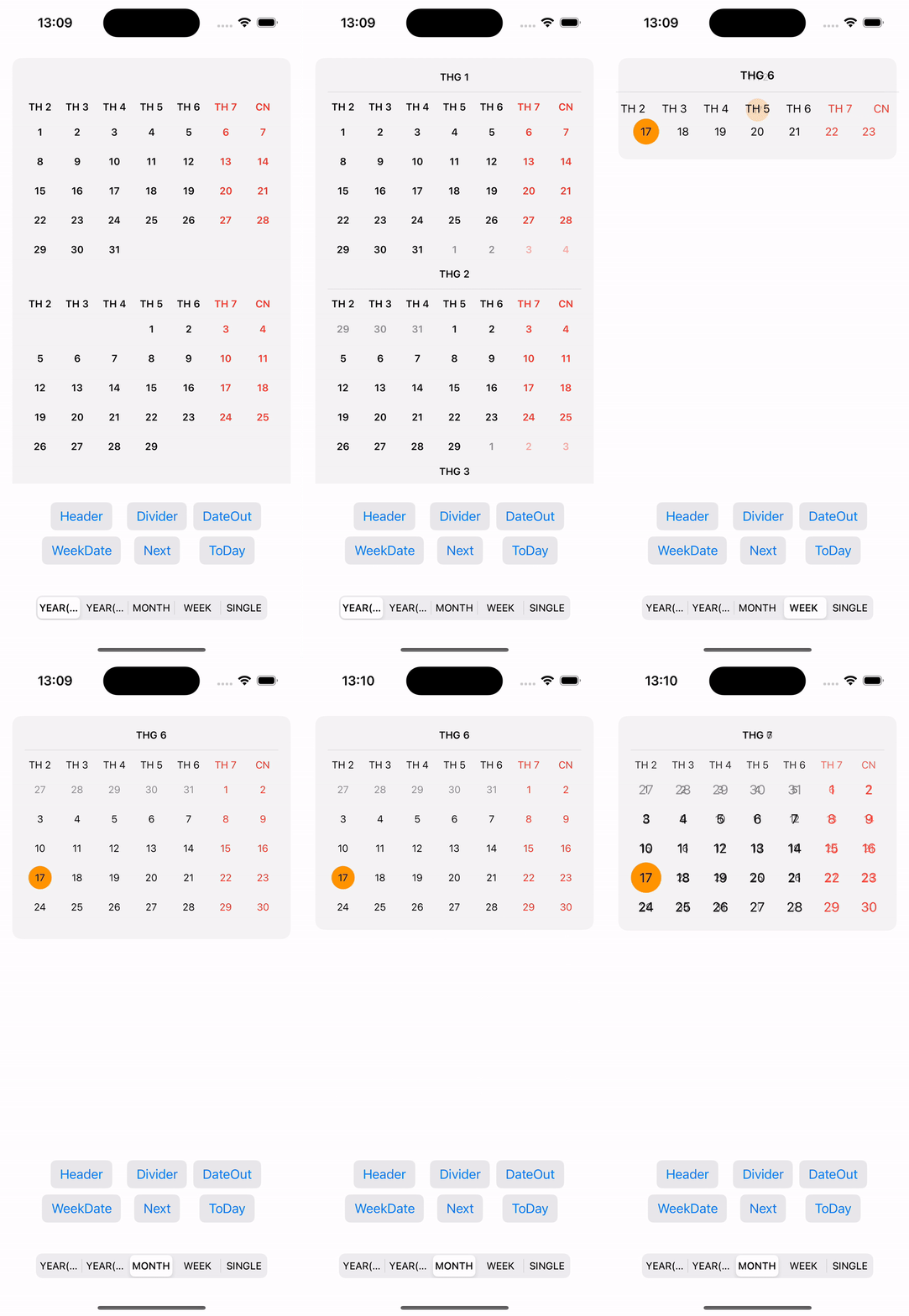
SwiftUI is a component for creating a calendar view with SwiftUI Framework. Build a Calendar By Pure SwiftUI using native Calendar and Date APIs. SwiftUICalendarView is a Swift Package for building and displaying a simple calendar interface in SwiftUI. This library provides an easy way to integrate a calendar into your app.

Important
| Platforms | Minimum Swift Version |
|---|---|
| iOS 17+ | 5.9 |
To integrate SwiftUICalendarView into your project, add the GitHub URL to the dependencies section in your Package.swift file:
dependencies: [
    .package(url: "https://github.com/iletai/SwiftUICalendarView.git", from: "v2.0.0"),
],
targets: [
    .target(name: "YourTarget", dependencies: ["CalendarView"]),
]
CocoaPods is a dependency manager for Swift and Objective-C Cocoa projects that helps to scale them elegantly.
Podfiletarget 'MyApp' do pod 'SwiftUICalendarView' end
Warning
To avoid interfering with the Observable reload mechanism in SwiftUI,
let the application control reloads using @State, @StateObject, or Observer directly.
import SwiftUI
import CalendarView

struct ContentView: View {
    @State var isShowHeader = false
    @State var isShowDateOut = false
    @State var firstWeekDate = 1
    @State var viewMode = CalendarViewMode.year
    @State private var selectedDate = Date()
    @State var listSelectedDate = [Date]()

    var body: some View {
        VStack {
            CalendarView(
                date: selectedDate
                , dateView: { date in
                    VStack {
                        Text(date.dayName)
                            .font(.footnote)
                            .fontWeight(.semibold)
                            .foregroundColor(
                                Calendar.current.isDateInWeekend(date) ? .red : .black
                            )
                    }
                    .frame(maxWidth: .infinity)
                    .frame(height: 30)
                    .background(listSelectedDate.contains(date) ? .cyan : .clear)
                }, headerView: { date in
                    VStack {
                        Text(date.weekDayShortName)
                            .font(.footnote)
                            .fontWeight(.bold)
                            .foregroundColor(
                                Calendar.current.isDateInWeekend(date) ? .red : .black
                            )
                    }
                }, dateOutView: { date in
                    Text(DateFormatter.day.string(from: date))
                        .font(.footnote)
                        .foregroundColor(.gray)
                },
                onSelectedDate: onSelectedDate
            )
You can customize the calendar's interface using properties like accentColor, selectedDateColor, and disabledDateColor:
            .enableHeader(isShowHeader)
            .enableDateOut(isShowDateOut)
            .firstWeekDay(firstWeekDate)
            .calendarLocale(Locale(identifier: "vi"))
            .enablePinnedView(.sectionHeaders)
            .setViewMode(viewMode)
            .rowsSpacing(0)
            .columnSpacing(0)
            .backgroundCalendar(.visible(20, .gray.opacity(0.3)))
            .onDraggingEnded { direction, mode in
                if direction == .forward {
                    selectedDate = Calendar.current.date(
                        byAdding: mode == .week ? .weekOfYear : .month,
                        value: 1,
                        to: selectedDate
                    ) ?? selectedDate
                }
            }
The SwiftDate dependency has been removed. Use native Calendar and Date APIs instead:
// Before (SwiftDate)
import SwiftDate
selectedDate = selectedDate.nextWeekday(.friday)

// After (native)
let nextFriday = Calendar.current.nextDate(
    after: selectedDate,
    matching: DateComponents(weekday: 6),
    matchingPolicy: .nextTime
)
selectedDate = nextFriday ?? selectedDate
The following APIs have been renamed. Deprecated aliases are provided for backward compatibility:
| Old Name | New Name |
|---|---|
calendarLocate(locale:) |
calendarLocale(_:) |
enablePinedView(_:) |
enablePinnedView(_:) |
hightLightToDayView(_:_:) |
highlightTodayView(_:_:) |
withRounderConner(_:) |
withRoundedCorner(_:) |
enableHighlightToDay(_:) |
enableHighlightToday(_:) |
Note
For example using this repository, please help to see more at: https://github.com/iletai/SwiftUICalendarView/tree/master/CalendarExampleView
If you find a bug or have a way to improve the library, create an Issue or propose a Pull Request. We welcome contributions from the community.
SwiftUICalendarView is released under the MIT License. See details in LICENSE.
more like this
Widgets for Douban and Trakt watchlists plus personalized recommendations, live TV streaming including PlutoTV, Yatu ra…
Vibe-coded, but not slop. A mobile-first SDR receiver for iOS, Android & Apple Watch — the live waterfall on your wrist…
A lightweight, simplified, RedNotebook-inspired journal/diary app. Built with Electron. Makes dated text files.
search projects, people, and tags